
Video Transcriber AI ✓
Transcribe video to text online free
Verdict
A quick read before you dig into the full page.
- Best if
- You are students and need: Transcribe Online Lectures and Courses: Students can use Video Transcriber AI to turn online classes from YouTube, Bilibili, or…
- Skip if
- Multi-language but limited support
- Pick this when
- Supports multiple file formats
Considering AI Transcriptions by Riverside instead? Compare side by side
Overview
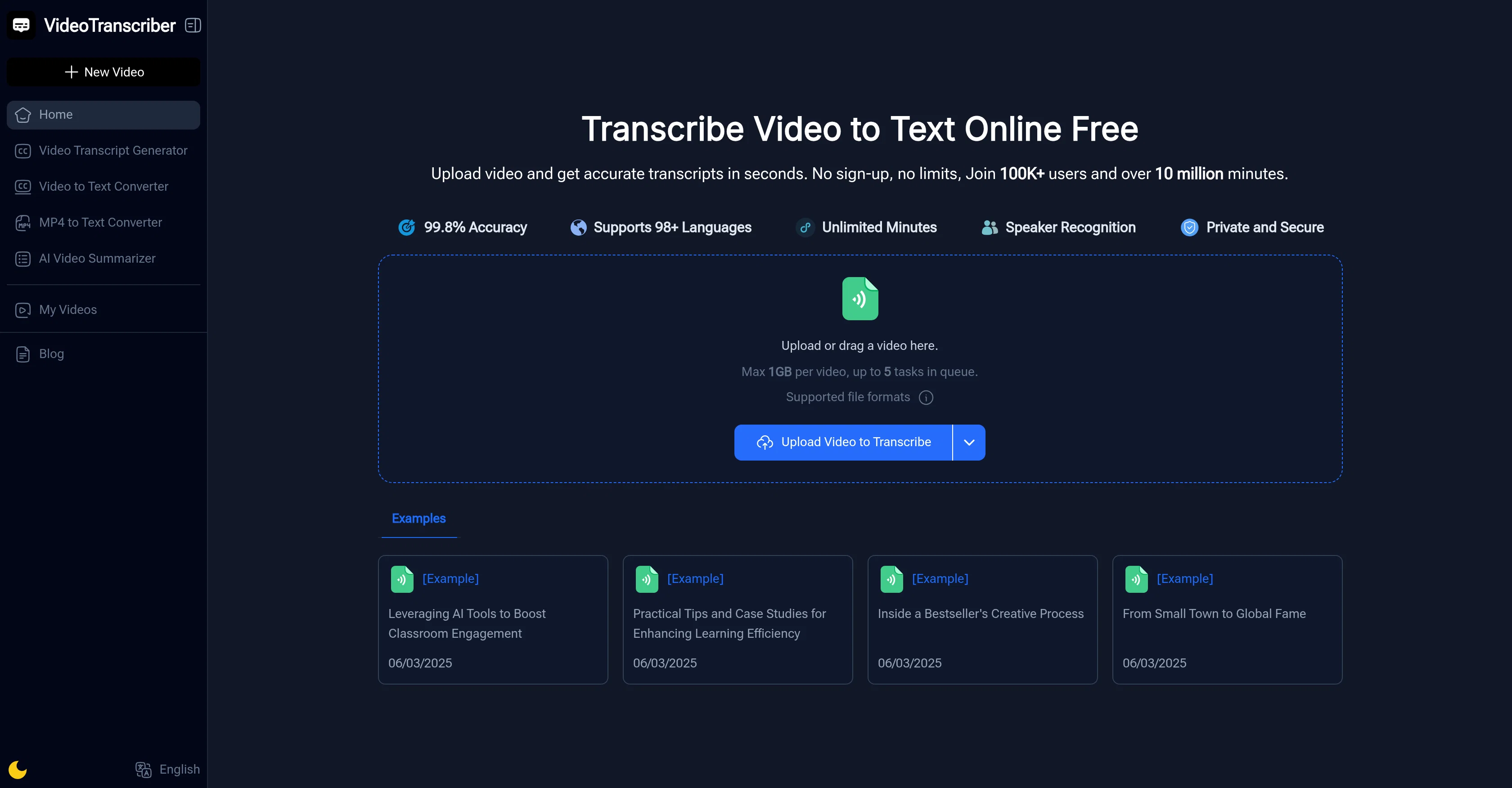
Video Transcriber AI is an AI-powered online tool that converts video content into written text. This versatile tool offers the convenience of transcribing video files from various popular formats like YouTube links, Zoom recordings, and MP4 files.
The process is simple, requiring the user to upload a video file which the system then processes by converting all the spoken content into accurate text.
Additional features include the ability to recognize multiple speakers and support transcription in various languages. Users can also adjust the balance between transcription speed and precision according to their needs.
Once the transcription process is complete, the text can be copied, downloaded, or shared with colleagues. It is ideally suited to a range of users including students, educators, professionals, content creators and journalists who need accurate text transcriptions for studies, meetings, content creation and report writing.
Video Transcriber AI is free to use, offering convenience with no requirement of sign-up or special software.
Best for
Short scenarios where Video Transcriber AI tends to shine.
-
Transcribe Online Lectures and Courses: Students can use Video Transcriber AI to turn online classes from YouTube, Bilibili, or recorded Zoom sessions into clear, searchable notes for study and review.
Best for Students
-
Convert Podcasts into Readable Articles: Podcasters and bloggers can use Video Transcriber AI to transform podcast episodes into full transcripts or blog-ready text — perfect for SEO and content repurposing.
Best for Teachers
-
Capture Meeting and Interview Notes: Professionals and journalists can rely on Video Transcriber AI to quickly convert meeting recordings or interviews into accurate written summaries and documentation.
Best for Trainers
-
Create Captions and Subtitles Automatically: With Video Transcriber AI, content creators can easily generate subtitles for YouTube or Bilibili videos, improving accessibility and engagement for global audiences.
Best for Professionals
-
Support Academic Research and Documentation: Researchers can use Video Transcriber AI to transcribe video lectures, presentations, or research discussions, making it easier to quote, analyze, and archive findings.
Best for Teams
-
Enhance Content Creation Efficiency: From video tutorials to vlogs, Video Transcriber AI helps creators extract text scripts, repurpose content, and save time — all powered by fast, AI-based transcription.
Best for Content creators
Example outputs 1
Sample generations and before/after results for Video Transcriber AI.
Access & connections
Where you can use Video Transcriber AI, and what it plugs into.
Platforms
Integrations
Capabilities
What this tool accepts, produces, and is strongest at.
Input
- Video
Output
- Text
Highlights
- No Signup
Supported features
- STT
- Transcription
- No Signup
Pros & cons
Pros
- Supports multiple file formats
- Labels different speakers
- Multilingual transcription
- No sign-up required
- Unlimited use time
- Works for various roles (students, professionals, content creators)
- Instant copying of transcriptions
- Ability to download transcriptions
Show 23 more
- Sharing transcription feature
- Optional transcription accuracy modes
- Supports processing from YouTube
- Processes Zoom recordings
- Generate captions for videos
- Recognized by top organizations
- No download necessary
- Video to text in seconds
- Possibility to choose balance of speed and precision
- Copy, download, or share transcript
- No special tools required
- Turns lectures into study notes
- Suitable for lesson plan creation
- Captures meetings and webinars
- Creates captions for YouTubers
- Converts interviews into text
- Fast and accurate press conference transcription
- User testimonials included
- Supports bulk transcription
- 1GB upload limit
- Transcribes Zoom and other meeting platforms
- Multiple speaker recognition
- Supports English and many other languages
Cons
- No offline functionality
- Possible loss of privacy
- Limited to 1GB file size
- Limited to 5 tasks queue
- Dependent on internet speed
- Claims but unverified 99.8% accuracy
- Audio quality affects accuracy
- Multi-language but limited support
Show 2 more
- Requires manual adjustment for accuracy
- No user feedback for improvement
Compare alternatives
Similar tools in the catalog.

AI Transcriptions by Riverside ✓
FreemiumTranscribe audio and video in 100+ languages effortlessly
Free + from $15/mo
Full comparison
Exemplary AI ✓
FreemiumTranscribes 120+ languages' audio/video.
Free + from S$12 / month
Full comparison
YouTube Transcript Optimizer ✓
PaidTransform YouTube videos into polished documents and quizzes.
from $10
Full comparison
Taption ✓
FreemiumConvert audio and video to text in 40+ languages.
Free + from $12.00/mo
Full comparisonPeople also view
Tools that often show up alongside Video Transcriber AI in collections and comparisons.
The Prompt Challenge ✓
FreeMaster AI prompting through practice challenges.
MathAI GPT ✓
FreemiumAI math solver with step-by-step solutions.
YouTube Transcript Optimizer ✓
PaidTransform YouTube videos into polished documents and quizzes.

Vid2txt ✓
PaidDrag, drop, done: Effortless video transcription.
Taption ✓
FreemiumConvert audio and video to text in 40+ languages.
ScriptMe ✓
Free TrialTranscribe and subtitle media faster than realtime.
Exemplary AI ✓
FreemiumTranscribes 120+ languages' audio/video.
AI Transcriptions by Riverside ✓
FreemiumTranscribe audio and video in 100+ languages effortlessly
Releases 1
Imported reviews 12
I’ve used this for a while and it’s genuinely really good. It’s fast, accurate, and makes subtitles and organizing content feel pretty effortless. You can tell it’s been well thought out.
Lately I’ve also been using Saveto AI for the same kind of workflow, mainly turning videos into text and notes. It’s been pretty handy for quickly going back through long content and grabbing the key parts when I need them.
It’s a really solid transcription tool—both the user experience and the results exceeded my expectations. It actually reminded me of Saveto AI, which is quite similar. Plus, Saveto AI is 100% free.
This is a really solid AI tool.
I’ve also recently tried another AI transcriber and summarizer called Saveto AI, and it performed quite well too. Both tools are easy to use, and one thing I appreciated is that they offer a fairly generous free quota, which makes them convenient for regular testing or light daily use.
One of my favorite transcription tools to date, but unfortunately it now forces users to upgrade. The free version is limited to just 4 transcriptions per day, which makes it less practical. While the pricing isn’t too expensive ($4/month for basic or $9/month for pro), the daily limit makes it hard to recommend.
Excellent tool, when transcribing large audio files, I would choose this tool first.
This tool can help me extract and summarize content from videos for free, which is fantastic!
A great tool, and it's completely free! It transcribes both videos and audio, helping me transcribe many lectures.
I love how simple it is. I can upload a recording of my class, and Video Transcriber turns it into text I can share with students who missed it.
An incredible AI tool that accurately transcribes and summarizes videos/audio for free. An absolute must-have!
Nice tool to Video Transcriber
Honestly, you've really helped me out a lot.
It's pretty good; it's a great tool for learning videos and creating derivative works from them.
FAQ 12
What file formats are supported by Video Transcriber AI?
Can Video Transcriber AI transcribe videos from YouTube?
What is the procedure to use Video Transcriber AI?
Does Video Transcriber AI differentiate between different speakers in a conversation?
Is Video Transcriber AI suitable for students and researchers?
Does Video Transcriber AI work with Zoom recordings?
Can I use Video Transcriber AI to generate subtitles for my videos?
Does Video Transcriber AI support multiple languages?
What are the transcription accuracy modes offered by Video Transcriber AI?
Can I download, copy or share the transcripts generated by Video Transcriber AI?
Is there a time limit to use Video Transcriber AI?
Do I need to sign up to use Video Transcriber AI?
Related tools
Recommended

AI Humanizer.work ✓
FreeTransform AI text into natural, undetectable human writing.

VisualGPT ✓
FreemiumCreate, edit, and enhance images with AI.

Audio Converter AI ✓
FreemiumAI turns your audio into accurate text instantly.

Image Editor Online ✓
FreeTransform images with AI prompts instantly online.

PixPal - Free AI Chat with Image Editor & Video Gener... ✓
FreeAI chat with images – Create, edit, innovate for free!

Free AI Video Upscaler ✓
FreeUpscale videos or images with AI for free, right in your browser