
Audio Converter AI ✓
AI turns your audio into accurate text instantly.
Free + from $4.49
Verdict
A quick read before you dig into the full page.
- Best if
- AI turns your audio into accurate text instantly
- Skip if
- Limited to 1GB uploads
- Pick this when
- Transcribes audio and video
Considering Voicetype AI instead? Compare side by side
Overview
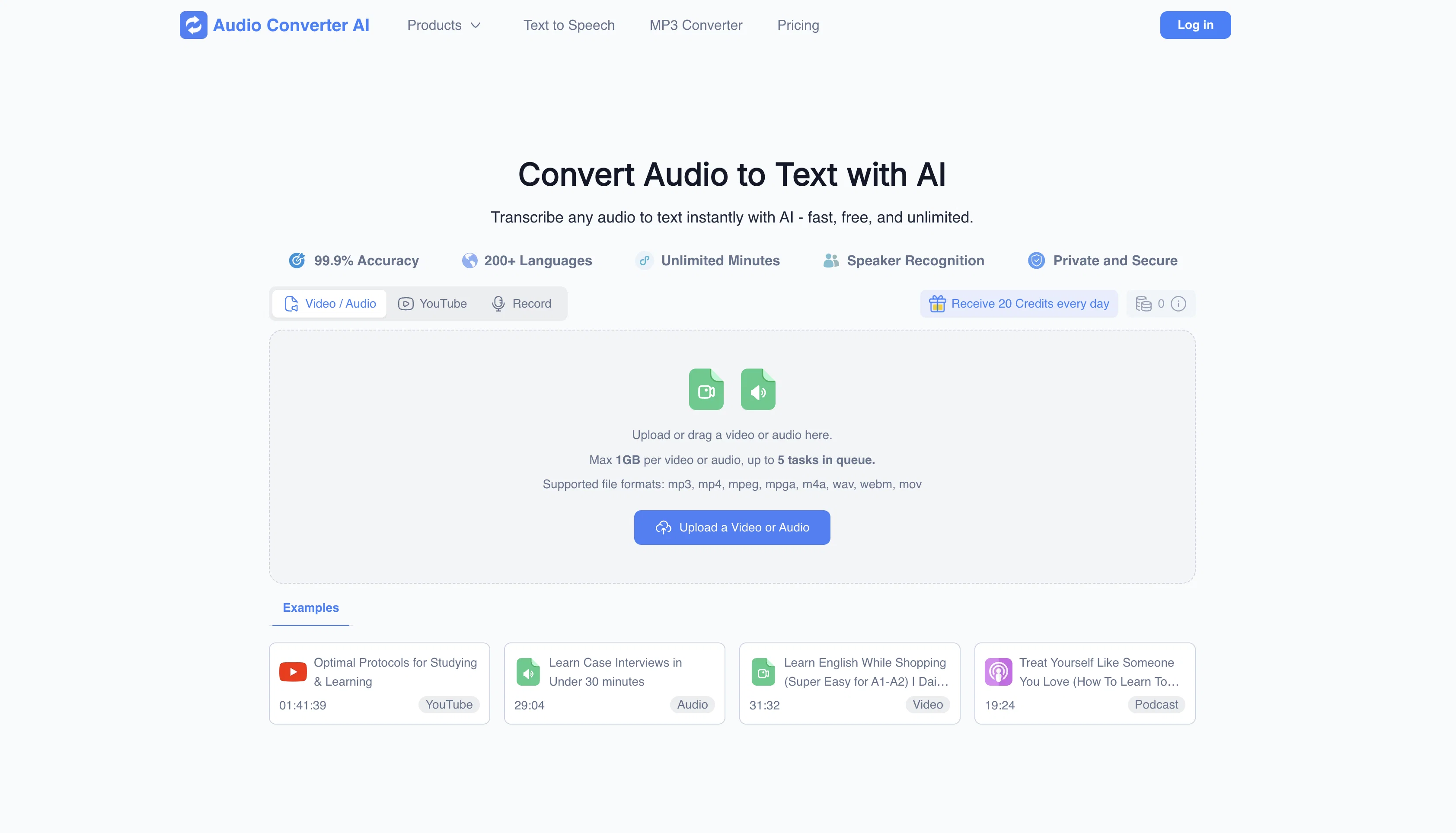
Audio Converter AI is an online tool that provides audio and video to text conversion with high accuracy. Apart from converting audio files into text, the tool can transcribe multiple files at once, identify speakers in the recording, and supports translation into multiple languages.
Users can also edit, share, and export the transcripts immediately. Handling large files and extended recordings is another key advantage of this AI tool.
The transcriptions offered by Audio Converter AI include timestamps, allowing users to navigate and reference specific segments efficiently. More than being an audio to text converter, it also doubles up as a solution for organizing and managing large volumes of audio data.
The AI is trusted globally and utilized by top organizations and innovators. From students making lecture notes, researchers organizing interviews and focus groups, professionals tracking meetings and presentations, to creators repurposing audio content, and educators converting lessons into accessible formats - a wide range of user groups benefit from this tool.
The seamless conversion process involves users uploading their audio files, allowing the AI to transcribe and summarise into accurate text with clear notes, which can then be downloaded or shared for further use.
Access & connections
Where you can use Audio Converter AI.
Platforms
Capabilities
What this tool accepts, produces, and is strongest at.
Input
- Audio
Output
- Text
Supported features
- Transcription
Pros & cons
Pros
- Transcribes audio and video
- Supports large files (1GB)
- Can multi-task (5 videos)
- Recognizes speakers
- Allows instant edits
- Exports and shares transcriptions
- Supports diverse file types
- Timestamped transcriptions
Show 42 more
- Summarizes audio content
- Suitable for various users
- Text transcription for language learners
- Online tool, no installation
- Trusted by top organizations
- Supports 98+ languages
- Timestamps and notes in summary
- Automated smart notes
- High transcription accuracy (98%)
- Handles long duration files
- Quick download and sharing
- Organizes large volumes of data
- Translates into multiple languages
- Delivers clear speaker labels
- Easy navigation with timestamps
- Transforms content into accessible formats
- Facilitates collaboration
- Facilitates content distribution
- Upload or drag files
- Speech to text in seconds
- Helps with content repurposing
- Aids in studying
- Aids in conducting research
- Useful for data analysis
- Helps in learning languages
- Efficient information organization
- Multi-format download and sharing
- Useful for teams tracking meetings
- Improves team efficiency
- Enables keyword search
- Encrypted and private files
- Helps creators with content creation
- Assists educators and trainers
- Enhances comprehension and learning
- No sign-up required
- Track meetings with ease
- Review lectures faster
- Repurpose content in seconds
- Time efficiency
- Ensures precise conversion
- Creates editable text
- Recordings to clean transcripts
Cons
- Limited to 1GB uploads
- Online tool only
- Handles up to 5 tasks
- Lacks offline functionality
- No app version
- May struggle with accents
- Dependent on internet connection
- No mentioned integration with other tools
Show 2 more
- Unspecified processing time
- No draft/save progress option mentioned
Compare alternatives
Similar tools in the catalog — with a clear reason to open each one.

Voicetype AI ✓
Free TrialWrite 9x Faster with AI Speech to Text on all Apps
Why look Better for writing
Full comparison
Transcript LOL ✓
FreemiumUnlimited transcripts, summaries, 99.8% accuracy, speaker recognition, superfast
Why look Offers a public API
Full comparison
TurboScribe ✓
Freemium🎯 3 free transcripts every day. 🔥 Unlimited transcription starting at $10/mo.
Free + from $10/mo
Full comparison
RambleFix ✓
Paid⚡ Write by thinking aloud - emails, notes, articles, in your style.
Why look Better for writing
Full comparison
Paraspeech ✓
Free TrialPrivate dictation, cloud optional
Why look More privacy-focused
Full comparisonReleases 1
Imported reviews 12
A simple and effective tool for converting audio files quickly. No sign-up required, works directly in the browser. Great for anyone who needs fast format conversion without complicated software. Highly recommended!
Great tool for converting audio files to text.
It’s totally free! In just a minute, it turned my audio and video into text, and it was super accurate. Saved me a lot of time!
A great tool turns your audio into accurate text.
This tool is awesome for turning speech, even from videos, into text super fast and accurately. I just toss it my meeting recordings and wait for the copy-and-paste moment.
It’s a really useful free tool. I use it to transcribe my classes.
Very practical, I basically use it every week.
This is an incredibly useful feature that helps me quickly create meeting minutes—it's so convenient!
I really like the video summary feature of this tool; it's very helpful for learning.
A great tool that helps me transcribe interview recordings and create summaries.
It's very easy to use, completely free, and even supports files up to 1GB in size.
A nice tool that help transcribe audio and video to text fast with high accuracy, plus with smart AI summary, saving time and effort!
FAQ 12
What is Audio Converter AI?
How does Audio Converter AI convert audio into text?
What kind of files does Audio Converter AI support?
Can Audio Converter AI handle large files?
Can Audio Converter AI transcribe multiple videos simultaneously?
What languages does Audio Converter AI support?
Does Audio Converter AI offer speaker recognition?
How do I utilize the text export feature on Audio Converter AI?
Can I share my transcriptions instantly with Audio Converter AI?
What is the process of converting audio into text with Audio Converter AI?
Can I edit my transcriptions in Audio Converter AI?
Is Audio Converter AI suitable for educational purposes?
Related tools
Recommended

Video Transcriber AI ✓
FreeTranscribe video to text online free

Image Editor Online ✓
FreeTransform images with AI prompts instantly online.

AI Humanizer.work ✓
FreeTransform AI text into natural, undetectable human writing.
Denote ✓
PaidSave and analyze ads across social platforms.

DeepSeek ✓
FreeUnravel the mystery of AGI with curiosity

VisualGPT ✓
FreemiumCreate, edit, and enhance images with AI.