

PDF to Video AI ✓
Turn PDFs into professional explainer videos in minutes.
Verdict
A quick read before you dig into the full page.
- Best if
- Turn PDFs into professional explainer videos in minutes
- Skip if
- Watermark in free version
- Pick this when
- Fast conversion process
Considering PDF To Brainrot AI instead? Compare side by side
Overview
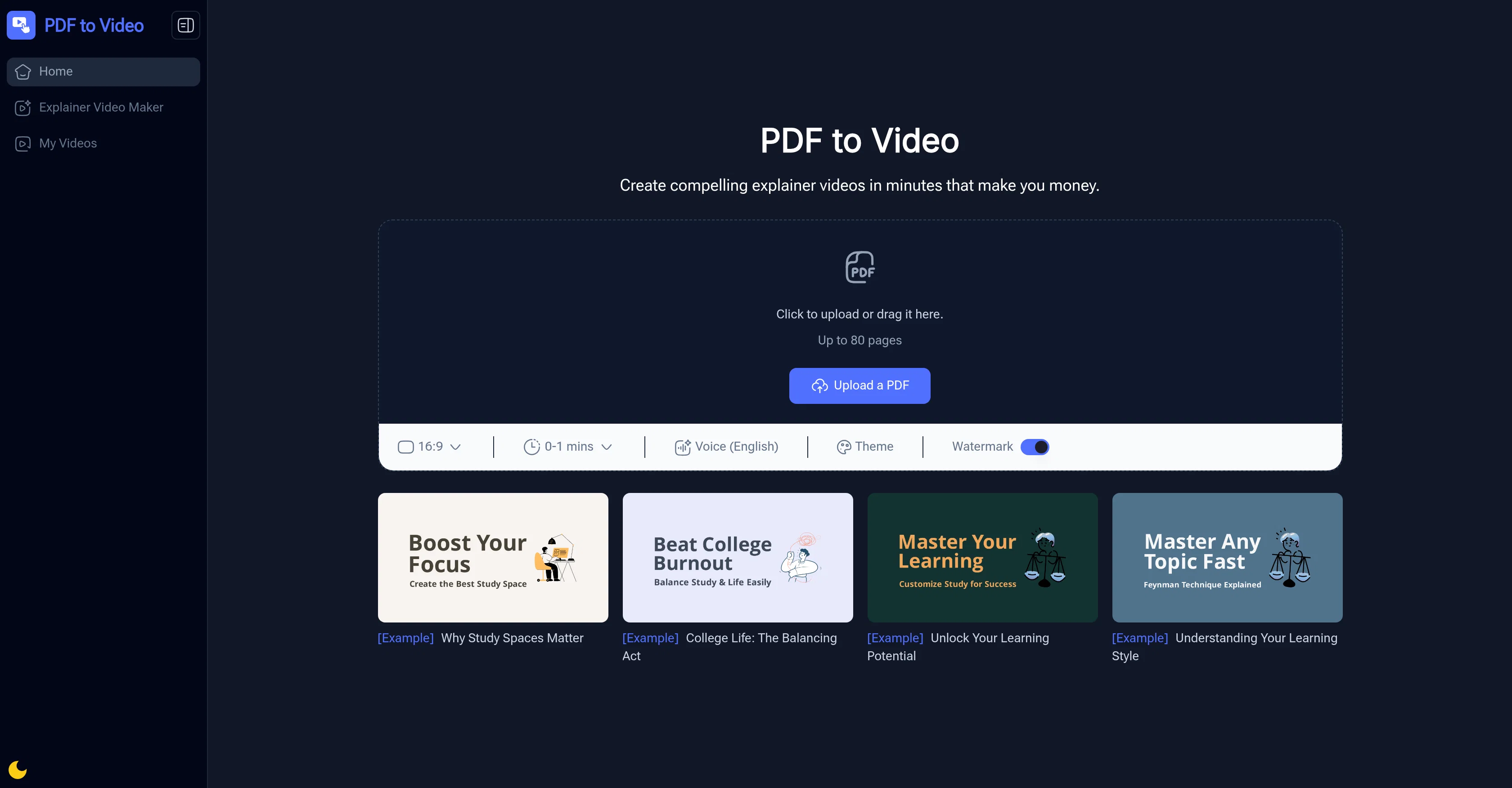
Simply upload a PDF of up to 80 pages, and the AI automatically analyzes the text, images, and layout to create a polished video in minutes. You can choose from preset themes, adjust the narration style, or make quick edits before downloading or sharing the finished product.
Designed for educators, trainers, marketers, and business professionals, PDF to Video helps make important information more engaging and easier to share. From lesson plans and corporate reports to nonprofit campaigns and study notes, the tool adapts to any use case, ensuring content is clear, professional, and memorable.
Best for
Short scenarios where PDF to Video AI tends to shine.
-
Turn PDFs into professional explainer videos in minutes.
Example outputs 1
Sample generations and before/after results for PDF to Video AI.
Access & connections
Where you can use PDF to Video AI, and what it plugs into.
Platforms
Integrations
Capabilities
What this tool accepts, produces, and is strongest at.
Input
- Text
- Tabular
Output
- Video
Pros & cons
Pros
- Fast conversion process
- No video editing skills required
- Free to use online
- Customizable themes and narration
- Professional-looking results
- Works with up to 80-page PDFs
- Export-ready videos for sharing
- Great for teachers and trainers
Show 2 more
- Ideal for marketing explainers
- Saves hours of manual video editing
Cons
- Limited voice options (English only)
- No advanced editing features
- Watermark in free version
- File size restrictions may apply
- Best suited for short to medium-length content
Compare alternatives
Similar tools in the catalog.
People also view
Tools that often show up alongside PDF to Video AI in collections and comparisons.

PDF To Brainrot AI ✓
FreemiumTransform PDFs into addictive TikTok-style videos.
Brainrot Shorts ✓
FreemiumCreate viral AI brainrot videos in minutes.

Video Transcriber AI ✓
FreeTranscribe video to text online free

Thea ✓
FreemiumAI study tools to master material, not just memorize it.

SMMAI: Social Media Templates ✓
FreeCreate posts & stories by AI

remio: Your Personal ChatGPT ✓
FreemiumGet Tailored Answer with Your Personal ChatGPT

PixPal - Free AI Chat with Image Editor & Video Gener... ✓
FreeAI chat with images – Create, edit, innovate for free!

Image Editor Online ✓
FreeTransform images with AI prompts instantly online.
Releases 1
Imported reviews 12
By far the best video maker I have used so far
Very good, would like to have more voices available. Nevertheless, it works to a high level.
I just want to say Thank you to whoever created this tool 😭😭😭😭❤️❤️❤️... Thank you so much... I hope it remains free😭❤️ but for real thank you so much 🙌🏾🙌🏾🙏🏾🙏🏾🙏🏾
Reviewing after using it for a while, the tool is really slow, sometimes it's good sometimes it's shit. Need to improve on the speed guys. My video generation has been stuck at 97% for last 3 hours. Got nowhere. changing my rating from 5 to 3 stars.
Really good overall works fast..
Great Idea and very helpful, it need to have more voices to choose from, and need to give us the option to edit the transcription, and also it should not always edit the pdf because sometimes the result will be a little glitchy.
But I have to say: WELL DONE.
Amazing tool. Absolutely loved it! As a new guy who is trying get into teaching this helps me a lot. NO FEE AT ALL! This is amazing. I hope you add an AI chat bot to give commands as well to cover specific topics in the PDF. Absolutely love it, keep it up guys.
Gave it a 4 because the voice over would say "registered" whenever the symbol (R) appears.
Great Tool Guys Need to Try These
I am an educator, and PDF to Video has really solved my problem of classroom presentations. My students no longer have to look at stiff text, which is really great for improving my teaching quality.
It's very smooth to use and has saved me a lot of time in making videos.
Good, I hope that the text to video function can be launched in the future.
FAQ 6
Is PDF to Video free to use?
Do I need prior video editing experience?
Can I add voice narration to my video?
What file types are supported?
How long does it take to create a video?
Can I use PDF to Video for commercial purposes?
Related tools
Recommended
Thea ✓
FreemiumAI study tools to master material, not just memorize it.

VisualGPT ✓
FreemiumCreate, edit, and enhance images with AI.
Video Transcriber AI ✓
FreeTranscribe video to text online free

AI Humanizer.work ✓
FreeTransform AI text into natural, undetectable human writing.
PixPal - Free AI Chat with Image Editor & Video Gener... ✓
FreeAI chat with images – Create, edit, innovate for free!
remio: Your Personal ChatGPT ✓
FreemiumGet Tailored Answer with Your Personal ChatGPT