

Video upscaling vv2.0
Free AI Video Upscaler ✓
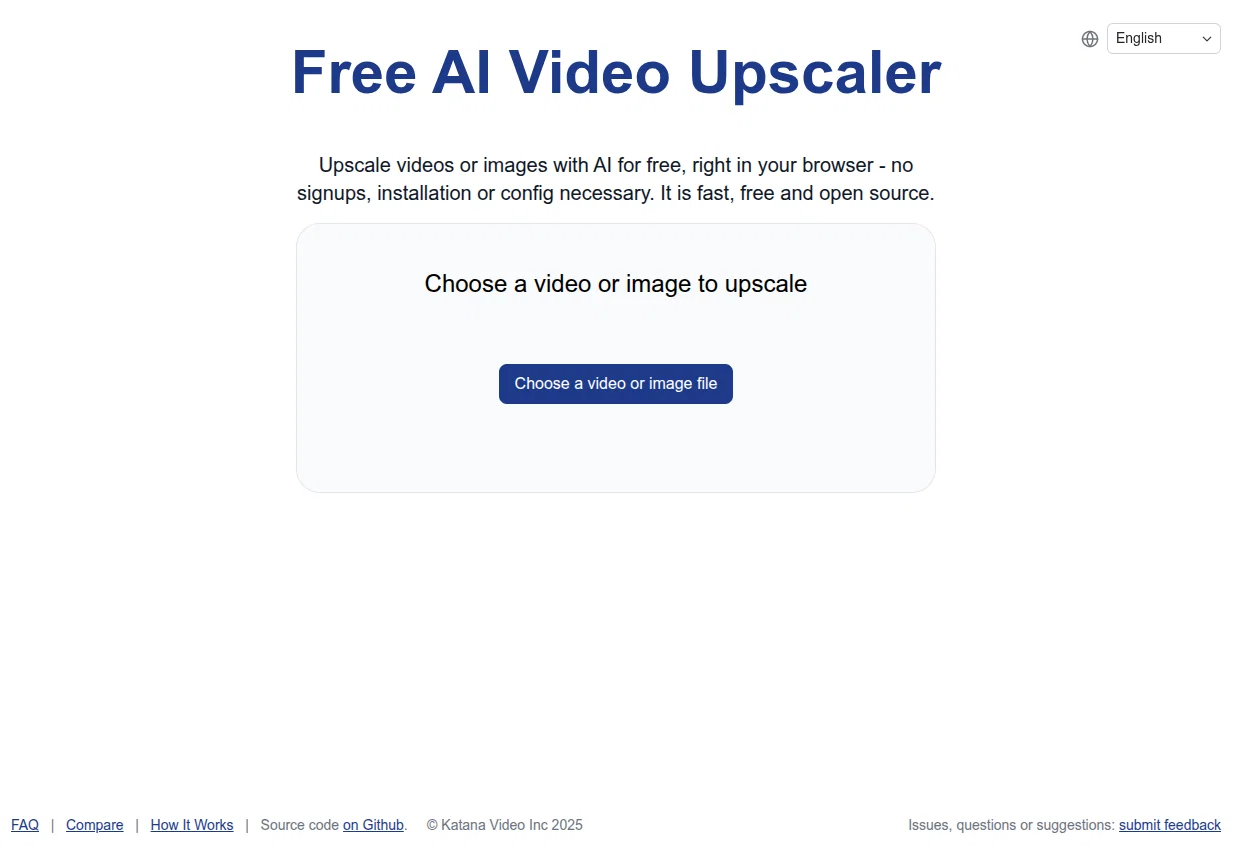
Upscale videos or images with AI for free, right in your browser
Verdict
A quick read before you dig into the full page.
- Best if
- Upscale videos or images with AI for free, right in your browser
- Skip if
- Limited network size options
- Pick this when
- Video upscaling
Considering UpscaleMy.Video instead? Compare side by side
Overview
Key Features
? Completely Free: Access the tool without any costs or hidden fees.
? No Signup Required: Start using the tool immediately, without the hassle of creating an account.
? Browser-Based: Perform all processing directly in your browser without the need for software installation.
? Open Source: Built on open-source technology, ensuring transparency and community support.
? Quick and Easy to Use: Upscale videos in just a few simple steps, perfect for casual users.
? Unlimited usage: Because this software works in your browser, you can use it as much as you want as long as you want.
? Privacy Focused: Videos are processed locally in your browser, meaning no one, not even the developers of the tool can access the videos, it is 100% private.
How It Works:
The Free AI Video Upscaler adapts advanced AI Upscaling algorithms like Anime4K or RealESRGAN for deployment on the web, and have been updated to handle new types of content like AI generated images and video.
By porting these algorithms into WebGPU and WebGL, the tool allows users to upscale each frame of their videos seamlessly within their browsers.
Benefits¨
? Fast Processing: Experience quicker upscaling compared to other popular AI tools.
? User-Friendly: No complicated setups or configurations are necessary.
? Ideal for Non-Professional Use: A perfect solution for casual users who want to enhance video quality without the complexity of professional software.
This tool is ideal for:
? Casual users looking to enhance personal video collections.
? Content creators needing quick upscaling solutions for AI generated content
? Anyone who wants to improve video quality without investing in expensive software.
Getting Started
To upscale a video, simply choose a video file, select your desired upscaling settings (Small, Medium, or Large), and let the browser handle the processing. This tool will work on all major browsers, on desktop or mobile, but for the best experience, use a modern browser like Chrome or Edge on a desktop.
Best for
Short scenarios where Free AI Video Upscaler tends to shine.
-
Upscale videos or images with AI for free, right in your browser
Example outputs 1
Sample generations and before/after results for Free AI Video Upscaler.
Access & connections
Where you can use Free AI Video Upscaler, and what it plugs into.
Platforms
Integrations
Capabilities
What this tool accepts, produces, and is strongest at.
Input
- Image
- Video
Output
- Video
- Image
Highlights
- Open Source
- No Signup
Supported features
- Open Source
- No Signup
- Upscaling
Pros & cons
Pros
- Free to use
- Video upscaling
- Browser-based
- No signups required
- No installations required
- No additional configuration
- Efficient
- Fast
Show 16 more
- Supports WebGPU
- Compatible with Chrome
- Compatible with Edge
- Best for laptop use
- Best for desktop use
- Works with animated videos
- Works with real life videos
- Works with 3D videos
- Selectable upscaling network setting
- Small, medium, large options
- Allows output location specification
- Open source
- User customization
- Hosted on Github
- Encourages user feedback
- Issues, questions, suggestions page
Cons
- Less powerful than competitors
- No offline use
- Dependent on browser updates
- Processing power impacts speed
- No multi-file processing
- Limited network size options
- Error handling not clear
Compare alternatives
Similar tools in the catalog — with a clear reason to open each one.

AI Video Upscaler ✓
Free TrialUpscale and enhance your videos with AI Magic
Free + from $20
Full comparison
VideoUpscale.net ✓
PaidUpscale video to 4K in minutes.
Why look Higher community rating
Full comparison
Video to Frames | AI Video Upscaler ✓
FreeUpscale your videos locally with AI free, private, no sign-up.
Why look More privacy-focused
Full comparisonPeople also view
Tools that often show up alongside Free AI Video Upscaler in collections and comparisons.
VideoUpscale.net ✓
PaidUpscale video to 4K in minutes.

VideoUpscaler.net ✓
PaidTransform videos to 4K with AI upscaling.
Video to Frames | AI Video Upscaler ✓
FreeUpscale your videos locally with AI free, private, no sign-up.

UpscaleMy.Video ✓
FreemiumInstantly enhance blurry videos with AI.
Nero AI Video Upscaler ✓
PaidEnhance video to 4K with AI magic
AI Video Upscaler ✓
Free TrialUpscale and enhance your videos with AI Magic
Vireel AI Photo to 4K ✓
PaidUpscale any photo to stunning 4K instantly.

Kyukoma ✓
Free TrialTurn your stories into manga pages with AI.
Releases 2
Overhauled the entire tool, fixing tons of outstanding bugs, improving the quality of the AI models, making it responsive on mobile, translating it to a number of languages, improving performance of the tool on mobile
Imported reviews 4
best free video upscaler for ai generated videos!
very worth it for SHORT CLIPS (like 5 to 30 s)
Avoid longer length like over 1, 2 or more mins, since its SSSSlows, seems to litteraly devour YOUR own RAM, and occasionnaly produce "corrupted" results at some point of the vid (= video freeze on an image to the rest of the video while audio is still accurate, video beeing unusable anyway)
very useful. The results are 80-90% accurate.
Simple, quick, free, easy to use
FAQ 12
What is the Free AI Video Upscaler?
How does Free AI Video Upscaler work?
Do I need to install anything to use Free AI Video Upscaler?
What types of videos does Free AI Video Upscaler support?
What kind of web browser do I need to use Free AI Video Upscaler?
What is the WebGPU requirement for Free AI Video Upscaler?
Is Free AI Video Upscaler compatible with all devices?
What are the network settings options in Free AI Video Upscaler?
Can Free AI Video Upscaler be used for 3D videos?
How do I select output location in Free AI Video Upscaler?
Can I improve or modify the Free AI Video Upscaler myself?
How can I contribute to the source code of Free AI Video Upscaler?
Related tools
Recommended

Free Text-To-Speech ✓
FreeText transformed into customizable spoken output.

Upscayl ✓
Free TrialEnhance images with free, open-source AI upscaling.

Business Idea Generator AI ✓
FreeGenerate innovative business ideas with AI
AnimatedDrawings by Meta ✓
FreeBring children's drawings to life through animation.

Kin - Personal AI Advisors ✓
FreePrivacy-first & designed your for mind, and life at work

Namecheap Free Logo Maker ✓
FreeCreate custom logos for free in minutes