

Taption ✓
Convert audio and video to text in 40+ languages.
Free + from $12.00/mo
Verdict
A quick read before you dig into the full page.
- Best if
- Convert audio and video to text in 40+ languages
- Skip if
- Expensive for heavy usage
- Pick this when
- Audio and video to text
Considering AI Transcriptions by Riverside instead? Compare side by side
Overview
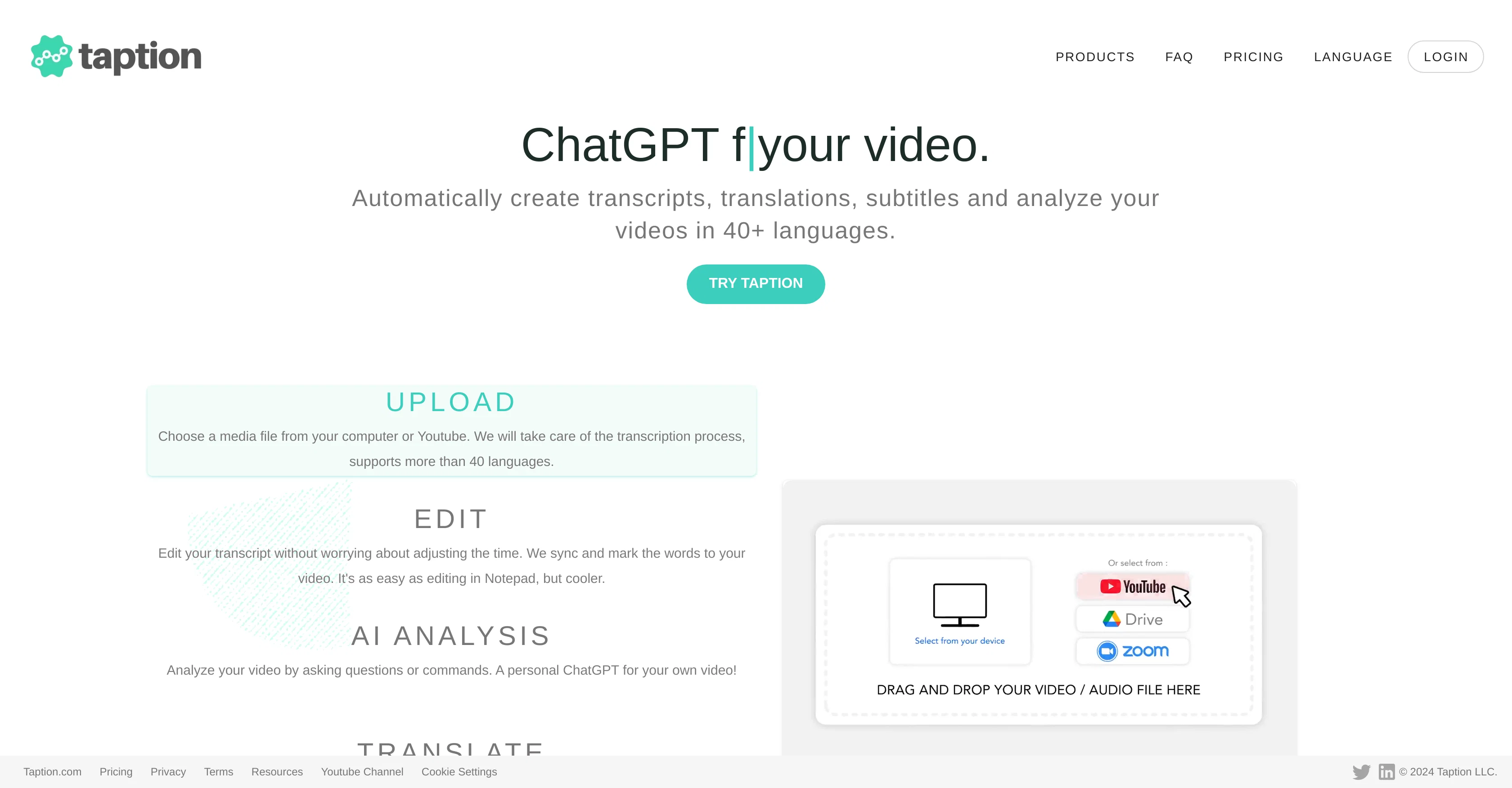
Taption is a technologically advanced AI tool that offers a wide range of services centered around the conversion of audio or video content into written form.
It is capable of generating transcripts of audio or video files, making it a useful tool for creating accurate documentation of meetings, conferences, or any spoken-word content.
This conversion is not limited to a single language, but has multilingual capabilities, enhancing its utility across different markets. Furthermore, Taption is equipped to craft subtitles for video content, providing added accessibility options for audiences.
Its functionality extends to creating bilingual subtitles, a feature that opens up avenues for content sharing across different language-speaking communities without losing context or meaning.
Another significant feature of Taption is its automatic translation service for the generated transcripts. This aspect not only aids in content localization but permits seamless communication across varied linguistic landscapes.
Beyond its multilanguage features, Taption also stands out for its ability to label speakers within a transcript, adding another layer of contextual understanding for users.
Its offerings drive efficiency and accessibility in content creation and distribution, proving it a valuable tool for enterprises, content creators, and individuals alike.
Interested users can register to use Taption's services.
Best for
Short scenarios where Taption tends to shine.
-
Convert audio and video to text in 40+ languages.
Example outputs 1
Sample generations and before/after results for Taption.
Access & connections
Where you can use Taption.
Platforms
Capabilities
What this tool accepts, produces, and is strongest at.
Input
- Video
- Audio
Output
- Video
- Text
Pros & cons
Pros
- Audio and video to text
- Supports 40+ languages
- Creates bilingual subtitles
- Labels speakers in transcripts
- Translates transcripts
- Adds captions to videos
- Converts audio to video
- Supports team collaboration
Show 25 more
- Exports transcripts in multiple formats
- Offers pay-as-you-go pricing
- Premium subscription available
- Bulk subscription available
- Generates speakers labeled transcripts
- Enables content localization
- Assists in accessibility
- Useful for documentation
- Content creation aid
- Useful for content distribution
- Valuable for enterprises
- Helps content creators
- Enhances user understanding
- Seamless multilanguage communication
- Comes with automatic translation
- Embedded bilingual subtitles creation
- Free registration
- Offers 60 minutes credit
- Offers 120 minutes credit
- Offers 1000 minutes credit
- 25% discount on hourly purchases
- 63% discount on hourly purchases
- Enables sharing of minutes
- Provides institutional download receipts
- Added contextual understanding in transcripts
Cons
- Limited language support
- No free usage tier
- Expensive for heavy usage
- Limited collaboration tools
- No direct audio recording feature
- No real-time transcribing feature
- No offline functionality
- No app version
Compare alternatives
Similar tools in the catalog — with a clear reason to open each one.

AI Transcriptions by Riverside ✓
FreemiumTranscribe audio and video in 100+ languages effortlessly
Free + from $15/mo
Full comparison
Exemplary AI ✓
FreemiumTranscribes 120+ languages' audio/video.
Free + from S$12 / month
Full comparison
YouTube Transcript Optimizer ✓
PaidTransform YouTube videos into polished documents and quizzes.
Why look Typically cheaper
Full comparison
ScriptMe ✓
Free TrialTranscribe and subtitle media faster than realtime.
Free + from $45/mo
Full comparison
Vid2txt ✓
PaidDrag, drop, done: Effortless video transcription.
Why look Typically cheaper
Full comparison
Targum Video ✓
PaidTranslate videos into multiple languages in minutes.
Why look Typically cheaper
Full comparisonPeople also view
Tools that often show up alongside Taption in collections and comparisons.
YouTube Transcript Optimizer ✓
PaidTransform YouTube videos into polished documents and quizzes.
Vid2txt ✓
PaidDrag, drop, done: Effortless video transcription.
Targum Video ✓
PaidTranslate videos into multiple languages in minutes.
ScriptMe ✓
Free TrialTranscribe and subtitle media faster than realtime.
Exemplary AI ✓
FreemiumTranscribes 120+ languages' audio/video.
AI Transcriptions by Riverside ✓
FreemiumTranscribe audio and video in 100+ languages effortlessly

UnMarkAI - Remove subtitles first. Translate video, d... ✓
Free TrialAI video translation with dubbing and lip-sync.
TubeVocab ✓
Free TrialTurn any YouTube video into AI flashcards you actually remember.
Releases 1
Imported reviews 1
It translateed quite well my video and easy to use and edit. PLus the free version is good to hava a first try
FAQ 12
What languages can Taption convert audio and video into text?
Can Taption create bilingual subtitles for videos?
What are the services provided by Taption for meetings?
How many languages can Taption translate transcripts into?
Can Taption label speakers in audio files?
Does Taption offer a feature to convert audio into video?
Can teams collaborate on Taption?
In what formats can transcripts be exported from Taption?
What are Taption's pricing options?
What does the pay-as-you-go option at Taption include?
What extras do I get with a premium subscription at Taption?
What benefits come with the bulk subscription at Taption?
Related tools
Recommended

Eightify
UnknownAI-powered YouTube video summarizer extracting key ideas for quick content assessment.

TranslateVideo ✓
FreemiumTranslate videos with just 1-Click

VenturusAI ✓
FreemiumBusiness idea analysis and reporting.

Stockimg AI ✓
PaidGenerated images and text for design ease.

KeywordSearch ✓
FreemiumDiscover and target YouTube audiences.

B12 AI Website Builder ✓
FreemiumAI-powered website builder