

Image To Video AI.run ✓
Upload an image, get an HD video in seconds.
Free + from $5/mo
Verdict
A quick read before you dig into the full page.
- Best if
- Upload an image, get an HD video in seconds
- Skip if
- Limited image formats supported
- Pick this when
- Converts images into videos
Considering MojoMake - AI Image to Video Generator instead? Compare side by side
Overview
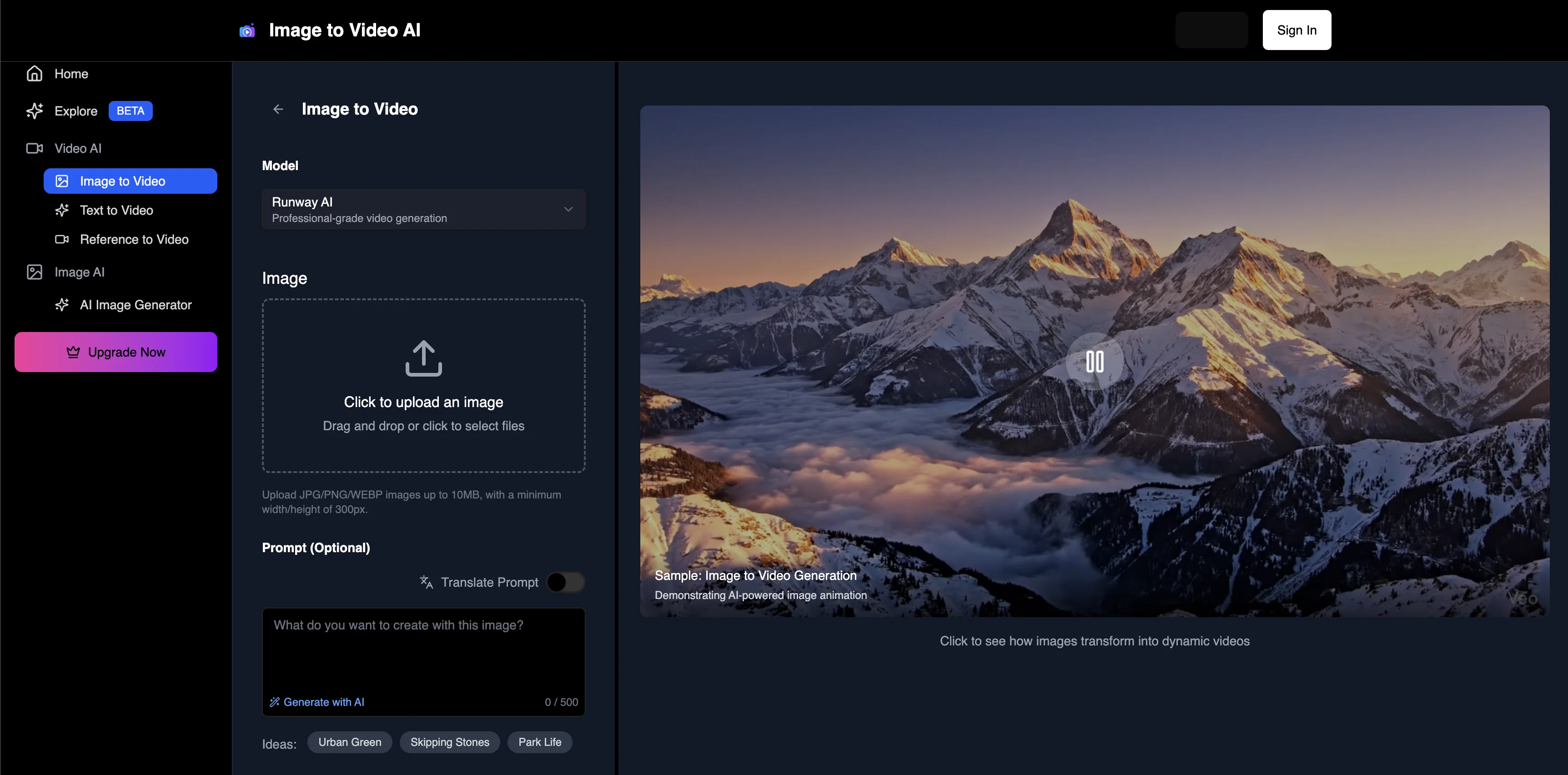
This AI tool facilitates effortless conversion of an image into a video of high quality. It is engineered to rapidly generate HD videos from any image, implementing Flux AI, Kontext, Veo3, Replicate, and FAL.ai AI models.
The tool caters to user needs by providing over a hundred templates and complete control over resolution, duration, and motion levels. It is recognized for its ability to generate videos with crisp motion, smooth transitions, and a natural pace.
The AI Image to Video Generator is intuitive and easy to use, requiring no editing skills. Users can upload a picture, input a prompt, and let the AI build the rest.
Full-fledged attention is given to user data security. Uploaded photos and generated videos are not permanently stored or shared, ensuring maximum privacy.
The tool also facilitates batch uploads, allowing the creation of videos from multiple images, a handy component for narrative visualization like slideshows or storytelling.
This AI tool is highly recommended for a variety of users including content creators, marketers, educators, and small businesses. It is not bound with hidden fees or watermarks and does not require any subscriptions.
Best for
Short scenarios where Image To Video AI.run tends to shine.
-
Upload an image, get an HD video in seconds.
Example outputs 1
Sample generations and before/after results for Image To Video AI.run.
Access & connections
Where you can use Image To Video AI.run.
Platforms
Capabilities
What this tool accepts, produces, and is strongest at.
Input
- Text
- Image
Output
- Video
- Image
Highlights
- No Signup
Supported features
- Video Generation
- Image Understanding
- Styling
- Translation
- No Signup
Pros & cons
Pros
- Converts images into videos
- High-quality MP4 output
- No watermarks on videos
- Easy to use interface
- No login required
- Supports batch uploads
- Prompts for video generation
- Privacy-focused operations
Show 36 more
- Fast video generation
- Customizable video options
- Supports JPG, PNG, WEBP
- Over 100 templates available
- Suitable for various user types
- No editing skills needed
- Crisp motion in videos
- Smooth transitions in videos
- Natural pacing of videos
- Control over video resolution
- Control over video timings
- Option to adjust motion
- Ideal for content creation
- Ideal for marketing purposes
- Ideal for educational purposes
- Ideal for small businesses
- Free to use tool
- No subscriptions required
- Generates HD videos
- Data security prioritized
- Ideal for narrative visualizations
- Ideal for slideshow creation
- No hidden fees
- Educational tool
- Marketing tool
- Content creation tool
- Small business tool
- Rapid image to video conversion
- Storytelling tool
- Supports various image formats
- User-friendly interface
- Convenient for batch uploads
- Effortless image to video transformation
- Privacy protection ensured
- Professional-level video creation
- Flexible tool with customizable options
Cons
- No audio support
- Limited image formats supported
- No login could risk data loss
- Doesn't provide video editing features
- No version control for videos
- Over-reliance on prebuilt templates
- Lack of advanced customizations
- No API for integrations
Show 2 more
- No support for animations
- No mobile app version
Compare alternatives
Similar tools in the catalog — with a clear reason to open each one.

MojoMake - AI Image to Video Generator ✓
FreemiumUse every top AI model and 100+ effects in one account.
Why look Offers a public API
Full comparison
VidFlux - Photo to Video Generator ✓
PaidTransform photos into cinematic videos with AI.
from $6.75/mo
Full comparison
Grok Imagine ✓
FreemiumUnleash Your Creativity with Grok Imagine
Why look Offers a public API
Full comparison
VidFlux - Image to Video AI ✓
PaidTransform any image into stunning videos.
from $9/mo
Full comparison
MindVideo ✓
FreemiumCreate stunning videos from text or images.
Free + from $7.9/mo
Full comparisonPeople also view
Tools that often show up alongside Image To Video AI.run in collections and comparisons.
VidFlux - Photo to Video Generator ✓
PaidTransform photos into cinematic videos with AI.
VidFlux - Image to Video AI ✓
PaidTransform any image into stunning videos.
MojoMake - AI Image to Video Generator ✓
FreemiumUse every top AI model and 100+ effects in one account.
MindVideo ✓
FreemiumCreate stunning videos from text or images.

Himedia AI Video Generator ✓
Free TrialCreate any AI Videos, Images and Music - No creative limits
Grok Imagine ✓
FreemiumUnleash Your Creativity with Grok Imagine

Motiofy ✓
Free TrialCreate Product and Social Videos Without Filming a Thing

MorphLogo ✓
Free TrialStatic logo in, cinematic motion out.
Releases 1
Imported reviews 2
It's not free, requires credits to run
Every claim on this site starting with #1 Free use as many times as you like is false. Dont waste your time! "https://imagetovideoai.run/#:~:text=1,as%20you%20need.
FAQ 12
What types of images can I upload to the Free Image to Video AI generator tool?
Will the videos generated by the Free Image to Video AI generator have any watermarks?
Is the Free Image to Video AI generator suitable for small business use?
What options can I customize in the Free Image to Video AI generator?
Can I generate HD videos using the Free Image to Video AI generator?
Do I need to log in to use the Free Image to Video AI generator?
Are my images and videos private when using the Free Image to Video AI generator?
Can I use the Free Image to Video AI generator to create videos from several photos at once?
Are there any templates available in the Free Image to Video AI generator?
Is the Free Image to Video AI generator easy to use?
Can I adjust the resolution and timing of the videos I create with the Free Image to Video AI generator?
Is the Free Image to Video AI generator tool really free to use?
Related tools
Recommended

AI Video Generator by RenderFlow AI ✓
FreemiumAI Video Generator by RenderFlow AI - Wan, Sora 2, Kling etc.

VoooAI ✓
FreemiumGenerate a Multimedia workflow with one sentence.Support OpenClaw

AIVideoMaker - Free AI Video Maker ✓
FreemiumTransform static images into animated videos instantly.

Img2Video AI ✓
FreemiumConvert photos to videos instantly with AI.
Viva AI ✓
Free TrialUnleash creativity with free AI-powered visual generation.