

Image to video vv1.6.0 2026 Rank: #85
VidFlux - Image to Video AI ✓
Transform any image into stunning videos.
Verdict
A quick read before you dig into the full page.
- Best if
- You are content creators and need: Animate still images into vivid stories
- Skip if
- Possibly expensive
- Pick this when
- Supports various image formats
Considering MojoMake - AI Image to Video Generator instead? Compare side by side
Overview
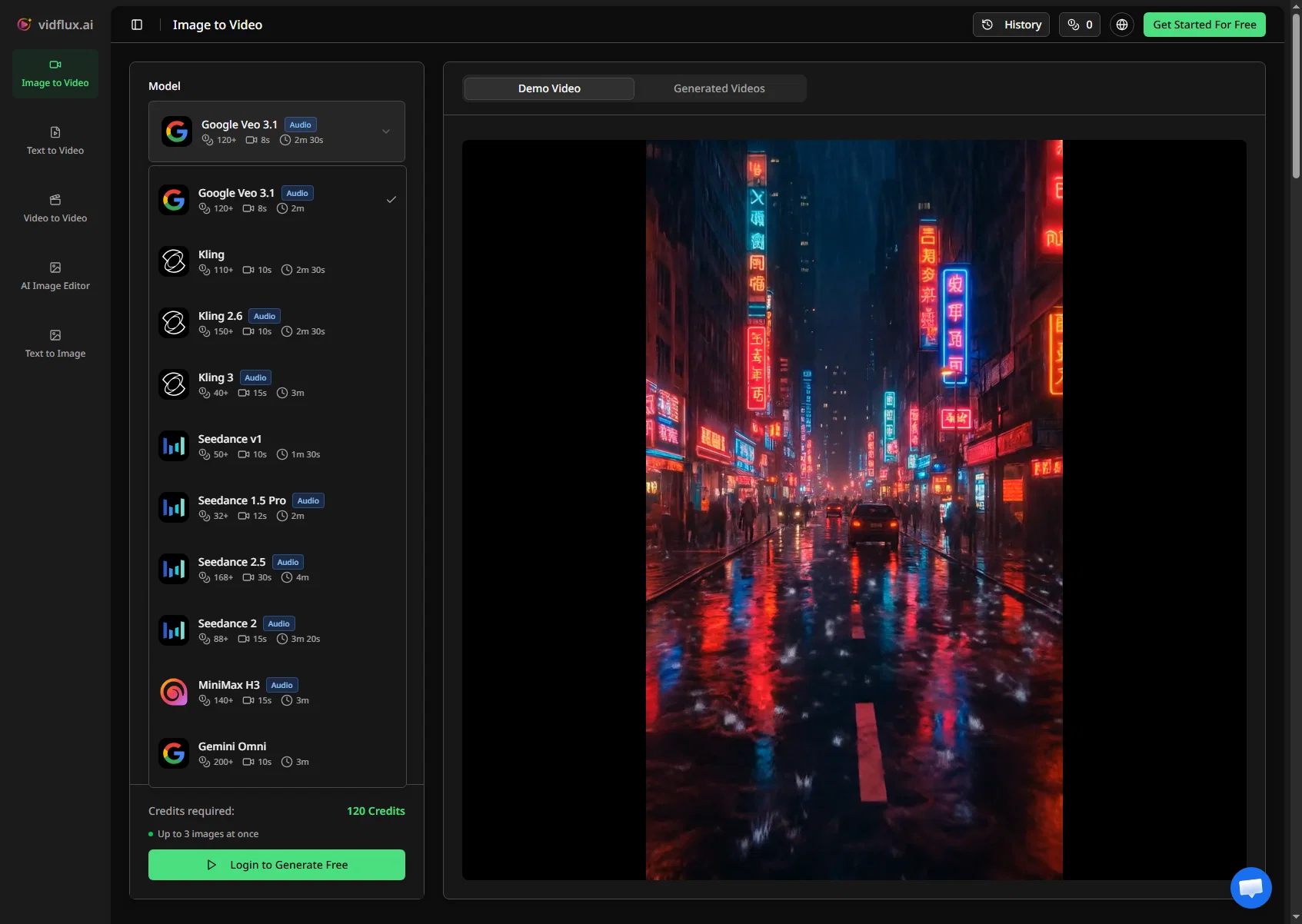
VidFlux.ai is an all-in-one image to video platform that uses artificial intelligence to transform images into videos. Users can upload images of various formats up to a certain size and then generate AI-enhanced videos from these images.
Multiple advanced AI models are leveraged within the platform including Google Veo 3.1, Sora 2, Kling AI, Runway, Seedance, and Wan AI. These AI models are integrated into a single platform, providing users the capability to create professional-grade videos from images without the need to switch between different individual tools.
Each model allows the user to have frame to frame control for precision, as well as aid rapid generation with visual consistency. The platform supports different aspect ratios and provides an estimation of the credits required to create a video.
Users can get a preview of the end result before the full video generation. VidFlux.ai offers a streamlined, efficient solution for all image to video needs.
Best for
Short scenarios where VidFlux - Image to Video AI tends to shine.
-
Animate still images into vivid stories
Best for Content creators
-
Create professional video content from photos
Best for Video producers
-
Generate realistic scenes or animations from uploaded images
Best for Marketing professionals
-
Produce creative videos for various purposes (e.g., social media, marketing)
Best for Social media managers
Example outputs 1
Sample generations and before/after results for VidFlux - Image to Video AI.
Access & connections
Where you can use VidFlux - Image to Video AI.
Platforms
Capabilities
What this tool accepts, produces, and is strongest at.
Input
- Image
Output
- Video
Supported features
- Video Generation
- Video Edit
- Image Generation
- Image Edit
- Digital Personas
- Translation
- Styling
- Social Media
- Integrations
Pros & cons
Pros
- Supports various image formats
- Frame to frame control
- Allows rapid video generation
- Ensures visual consistency
- Supports different aspect ratios
- Provides credit estimation
- Allows for video preview
- Streamlined workflow
Show 25 more
- Produces professional-grade videos
- Transforms any image
- No need to switch tools
- Google Veo 3.1 integration
- Sora 2 integration
- Multi-image reference feature
- Fast video generation
- All-in-one platform
- Single-platform access to 6+ models
- Efficient solution for video needs
- Preview end result
- Easy to upload images
- Supports images up to 10MB
- User-friendly interface
- Allows optional prompts for generation
- Charges as per credits used
- Toggle sidebar menu for ease
- Multi-language support
- Generates MP4 videos
- Create videos in about a minute
- Compatible with Chrome Extension
- Detailed product and pricing info
- Compliant with legal standards
- Unified platform for top-tier models
- Seamless video creation from images
Cons
- Limited image size upload
- Credits required for video generation
- No direct API mentioned
- Possibly expensive
- No Chrome extension for images
- No other language support mentioned
- No free trial mentioned
Compare alternatives
Similar tools in the catalog — with a clear reason to open each one.

MojoMake - AI Image to Video Generator ✓
FreemiumUse every top AI model and 100+ effects in one account.
Why look Freemium alternative
Full comparison
VidFlux - Photo to Video Generator ✓
PaidTransform photos into cinematic videos with AI.
Why look Typically cheaper
Full comparison
Grok Imagine ✓
FreemiumUnleash Your Creativity with Grok Imagine
Why look Freemium alternative
Full comparison
MindVideo ✓
FreemiumCreate stunning videos from text or images.
Why look Freemium alternative
Full comparisonPeople also view
Tools that often show up alongside VidFlux - Image to Video AI in collections and comparisons.
Vidnix | AI Image to Video Generator ✓
Free TrialTurn text into stunning AI videos.
VidFlux - Photo to Video Generator ✓
PaidTransform photos into cinematic videos with AI.
MojoMake - AI Image to Video Generator ✓
FreemiumUse every top AI model and 100+ effects in one account.
MindVideo ✓
FreemiumCreate stunning videos from text or images.

Himedia AI Video Generator ✓
Free TrialCreate any AI Videos, Images and Music - No creative limits
Grok Imagine ✓
FreemiumUnleash Your Creativity with Grok Imagine

Motiofy ✓
Free TrialCreate Product and Social Videos Without Filming a Thing

MorphLogo ✓
Free TrialStatic logo in, cinematic motion out.
Releases 7
- Added Seedance 2.5 and MiniMax H3 for improved video generation quality.
- Support generating videos up to 30 seconds.
- Improved motion, consistency, and overall video effects.
✨ New: Gemini Omni Model
Generate more realistic videos with improved creativity, motion quality, and scene coherence.
Now available alongside Veo, Kling, Grok Imagine, Wan, and Seedance models.
✨ New: Seedance 2 is now available
✨ New: AI-powered prompt optimization
Better results across Veo, Kling, Wan, and Seedance
🚀 Added support for concurrent video generation. Generate multiple videos at the same time to significantly improve efficiency.
✨ Added new models: Seedance 1.5 Pro and Kling 2.6
🚀 Improved generation experience and stability for existing models (WAN, Veo, Grok Imagine, Sora)
⚡ Performance optimizations and minor bug fixes
Imported reviews 3
Having Veo, Sora, Kling, Runway, Seedance and Wan in one place is useful for creators who want to compare results without switching between multiple platforms. The frame-to-frame control and preview before spending credits also make the workflow more practical especially when consistency matters.
Credits get consumed, but video never completes. It is "processing".
Many ai models help me create videos I love
FAQ 12
What is VidFlux.ai?
How does VidFlux.ai use artificial intelligence?
How do users upload images on VidFlux.ai?
What AI models does VidFlux.ai use?
Can I switch between different AI models in VidFlux.ai?
What does it mean to have frame to frame control in VidFlux.ai?
How does rapid generation with visual consistency work in VidFlux.ai?
What are the supported aspect ratios on VidFlux.ai?
How can I see an estimation of the credits required to create a video in VidFlux.ai?
Is there a preview feature in VidFlux.ai?
What image formats are supported by VidFlux.ai?
Are there size limitations for the images I can upload?
Related tools
Recommended

freebeat AI ✓
FreemiumTurn Music & Ideas into Viral Videos In One Click

ChatGPT ✓
FreemiumAsk anything, create anything, and move from idea to action.

Automateed ✓
Free TrialCreate eBooks effortlessly with Automateed, the AI-powered writing tool.

MagicLight ✓
FreemiumTransform text into captivating videos instantly.

AirMusic ✓
Free TrialAI music generator and music video creator in one platform.

Suno ✓
FreemiumMake music at the speed of your ideas.