

Image to video vv1.8.0 2026 Rank: #57
VidFlux - Photo to Video Generator ✓
Transform photos into cinematic videos with AI.
Verdict
A quick read before you dig into the full page.
- Best if
- You are content creators and need: Animate still images into vivid stories
- Skip if
- Possible watermark on outputs
- Pick this when
- Transforms photos into videos
Considering MojoMake - AI Image to Video Generator instead? Compare side by side
Overview
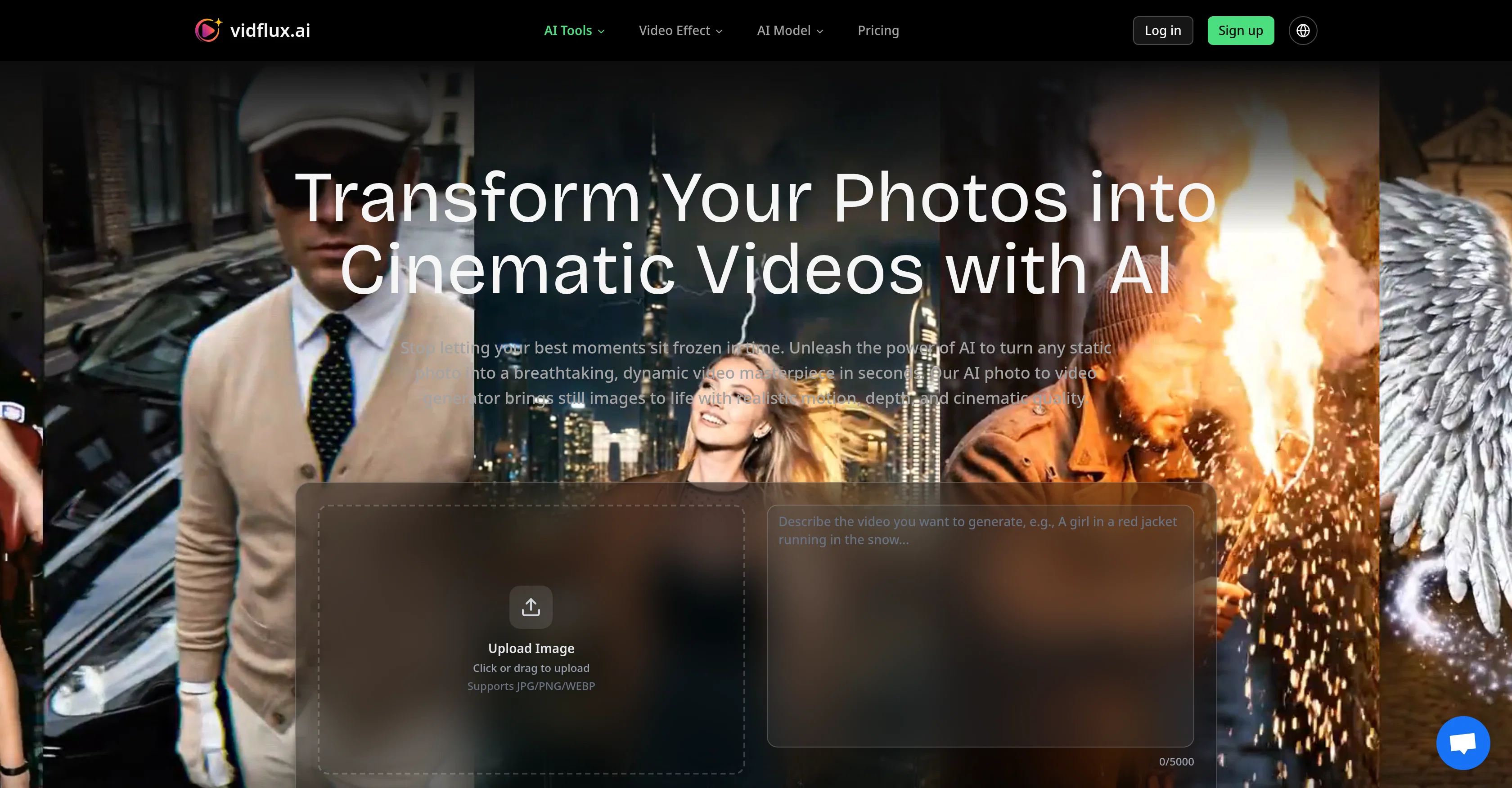
The AI Photo to Video Generator is a tool designed to bring static photos to life, transforming them into dynamic, cinematic videos with realistic motion and depth.
The system intelligently analyzes your photo and generates smooth, lifelike motion that adds profound depth to flat images. This tool is powered by advanced AI models, providing high-definition clarity and multiple resolution options.
The platform is designed to be easy to use. Users simply upload a high-quality image, guide the AI with a text description, and generate their video, which can be up to 15 seconds long and downloaded in MP4 format.
It supports different aspect ratios and offers advanced features for professional content creators, such as AI-powered motion understanding for realistic animation and a flexible credit system.
This tool can be particularly useful in a variety of industries, such as e-commerce, social media content creation, digital art, historical archives preservation, marketing and advertising, and real estate and architecture, adding depth and motion to the visuals used in these fields.
Best for
Short scenarios where VidFlux - Photo to Video Generator tends to shine.
-
Animate still images into vivid stories
Best for Content creators
-
Create professional video content from photos
Best for Video producers
-
Generate realistic scenes or animations from uploaded images
Best for Marketing professionals
-
Produce creative videos for various purposes (e.g., social media, marketing)
Best for Social media managers
Example outputs 1
Sample generations and before/after results for VidFlux - Photo to Video Generator.
Access & connections
Where you can use VidFlux - Photo to Video Generator.
Platforms
Capabilities
What this tool accepts, produces, and is strongest at.
Input
- Image
- Text
Output
- Video
Highlights
- SOTA
Supported features
- Video Generation
- Image Understanding
- Visual Creation
Pros & cons
Pros
- Transforms photos into videos
- Cinematic quality motion
- High resolution videos
- 15 seconds video generation
- Outputs video in MP4
- Multiple resolution options
- Supports various aspect ratios
- Advanced features for professionals
Show 35 more
- E-commerce application
- Social media content creation
- Applicable for digital art
- Preserves historical archives
- Useful for marketers
- Advertising tool
- Useful in real estate
- Useful in architecture
- Easy to use
- Flexible credit system
- Photo Animation
- Platform supports different ratios
- Intelligent motion generation
- High-definition clarity
- Credit system for payment
- Supports JPG/PNG/WEBP
- Adjustable video length
- Video sharing on any platform
- Supports 16:9, 9:16, 1:1 ratios
- Intuitive user interface
- Supports 1080p resolution
- Suitable for individual and professional use
- Generate 3D product showcases
- Generate scroll-stopping Reels and TikToks
- Revive historical black-and-white portraits
- Generate dynamic ad content
- Virtual property walkthroughs
- Generate up to 220 videos
- No watermark on videos
- Commercial usage rights
- Priority support for Pro users
- Dedicated support for studio users
- Simple and powerful interface
- Fast video generation
- Multi industry use cases
Cons
- Limited to 15 seconds
- Video output only MP4
- Requires high-quality image
- Manual text prompt needed
- Limited resolution options
- No support for audio
- Cost per use within credit system
- Possible watermark on outputs
Show 1 more
- Aspect ratios may be limited
Compare alternatives
Similar tools in the catalog — with a clear reason to open each one.

MojoMake - AI Image to Video Generator ✓
FreemiumUse every top AI model and 100+ effects in one account.
Why look Freemium alternative
Full comparison
Grok Imagine ✓
FreemiumUnleash Your Creativity with Grok Imagine
Why look Freemium alternative
Full comparison
VidFlux - Image to Video AI ✓
PaidTransform any image into stunning videos.
from $9/mo
Full comparison
MindVideo ✓
FreemiumCreate stunning videos from text or images.
Why look Freemium alternative
Full comparison
People also view
Tools that often show up alongside VidFlux - Photo to Video Generator in collections and comparisons.

Ai Melodia ✓
FreemiumSongs at the speed of imagination.

Vidnix | AI Image to Video Generator ✓
Free TrialTurn text into stunning AI videos.
Vtuber Assistant ✓
PaidYour AI VTuber co-host that actually pays attention.

Team Pulse ✓
FreemiumProject management with no PhD required.

cutedyno.com ✓
FreemiumGenerate websites from prompts, keep editing and shipping.

Scavio AI ✓
FreemiumOne API to search every platform.

MiniMax Agent ✓
Free TrialYour AI supercompanion for enhanced creativity and productivity.

Claude ✓
FreemiumBuilding reliable, interpretable AI systems
Releases 9
✨ New: Seedance 2.5 and MiniMax H3 Model.
- Support generating videos up to 30 seconds.
- Improved motion, consistency, and overall video effects.
✨ New: Seedance 2 Mini Model
Better quality. Lower cost. Now available for AI video generation.
✨ New: Gemini Omni Model
Generate more realistic videos with improved creativity, motion quality, and scene coherence.
Now available alongside Veo, Kling, Grok Imagine, Wan, and Seedance models.
✨ New: Seedance 2 Model
Experience higher quality, better facial consistency, and smoother motion.
Also supports Veo, Kling, Grok Imagine, Wan, and more models.
✨ New: AI Prompt Generation
Instantly create optimized prompts for better results across Veo, Kling,Grok imagine , Wan, and Seedance.
✨ New: Edit images before video generation
Better results across Veo, Kling, Sora, Wan, and Seedance
🚀 Added Kling 3 for video generation.
Improved video generation experience for Wan 2.6, Veo 3.1, Seedance 1.5, Grok Imagine, and Sora 2.
Supports generating multiple videos at the same time.
Imported reviews 3
Only app I could create video for free! Thanks
Many models available, cost effective
There are tons of video generation models to choose from, which really helped solve my problem. I also love that I can try it for free before paying. Overall, it’s super useful and works great. 👍
FAQ 12
What is the AI Photo to Video Generator?
How does the AI Photo to Video Generator work?
What type of photos can I upload to the AI Photo to Video Generator?
What type of text prompts should I use with the AI Photo to Video Generator?
What length of video can be generated by the AI Photo to Video Generator?
In what format does the AI Photo to Video Generator output videos?
What resolution options does the AI Photo to Video Generator offer?
What aspect ratios does the AI Photo to Video Generator support?
Who can use the AI Photo to Video Generator?
How can the AI Photo to Video Generator benefit content creators?
What industries could benefit from using the AI Photo to Video Generator?
How can this tool be utilized for e-commerce?
Related tools
Recommended

freebeat AI ✓
FreemiumTurn Music & Ideas into Viral Videos In One Click

Suno ✓
FreemiumMake music at the speed of your ideas.

Suno Prompt ✓
Free TrialGenerate custom lyrics and song prompts for AI music creation.

Prompt Octopus ✓
FreeCompare multiple AI prompt responses side-by-side

AirMusic ✓
Free TrialAI music generator and music video creator in one platform.

MicroClipz ✓
PaidGenerate cinematic AI video clips from images, prompts, or existing video