

Image to video vv1.3 2026 Rank: #69
MojoMake - AI Image to Video Generator ✓
Use every top AI model and 100+ effects in one account.
Verdict
A quick read before you dig into the full page.
- Best if
- Use every top AI model and 100+ effects in one account
- Skip if
- No built-in video editor
- Pick this when
- Create product videos, viral effects, and ad creatives from one account
Considering VidFlux - Photo to Video Generator instead? Compare side by side
Overview

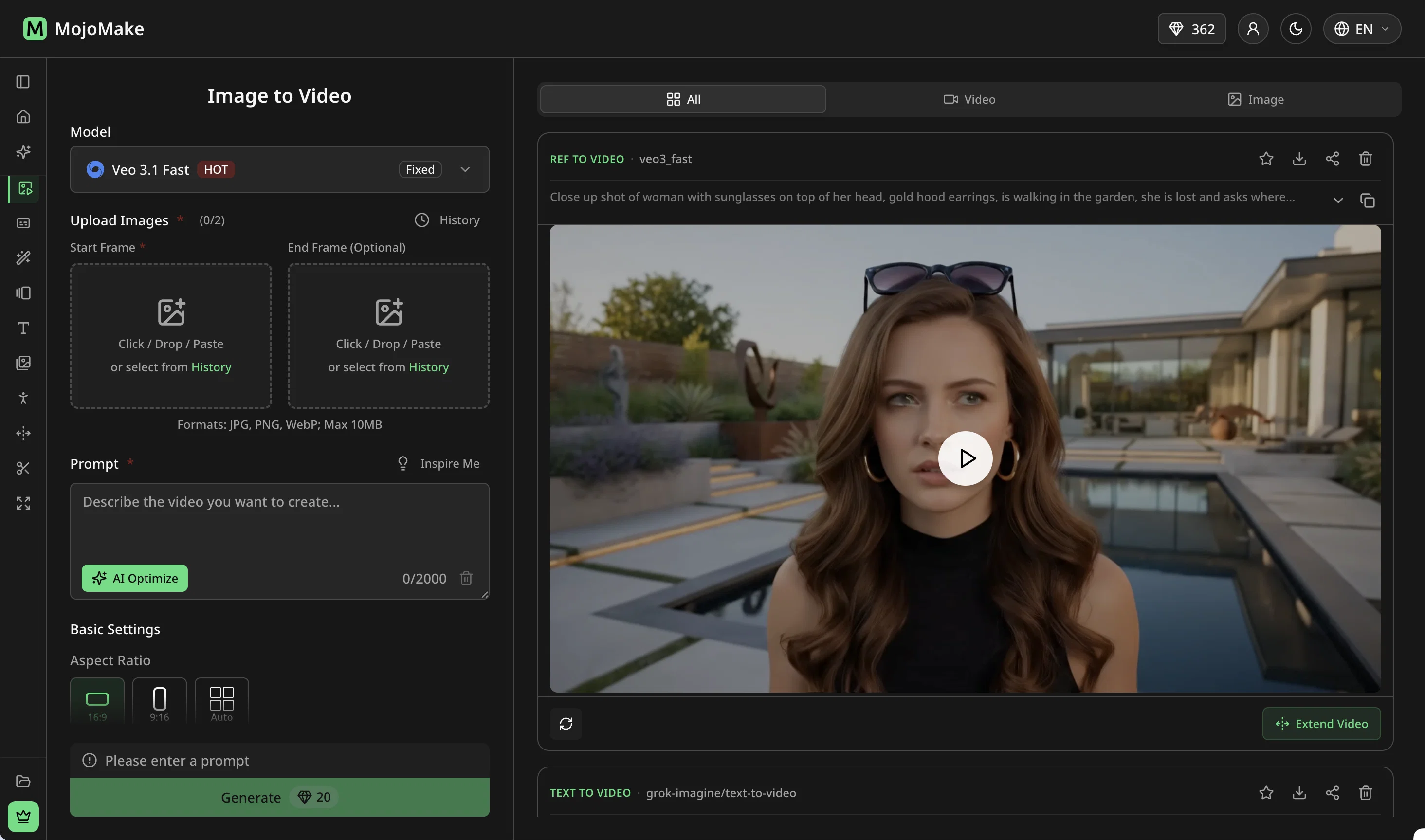
Stop paying for multiple AI tools. MojoMake gives you official API access to the world’s best AI video models—Veo, Kling, Seedance, Wan, Grok, and Hailuo—all under one single account.
How it works:
Upload a photo, describe the motion, and let the AI do the rest. Switch between top video models instantly with the same prompt to compare results and find your perfect shot.
Key Features:
The Ultimate All-in-One: 12+ tools including Video Extension, Background Removal, and 4K Image Generation (Flux, GPT Image).
100+ Viral Presets: Skip the prompting! Use one-click effects like AI Hug, Earth Zoom, or Product Spin.
Mimic Motion: Copy complex human movements from any reference video perfectly.
Built for Creators & Businesses:
Includes full commercial rights. 1080p video & 4K image exports (watermark-free on paid plans).
🎁 Try it risk-free: 10 free credits on sign-up. No credit card required.
- All Top Ai Models In One Account (veo, Kling, Seedance, Grok, Flux)
- Replaces 4-5 Separate Ai Subscriptions
- 100+ Ready-made Video Effects (ai Hug, Ghibli Me, Product Spin)
- Text-to-video Generation
- Image-to-video Generation
- Reference-to-video (character Consistency)
- Mimic Motion
- Video Extension
- Background Removal
- Image-to-image Editing
- 100% Commercial Rights, No Watermarks
- 4k Image / 1080p Video Export
- Free Credits On Signup, No Credit Card
- 7 Language Support (en, Zh, Ja, Es, Pt, Fr, De)
Best for
Short scenarios where MojoMake - AI Image to Video Generator tends to shine.
-
Use every top AI model and 100+ effects in one account.
Example outputs 1
Sample generations and before/after results for MojoMake - AI Image to Video Generator.
Access & connections
Where you can use MojoMake - AI Image to Video Generator, and what it plugs into.
Platforms
Integrations
Capabilities
What this tool accepts, produces, and is strongest at.
Input
- Image
- Text
- Video
Output
- Video
- Image
Highlights
- SOTA
- Use code TAAFT
- 30% OFF
Supported features
- Image Generation
- Image Edit
- Video Generation
- Video Edit
Models
Text
Image
Audio
Video
Pros & cons
Pros
- Create product videos, viral effects, and ad creatives from one account
- All major AI models in one account (Veo, Kling, Seedance, Grok, Nano Banana, Flux, GPT Image)
- One subscription instead of several
- Switch between models with one click
- Skip prompt writing with 100+ effects (AI Hug, Ghibli Me, Product Spin, Earth Zoom, and more)
- Keep the same character across scenes with the same face and outfit
- Free to start with 10 credits, no credit card
- 100% commercial rights, no watermarks
Show 2 more
- 4K images, 1080p video
- Works in 7 languages
Cons
- No built-in video editor
- No timeline, cuts, or transitions
- No mobile app
- No 3D modeling
- No direct social media posting
Compare alternatives
Similar tools in the catalog — with a clear reason to open each one.

VidFlux - Photo to Video Generator ✓
PaidTransform photos into cinematic videos with AI.
Why look Typically cheaper
Full comparison
Grok Imagine ✓
FreemiumUnleash Your Creativity with Grok Imagine
Free + from $30/mo
Full comparison
VidFlux - Image to Video AI ✓
PaidTransform any image into stunning videos.
from $9/mo
Full comparison
MindVideo ✓
FreemiumCreate stunning videos from text or images.
Free + from $7.9/mo
Full comparison
People also view
Tools that often show up alongside MojoMake - AI Image to Video Generator in collections and comparisons.

Whacka ✓
Free TrialTurn ideas into real apps from your phone.

Video maker by AI Generator Hub ✓
Free TrialCreate stunning AI videos, images, and music effortlessly.

ThumbnailCreator.com ✓
Free TrialCreate eye-catching YouTube thumbnails in seconds.

SellShots ✓
Free TrialTurn one photo into high-converting product images
Pixwit AI ✓
FreemiumCreate cinematic AI videos from text or images.

ImageToVideoAI.net ✓
FreemiumAI Image to Video Generator | Free to Start, 14 AI Models
Canva AI ✓
FreemiumAI tools for design, writing, and creativity.
Vidnix | AI Image to Video Generator ✓
Free TrialTurn text into stunning AI videos.
Releases 4
🎬 Just Added: Gemini Omni & Kling 3.0 Turbo!
Two new video models are here. Make better videos, faster.
🎁 Free to start: 10 credits, no card, full commercial rights.
🎬 v1.2 makes MojoMake faster and more reliable.
You get a smoother, more efficient generation experience.
Failed generations are refunded automatically.
🎁 Free to start: 10 credits, no card, full commercial rights.
🚀 Just Added: Seedance 2, Veo 3.1 Lite & GPT Image 2!
Stop juggling subscriptions. Access the world's best AI video & image models in ONE single account.
🎁 Start with 10 free credits (no card required) and keep 100% commercial rights.
Imported reviews 2
"Stop paying for multiple AI tools." 👍 — Isn't this just a way for ordinary people to shell out cash for an "AI tool bundle" and pretend they're rich? Think of those "family bucket" combos at the convenience store downstairs—sure, they're marketed as a "package of all the snacks," but what are you actually eating?
As *The Atlantic* put it: "The more tools you add, the more you become the tool." You aren't using AI; you're acting as an ATM for it.
a friend sent me this the other day. veo, grok, seedance all run from one upload and it's actually fast. ui doesn't fight me. no complaints.
FAQ 12
What is MojoMake?
🛠️ 2
tools
🙏 5
karma
wrote:
MojoMake is one account for every major AI video and image model: Veo, Kling, Seedance, Wan, Grok Imagine, Nano Banana, Flux, GPT Image, and more. Instead of paying for each one separately, you get all of them in one dashboard with one-click switching. Write custom prompts, upload photos to animate, or pick from 100+ ready-made effects.
Is the output really the same as using Veo, Kling, or Flux directly?
🛠️ 2
tools
🙏 5
karma
wrote:
Yes. We're hitting the official APIs straight from Google, Kuaishou, ByteDance and the rest. Not copies, not fine-tunes, not wrappers. You get the exact same model output you'd get if you signed up with each company directly. You just don't have to sign up with each company directly.
Can I try it for free?
🛠️ 2
tools
🙏 5
karma
wrote:
Yes. New accounts get 10 free credits on signup, no credit card required. That's enough to test multiple models and see if the platform works for you. After that, you can subscribe from $9/month or buy credit packs from $15 with no recurring charges.
Can I use what I create for commercial purposes?
🛠️ 2
tools
🙏 5
karma
wrote:
Yes. You own 100% of the content you generate on any plan, including the free trial. No watermarks, no usage limits. Use it for YouTube, TikTok, ads, your e-commerce store, or client work.
How long does it take to generate a video or image?
🛠️ 2
tools
🙏 5
karma
wrote:
Most images are ready in 5 to 15 seconds. Most videos finish in 30 to 120 seconds, depending on the model and length. You can queue multiple jobs and get notified when they're done, no need to keep the tab open.
Can I cancel my subscription anytime?
🛠️ 2
tools
🙏 5
karma
wrote:
Yes. Cancel from your account settings in two clicks. You keep full access until the end of the billing period. No partial refunds, but no sneaky charges either.
Can I use the content created on MojoMake for commercial purposes?
🛠️ 2
tools
🙏 5
karma
wrote:
Yes, MojoMake offers 100% commercial rights on all content created on the platform. This means you can freely use your generated content for commercial purposes.
Is my data and content private?
🛠️ 2
tools
🙏 5
karma
wrote:
Your prompts and uploaded images are only used to generate your output. We don't train models on your content. Generated files are stored in your private library and only visible to you.
Why use MojoMake instead of subscribing to Runway, Kling, or Veo directly?
🛠️ 2
tools
🙏 5
karma
wrote:
Cost, mostly. If you only use one model, going direct is fine. Once you're using two or three, paying for each one separately gets expensive fast. MojoMake is one account for all of them. You stop paying five companies to do what one subscription can do.
Who are the targeted users of MojoMake?
How does MojoMake simplify the video and image creation process?
Can I use MojoMake for YouTube content creation and digital marketing?
Related tools
Recommended
Whacka ✓
Free TrialTurn ideas into real apps from your phone.

freebeat AI ✓
FreemiumTurn Music & Ideas into Viral Videos In One Click

DeepSeek ✓
FreeUnravel the mystery of AGI with curiosity

Movie Maker Gemini ✓
FreeGenerate watermark-free AI videos with your Gemini key
Pixwit AI ✓
FreemiumCreate cinematic AI videos from text or images.

Image3D.io ✓
FreemiumImage to STL and 3D models from any image