

3D objects 2026 Rank: #792
Hi3D ✓
AI-powered 3D model generator with unprecedented precision.
Trial; then from $17.91/mo
Verdict
A quick read before you dig into the full page.
- Best if
- You are game developers and need: Generating 3D models from single images for rapid prototyping
- Skip if
- Limited free user rights
- Pick this when
- Generates 3D assets efficiently
Considering 3D AI Studio instead? Compare side by side
Overview
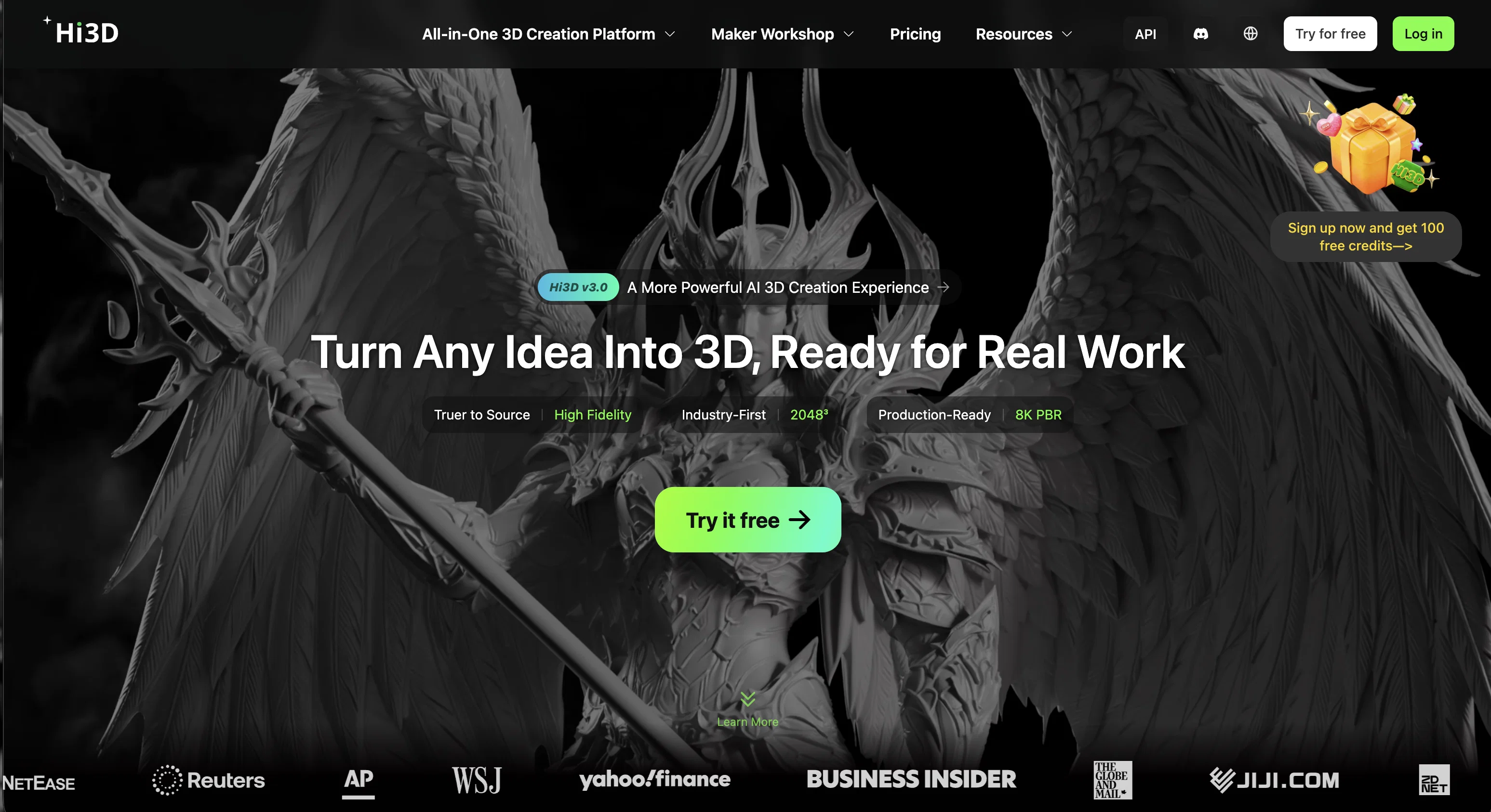
Hi3D is an AI-based tool used for generating 3D models. Developed by Math Magic, this software integrates the efficiency of Ultra3D with the precision of Sparc3D to create high-quality, studio-ready 3D assets from a single reference image.
This streamlined process is designed to democratize 3D creation, equipping game developers, designers, and 3D artists with a powerful tool to expedite creative workflows from concept to deployment.
Hi3D supports the generation of models with superior geometric structures and high engraving precision. The application allows users to upload various image formats, including .JPG, .JPEG, .PNG, and .WebP, to create models.
The output 3D models formulated by Hi3D can be utilized in several scenarios including game development, visual effects production, product modeling, and 3D printing.
It supports the download of the 3D models in GLB, OBJ, FBX, and STL formats. Hi3D ensures user data protection by adopting industry-standard security measures, maintaining the confidentiality, integrity, and availability of all uploaded content.
Users have complete control over their generated models' privacy settings and ownership rights. Paid users retain full ownership over their creations, enabling distribution and sales, while free users can also use the models commercially with an acknowledgment.
Best for
Short scenarios where Hi3D tends to shine.
-
Generating 3D models from single images for rapid prototyping
Best for Game developers
-
Creating printable 3D models for FDM and resin 3D printing
Best for 3D artists
-
Producing 3D relief models for CNC carving and laser engraving
Best for Graphic designers
-
Generating multi-color separated meshes for advanced 3D printing workflows
Best for Product designers
-
Building game-ready assets from concept images or sketches
Best for VFX specialists
-
Quickly creating base meshes for Blender refinement workflows
Best for Game developers
-
Converting 2D concepts into 3D assets for AR/VR content
Best for Game developers
-
Accelerating industrial and product visualization workflows
Best for Game developers
Example outputs 1
Sample generations and before/after results for Hi3D.
Access & connections
Where you can use Hi3D.
Platforms
Capabilities
What this tool accepts, produces, and is strongest at.
Input
- Image
Output
- 3D
Supported features
- 3D Generation
- Image Understanding
- Visual Creation
- Realism
- Styling
Pros & cons
Pros
- Generates 3D assets efficiently
- High engraving precision
- Works from single reference image
- Accelerates creative workflows
- Supports JPG, JPEG, PNG, WebP formats
- Produces industry-standard GLB, OBJ, FBX, STL files
- Strong data protection measures
- User data privacy
Show 31 more
- Supports maximum image size: 20MB
- Downloadable models support
- Democratizes 3D creation process
- Delivers smooth, artifact-free surfaces
- Dedicated Discord community for support
- Email support
- Preserves textures, edges, and silhouettes
- Complete geometry reconstruction
- Commercial usability
- Paid users retain ownership
- Credit-based usage for free users
- High resolution image processing
- Models usable in various applications
- Suited for game development
- Facilitates product modelling
- Helpful for 3D printing
- Tool apt for 3D Artists
- Offers accurate material contours
- Enables refined shading
- Ensures surface fidelity
- Creates true 360 models
- Output models production-ready
- Service integration with Ultra3D & Sparc3D
- Supports multiple download file formats
- Direct user interaction on Discord
- Email communication channel available
- Outstanding geometric structure generation
- Semantic detailing in model creation
- Maintains image edge integrity
- Allows model privacy customization
- Supports mainstream image file formats
Cons
- Limited upload file formats
- No multi-image input support
- 20MB maximum file size
- Limited download formats
- No native mobile app
- No offline capability
- Limited free user rights
- Lacks comprehensive editing tools
Show 1 more
- No direct API integration
Compare alternatives
Similar tools in the catalog — with a clear reason to open each one.

3D AI Studio ✓
PaidEasily generate free 3D models with our AI-powered 3D AI Studio.
Why look Offers a public API
Full comparison
Mimetic Labs ✓
Free TrialTransform ideas into printable 3D models with AI.
Why look Typically cheaper
Full comparison
Image3D.io ✓
FreemiumImage to STL and 3D models from any image
Why look Typically cheaper
Full comparison
TRELLIS 2 ✓
UnknownGenerate high-fidelity 3D assets from images instantly.
No pricing
Full comparison
Neural4D | Image to 3D ✓
Free TrialTurn photos or prompts into 3D models instantly.
Why look Typically cheaper
Full comparison
Fast3D ✓
FreemiumTransform text or images into 3D models instantly.
Why look Typically cheaper
Full comparisonPeople also view
Tools that often show up alongside Hi3D in collections and comparisons.
Neural4D | Image to 3D ✓
Free TrialTurn photos or prompts into 3D models instantly.
Image3D.io ✓
FreemiumImage to STL and 3D models from any image
TRELLIS 2 ✓
UnknownGenerate high-fidelity 3D assets from images instantly.
Mimetic Labs ✓
Free TrialTransform ideas into printable 3D models with AI.
Fast3D ✓
FreemiumTransform text or images into 3D models instantly.
3D AI Studio ✓
PaidEasily generate free 3D models with our AI-powered 3D AI Studio.

Trify3D ✓
Free TrialTurn images and text into 3D models instantly.

Image to STL ✓
PaidTurn 2D images into 3D printable STL files.
Releases 1
FAQ 12
What is Hi3D?
How does Hi3D use AI in 3D model generation?
Who developed Hi3D?
What type of artists and professionals is Hi3D designed for?
Which image file formats does Hi3D support for uploading?
What model file formats does Hi3D support for downloading?
Is Hi3D suitable for game development?
How does Hi3D ensure the privacy and security of user content?
How can I get support or assistance with using Hi3D?
What are the applications of models created by Hi3D?
Can Hi3D generate a full 360° model from a single image?
How does Hi3D handle data protection and user privacy?
Related tools
Recommended

Veemo AI | Text to Video ✓
PaidAll-in-one AI studio for videos and images.

VidFlux - Image to Video AI ✓
PaidTransform any image into stunning videos.

Meshy ✓
FreemiumTurn text and images into production-ready 3D models with AI in seconds.

Kinovi - AI Video Generator ✓
Free TrialAI video generator powered by Seedance 2.0

BeatMV ✓
Free TrialTurn any song into scroll-stopping videos in minutes with AI-directed scripts and
Scrollsequence ✓
FreemiumBuild immersive scroll-driven digital experiences.