

3D objects 2026 Rank: #922
Neural4D | Image to 3D ✓
Turn photos or prompts into 3D models instantly.
Verdict
A quick read before you dig into the full page.
- Best if
- You are 3D designers and need: AR applications
- Skip if
- Possible limited texture customization
- Pick this when
- Online 3D editor
Considering 3D AI Studio instead? Compare side by side
Overview




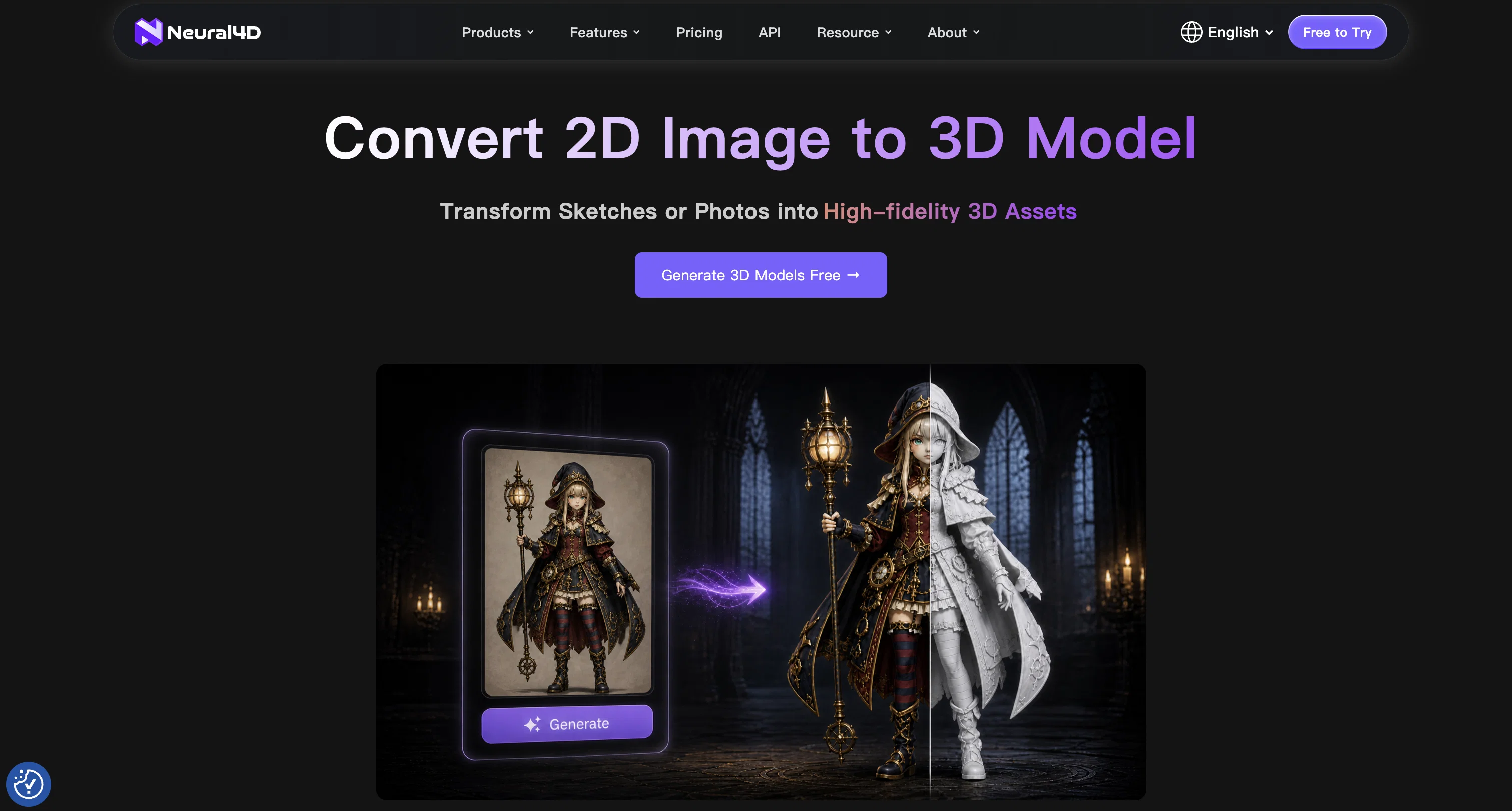
Built for game developers, 3D designers, Blender and ZBrush users, 3D printing creators, e-commerce visual teams, and XR/VR content makers, Neural4D helps speed up the 3D creation workflow from idea to usable asset. It can be used to generate game props and characters, product display models, printable figurines, sculpting base meshes, virtual space assets, and creative prototypes.
Designed for both speed and detail, Neural4D offers Standard, High, and Extra High mesh options for different production needs. Users can generate fast previews for quick selection, or create high-precision 3D models with better shape accuracy, richer geometry, and preserved textures for further editing or presentation.
Generated models can be downloaded in common 3D formats such as STL and OBJ, making them suitable for 3D printing, Blender/ZBrush editing, game prototyping, product visualization, virtual production, and XR/VR content workflows.
Best for
Short scenarios where Neural4D | Image to 3D tends to shine.
-
AR applications
Best for 3D designers
-
VR applications
Best for Game developers
-
3D design
Best for Animators
-
3D printing
Best for Advertisers
-
Advertising
Best for Filmmakers
-
Animation production
Best for Industrial modelers
-
Film and television production
Best for AR/VR developers
-
Industrial modeling
Best for 3D designers
Example outputs 1
Sample generations and before/after results for Neural4D | Image to 3D.
Access & connections
Where you can use Neural4D | Image to 3D.
Platforms
Capabilities
What this tool accepts, produces, and is strongest at.
Input
- Image
- Text
Output
- 3D
Highlights
- API
Supported features
- API
- 3D Generation
- Image Understanding
- Visual Creation
- Styling
- Image Generation
- Realism
Pros & cons
Pros
- Online 3D editor
- Instant photo to 3D
- Instant text to 3D
- No downloads required
- Mesh optimization
- Generates videos
- Creates 3D anime artworks
- Incorporates texture generation
Show 11 more
- PBR high texture outputs
- Easy-to-use interface
- One-click generation solutions
- API for developers
- Community interaction and resources
- Shared assets
- Automated 3D design
- Browser based tool
- 3D transformations
- Smart drawing feature
- 1000000 @ Generate 30
Cons
- Limited to 3D anime style
- No offline capabilities
- Potential over-reliance on community
- Limited to browser-based access
- No explicit VR/AR support
- Browser performance dependency
- Possible limited texture customization
- Only instant generation
Show 1 more
- No direct CAD integration
Compare alternatives
Similar tools in the catalog — with a clear reason to open each one.

3D AI Studio ✓
PaidEasily generate free 3D models with our AI-powered 3D AI Studio.
from $15.55/mo
Full comparison
Mimetic Labs ✓
Free TrialTransform ideas into printable 3D models with AI.
Free + from $9.99
Full comparison
Image3D.io ✓
FreemiumImage to STL and 3D models from any image
Why look Typically cheaper
Full comparison
Hi3D ✓
Free TrialAI-powered 3D model generator with unprecedented precision.
Free + from $17.91/mo
Full comparisonPeople also view
Tools that often show up alongside Neural4D | Image to 3D in collections and comparisons.
Image3D.io ✓
FreemiumImage to STL and 3D models from any image
TRELLIS 2 ✓
UnknownGenerate high-fidelity 3D assets from images instantly.
Mimetic Labs ✓
Free TrialTransform ideas into printable 3D models with AI.
Hi3D ✓
Free TrialAI-powered 3D model generator with unprecedented precision.

Fast3D ✓
FreemiumTransform text or images into 3D models instantly.
3D AI Studio ✓
PaidEasily generate free 3D models with our AI-powered 3D AI Studio.

Trify3D ✓
Free TrialTurn images and text into 3D models instantly.

Image to STL ✓
PaidTurn 2D images into 3D printable STL files.
Releases 1
FAQ 12
What is the AI Image to 3D Generator?
What does the AI Image to 3D Generator do?
How does the AI Image to 3D Generator convert 2D images into 3D?
What kind of image resolution does the AI Image to 3D Generator support?
What types of mesh quality models does the AI Image to 3D Generator provide?
Can I edit 3D models generated by the AI Image to 3D Generator?
What are the potential applications of the AI Image to 3D Generator?
How does the AI Image to 3D Generator preserve details and textures from original images?
How does the 'High' mesh quality differ in the AI Image to 3D Generator?
What makes 'Extra High' mesh quality suitable for final usable assets in the AI Image to 3D Generator?
What do I need to provide as input for the AI Image to 3D Generator?
How long does it take for the AI Image to 3D Generator to create a 3D model?
Related tools
Recommended

Audio To Text Converter ✓
FreemiumTurn any audio file into searchable text instantly.

MagicLight ✓
FreemiumTransform text into captivating videos instantly.

Whacka ✓
Free TrialTurn ideas into real apps from your phone.

Movie Maker Gemini ✓
FreeGenerate watermark-free AI videos with your Gemini key

SureThing.io - "OpenClaw" for Beginners ✓
FreemiumFirst General AI Agency. Designed for long-horizon tasks.

Intuo – Your AI geospatial analyst ✓
FreeAsk a question about anywhere. Get analyst-grade maps and answers.