

3D objects 2026 Rank: #1372
Trify3D ✓
Turn images and text into 3D models instantly.
Verdict
A quick read before you dig into the full page.
- Best if
- Turn images and text into 3D models instantly
- Skip if
- Limited Supported Engines
- Pick this when
- Runs multiple 3D engines
Considering 3D AI Studio instead? Compare side by side
Overview
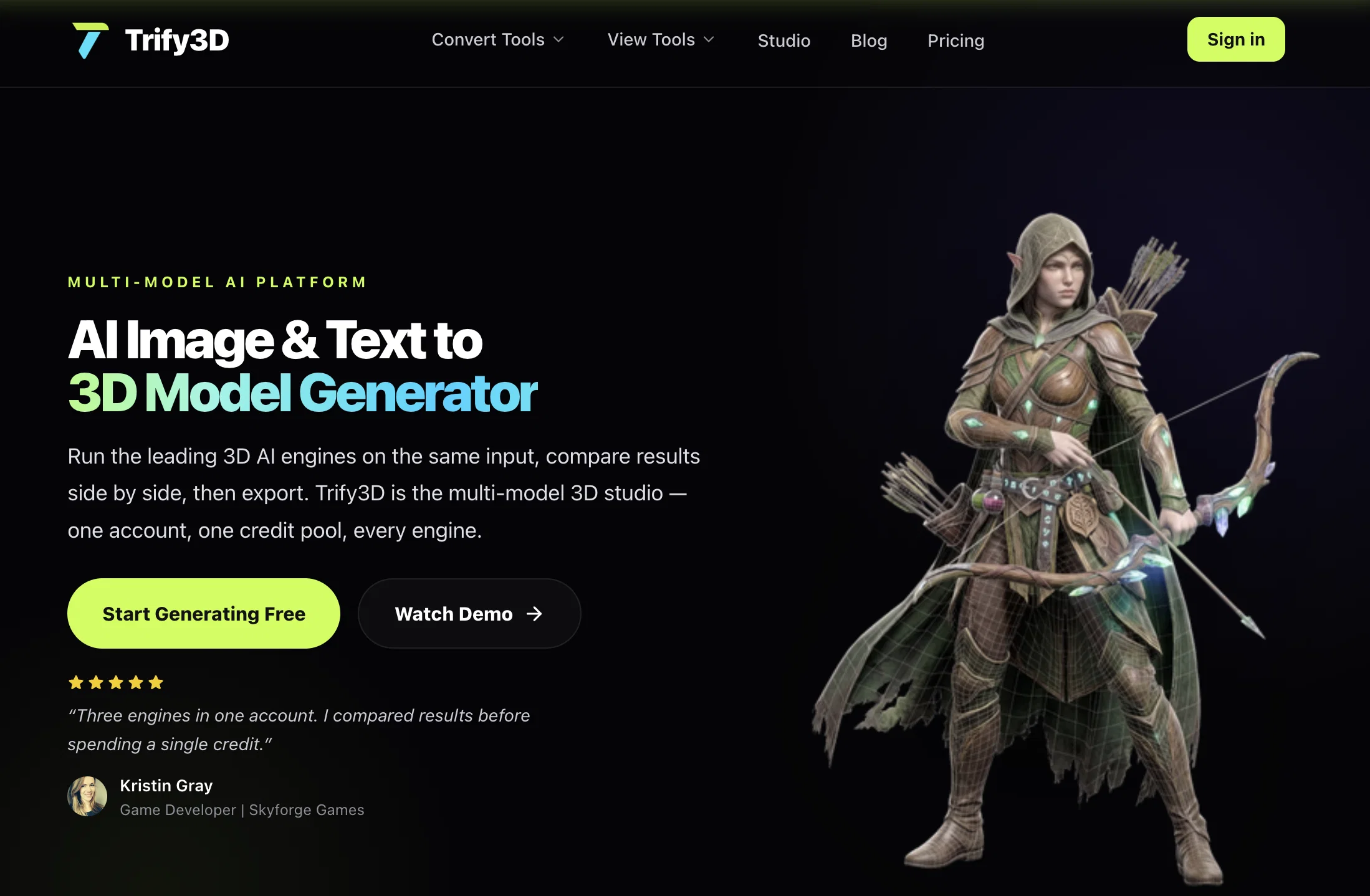
Trify3D is a powerful tool that converts images and text into 3D models. It streamlines the process by running multiple leading 3D engines on the same input, enabling users to compare results side by side before making a selection, hence averting the pitfalls associated with a single tool.
This functionality allows users to sidestep challenges such as weak texturing, bad topology, and overcome the need for multiple platforms. Trify3D also supports multiple conversion formats besides having an array of online viewers for different file types, providing a decisive advantage to its users.
Its unique approach, allowing users to describe what they imagine or upload an image, and receive a fully textured 3D model, makes it user-friendly and saves time.
Moreover, it offers options to generate physically-based rendering (PBR) textures for any existing mesh, with controllable style, material properties, and detail level.
Trify3D is suitable for various projects, including game development, 3D printing, and even Roblox, as it exports 3D models in GLB, glTF, OBJ, or STL formats.
All these attributes make Trify3D an ideal multi-model 3D studio for artists, game developers, and anyone interested in 3D modeling.
Access & connections
Where you can use Trify3D, and what it plugs into.
Platforms
Integrations
Capabilities
What this tool accepts, produces, and is strongest at.
Input
- Image
- Text
Output
- 3D
Pros & cons
Pros
- Runs multiple 3D engines
- Side-by-side results comparison
- Solves weak texturing issues
- Corrects bad topology
- Supports multiple conversion formats
- User-friendly model creation
- Saves time on modeling
- PBR textures generation
Show 37 more
- Control style, material properties
- Detail level control
- Supports game development
- Useful for 3D printing
- Supports Roblox modeling
- Exports GLB, glTF, OBJ, STL formats
- Online viewer for different file types
- One account, one credit pool
- Auto-retopology
- Supports natural language input
- Automatic UV wrapping
- 3D printing slicer compatibility
- Export and ship feature
- View 3D files privately
- View blender files without installing
- Export for Unity and Unreal
- Trusted by 18,000+ creators
- 4.8 average creator rating
- 1 account for every engine
- 3 powerful generation modes
- Text to 3D conversion
- Full albedo, normal, roughness, metallic map output
- Upload any image for 3D conversion
- Generates 3D from text prompts
- Image, Text to 3D conversion
- Generates PBR textures for any mesh
- Streamlined multi-model 3D studio platform
- Auto-retopology from image uploads
- Provides high fidelity detail capture
- FBX convert for game engines
- Simple pricing with generous free tier
- Provides credits-based access to 3 engines
- Generate-compare-export feature
- Ability to run multiple engines on single input
- Auto-retopology output runs smoothly in Unreal
- Suitable for commercial use
- Compatible with Unity, Unreal, Blender, Three.js.
Cons
- Requires Internet Connection
- No Android App
- No iOS App
- Limited Conversion Formats
- No Offline Mode
- Non-customizable UI
- No API Access
- No Integration with other apps
Show 2 more
- Limited Supported Engines
- Lack of Extended Settings
Compare alternatives
Similar tools in the catalog — with a clear reason to open each one.

3D AI Studio ✓
PaidEasily generate free 3D models with our AI-powered 3D AI Studio.
Why look Offers a public API
Full comparison
Mimetic Labs ✓
Free TrialTransform ideas into printable 3D models with AI.
Why look Typically cheaper
Full comparison
Image3D.io ✓
FreemiumImage to STL and 3D models from any image
Why look Typically cheaper
Full comparison
Hi3D ✓
Free TrialAI-powered 3D model generator with unprecedented precision.
Why look Higher community rating
Full comparison
TRELLIS 2 ✓
UnknownGenerate high-fidelity 3D assets from images instantly.
Why look Higher community rating
Full comparison
Neural4D | Image to 3D ✓
Free TrialTurn photos or prompts into 3D models instantly.
Why look Typically cheaper
Full comparisonReleases 1
Imported reviews 1
I didnt get to use it, they start u off with 10 credits but it takes 90 to generate. Looks good, the math aint right.
FAQ 12
What is Trify3D?
What are the main features of Trify3D?
How does Trify3D convert images and text to 3D models?
Can I choose the engine on which Trify3D runs?
What are the different conversion formats Trify3D supports?
What is the advantage of using the online viewer on Trify3D?
How does Trify3D correct bad topology in 3D models?
What types of projects is Trify3D suitable for?
Can Trify3D generate PBR textures for any existing mesh?
What does the type of control Trify3D offer over style and material properties?
Can Trify3D be used for Roblox modelling?
Can Trify3D export 3D models in OBJ format?
Related tools
Recommended

WitSpeak ✓
FreemiumYour AI English speaking coach.

Similarweb ✓
UnknownReal-time intelligence to outsmart your competition.
Kilo | Code Reviewer ✓
FreemiumAI-powered code reviews that catch bugs before merge.

Froging AI ✓
FreemiumCreate images and videos with leading AI models in one workspace.

GetLogit ✓
FreemiumArtificial intelligence, available for everyone.

ChatGPT ✓
FreemiumAsk anything, create anything, and move from idea to action.