

3D objects 2026 Rank: #1137
Image to STL ✓
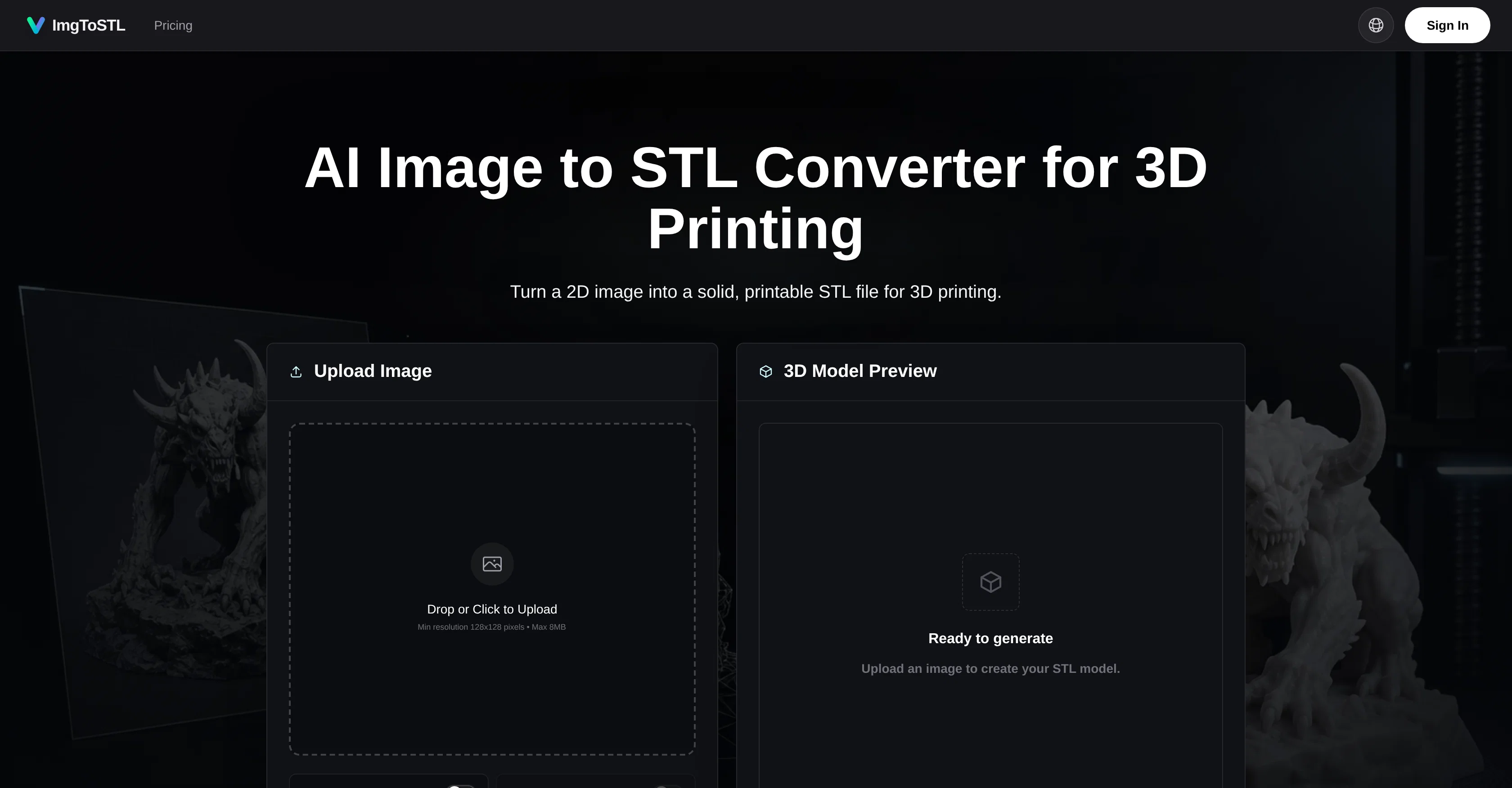
Turn 2D images into 3D printable STL files.
Verdict
A quick read before you dig into the full page.
- Best if
- Turn 2D images into 3D printable STL files
- Skip if
- Not suitable for complex images
- Pick this when
- Supports JPEG, PNG, WebP
Considering 3D AI Studio instead? Compare side by side
Overview
Upload a product photo, sketch, logo, character reference, prop concept, or AI-generated image, then create a 3D model you can preview and rotate directly in the browser before downloading an STL file. ImgToSTL supports common image formats including JPG, PNG, JPEG, and WebP, so users can move from visual reference to slicing, 3D printing, Blender cleanup, tabletop miniatures, DIY parts, cosplay props, or rapid product prototypes without modeling everything from scratch.
The product is built for 3D printing hobbyists, makers, tabletop creators, AI art users, product designers, and DIY builders who want a quick STL-ready model they can refine before printing.
Access & connections
Where you can use Image to STL.
Platforms
Capabilities
What this tool accepts, produces, and is strongest at.
Input
- API
- Image
Output
- 3D
- API
Supported features
- 3D Generation
Pros & cons
Pros
- Supports JPEG, PNG, WebP
- Exports STL, GLB, OBJ, FBX
- Rapid prototyping support
- DIY and cosplay-friendly
- Preview before downloading
- Fast iteration capability
- Commercial use allowed
- User-friendly interface
Show 41 more
- Quality dependent on input
- STL-focused export
- Handles complex image conversion
- Creates printable 3D models
- Accepts major image formats
- Preview and rotate models
- Supports custom parts creation
- Supports miniature creation
- Supports prototype development
- Built for functional 3D printing
- Can adjust before conversion
- Supports product design
- Prioritizes functionality and speed
- Supports JPG to STL
- Supports PNG to STL
- Tabletop props production support
- Allows for visual concept conversion
- Texture generation functionality
- Advanced format export
- Early access to new features
- API access
- Priority support
- Batch experiments support
- Credit packs available
- Handles armor concepts
- Handles jewelry designs
- Supports product sketches
- Handles character sketches
- Facilitates slicing preparation
- Allows commercial license
- Handles 2D CAD sketches
- Supports image enhancement
- Can handle low-contrast images
- Generates textured 3D models
- Pre-printing preview feature
- Supports various hobby applications
- Supports digital design
- Accommodates file conversion
- Supports character photos converting
- Capable of turning clear single-object images
- Handles broken part photos
Cons
- Limited editing options
- Quality dependent on source
- Not suitable for complex images
- May require additional refinement
- No support for batch uploads
- No free usage tier
- Limited supported input formats
- Mainly STL-oriented export
Show 2 more
- Lack smaller scale pricing options
- Quality inconsistency for low-contrast images
Compare alternatives
Similar tools in the catalog — with a clear reason to open each one.

3D AI Studio ✓
PaidEasily generate free 3D models with our AI-powered 3D AI Studio.
Why look Offers a public API
Full comparison
Mimetic Labs ✓
Free TrialTransform ideas into printable 3D models with AI.
Free + from $9.99
Full comparison
Image3D.io ✓
FreemiumImage to STL and 3D models from any image
Why look Freemium alternative
Full comparison
Hi3D ✓
Free TrialAI-powered 3D model generator with unprecedented precision.
Free + from $17.91/mo
Full comparison
TRELLIS 2 ✓
UnknownGenerate high-fidelity 3D assets from images instantly.
No pricing
Full comparison
Neural4D | Image to 3D ✓
Free TrialTurn photos or prompts into 3D models instantly.
Why look Typically cheaper
Full comparisonReleases 1
FAQ 12
What is ImgToSTL?
How does ImgToSTL work?
What type of images can I convert into STL files using ImgToSTL?
What formats does ImgToSTL accept for input?
What output formats does ImgToSTL support?
Can I make adjustments to the 3D design before converting with ImgToSTL?
Can I use ImgToSTL for 3D printing projects?
Is ImgToSTL useful for cosplay and DIY projects?
How quickly can ImgToSTL convert a 2D image into a 3D model?
Is there a maximum size limit for the images uploaded to ImgToSTL?
Can I use ImgToSTL to convert sketches or concepts into 3D models?
How does ImgToSTL handle the conversion of jewelry designs and armor concepts?
Related tools
Recommended

RenameClick ✓
FreemiumRename, organize, and search files by content with local AI

Choosaro ✓
FreemiumCompare options and decide faster with AI.

Meshy ✓
FreemiumTurn text and images into production-ready 3D models with AI in seconds.

Renamer.ai ✓
FreemiumAI-Powered Bulk File Renamer & Organizer

BuildCheck ✓
FreeKnow before you build.

Vireel AI Image to Image Generator ✓
Free TrialTransform images with AI-powered creative editing tools.