

3D objects vv1.1.0 2026 Rank: #680
3D AI Studio ✓
Easily generate free 3D models with our AI-powered 3D AI Studio.
Verdict
A quick read before you dig into the full page.
- Best if
- You are game developers and need: Generating 3D models for game development
- Skip if
- Limited number of generations per month
- Pick this when
- High-quality 3D models
Considering Mimetic Labs instead? Compare side by side
Overview
Key capabilities:
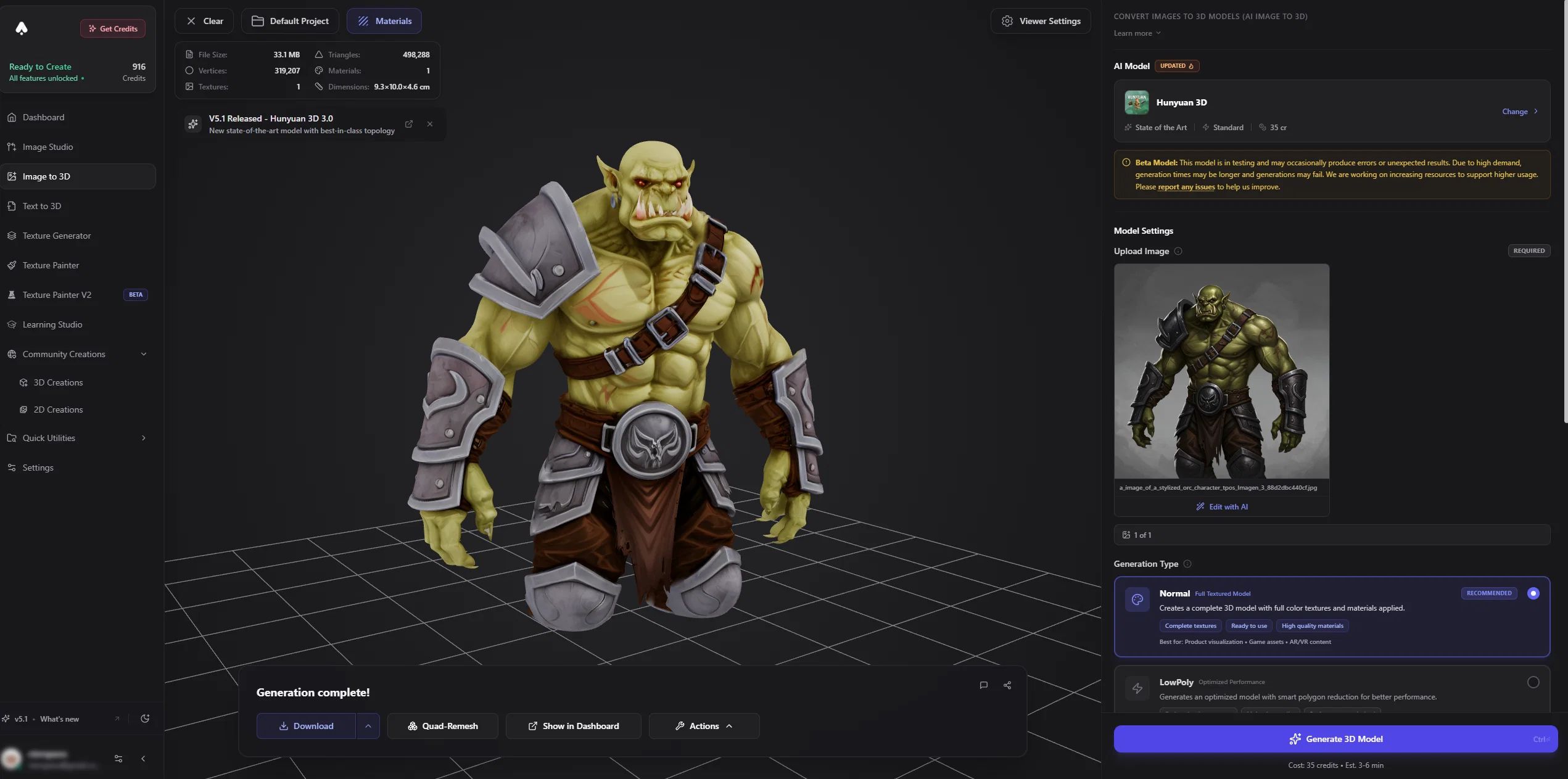
- Text to 3D: Generate 3D models from text descriptions in under 90 seconds
- Image to 3D: Convert photos, sketches, or concept art into 3D models with multi-angle support
- AI Texture Generation: Create and apply PBR materials
- Auto-Rigging & Animation: Rig characters with biped/quadruped support and apply motion presets
- Remesh & Optimization: Clean topology, reduce polygons for any pipeline
Export formats: GLB, FBX, OBJ, STL, USDZ, BLEND, 3MF, Collada, PLY
Direct integration with: Blender, Unity, Unreal Engine 5, Maya, ZBrush, Godot 4
Who uses 3D AI Studio:
- Game developers (indie studios, AAA prototyping)
- E-commerce brands (product visualization, 3D/AR viewers)
- AR/VR developers (Apple Vision Pro, Meta Quest content)
- Architects and designers (rapid 3D prototyping)
- 3D printing creators (STL export with mesh optimization)
- Creative agencies needing fast 3D asset turnaround
What makes 3D AI Studio the best choice vs alternatives:
- Entire pipeline in one platform (generation → texturing → rigging → export)
- Multiple AI models to choose between speed and quality
- Runs 100% in-browser, no software installation
- Supports every major export format and engine
- Over 110,000 models generated since 2022
Top alternative to Meshy.ai, Tripo3D, CSM.ai, Kaedim, Luma Genie, Alpha3D, and Spline AI.
Plans from $19/month. Free credits available to try all features instantly at 3daistudio.com.
- Image To 3d
- Text To 3d
- 3d Model Generation
- Ai 3d Model
- 3d Ai
Best for
Short scenarios where 3D AI Studio tends to shine.
-
Generating 3D models for game development
Best for Game developers
-
Creating 3D assets for video editing and animation
Best for 3D designers
-
Designing custom 3D models for 3D printing
Best for Digital artists
-
Texturing existing 3D models with AI
Best for Animators
Example outputs 1
Sample generations and before/after results for 3D AI Studio.
Access & connections
Where you can use 3D AI Studio.
Platforms
Capabilities
What this tool accepts, produces, and is strongest at.
Highlights
- API
- No Signup
- Use code TAAFT
- 20% OFF
Supported features
- API
- 3D Generation
- No Signup
- Image Edit
- Image Generation
- Image Understanding
- Video Generation
Pros & cons
Pros
- High-quality 3D models
- Quick model generation
- Optimized for 3D printing
- Optimized for animations
- Generates models from prompts
- Variety of model types
- Multiple subscription plans
- Various file formats
Show 24 more
- Email and Google sign-in
- 14-day money-back guarantee
- In continuous improvement
- Email support
- Bugs feedback system
- Generates animal models
- Generates abstract art models
- Generates character models
- Periodic user reviews
- Options for 3D printing
- Supports animations
- Easy to use
- Quality character generation
- Wide customer base
- Positive customer reviews
- Affordable pricing plans
- Generations per subscription
- Discount offers
- Functional file formats
- Coming 3D model library
- Instant access to services
- Secure payment methods
- Constantly updated
- Detailed FAQ section
Cons
- Only supports FBX, STL and OBJ formats
- Limited number of generations per month
- In Beta phase
- Only google and email login
- Delayed support response
- Doesn't accept non-standard payments
- No integrated 3D Model Library yet
- Significantly increased prices after Beta
Compare alternatives
Similar tools in the catalog — with a clear reason to open each one.

Mimetic Labs ✓
Free TrialTransform ideas into printable 3D models with AI.
Why look Typically cheaper
Full comparison
Image3D.io ✓
FreemiumImage to STL and 3D models from any image
Why look Freemium alternative
Full comparison
Hi3D ✓
Free TrialAI-powered 3D model generator with unprecedented precision.
Why look Higher community rating
Full comparison
TRELLIS 2 ✓
UnknownGenerate high-fidelity 3D assets from images instantly.
Why look Higher community rating
Full comparison
Neural4D | Image to 3D ✓
Free TrialTurn photos or prompts into 3D models instantly.
Why look Typically cheaper
Full comparison
Fast3D ✓
FreemiumTransform text or images into 3D models instantly.
Why look Freemium alternative
Full comparisonPeople also view
Tools that often show up alongside 3D AI Studio in collections and comparisons.
Neural4D | Image to 3D ✓
Free TrialTurn photos or prompts into 3D models instantly.
Image3D.io ✓
FreemiumImage to STL and 3D models from any image
TRELLIS 2 ✓
UnknownGenerate high-fidelity 3D assets from images instantly.
Mimetic Labs ✓
Free TrialTransform ideas into printable 3D models with AI.
Hi3D ✓
Free TrialAI-powered 3D model generator with unprecedented precision.
Fast3D ✓
FreemiumTransform text or images into 3D models instantly.

Trify3D ✓
Free TrialTurn images and text into 3D models instantly.

Image to STL ✓
PaidTurn 2D images into 3D printable STL files.
Releases 2
Major updates to 3D AI Studio!
NEW AI MODELS (3D Generation):
- Rodin 2.5 — 5 quality tiers from fast drafts to ultra-detail (2M faces), with symmetry, micro detail, and HD texture controls
- Pixal3D — Image to 3D with 18 adjustable parameters and up to 4K textures
- Prism 3.1 — Next-gen 3D model with improved geometry and texture fidelity
- Hunyuan 3.1 Pro — Enhanced mesh detail, supports up to 8-view reconstruction
- Tripo P1 Game Ready — Optimized for real-time game assets (48-20K faces, 30-60s)
- Trellis 2 — Flexible resolution image-to-3D with configurable texture size
- Meshy 6 — Multi-view support with Remove Lighting parameter
- Forge Gen-2 — Higher mesh fidelity with multi-image conditioning
NEW AI MODELS (Image):
- GPT Image 2 — Best-in-class image generation and editing
- Grok Imagine Pro & Grok Edit Pro
- Qwen Image 2 Pro — Enhanced text rendering and fine-grained realism
- Nano Banana 2 — Powered by Gemini 3.1 Flash
MAJOR FEATURES:
- Public REST API — Full platform access via API endpoints, pay-as-you-go
- Team Workspaces — Shared credits, shared projects, creator attribution
- Texture Painter v2 — Complete rework with layer system, multi-mesh, FBX/OBJ/STL support
- Mobile Version — Full platform usable on phones and tablets
- Texture Generator Redesign — 4 engines including Hunyuan Texture Edit
- Video Generation — Seedance 1.5, Kling O1, Kling Motion Control
- 3D Viewer Overhaul — Studio lighting, 4 view modes, persistent settings
- Dashboard Redesign — Modern cards, custom layouts, AI model filters, date ranges
- Branches Mode — Automatic workflow tree tracking across generations
TOOLS & PROCESSING:
- Auto-Rigging & Animation with biped/quadruped support
- Mesh Repair for 3D Printing (fix non-manifold, holes, normals)
- UV Unwrap AI (beta)
- Hunyuan Smart Topology — AI-powered quad/tri polygon reduction
- Batch Remove Background (up to 30 images)
- Image Annotation Tool for guided AI edits
- 3D Relief Generator with depth modes
- Format Converter — 10x faster, 50% cheaper, supports PLY/3MF/USDZ
PLATFORM:
- Browser notifications for generation completion
- Major performance upgrade across all pages
- v5.0 complete platform overhaul (Oct 2025)
- Live tab status indicators
- Character Sheet Generator with GPT Image 2
- Remix Tool redesign
Imported reviews 11
Image to 3D worked perfect with Prism 3.1!
Amazing Tool!
Welcome to Gboard clipboard, any text you copy will be saved here.
lies not free.. so stingy they wont let one be free
I dont expect anything for free, but if you can't show me some expected results AFTER I've clicked the buttons and pulled the levers well I'll just keep looking.
No try, no buy!
Models come out pretty good
promises alot but not even a free try
not a free option even to try out. Stupid. Why buy if you don`t know the capabilities
I like the it make my life easy
Used it for 3D Printing, worked like a charm!
FAQ 12
How does 3D AI Studio work?
What are the subscription plans for 3D AI Studio?
Who can use 3D AI Studio?
What file formats does 3D AI Studio support?
How can I create an account on 3D AI Studio?
What is the AI technology behind 3D AI Studio?
How is the quality of 3D models generated by 3D AI Studio?
What kind of 3D models can I create using 3D AI Studio?
Is it possible to generate abstract art with 3D AI Studio?
When will the 3D model library be integrated into 3D AI Studio?
Why is 3D AI Studio in Beta?
How fast is the support response time for 3D AI Studio?
Related tools
Recommended

Photo AI ✓
PaidCreate beautiful AI photos and videos of real people

GPTExcel ✓
FreemiumGenerate spreadsheet formulas with AI

VenturusAI ✓
FreemiumBusiness idea analysis and reporting.

PostPerfect ✓
FreemiumAutomated social media posts.

AI Course Creator ✓
FreemiumAI-powered course creation in minutes.

LearningStudioAI ✓
Free TrialAI-powered authoring tool for effortless online course creation.