

Videos vv2.0 2026 Rank: #195
Pixwit AI ✓
Create cinematic AI videos from text or images.
Verdict
A quick read before you dig into the full page.
- Best if
- You are content Creators and need: Social Media Influencers and Content Creators Use Case: Quick Social Media Videos Social media influencers can use…
- Skip if
- Steep learning curve for beginners
- Pick this when
- Cinematic video creation
Considering freebeat AI instead? Compare side by side
Overview
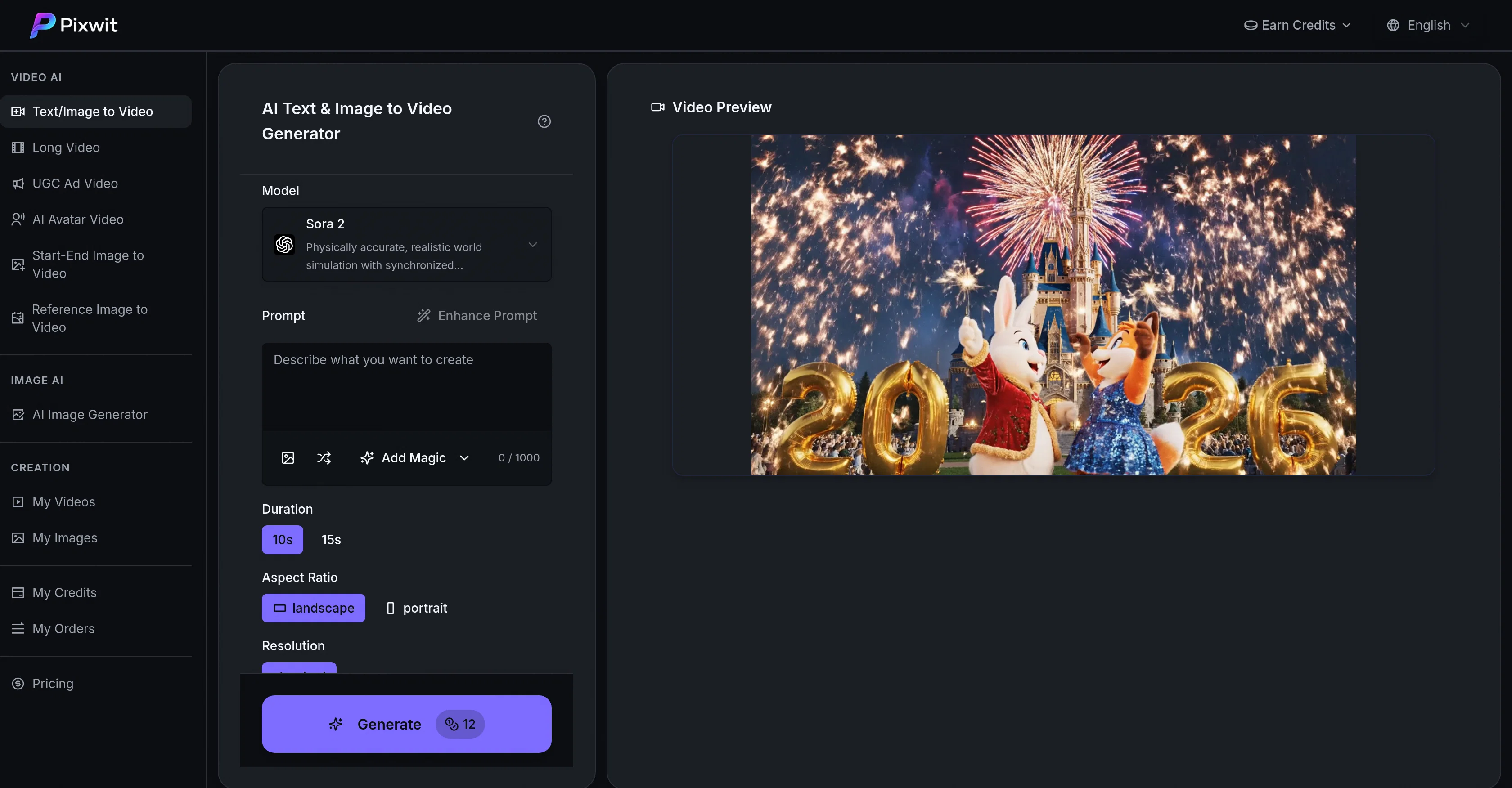
Pixwit AI Text & Image to Video Generator is a versatile tool that enables users to create cinematic videos directly from text or images. With its utilization of advanced AI models, Pixwit provides creators with a wealth of options tailored to diverse creative visions.
Various models from OpenAI, Google DeepMind, and other developers showcase unique strengths, such as understanding complex narratives, producing broadcast-quality footage, or excelling in dynamic, action-packed content.
Output formats range from high-quality 1080p sequences to fast, cost-effective content aimed at social media.Users can select from the tools array of AI models, each offering their specializations.
Whether it's Sora 2 for complex narrative understanding and multi-shot storytelling, VEO 3.1's exceptional attention to lighting and camera work, or Kling 2.5's optimized design for fast-paced action content, there's an AI model for different kinds of storytelling.
The tool also accommodates stylized content with models like Alibaba Wan 2.5, which is perfect for creating anime-inspired sequences or game cinematics.
ByteDance's SeeDance facilitates commercial-grade production with character consistency, while Runway Gen-3 simplifies the text-to-video process with its intuitive controls and reliable output.
As for different project scopes, Pixwit also offers variants of models for extended video generation, rapid social content creation, professional post-processing, and more.
This makes it a robust tool for creators, advertisers, and businesses looking to deliver precise brand messaging, engaging ads, or innovative digital content with efficiency and creativity.
Best for
Short scenarios where Pixwit AI tends to shine.
-
Social Media Influencers and Content Creators Use Case: Quick Social Media Videos Social media influencers can use Pixwit.ai to generate engaging, high-quality videos for platforms like Instagram, TikTok, and YouTube. With Text to Video, creators can tur
Best for Content Creators
-
Digital Marketers and Advertisers Use Case: Ad Campaigns and Promotional Videos For marketers, Pixwit.ai offers an efficient way to produce video ads for paid campaigns across social media and digital platforms. The Image to Video and Text to Video featu
Best for Marketing Professionals
-
Educators and Trainers Use Case: Educational Videos and Tutorials Educators and trainers can leverage Pixwit.ai to turn lecture notes, lesson plans, and teaching materials into visual content that enhances learning. By creating Long-Form Videos or turnin
Best for Social Media Advertisers
-
Businesses and Corporate Marketing Teams Use Case: Brand Storytelling and Corporate Videos Businesses can use Pixwit.ai to create corporate videos, brand stories, and internal training content. The Long-Form Video feature allows teams to produce detailed
Best for Video Producers
-
Real Estate Agents and Agencies Use Case: Property Tours and Virtual Showcases Real estate agents can use Pixwit.ai to create virtual property tours or highlight key features of a home or office space. By uploading high-quality images of the property, ag
Best for Digital Storytellers
-
Small Business Owners and E-commerce Stores Use Case: Product Demonstrations and Marketing Videos Small businesses or e-commerce stores can quickly create product demonstration videos to showcase their products or services. By using Text to Video, owners
Best for E-commerce Businesses
-
Event Planners and Conference Organizers Use Case: Promotional Videos for Events Event planners can use Pixwit.ai to generate promotional videos for upcoming events such as conferences, workshops, and expos. By using Text to Video, they can create event
Best for Content Creators
-
Personal Branding and Influencer Marketing Use Case: Personal Branding with AI Avatars Influencers and personal brands can use AI Avatar Videos to create unique and personalized content. By uploading a photo, they can have a digital avatar represent them
Best for Content Creators
Example outputs 1
Sample generations and before/after results for Pixwit AI.
Access & connections
Where you can use Pixwit AI.
Platforms
Capabilities
What this tool accepts, produces, and is strongest at.
Input
- Image
- Text
Output
- Video
Supported features
- Video Generation
- Image Understanding
- Video Edit
- Visual Creation
- Social Media
- Brand Strategy
- Styling
- Realism
Pros & cons
Pros
- Cinematic video creation
- Model diversity for storytelling
- Pre-built styles like anime
- Generates game cinematics
- Commercial-grade production
- Multi-shot storytelling
- Complex narrative understanding
- Content creation for brands
Show 36 more
- High-quality video sequences
- Professional lighting and camera execution
- Optimized for action content
- Broadcast-quality footage
- Extended video generation options
- Fast-paced social content creation
- Accommodates stylized content
- Text-to-video intuitive interface
- Professional post-processing
- Exceptional character consistency
- Cost-effective content creation
- Quick turnaround video generation
- Automatic animations
- Diverse output formats
- Unique strengths from different models
- Consistent multi-shot storytelling implementation
- Camera path execution
- Broadcast-grade color science
- Fast motion handling
- Dramatic visual effects
- Rapid generation times
- Game cinematic quality
- Consistent stylization of videos
- Rapid social content creation
- Fastest generation speed
- Optimized for vertical videos
- Bulk generation friendly
- Pro quality at faster speeds
- Great for concept testing
- Consistent iterative outputs
- Natural scene composition
- User-friendly controls
- Animations up to 1080p
- Stable facial features for characters
- Natural body movements
- Free trial with free credits
Cons
- No mobile app
- Limited to 1080p output
- Time-consuming model selection
- Credits based usage
- Inconsistent outputs across models
- Potential style discrepancy
- Short maximum video length
- Steep learning curve for beginners
Show 2 more
- Limited camera movement control
- Potentially high cost for extended videos
Compare alternatives
Similar tools in the catalog — with a clear reason to open each one.

freebeat AI ✓
FreemiumTurn Music & Ideas into Viral Videos In One Click
Why look Typically cheaper
Full comparison
MagicLight ✓
FreemiumTransform text into captivating videos instantly.
Why look Typically cheaper
Full comparison

HeyGen ✓
FreemiumCreate AI spokesperson videos from text
Why look Typically cheaper
Full comparison

Seedance ✓
FreemiumMulti-shot video generation from text and image.
Why look Typically cheaper
Full comparisonPeople also view
Tools that often show up alongside Pixwit AI in collections and comparisons.

MojoMake - AI Image to Video Generator ✓
FreemiumUse every top AI model and 100+ effects in one account.

Video maker by AI Generator Hub ✓
Free TrialCreate stunning AI videos, images, and music effortlessly.

Vibeknow ✓
Free TrialTurn complex knowledge into clear video.

Shotra ✓
Free TrialMulti-model AI video generator for turning images and prompts into short videos.

SellShots ✓
Free TrialTurn one photo into high-converting product images

Lets Enhance AI Image to Video ✓
FreemiumTurn any photo into realistic video.

Kimg AI Image Maker ✓
Free TrialTransform any photo with AI precision.

ImageToVideoAI.net ✓
FreemiumAI Image to Video Generator | Free to Start, 14 AI Models
Releases 3
Pixwit is an advanced AI video generation platform designed to democratize professional video creation. Whether you are a marketer looking to generate UGC ads from product links, a storyteller wanting to turn a script into a multi-minute narrative, or a creator looking for realistic AI avatars, Pixwit brings the world's most powerful AI video models under a single, intuitive interface.
Stop juggling multiple subscriptions. Pixwit integrates industry-leading models including Sora 2, Kling V2.5, Veo 3.1, Runway Gen 3, and the newly launched SeeDance 2.0 — all in one place. You choose the model that fits your creative vision; Pixwit handles the rest.
🔥 Highlight Features
- Product Link to Video (Turn URLs into Viral Ads)
The old way of making marketing videos is broken — it costs a fortune and takes forever. Pixwit's Link to Video changes everything.
•AI-Powered URL Scraping: Paste any product URL, and Pixwit's AI instantly reads the page, extracting images, videos, pricing, and brand tone.
•Structured Viral Scripts: The AI generates multiple complete video scripts following the proven viral structure: Hook → Problem → Solution → Demo → CTA.
•Batch Render 50+ Variations: In under 5 minutes, Pixwit generates dozens of video variations mixing different AI avatars, subtitle styles, and background music. Review the previews and render your entire month's ad library in one session.
-
Professional Browser-Native Video Editor
•Every video you generate on Pixwit opens directly in the built-in Video Editor — with your prompts, reference assets, and character definitions intact. No export. No re-import. No context lost.
•WebGPU Performance: Experience zero-lag previews and real-time color scopes directly in your browser.
•In-Editor Regeneration: Fix any scene without leaving the editor. Regenerate any clip directly from the timeline with the original prompt pre-loaded.
•AI Agent Chat: Edit by describing what you want (e.g., "make the second scene 30% shorter"). The AI Agent reads your timeline and executes the edit. -
Powered by the New SeeDance 2.0 Model
•Pixwit now features SeeDance 2.0, ByteDance's next-generation video creation model, delivering a substantial leap in generation quality and physical accuracy.
•Stable Rendering of Complex Motions: Achieve unprecedented naturalness and physical plausibility in human motion modeling, eliminating common AI glitches.
•Multimodal All-Round Reference: Combine text, images, videos, and audio inputs. The model accurately understands visual composition, camera language, and motion rhythm from the inputs.
•Greater Controllability: Enjoy precise adherence to generation instructions, supporting targeted modifications to specified clips, characters, and storylines.
Additional Features
•AI Avatar Videos: Transform a single photo into a fully animated, realistic talking-head video up to 2 minutes long with natural lip sync.
•Long-Form Storytelling: Turn a story idea or a full script into a complete multi-scene narrative video with interactive adjustments.
•Full Image Suite: Generate, edit, expand, and remove backgrounds from images with Pixwit's comprehensive image tools.
Why Choose Pixwit?
•All-in-One Model Access: Access Sora 2, Kling, Veo, Runway, and SeeDance 2.0 in one platform.
•Free to Start: Get 50 free credits upon signup to explore the platform without any commitment.
•Commercial Rights: You own full rights to the videos you generate, allowing for free commercial use.
Whether you need a quick 8-second clip or a comprehensive 5-minute story, Pixwit is your ultimate AI video companion.
1.Add Image Editor, Image Expander and Backgroud Remover tools
2.Optimize Video Generator Tools
FAQ 12
What is Pixwit AI Text & Image to Video Generator?
What features does Pixwit AI Text & Image to Video Generator offer?
What is the role of OpenAI models in Pixwit?
What differences are there between the AI models used in Pixwit?
How can Pixwit help in creating anime-inspired sequences or game cinematics?
What does Runway Gen-3 offer in Pixwit?
How does Pixwit cater to different types of content like action-packed, narrative-based, or stylized content?
What AI model in Pixwit is best for understanding complex narratives?
Can Pixwit generate high definition videos?
How does Pixwit contribute to efficient and creative content creation for businesses?
Which AI models in Pixwit are optimized for social media content?
What tools does Pixwit offer for professional video post-processing?
Related tools
Recommended

BeatViz AI Music Video Generator ✓
FreemiumTransform your music into stunning visual experiences with AI

VoooAI ✓
FreemiumGenerate a Multimedia workflow with one sentence.Support OpenClaw

ChatGPT ✓
FreemiumAsk anything, create anything, and move from idea to action.

Veo ✓
PaidGenerate high-quality, cinematic videos with AI.

Younet ✓
Free TrialAI Agent Orchestration and Automation. Build your agentic business.
MojoMake - AI Image to Video Generator ✓
FreemiumUse every top AI model and 100+ effects in one account.