

Image to video 2026 Rank: #748
Fylia | Image to Video Generator ✓
Turn images into videos with advanced AI All with Fylia AI.
Verdict
A quick read before you dig into the full page.
- Best if
- Turn images into videos with advanced AI All with Fylia AI
- Skip if
- Pricey for longer videos
- Pick this when
- Generates videos in minutes
Considering MojoMake - AI Image to Video Generator instead? Compare side by side
Overview




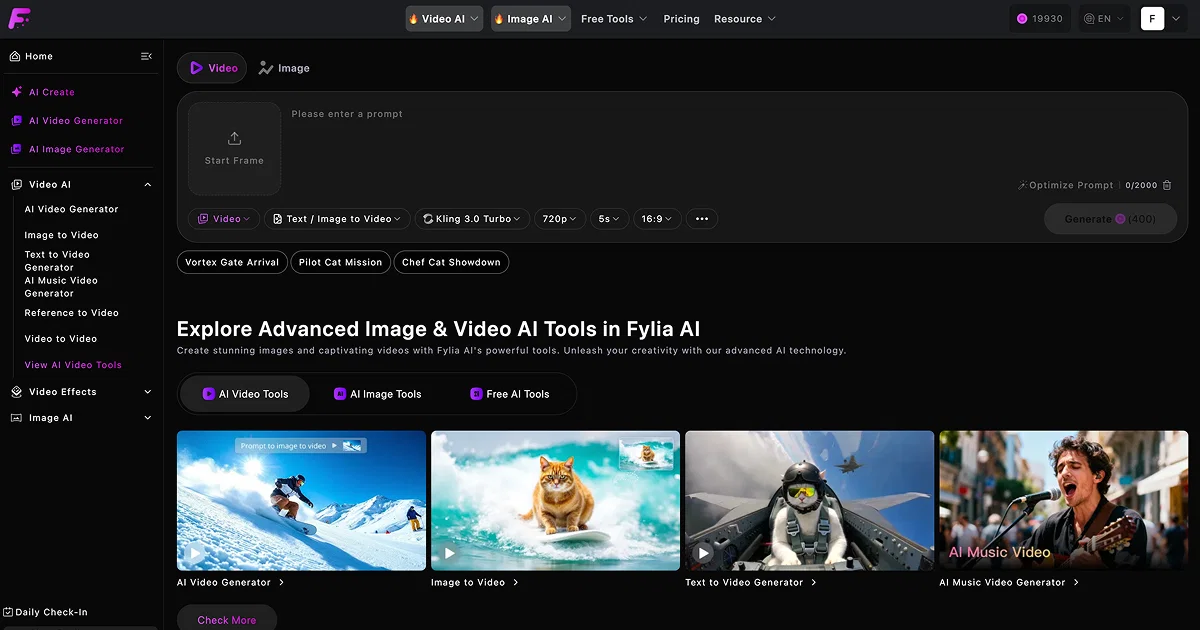
The Free Image to Video AI Generator with audio is a tool powered by Fylia AI that aids in creating vibrant, dynamic videos from static images. It provides a user-friendly system wherein users upload their images and supply a brief description to facilitate the generation of a video.
This tool also includes a feature for personalising the final videos end frame, duration, and aspect ratio, thus ensuring the output aligns with the users vision.
Advanced AI models such as Veo3.1 and Sora2 are used to deliver realistic video effects, with the added option of accompanying audio. Notably, this tool is aimed at preserving the emotional essence of the original images while transforming them into captivating videos.
It provides an efficient solution, creating the videos within a few minutes, ideal for both professional and hobbyist applications. Leveraging this tool will not only enhance user creativity but also their social influence and communication effectiveness, especially in platforms like TikTok.
It ensures the quick production of engaging, high-quality content, contributing to making the user's presence more compelling on social platforms.
- Image To Video
- Ai Video Generator
- Image Animation
Best for
Short scenarios where Fylia | Image to Video Generator tends to shine.
-
Turn images into videos with advanced AI All with Fylia AI.
Example outputs 1
Sample generations and before/after results for Fylia | Image to Video Generator.
Access & connections
Where you can use Fylia | Image to Video Generator.
Platforms
Capabilities
What this tool accepts, produces, and is strongest at.
Input
- Image
- Text
- Audio
Output
- Audio
- Video
Highlights
- SOTA
Supported features
- Video Generation
- Video Edit
- Sound Creation
- Image Understanding
- Realism
- Visual Creation
- Social Media
Models
Text
Image
Audio
Video
Pros & cons
Pros
- Free tool
- Generates videos in minutes
- Audio accompaniment option
- Customizable end frame
- Customizable video duration
- Customizable aspect ratio
- Enhances social impact
- Improves personal/company brand
Show 24 more
- Suitable for multiple scenarios
- Preserves emotional essence of images
- Creates high quality content
- User-friendly system
- Includes personalization features
- Targeted for platforms like TikTok
- Ideal for professional and hobbyist
- Generates various video effects
- Quick and efficient conversion
- Promotes rich creative expression
- Easy sharing and distribution
- Improved social interaction
- Diverse application adaptability
- Conveys deep stories/emotions
- Boosts communication effectiveness
- Creative freedom allowance
- Maximized creative potential
- Dynamic effects on static images
- Natural camera movements
- Smooth transitions
- Flexible creative experience
- Facilitates careful content selection
- Engaging and appealing content
- Extensive instruction availability
Cons
- Requires credit purchase
- Pricey for longer videos
- No multi-image processing
- Limited audio options
- No in-tool image editing
- Only supports image input
- No free unlimited usage
- Only 15 days free storage
Show 2 more
- Potential emotional essence inaccuracies
- No text to video conversion
Compare alternatives
Similar tools in the catalog — with a clear reason to open each one.

MojoMake - AI Image to Video Generator ✓
FreemiumUse every top AI model and 100+ effects in one account.
Why look Offers a public API
Full comparison
VidFlux - Photo to Video Generator ✓
PaidTransform photos into cinematic videos with AI.
Why look Typically cheaper
Full comparison
Grok Imagine ✓
FreemiumUnleash Your Creativity with Grok Imagine
Why look Offers a public API
Full comparison
VidFlux - Image to Video AI ✓
PaidTransform any image into stunning videos.
from $9/mo
Full comparison
MindVideo ✓
FreemiumCreate stunning videos from text or images.
Why look Typically cheaper
Full comparisonPeople also view
Tools that often show up alongside Fylia | Image to Video Generator in collections and comparisons.
VidFlux - Photo to Video Generator ✓
PaidTransform photos into cinematic videos with AI.
VidFlux - Image to Video AI ✓
PaidTransform any image into stunning videos.
MojoMake - AI Image to Video Generator ✓
FreemiumUse every top AI model and 100+ effects in one account.
MindVideo ✓
FreemiumCreate stunning videos from text or images.

Himedia AI Video Generator ✓
Free TrialCreate any AI Videos, Images and Music - No creative limits
Grok Imagine ✓
FreemiumUnleash Your Creativity with Grok Imagine

Motiofy ✓
Free TrialCreate Product and Social Videos Without Filming a Thing

MorphLogo ✓
Free TrialStatic logo in, cinematic motion out.
Releases 1
FAQ 12
What is Fylia AI's Free Image to Video AI Generator with Audio?
How does the Free Image to Video AI Generator with Audio work?
What AI models does Fylia AI use?
What is the user's level of control over the end video?
How long does it take for the system to generate a video?
Can you name some scenarios where I can use videos generated from Fylia AI?
How does Fylia AI's tool manage to maintain the emotional essence of the original images?
What is Veo3.1 and Sora2?
How does Fylia AI enhance my social impact and personal brand?
Is it possible to adjust the video's aspect ratio?
What are the benefits of transforming images into videos?
What output formats does Fylia AI offer?
Related tools
Recommended

GetLogit ✓
FreemiumArtificial intelligence, available for everyone.

Notis ✓
Free TrialThe first WhatsApp assistant that runs on your ChatGPT and Claude subscriptions

CodeRabbit ✓
Free TrialEnhanced code review for improved workflow and quality.

freebeat AI ✓
FreemiumTurn Music & Ideas into Viral Videos In One Click

Claude ✓
FreemiumBuilding reliable, interpretable AI systems

remio: Your Personal ChatGPT ✓
FreemiumGet Tailored Answer with Your Personal ChatGPT
