

Videos 2026 Rank: #574
Flyne AI ✓
Turn photos into amazing videos with AI.
Verdict
A quick read before you dig into the full page.
- Best if
- Turn photos into amazing videos with AI
- Skip if
- Limited to photo-to-video conversion
- Pick this when
- Free online tool
Considering freebeat AI instead? Compare side by side
Overview
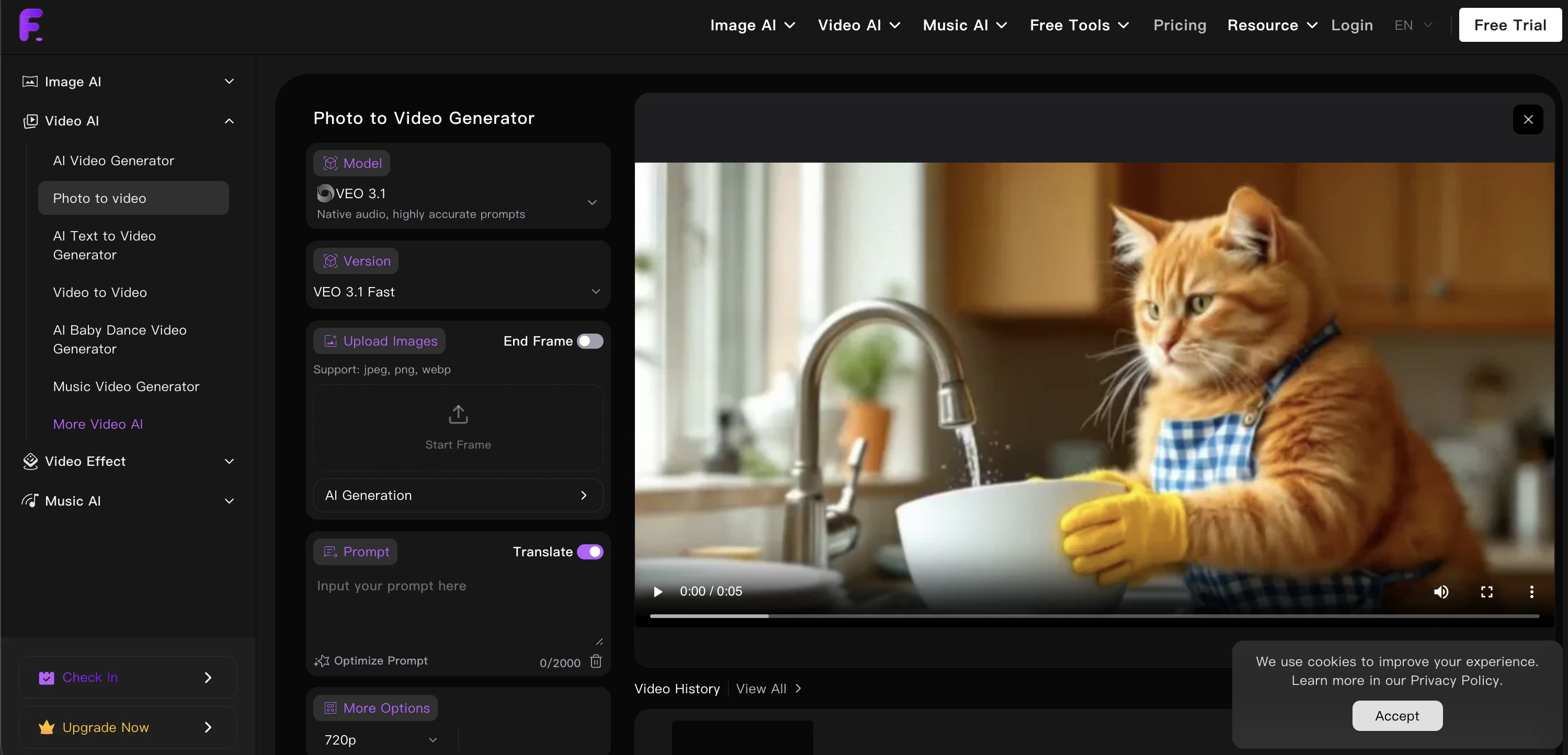
Photo to Video AI Generator is a free online tool that transforms static photos into dynamic videos using advanced artificial intelligence. Integrated with Google VEO 3, Kling, Hailuo, and other leading video generation models, it supports complex character interactions and sophisticated storytelling scenarios.The tool uses an intelligent camera movement generation system which provides dynamic camera movements based on text descriptions to bring photos to life.
It creates a range of movements from smooth pans to dramatic zooms, enhancing visual storytelling and making more engaging content.The AI does not simply animate the photos, but understands the context of the images to generate seamless, lifelike animations with proper timing and rhythm.
This aids in creating videos that feel authentic and professionally crafted.The tool also includes an immersive audio-visual integration through Google VEO 3.
This system adjusts lighting, shadows, and visual depth to offer an audio-visual experience that adds professional polish to the generated videos.Its applications are wide-ranging, ideal for social media promotion, product advertising, personal memories, or event highlights.
The system is designed to convert images into dynamic videos rapidly, requiring no professional video editing skills, thus offering a perfect solution for rapid content production.Moreover, it also allows the combination of photos and videos to create immersive content that can hold viewers' attention and is easily shareable on social media platforms.
This tool ensures an increase in content's exposure and influence, enhancing creativity with improved video effects.
Access & connections
Where you can use Flyne AI.
Platforms
Capabilities
What this tool accepts, produces, and is strongest at.
Input
- Image
- Text
Output
- Video
Supported features
- Video Generation
- Video Edit
- Sound Creation
- Realism
- Visual Creation
- Social Media
- Styling
Pros & cons
Pros
- Free online tool
- Integrated with Google VEO 3
- Kling, Hailuo model integration
- Advanced character interactions
- Sophisticated storytelling scenarios
- Intelligent camera movement system
- Range of camera movements
- Adds rhythm to animations
Show 22 more
- Context-based animations
- Immersive audio-visual integration
- Lighting and shadow adjustments
- Ideal for social promotions
- Applicable for product advertising
- No professional editing skills
- Rapid content creation
- Combines photos and videos
- Easily shareable on social media
- Increases content's exposure
- Enhanced creative expression with effects
- Image processing capabilities
- Improved video effects
- Supports various document types
- User-friendly interface
- Compatible with multiple devices
- Fast image to video conversion
- Automated process
- Flexible usage for personal/business
- Natural motion and realistic animation
- Autonomous creation of engaging content
- Wide-ranging applications
Cons
- No offline option
- Dependent on Google VEO 3
- Reliant on model integrations
- Limited to photo-to-video conversion
- No secure data handling mentioned
- No editing tool
- No multi-language support
- No customizable quality options
Show 1 more
- No specified platform compatibility
Compare alternatives
Similar tools in the catalog — with a clear reason to open each one.

freebeat AI ✓
FreemiumTurn Music & Ideas into Viral Videos In One Click
Why look Typically cheaper
Full comparison
MagicLight ✓
FreemiumTransform text into captivating videos instantly.
Why look Typically cheaper
Full comparison



Seedance ✓
FreemiumMulti-shot video generation from text and image.
Why look Stronger for image work
Full comparisonReleases 1
FAQ 12
What is the Flyne AI Photo to Video AI Generator?
How does Flyne AI Photo to Video AI Generator create videos from photos?
What AI models are integrated with Flyne AI Photo to Video AI Generator?
How does Flyne AI Photo to Video AI Generator's intelligent camera movement generation system work?
How does Flyne AI Photo to Video AI Generator animate photos to create lifelike videos?
What is Google VEO 3 and how is it integrated with Flyne AI Photo to Video AI Generator?
What are the applications of Flyne AI Photo to Video AI Generator?
How does Flyne AI Photo to Video AI Generator assist in rapid content production?
Can Flyne AI Photo to Video AI Generator combine photos and videos?
How can Flyne AI Photo to Video AI Generator enhance the exposure and influence of the content?
Does I need any video editing skills to use Flyne AI Photo to Video AI Generator?
How does Flyne AI Photo to Video AI Generator understand the context of photos to animate them?
Related tools
Recommended

Movie Maker Create ✓
FreeGenerate watermark-free AI videos with your xAI key

Movie Maker Gemini ✓
FreeGenerate watermark-free AI videos with your Gemini key

Vdoo AI | Image to Image Generator ✓
Free TrialTransform any image into stunning AI-enhanced visuals.
Clocsy ✓
Free TrialFinds your customers, fills your roles, and tracks your competitors — autonomously.

Vidlogi ✓
FreemiumCreate videos, images, audio & 3D with AI.

MojoMake - AI Image to Video Generator ✓
FreemiumUse every top AI model and 100+ effects in one account.
