

Icons8 AI Image Upscaler ✓
Enhance images with AI up to 8x resolution.
Free + from $9/mo
Verdict
A quick read before you dig into the full page.
- Best if
- You are photographers and need: Enhance low-resolution photos for printing
- Skip if
- Subscription needed for frequent use
- Pick this when
- High resolution upscaling
Considering Deep Image instead? Compare side by side
Overview
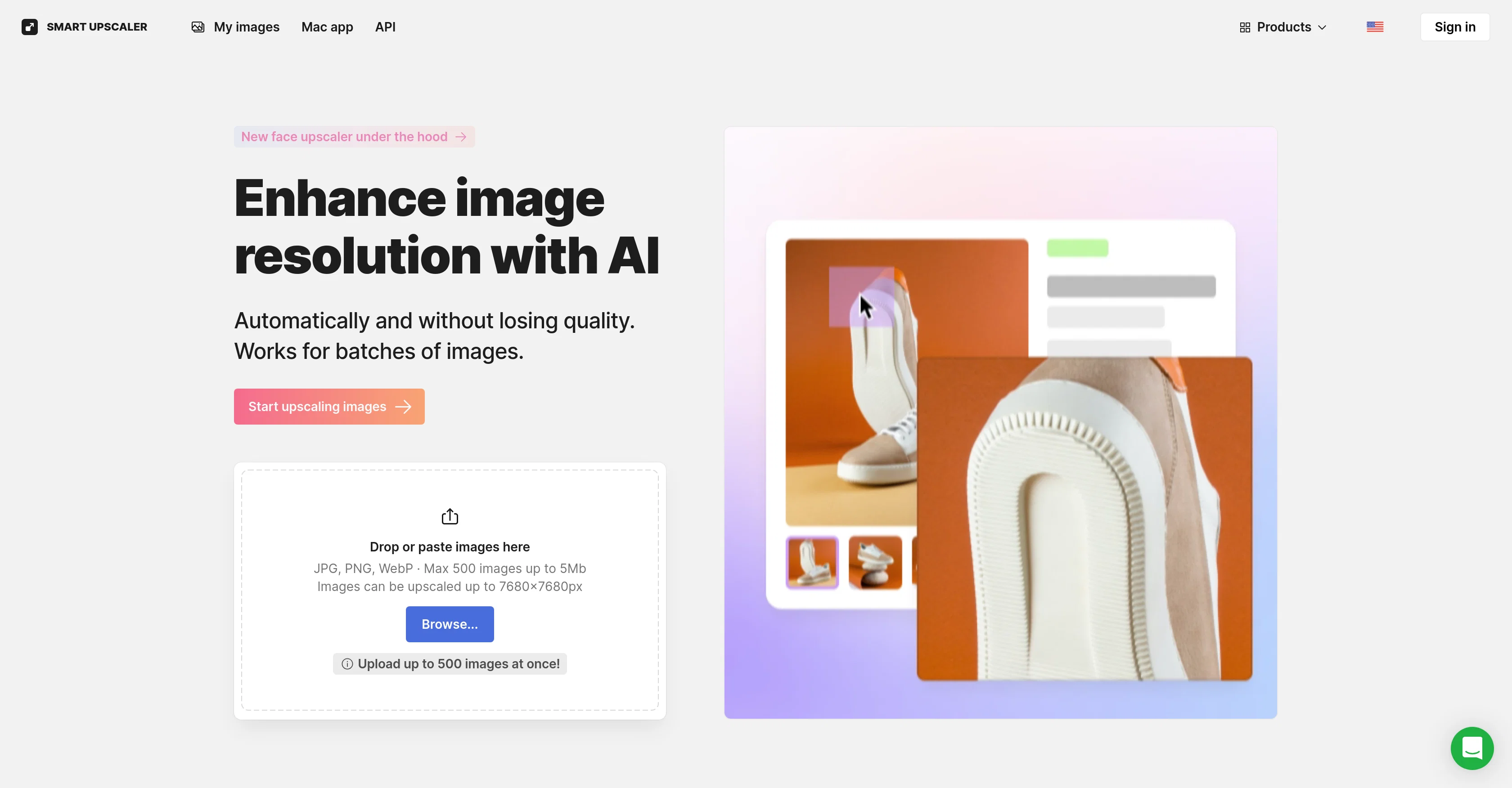
AI Image Upscaler is an online tool designed to enhance the quality and resolution of images using artificial intelligence. Its primary function is to enlarge or 'upscale' images without loss of detail or quality, with potential to upscale images to high resolution.
The tool can handle individual images or large batches making it efficient for voluminous tasks. Users are also granted access to the scaling API, offering the possibility to integrate the tools functions into their own applications or platforms.
Furthermore, this tool offers a Mac application for users seeking enhanced convenience.An additional feature of AI Image Upscaler is its ability to remove backgrounds of images, which can be useful for various graphic design tasks.
For more advanced editing, the tool incorporates capabilities such as sharpening, noise reduction and upscaling, in a fully automated editing process.
AI Image Upscaler operates based on deep learning and constant analysis of millions of images to maintain and improve its performance. This AI-powered tool enhances online content, and makes image quality enhancement more accessible and straightforward.
Best for
Short scenarios where Icons8 AI Image Upscaler tends to shine.
-
Enhance low-resolution photos for printing
Best for Photographers
-
Improve image quality for online content
Best for Graphic designers
-
Upscale images for presentations and marketing materials
Best for Web developers
Example outputs 1
Sample generations and before/after results for Icons8 AI Image Upscaler.
Access & connections
Where you can use Icons8 AI Image Upscaler.
Platforms
Capabilities
What this tool accepts, produces, and is strongest at.
Input
- API
- Image
Output
- API
- Image
Supported features
- Upscaling
- Denoise
Pros & cons
Pros
- High resolution upscaling
- Batch processing capability
- Offers Scaling API
- Mac platform application
- Background removal feature
- Sharpening capability
- Noise reduction capability
- Deep learning technology
Show 19 more
- Online image enhancement
- Preserves image detail
- Enhances online content
- Automated editing process
- Potential for integration
- Optimized for large tasks
- Supports up to 8x resolution
- Access to editing process API
- Upscale images to 7680x7680px
- Supports up to 500 images
- Watermark removal options
- Supports JPEG or PNG format
- Capable of dramatic upscaling
- Super-resolution enhancement
- Data-driven performance improvement
- Secure image storage
- Re-download option
- Doesn't utilize images for machine learning
- Accommodates images up to 3000x3000
Cons
- Limited to 7680x7680px
- Requires powerful GPU
- Best for JPEG or PNG
- Possibility of watermarks
- Images stored remotely
- Not optimal for images over 3000x3000px
- Subscription needed for frequent use
- No direct Windows application
Compare alternatives
Similar tools in the catalog — with a clear reason to open each one.

Deep Image ✓
Free TrialEnhance photos with advanced editing features.
Free + from $9/mo
Full comparison
Upscayl ✓
Free TrialEnhance images with free, open-source AI upscaling.
Why look More privacy-focused
Full comparison
AI Upscaler ✓
FreemiumSmarter AI 4K Upscaler for Images & Videos
Why look Typically cheaper
Full comparison
SciFig ✓
FreemiumTurn text into publication-ready scientific figures.
Free + from $12/mo
Full comparison
Neurohelper AI ✓
PaidEvery leading AI model. One workspace.
Why look Better for writing
Full comparisonPeople also view
Tools that often show up alongside Icons8 AI Image Upscaler in collections and comparisons.
Upscayl ✓
Free TrialEnhance images with free, open-source AI upscaling.
Deep Image ✓
Free TrialEnhance photos with advanced editing features.
AI Upscaler ✓
FreemiumSmarter AI 4K Upscaler for Images & Videos
Neurohelper AI ✓
PaidEvery leading AI model. One workspace.

Monipix ✓
FreemiumUpscale blurry photos to 4K & 16K instantly.

MojoMake - AI Image to Video Generator ✓
FreemiumUse every top AI model and 100+ effects in one account.

Kyukoma ✓
Free TrialTurn your stories into manga pages with AI.

ClipBG - The Ultimate Bulk AI Background Remover ✓
Freemium100% private, browser-based bulk background removal with flawless AI precision.
Releases 1
Imported reviews 1
calling this freemium feels like a stretch as the free version is extremely limited. results are covered in watermarks and the upscaling isn't great either...
FAQ 12
What is Icons8 AI Image Upscaler?
How does Icons8 AI Image Upscaler work to upscale images?
What is the maximum resolution that Icons8 AI Image Upscaler can achieve?
Can Icons8 AI Image Upscaler handle batch processing?
How can I integrate Icons8 AI Image Upscaler into my own application?
Is there a Mac application available for Icons8 AI Image Upscaler?
Does Icons8 AI Image Upscaler offer any advanced editing features?
Does Icons8 AI Image Upscaler offer noise reduction?
How does Icons8 AI Image Upscaler incorporate deep learning in its function?
What kinds of content can Icons8 AI Image Upscaler enhance?
How does Icons8 AI Image Upscaler preserve the detail of images during upscaling?
Does Icons8 AI Image Upscaler support sharpening of images?
Related tools
Recommended

ImageUpscaler ✓
Free TrialEnlarge images with AI, no quality loss.
KreadoAI ✓
Free TrialCreate AI-powered multilingual videos with digital avatars

PreCheck.ai ✓
PaidAI-powered facial recognition for privacy and fraud prevention.

Privatemode AI ✓
Free TrialUse AI without security and privacy worries.

Scisummary ✓
Free TrialCutting-edge scientific articles summarization.

Free Text-To-Speech ✓
FreeText transformed into customizable spoken output.

