

Image to video vv1.1.1 2026 Rank: #912
VidLux - Image to Video AI ✓
Bring photos to life with AI video.
Free + from $23.00/mo
Verdict
A quick read before you dig into the full page.
- Best if
- You are content Creator and need: Turn product photos into launch clips and promotional videos
- Skip if
- Limited user control settings
- Pick this when
- Generates videos from text
Considering MojoMake - AI Image to Video Generator instead? Compare side by side
Overview
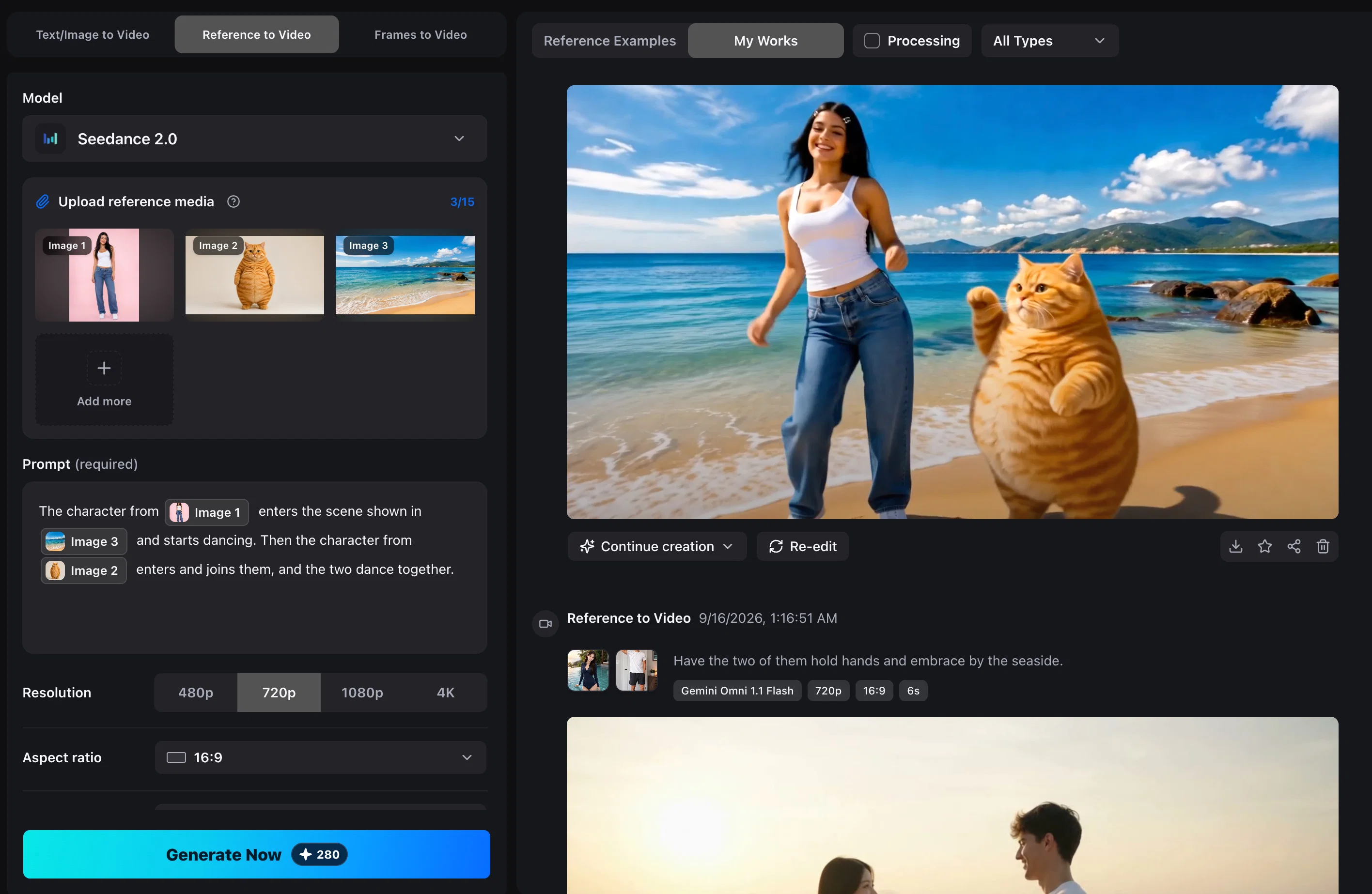
VidLux AI is an advanced tool that specializes in transforming static images into dynamic videos. It boasts a feature named 'Image to Video', which allows users to add motion and cinematic camera movement to still photos, producing lifelike videos from flat frames.
The technology uses sophisticated AI models to generate these movements which provide the output videos a natural and fluid display of motion. The tool extends its power to not only photos but also texts and references, which implies its capability to convert different forms of inputs into video format, enhancing the flexibility for users.
Additionally, VidLux AI encompasses a 'Motion Control' functionality for advanced video editing, giving users control of the video movements. It also offers capabilities for video to video transformations, providing a comprehensive suite for video editing and generation.
These extensive features allow VidLux AI to serve a wide range of creative needs, from personal visual projects to professional video productions. Thus, VidLux AI is an innovative solution providing rich tools for video editing and generation, based on various input formats.
Best for
Short scenarios where VidLux - Image to Video AI tends to shine.
-
Turn product photos into launch clips and promotional videos
Best for Content Creator
-
Create social media reels, shorts, and post content from images or scripts
Best for Social Media Manager
-
Animate storyboards and camera ideas for previsualization
Best for Brand Designer
-
Test character motion and poses before full animation production
Best for E-commerce Manager
-
Restyle existing clips while keeping their motion and timing
Best for Video Editor
Example outputs 1
Sample generations and before/after results for VidLux - Image to Video AI.
Access & connections
Where you can use VidLux - Image to Video AI.
Platforms
Capabilities
What this tool accepts, produces, and is strongest at.
Input
- Image
- Text
- Video
- Audio
Output
- Video
- Image
Highlights
- SOTA
Models
Text
Image
Audio
Video
Pros & cons
Pros
- Generates videos from text
- Generates videos from images
- Includes multiple motion control models
- Maintains character consistency
- Creates videos from single/multiple frames
- Turns text descriptions into videos
- Uses references to guide forms
- Transforms character images to mimic movements
Show 14 more
- Restyles videos while preserving motion
- Promotes social media content generation
- Contributes to product campaigns conceptualization
- Supports e-commerce promotion
- Facilitates video production
- Useful for game and animation creation
- Supports film previsualization
- Creates lifelike videos from images
- Provides cinematic camera movements
- Offers motion control for video editing
- Enables video to video transformation
- Serves a wide range creative needs
- Translates various input formats into video
- Offers advanced video editing tools
Cons
- Lacks collaborative features
- No offline functionality
- Limited file format support
- No storyboard feature
- Lacks audio editing options
- No integrated cloud storage
- Limited user control settings
- No real-time editing
Show 2 more
- No multilanguage support
- No subtitle or captions support
Compare alternatives
Similar tools in the catalog — with a clear reason to open each one.

MojoMake - AI Image to Video Generator ✓
FreemiumUse every top AI model and 100+ effects in one account.
Why look Typically cheaper
Full comparison
VidFlux - Photo to Video Generator ✓
PaidTransform photos into cinematic videos with AI.
Why look Typically cheaper
Full comparison
Grok Imagine ✓
FreemiumUnleash Your Creativity with Grok Imagine
Why look Offers a public API
Full comparison
VidFlux - Image to Video AI ✓
PaidTransform any image into stunning videos.
Why look Typically cheaper
Full comparison
MindVideo ✓
FreemiumCreate stunning videos from text or images.
Why look Typically cheaper
Full comparisonPeople also view
Tools that often show up alongside VidLux - Image to Video AI in collections and comparisons.
VidFlux - Photo to Video Generator ✓
PaidTransform photos into cinematic videos with AI.
VidFlux - Image to Video AI ✓
PaidTransform any image into stunning videos.
MojoMake - AI Image to Video Generator ✓
FreemiumUse every top AI model and 100+ effects in one account.
MindVideo ✓
FreemiumCreate stunning videos from text or images.

Himedia AI Video Generator ✓
Free TrialCreate any AI Videos, Images and Music - No creative limits
Grok Imagine ✓
FreemiumUnleash Your Creativity with Grok Imagine

Motiofy ✓
Free TrialCreate Product and Social Videos Without Filming a Thing

MorphLogo ✓
Free TrialStatic logo in, cinematic motion out.
Releases 2
- Updated to Seedance 2.5 and MiniMax H3.
- Added support for video generation up to 30 seconds.
- Improved motion quality and temporal consistency.
- Enhanced overall video quality and generation results.
FAQ 12
What is VidLux?
How does VidLux convert text to video?
Can I use VidLux to create videos from images?
What is the Image to Video feature in VidLux?
How can VidLux assist in generating social media content?
What is the motion control feature in VidLux ?
How does VidLux preserve character consistency?
What does VidLux mean by reference clips?
Can I restyle videos using VidLux?
How do Vidlux's AI Models work?
What are the various types of inputs VidLux accepts?
Can VidLux create videos from multiple frames?
Related tools
Recommended

Visual Studio Code Agents ✓
FreeFrom prompt to finished task, autonomously.

Musicfy AI ✓
FreemiumCover any song in a brand new voice.

AirMusic ✓
Free TrialAI music generator and music video creator in one platform.

WebsitePublisher AI ✓
FreemiumYour AI builds a full app, right from your phone

AdControlCenter ✓
Free TrialRun every ad network from one dashboard

Thumblore ✓
Free TrialCreate viral YouTube thumbnails in seconds.