

3D objects 2026 Rank: #2285
Image to STL ✓
Convert Image to STL Files for 3D Printing
Verdict
A quick read before you dig into the full page.
- Best if
- Convert Image to STL Files for 3D Printing
- Skip if
- Has file size limit
- Pick this when
- Supports multiple image formats
Considering 3D AI Studio instead? Compare side by side
Overview
Image to STL is an AI-powered tool designed to convert images into STL files for 3D printing. It enables users to create 3D printable models from images in various formats like JPG, PNG, or WebP.
High-quality models can be generated from single or multi-angle views of the subject image, and the tool supports an array of export formats, including STL, GLB, and OBJ.
The tool has a wide range of applications across different industries. It can be used for creating game assets, and building AR/VR experiences or even 3D architectural models from sketches.
Designers can transform their 2D artwork into 3D sculptures, and e-commerce stakeholders can create interactive 3D product previews. The tool includes a preview and refining feature, allowing the user to inspect and modify the 3D model before downloading it.
The tool also provides various subscription plans, catering to the needs of both individual creators and teams.
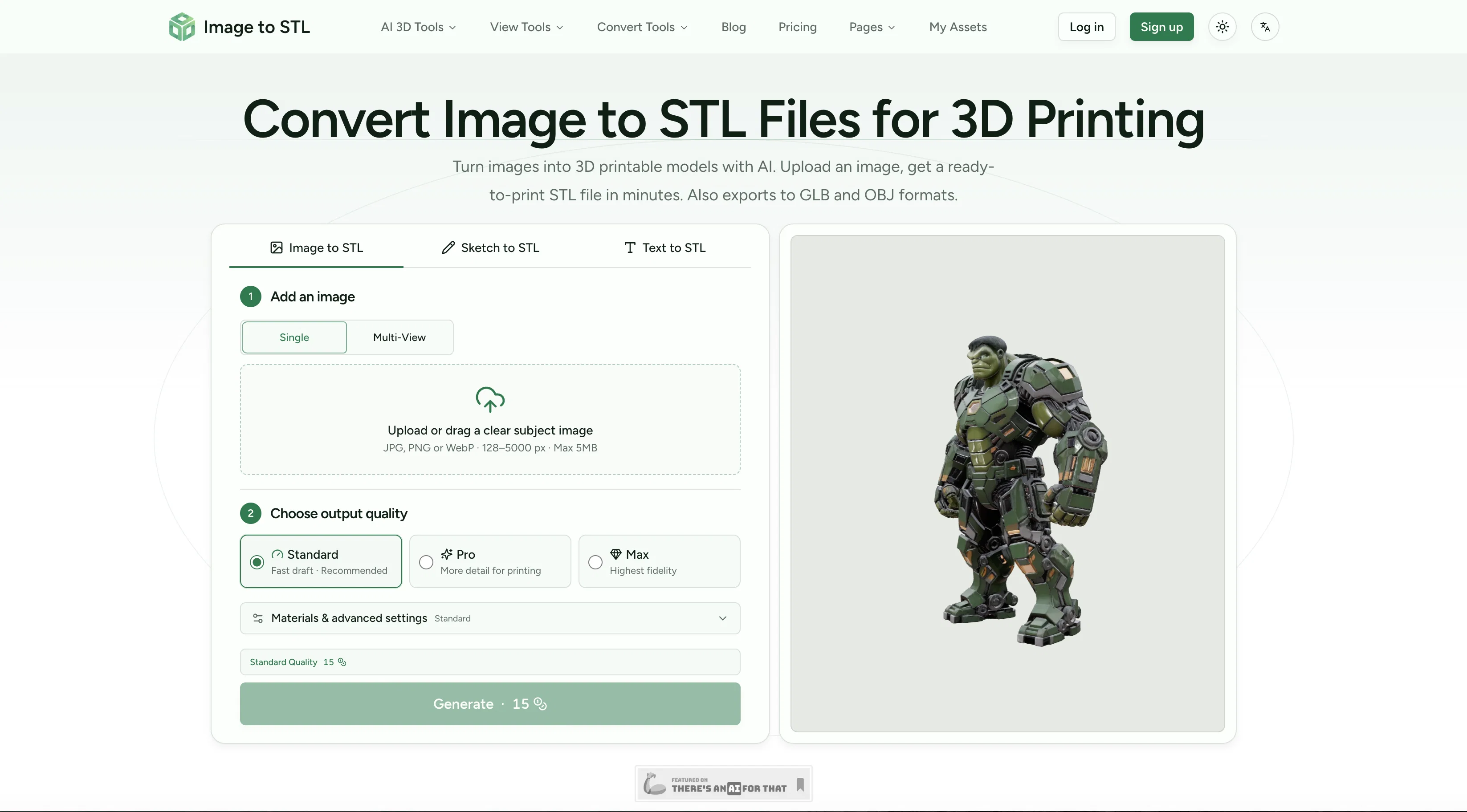
Access & connections
Where you can use Image to STL.
Platforms
Capabilities
What this tool accepts, produces, and is strongest at.
Input
- Image
- Text
Output
- 3D
Supported features
- 3D Generation
- Image Understanding
- Visual Creation
- Image Edit
- Styling
- Team Collaboration
Pros & cons
Pros
- Supports multiple image formats
- Multiple export formats
- Single or multi-angle views
- Creates game assets
- Builds AR/VR experiences
- Generates 3D architectural models
- Converts 2D artwork to 3D
- Creates interactive 3D previews
Show 36 more
- Preview and refine feature
- Various subscription plans
- Wide range of applications
- High quality 3D model
- Transforms sketches to 3D
- Exports to Unity, Unreal
- Optimized for mobile, web
- Interactive 3D viewer
- Supports up to 1500k triangles
- Accurate geometry and clean topology
- PBR Materials Max Mode
- Cancelable and renewable subscriptions
- Individual and team plans
- Community generated 3D models
- Download in multiple formats
- Supports multiple image angles
- CC BY 4.0 license option
- Customer owned assets option
- Concurrent task capability
- Standard, Pro, and Max mode
- Rapid prototyping capability
- Effective for hobbyist modelers
- Detailed geometry and PBR materials
- Multi-view feature for accurate results
- Useful for educational content
- Creates 3D product mockups
- Affordable and fast
- Converts images to STL files
- Queue priority system
- Turns product photos into concepts
- Turn hand-drawn sketches into 3D
- Boost e-commerce conversion rates
- Suitable for background assets and props
- Enhances social media ads
- Maximized queue priority in Max mode
- Fast turnaround from image to model
Cons
- Has file size limit
- Paid subscription needed for premium features
- No offline capabilities
- Limited to certain image formats
- Requires clear subject image
- Limited triangles in standard mode
- Subscription tied to credit system
- Output quality options are limited
Compare alternatives
Similar tools in the catalog — with a clear reason to open each one.

3D AI Studio ✓
PaidEasily generate free 3D models with our AI-powered 3D AI Studio.
Why look Offers a public API
Full comparison
Mimetic Labs ✓
Free TrialTransform ideas into printable 3D models with AI.
Why look Typically cheaper
Full comparison
Image3D.io ✓
FreemiumImage to STL and 3D models from any image
Why look Typically cheaper
Full comparison
Hi3D ✓
Free TrialAI-powered 3D model generator with unprecedented precision.
Free + from $17.91/mo
Full comparison
TRELLIS 2 ✓
UnknownGenerate high-fidelity 3D assets from images instantly.
Why look Higher community rating
Full comparison
Neural4D | Image to 3D ✓
Free TrialTurn photos or prompts into 3D models instantly.
Why look Typically cheaper
Full comparisonReleases 1
Imported reviews 1
The tool makes converting images into STL files quick and straightforward. It’s easy to use, though complex images may require some adjustment for the best results.
FAQ 12
What is Image to STL?
Can Image to STL convert any image format into STL files?
What types of export formats does Image to STL support?
How does Image to STL support multi-angle views?
What industries can benefit from using Image to STL?
How can I use Image to STL to create game assets?
How can I use Image to STL to create 3D architectural models from sketches?
How does Image to STL help in creating AR/VR experiences?
How does the 2D to 3D transformation work in Image to STL?
How can e-commerce stakeholders benefit from using Image to STL?
What is the preview and refining feature in Image to STL?
How can I modify the 3D model in Image to STL before downloading?
Related tools
Recommended

Vidu AI Video Generator ✓
FreemiumTransform text and images into high-quality AI videos.

Paintit.ai ✓
FreemiumPro Workflow: AI Visualization for Designers and Real Estate Teams

Whacka ✓
Free TrialTurn ideas into real apps from your phone.

Raccoon AI ✓
FreemiumThe AI Coworker for Apps, Research, Docs & Everything Else

TheFluxTrain ✓
FreemiumCreate AI ads, infographics, and films with agents or reusable workflows

Kineo ✓
FreemiumLaunch a faceless Shorts channel — same host every episode.