

Interior design vv1.0 2026 Rank: #189
Paintit.ai ✓
Pro Workflow: AI Visualization for Designers and Real Estate Teams
Verdict
A quick read before you dig into the full page.
- Best if
- You are home owners and need: Visualize and customize living spaces
- Skip if
- Limited language support (English-first UI)
- Pick this when
- Chat-first pro workflow for fast iterations and revisions
Considering Getfloorplan instead? Compare side by side
Overview





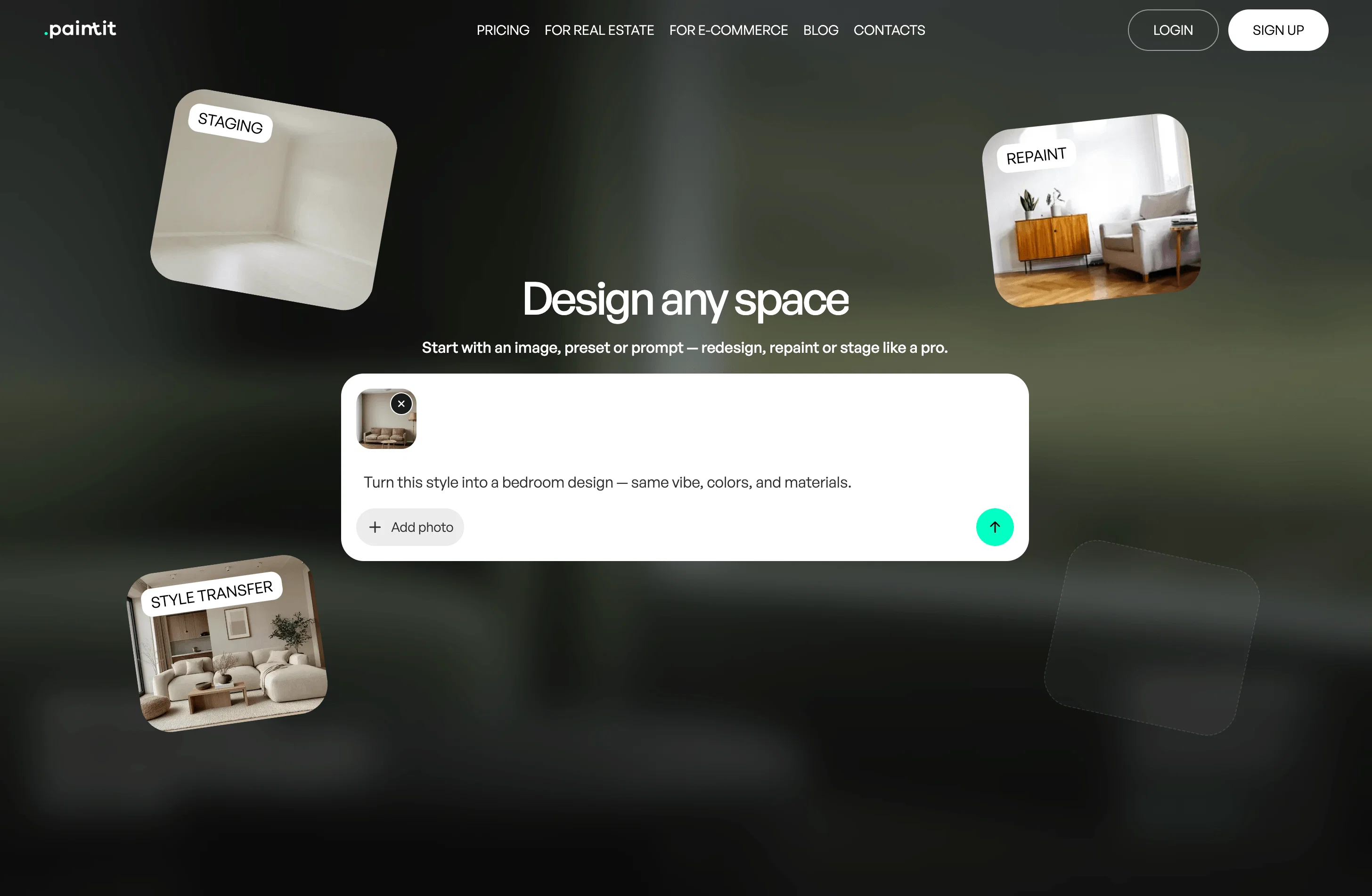
The platform supports a wide range of workflows, including interior and exterior design, landscape and outdoor areas, commercial spaces (including HoReCa), and furniture/decor visualization. Paintit.ai runs on a chat-first experience: users describe what they want to achieve (for example, restyle a living room, redesign a façade, stage a rental listing, refresh a café, or explore outdoor seating ideas) and receive visual variations that can be refined through natural-language iteration.
Paintit.ai is built for B2B use cases where visualization needs to live inside a digital customer journey—such as furniture retailers and marketplaces, home improvement brands, real estate platforms, and design services. It’s also used by professionals delivering concepts for clients, including interior designers, architects, decorators, landscapers, and real estate agents. Typical scenarios include “visualize in my space” experiences for products and finishes, virtual staging for listings, remote consultations and sales enablement, and rapid option comparison before purchase or execution. For pros, the value is speed: exploring multiple directions quickly, collecting feedback, and packaging options into a client-ready set.
Core capabilities include chat-based generation and editing (repaint, restyle, swap materials, add/remove objects), project organization with saved versions and moodboard inputs (including Pinterest boards), and product discovery from the generated visuals to support design-to-commerce workflows. For partners, Paintit.ai offers deployment options such as embeddable widgets, API access, and white-label implementations. The product is browser-based and works across devices, reducing setup friction for teams and end users.
Paintit.ai is commonly adopted by SMB and mid-market organizations in home & living, real estate, hospitality, and design services that need a repeatable way to produce visual concepts, iterate fast, and connect designs to purchasing or implementation decisions.
- Pinterest Connection — Import Pinterest Boards As References To Guide Style, Mood, And Direction In Your Projects.
- Image Gallery — Explore Community Creations For Inspiration And Prompt Examples, Then Save Ideas To Start New Designs Faster.
- Virtual Staging — Stage Empty Or Outdated Spaces With Realistic Furniture And Decor For Listings, Presentations, And Marketing Visuals.
- Projects — Organize Designs Into Projects, Keep Versions, And Manage Iterations Across Rooms And Concepts.
- Product Finder — Discover Matching Furniture And Decor From Your Generated Scenes And Jump To Vendor Stores To Buy.
- Text To Image — Generate Photorealistic Space Concepts From A Text Prompt When You Don’t Have A Reference Photo.
- Image To Image — Redesign A Real Space From An Uploaded Photo While Keeping The Original Room Context As The Starting Point.
Best for
Short scenarios where Paintit.ai tends to shine.
-
Visualize and customize living spaces
Best for Home owners
-
Enhance creative design processes with diverse options
Best for Interior designers
-
Showcase property potential with visualized renovations
Best for Real estate agents
Example outputs 1
Sample generations and before/after results for Paintit.ai.
Access & connections
Where you can use Paintit.ai.
Platforms
Capabilities
What this tool accepts, produces, and is strongest at.
Input
- Image
- Text
Output
- API
- Text
- Image
Highlights
- API
Supported features
- API
- Image Generation
- Image Edit
- Visual Creation
- Realism
- Styling
- Integrations
- Arhitecture & Interior design
Pros & cons
Pros
- Chat-first pro workflow for fast iterations and revisions
- Photorealistic interior, exterior, and commercial visualizations
- Virtual staging for real estate listings and presentations
- Start from a photo or generate concepts from scratch (text-to-image)
- Image-to-image redesign with iterative edits (repaint, restyle, swap items)
- Projects and version history to compare design directions
- Pinterest board import for moodboard-based guidance
- Community gallery for inspiration and prompt examples
Show 4 more
- Product discovery from scenes with links to vendor stores
- High-resolution exports (1K/2K/4K depending on plan)
- Commercial usage license available on paid plans
- Browser-based access with no installation required
Cons
- Internet connection required (no offline mode)
- Mobile app not available yet (web-based only)
- Limited language support (English-first UI)
- No bulk/batch generation workflow yet
- Fine-grained object control can require extra iterations
- Credits-based usage may require top-ups for heavy iteration
Compare alternatives
Similar tools in the catalog.




People also view
Tools that often show up alongside Paintit.ai in collections and comparisons.
AI Room Styles ✓
FreemiumPersonalized interior and exterior decor design

Droplette ✓
Free TrialAI-powered color palette generator for Figma

ArchiVinci ✓
PaidTransform your sketches into hyper-realistic renders effortlessly.

REimagineHome ✓
PaidAI-powered interior design reimagined

RoomLab.app ✓
PaidRedesign, Render, and Stage in Seconds.

ReRender AI ✓
Free TrialInstant photorealistic renders for architectural designs.

MNML ✓
PaidTransform sketches into stunning architectural designs with AI

Huemint ✓
FreeAI creates unique color schemes for your brand
Releases 2
New chat-first studio:
– Rebuilt the core chat experience as a unified workspace for prompts, image inputs, iterations, and results.
– New guided controls (space type, style, settings) to structure pro briefs and reduce trial-and-error.
– Faster iteration loop for multi-step edits (repaint, restyle, add/remove items, material swaps).
New agentic infrastructure:
– Introduced an agent-based orchestration layer that routes each request to the most suitable workflow (from-scratch generation vs photo-based redesign).
– Improved context handling across turns to keep revisions aligned with the same scene and direction.
– More predictable handling of multi-instruction prompts to reduce “try again” loops.
New top-tier model support:
– Expanded support for high-quality image generation models to improve photorealism, lighting consistency, and material detail.
– Better default model selection behind the scenes based on task complexity and input type.
New pro workflow building blocks:
– Projects/Collections for saving versions and comparing directions across a single room or a full project.
– Pinterest boards as reference inputs for moodboard-guided iterations.
– Product Finder updates for matching items from scenes and linking to vendor stores.
Performance & stability:
– Improved generation responsiveness and general stability across the app.
Imported reviews 9
Useful and convenient, main tool right now
Cool! Probably the best app!
Used it for virtual staging on a couple of listings - worked way better than I expected. Just describe the room, get a photorealistic result in seconds. Big time-saver for real estate work.
Convenient and understandable service - quickly helps with ideas for the interior. The results look stylish, easy to use. I recommend 👍
Yup, this is exactly what I’ve been looking for. Nailed it.
Nice app with nice UI
That’s cool — I really like the chat-first approach. Using it like ChatGPT for the whole workflow feels way more natural than filling out quizzes or clicking through a dashboard. And Ui/Ux is TOP!
The Pinterest integration is a game changer — I can import a board and the results stay much closer to the vibe I’m going for. It makes iteration faster because you’re not re-explaining the style every time.
The prompts are followed really accurately, and tweaking the result feels straightforward. It’s a smooth workflow for quick iterations and clean final visuals.
FAQ 12
Who is Paintit.ai best suited for?
🛠️ 1
tool
🙏 94
karma
wrote:
Paintit.ai is used by design professionals and real estate teams who need fast photorealistic concepts and iterative revisions. Typical users include interior designers, decorators, architects, home stagers, and real estate agents creating options for clients, listings, or early-stage concept direction.
What problems does Paintit.ai solve for professionals?
🛠️ 1
tool
🙏 94
karma
wrote:
It helps pros produce multiple visual directions quickly, reduce back-and-forth with clients, and move from a brief to concrete visuals faster. It’s commonly used for concept exploration, staging visuals, repaint/restyle iterations, and presenting alternatives before committing to detailed plans or purchases.
How does the workflow work for pro projects?
🛠️ 1
tool
🙏 94
karma
wrote:
ros can start from a photo (image-to-image) or from a text brief (text-to-image). The chat-first workflow supports iterative edits—repaint, restyle, swap materials, add/remove items—then versions can be saved into Projects for comparison and client-ready presentation.
Can Paintit.ai be used for real estate and virtual staging?
🛠️ 1
tool
🙏 94
karma
wrote:
Yes. Real estate teams use it to create staged listing visuals, refresh interiors, and test different styles for marketing. You can generate multiple variations and refine them in chat to match a target audience or property positioning.
Does it support interior, exterior, and commercial spaces?
🛠️ 1
tool
🙏 94
karma
wrote:
Yes. Paintit.ai supports interior and exterior concepts, commercial spaces (including HoReCa), and outdoor/landscape ideas. Users can generate concepts from scratch or edit an existing photo, depending on the task.
How do professionals keep style consistency across iterations?
🛠️ 1
tool
🙏 94
karma
wrote:
Pros typically save versions to Projects, reuse the same reference photo or selected outputs, and use moodboard inputs (including Pinterest boards) to keep the direction consistent across variations and rooms.
What outputs and export options are available?
🛠️ 1
tool
🙏 94
karma
wrote:
Paintit.ai provides downloadable renders, with export resolution depending on the plan (e.g., 1K/2K/4K). Pros often use exports for client presentations, listing imagery, and internal concept reviews.
Is there a way to connect visuals to products?
🛠️ 1
tool
🙏 94
karma
wrote:
Yes. Paintit.ai can surface product matches from generated scenes, helping users identify furniture/decor options and follow links to vendor stores. This is useful for shoppable visualizations and design-to-commerce workflows.
Is Paintit.ai a CAD/BIM or 3D modeling tool?
🛠️ 1
tool
🙏 94
karma
wrote:
No. Paintit.ai focuses on photorealistic visualization and iterative concept generation, not CAD drafting, BIM documentation, or manual 3D modeling. It’s typically used earlier in the process for direction-setting, staging, and fast option comparisons.
What are common limitations for pro use?
🛠️ 1
tool
🙏 94
karma
wrote:
Very specific object-level control or strict multi-image consistency may require extra iterations. The product is web-based (no offline mode), and bulk/batch workflows may be limited compared to dedicated enterprise rendering pipelines.
What types of professional projects is it commonly used for?
🛠️ 1
tool
🙏 94
karma
wrote:
Common pro scenarios include single-room redesigns with multiple iterations, multi-room direction setting, listing-ready virtual staging for real estate, and concept exploration for hospitality/commercial spaces (lobbies, cafés, offices). It’s also used to generate alternatives for client review.
Can I use Paintit.ai outputs commercially?
🛠️ 1
tool
🙏 94
karma
wrote:
Commercial usage depends on the plan. Paid tiers can include a commercial usage license, which is typically used for client work, listings, and marketing materials. If you need a specific licensing scope, check the plan details you’re on.
Related tools
Recommended

Hyperis ✓
FreemiumOrganized task prioritization.

VenturusAI ✓
FreemiumBusiness idea analysis and reporting.

Stunning ✓
PaidBuild AI-powered websites in seconds

FounderPal ✓
Free TrialGenerate a perfect marketing strategy in 5 minutes

Beeyond AI ✓
Free TrialBeeyond AI: Unlock 50+ AI tools under one subscription

Mindsmith ✓
FreemiumPlatform for building and sharing eLearning content