

Avoma ✓
AI Meeting Assistant: Transcribe, summarize, and analyze conversations.
Free + from $19/mo
Verdict
A quick read before you dig into the full page.
- Best if
- AI Meeting Assistant: Transcribe, summarize, and analyze conversations
- Skip if
- Limited target user groups
- Pick this when
- Automatic meeting transcribing
Considering Mumble AI: Voice-first workspace for Mac & iOS instead? Compare side by side
Overview
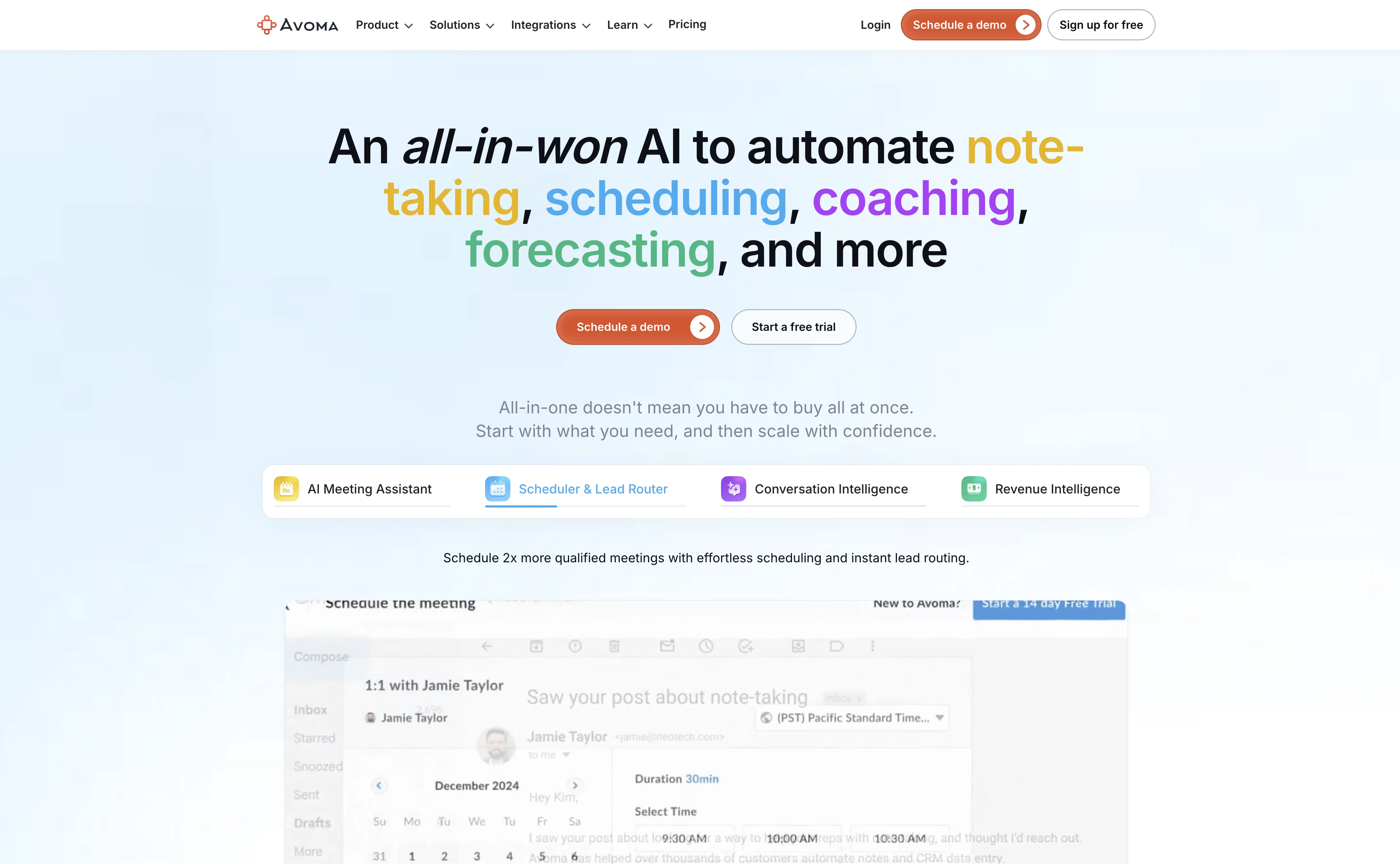
Avoma is an AI-based tool designed to offer comprehensive meeting and conversation management solutions. The tool primarily functions as a meeting assistant, taking on tasks such as automatic transcriptions and note generation, topic detection, keyword tracking, and speaker identification.
In addition, Avoma comes with a live bookmarking feature, making it easier to access important parts of the meeting conversation. Apart from being a meeting assistant, Avoma's capabilities extend to managing and scheduling meetings, providing tools for shared meeting templates and collaborative note editing.
Moreover, its conversation and revenue intelligence elements aid in decision-making by offering activity dashboards and allowing for interaction, competitor, and topic intelligence.
Avoma also facilitates collaboration in cross-functional teams, coupled with the capability to provide coaching insights to increase deal win rates and reduce employee ramp-up time.
Integrated with various conferencing, CRM, and Dialer systems, Avoma caters to a wide range of needs for sales, customer success, and remote teams.
Access & connections
Where you can use Avoma.
Platforms
Capabilities
What this tool accepts, produces, and is strongest at.
Input
- Audio
Output
- Audio
- Tabular
- Text
Supported features
- Meeting Intelligence
Pros & cons
Pros
- Automatic meeting transcribing
- Summarizes meetings
- Analyzes meetings
- Speaker identification
- Topic detection
- Keyword tracking
- Meeting scheduling
- Agenda templates
Show 35 more
- Agenda collaboration
- No-show reminders
- Automatic recording
- Live bookmarking
- Collaborative note-taking
- Conversation Intelligence
- Revenue Intelligence
- Activity dashboard
- Interaction intelligence
- Competitor intelligence
- Scorecards
- Coaching features
- Deal intelligence
- Conference integrations
- CRM integrations
- Dialer integrations
- Sales solutions
- Customer success solutions
- Solutions for remote teams
- Conversation management enhancement
- Collaborative note editing
- Global transcription search
- Meeting content snippets
- Meeting content playlists
- Lead routing for scheduling
- Augmented notes
- Improved meeting outcomes
- Historical conversation search
- Multiple integration options
- Supports various job roles
- Real-time transcription
- Data-driven decision-making tools
- High-growth organization usage
- Free signup
- Free demo
Cons
- No mobile apps mentioned
- Competing tool comparison missing
- No data security details
- No customization mentioned
- Limited conferencing integrations
- Limited CRM integrations
- Limited Dialer integrations
- Free sign-up, but paid?
Show 2 more
- Limited target user groups
- Not open-source
Compare alternatives
Similar tools in the catalog — with a clear reason to open each one.

Mumble AI: Voice-first workspace for Mac & iOS ✓
FreemiumVoice-first AI workspace for meetings, notes, and dictation. Works offline.
Why look Typically cheaper
Full comparison
Discord DiscMeet ✓
FreemiumDiscord voice transcription and note taking app for teams and DnD sessions
Why look Typically cheaper
Full comparison
Discord NotesBot ✓
Free TrialRecord, Transcribe, and AI Summarize Discord Calls
Why look Typically cheaper
Full comparison
TicNote Cloud ✓
FreemiumAI note taker for meetings and insights.
Why look Typically cheaper
Full comparison
Granola ✓
FreemiumTransform raw meeting notes into brilliance
Why look Typically cheaper
Full comparisonReleases 1
FAQ 12
What is Avoma and how does it function?
How does Avoma make my meetings more productive and efficient?
How does Avoma transcribe and analyze meetings?
What are the main features of Avoma?
What benefits does the speaker identification feature provide?
How does topic detection in Avoma work?
What does Avoma offer for better meeting preparation?
How does Avoma help with collaboration during meetings?
How does the note-taking feature in Avoma work?
How can Avoma help me provide better organization and analysis after meetings?
How does Avoma's conversation and revenue intelligence work?
What integrations does Avoma offer?
Related tools
Recommended

Deepmotion ✓
Freemium3D animations

Paraphrase Tool ✓
FreemiumParaphrase text in 15 modes for 100+ languages

Supercreator ✓
FreemiumCreate short videos 10x faster with AI

Semantic Scholar ✓
FreeAI-powered research tool for scientific literature

Browse AI ✓
FreemiumExtract and monitor web data without code.

Cleanup pictures ✓
FreemiumRemove unwanted elements from photos instantly.