

Fellow ✓
The #1 AI Meeting Assistant
Free + from $7/mo
Verdict
A quick read before you dig into the full page.
- Best if
- You are customer Success teams and need: Actionable AI meeting notes, follow-ups, and workflows for Customer Success teams
- Skip if
- Limited note-taking features
- Pick this when
- Built-in note-taking
Considering Mumble AI: Voice-first workspace for Mac & iOS instead? Compare side by side
Overview
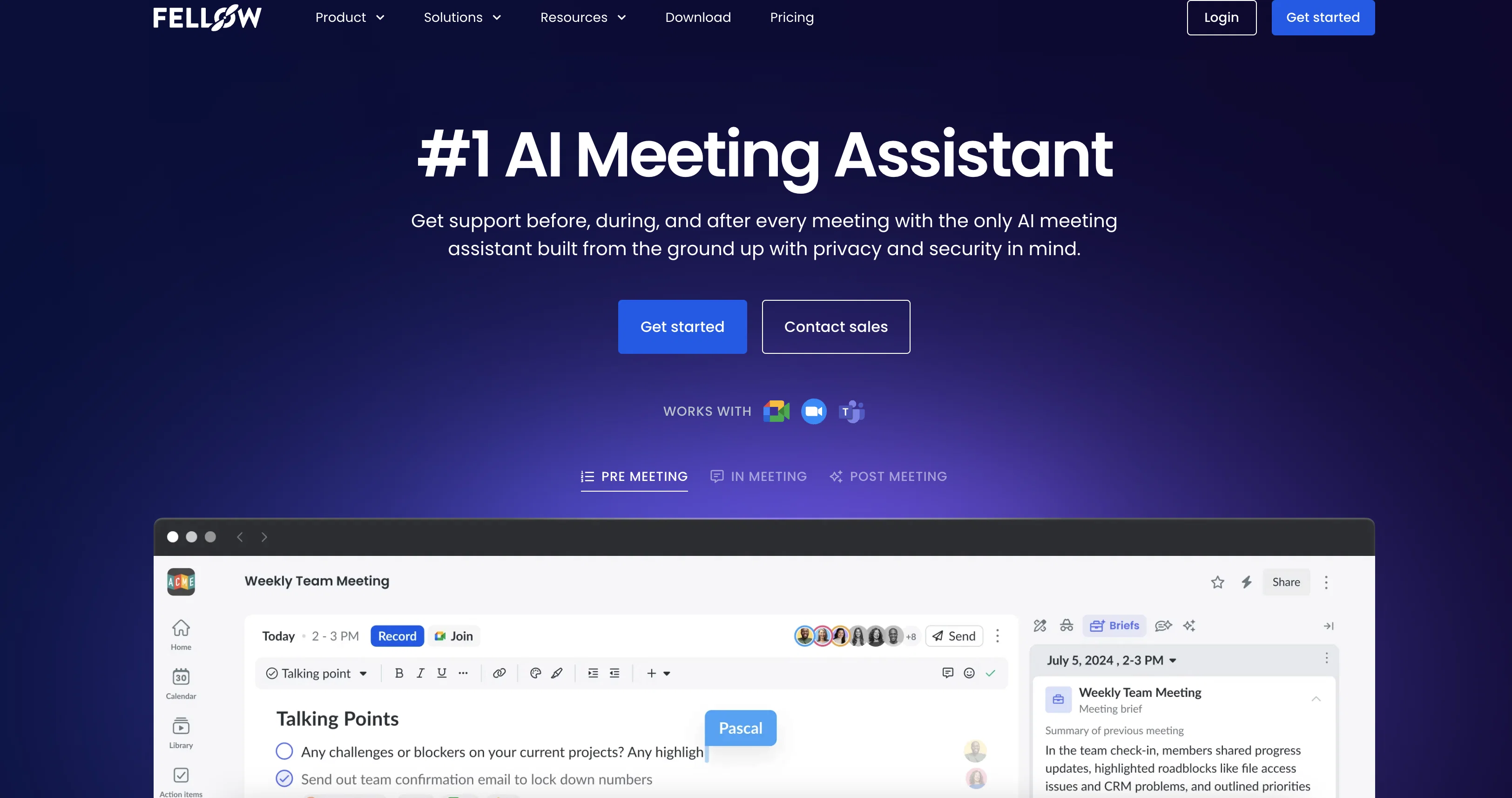
Fellow natively integrates with more than 50 tools so it fits seamlessly into your existing tech stack. Integrations with tools like Slack, Asana, Hubspot, Monday.com, and more mean that meeting data is synced across your tools.
“Ask Fellow” meeting chatbot provides answers and insights across meetings and performs follow-up tasks like post-meeting emails.
Fellow’s recording library keeps all your recordings in one place. Privacy and sharing controls mean you can keep everything centralized while controlling who has access.
Collaborative agendas and pre-meeting briefs mean you’re always prepared for an effective meeting — even when you’re in back-to-back meetings.
Best for
Short scenarios where Fellow tends to shine.
-
Actionable AI meeting notes, follow-ups, and workflows for Customer Success teams
Best for Customer Success teams
-
AI meeting notes for marketing teams that need to move fast
Best for Marketing teams
-
Accurate AI meeting notes to capture even the most technical discussions for Engineering teams
Best for Engineering teams
-
Accurate and secure AI meeting notes for leadership teams
Best for Leadership teams
-
Automated AI meeting notes, follow-ups and workflows for Sales teams
Best for Sales teams
-
Secure AI meeting notes, transcripts and recordings for HR teams
Best for HR teams
-
AI note taking security and privacy controls for org-wide bot governance for IT teams
Best for IT teams
Example outputs 1
Sample generations and before/after results for Fellow.
Access & connections
Where you can use Fellow, and what it plugs into.
Platforms
Capabilities
What this tool accepts, produces, and is strongest at.
Input
- Video
- Audio
Output
- Audio
- Video
- Text
Pros & cons
Pros
- Built-in note-taking
- Efficient meeting culture
- 'Ask Fellow' feature
- Robust Privacy
- Recordings Control settings
- Central Meetings library
- CRM automation
- Collaborative Agendas
Show 12 more
- Pre-meeting briefs
- Multi-department friendly
- Human-Level transcription accuracy
- Scalable for enterprise
- Privacy controls for sharing
- Follow-up workflows for CS
- Automated follow-ups for Sales
- HR specific recording privacy
- Org-wide bot governance
- Centralized meeting minutes
- Org-wide meeting analytics
- Over 50 integrations
Cons
- Lacks real-time collaborative editing
- Insufficient customization options
- Limited note-taking features
- No text-to-speech feature
- Lack of multilingual support
- No task prioritization
- No offline accessibility
- Lacks in-app tutorials
Show 2 more
- No social-media integration
- Doesn't support all CRMs
Compare alternatives
Similar tools in the catalog — with a clear reason to open each one.

Mumble AI: Voice-first workspace for Mac & iOS ✓
FreemiumVoice-first AI workspace for meetings, notes, and dictation. Works offline.
Why look Typically cheaper
Full comparison
Discord DiscMeet ✓
FreemiumDiscord voice transcription and note taking app for teams and DnD sessions
Why look Higher community rating
Full comparison
Discord NotesBot ✓
Free TrialRecord, Transcribe, and AI Summarize Discord Calls
Why look Typically cheaper
Full comparison
TicNote Cloud ✓
FreemiumAI note taker for meetings and insights.
Free + from $6.58/mo
Full comparison
Granola ✓
FreemiumTransform raw meeting notes into brilliance
Why look Higher community rating
Full comparison
People also view
Tools that often show up alongside Fellow in collections and comparisons.

Limitless - Personalized & Secure Memory AI ✓
FreemiumRecall anything you've said or heard in meetings or conversations

remio: Your Personal ChatGPT ✓
FreemiumGet Tailored Answer with Your Personal ChatGPT

ZoomScape ✓
PaidAI-generated stunning Zoom backgrounds

Zoom IQ ✓
FreemiumOne platform to connect and collaborate

Zoom AI Companion ✓
FreemiumZoom AI Companion: Elevate productivity
Smart Calendars AI — Plan fast & easy ✓
FreemiumSchedule without effort: speak, snap, paste — plan and adapt as you

Screenloop ✓
UnknownRevolutionize hiring with AI-powered talent operations.

Jobed ✓
FreeAI-powered job descriptions to attract top talent
Releases 1
FAQ 12
How does Fellow.app transcribe meetings?
What key insights does Fellow.app gather from meetings?
🛠️ 1
tool
wrote:
Fellow.app extracts key insights from meetings like action items, decisions and noteworthy discussions. These insights can provide value in understanding the outcomes of the meetings and setting plans for future action.
What does the 'Ask Fellow' feature do?
How does Fellow.app ensure privacy and security of meeting data?
Can Fellow.app help in drafting follow-up emails post-meeting?
How does Fellow.app support CRM automation?
What is the functionality of the library feature in Fellow.app?
Can Fellow.app be used across various departments of a company?
How can Fellow.app help to prepare for meetings?
How can I control who has access to meeting recordings and notes on Fellow.app?
Does Fellow.app offers note templates?
How does Fellow.app support team collaboration?
Related tools
Recommended

NotebookLM ✓
FreemiumAI-powered note-taking and research assistant

CodeRabbit ✓
Free TrialEnhanced code review for improved workflow and quality.
remio: Your Personal ChatGPT ✓
FreemiumGet Tailored Answer with Your Personal ChatGPT

RivalOut ✓
Free TrialAI-powered competitive and actionable insights for your smarter decisions

Mind Map Wizard ✓
FreemiumGenerate mind maps with AI: free, no sign-up, no ads

Marketing Assistant (Elsa AI) ✓
FreemiumDefine your ideal customers and craft a winning marketing strategy with Elsa.