

AI PowerPoint Maker ✓
Create presentations in minutes with AI
from $10/mo
Verdict
A quick read before you dig into the full page.
- Best if
- Create presentations in minutes with AI
- Skip if
- Subscription cost
- Pick this when
- Converts text to PowerPoint
Considering PPT.AI instead? Compare side by side
Overview
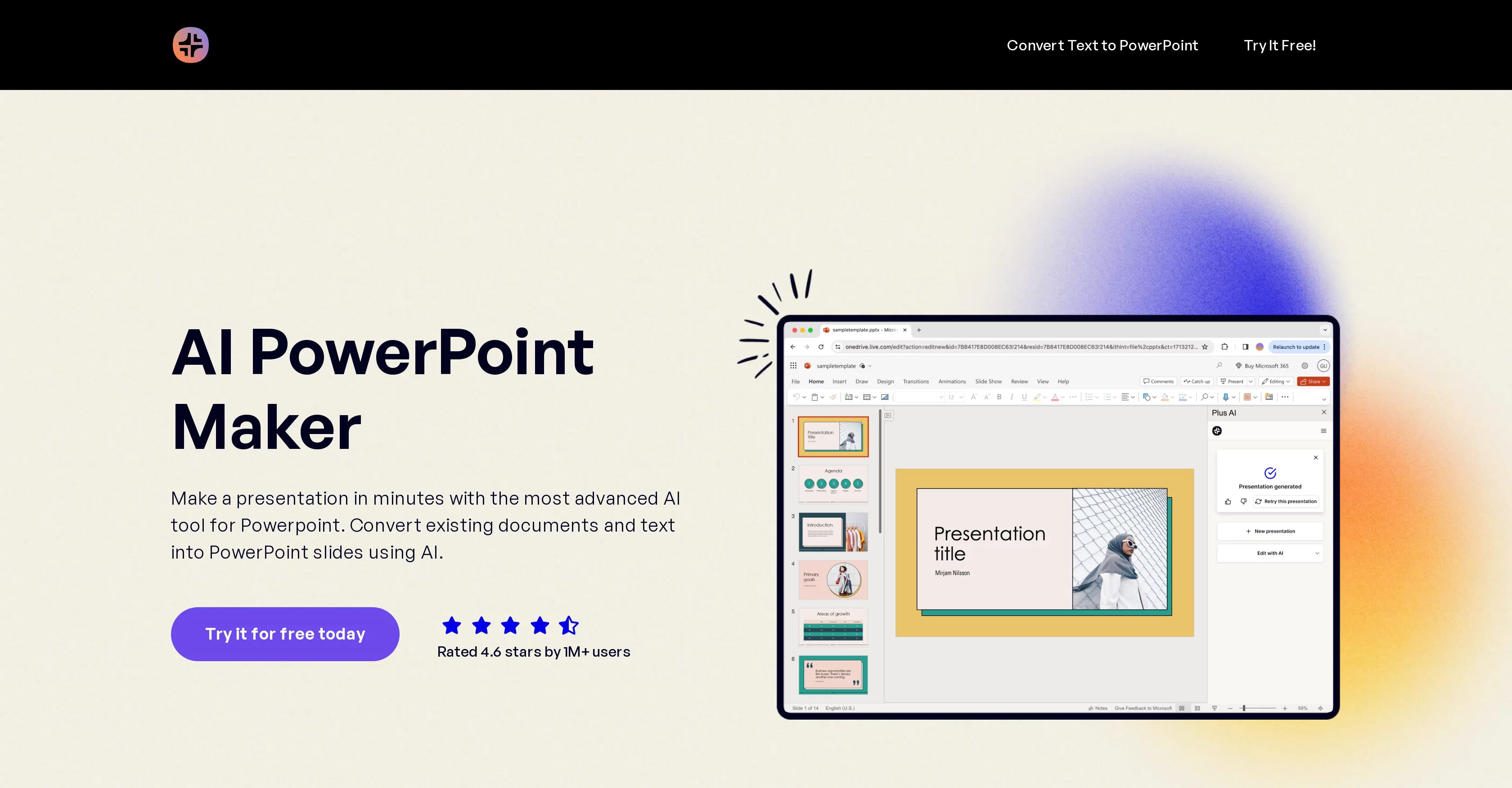
AI PowerPoint Maker is a tool designed to transform the process of creating PowerPoint presentations by leveraging advanced AI technology. The tool allows users to convert existing documents and text, including Word docs and PDFs, into PowerPoint slides.
It enables automatic formatting of PowerPoint slides, thereby saving time and effort in the designing process.It offers features to begin a presentation from a document or a user prompt, eliminating the issue of starting with blank pages.
Besides, it hosts professional templates ensuring well-structured presentations and allows users to edit slides using AI, even with their existing slide decks.The AI tool works within PowerPoint itself, ensuring users don't have to learn how to use a separate tool or worry about compatibility issues.
Users can also customize instructions to create consistent presentations across their team.For businesses, AI PowerPoint Maker offers options to set up a team and create presentations that align with their brand identity using custom templates.
It supports workspaces with existing PowerPoint templates, saving time on formatting and presentation design, and exploring other automations and data integrations.
Thus, whether for individual or enterprise use, AI PowerPoint Maker enhances the efficiency and quality of creating PowerPoint presentations.
Access & connections
Where you can use AI PowerPoint Maker.
Platforms
Capabilities
What this tool accepts, produces, and is strongest at.
Input
- Text
Output
- Text
Pros & cons
Pros
- Converts text to PowerPoint
- Automatically formats slides
- Starts presentations from prompts
- Offers professional templates
- Enables slide editing
- Works within PowerPoint
- Allows custom instructions
- Options for team setup
Show 37 more
- Promotes brand alignment
- Data Integration capabilities
- Template management
- Increases presentation efficiency
- Converts documents to slides
- Eliminates blank page issues
- Integrates with existing slide decks
- Supports workspace templates
- Custom templates for branding
- Automates presentation design
- Integrates with other automation
- Saves time on formatting
- Converts PDFs to PowerPoint
- Custom interface for enterprise
- Intelligent document conversion
- Preserves existing templates
- High-quality presentation creation
- Team collaboration support
- Multi-format source document support
- Customization for team consistency
- Professional pre-set templates
- Incessant workflow automation
- Trusted by global companies
- High user satisfaction rate
- Text-to-slide document conversion
- Direct PowerPoint integration
- Custom-branded templates
- Shared team library
- Built-in data integrations
- Optimized for enterprise use
- White-glove setup
- Slide insertion in 100+ layouts
- Cross-compatible with Microsoft AppSource
- 100K+ character length prompts
- Pitch deck presets
- Doc upload capability
- Brand-specific presentation themes
Cons
- Limited to PowerPoint
- No native app
- Requires manual template setup
- Limited document conversion types
- Potential compatibility issues
- Restricted by PowerPoint limitations
- Limited data integration support
- Customization complexity
Show 1 more
- Subscription cost
Compare alternatives
Similar tools in the catalog — with a clear reason to open each one.

PPT.AI ✓
Free TrialTransform ideas into stunning presentations instantly
Why look Typically cheaper
Full comparison
AI PPT Maker ✓
FreemiumAI turns your ideas into PowerPoint presentations instantly.
Why look Freemium alternative
Full comparison
Slideteam - Presentation Maker ✓
FreemiumGenerate professional presentations in seconds with AI
Why look Freemium alternative
Full comparison
workppt ✓
Free TrialCreate unlimited presentations with AI in seconds.
Why look Typically cheaper
Full comparison
AI Presentations App ✓
FreemiumTurn text into PowerPoint slides instantly.
Why look Freemium alternative
Full comparisonReleases 1
Imported reviews 1
You can't do anything without paying
FAQ 12
What is AI PowerPoint Maker and what does it do?
How does AI PowerPoint Maker convert existing documents into PowerPoint slides?
Can AI PowerPoint Maker automatically format PowerPoint slides?
Can AI PowerPoint Maker create a presentation from a document or a user prompt?
Does AI PowerPoint Maker offer professional templates?
Can I edit slides using AI PowerPoint Maker?
Does AI PowerPoint Maker work within PowerPoint itself?
Can users customize instructions in AI PowerPoint Maker?
How does AI PowerPoint Maker facilitate team collaboration?
Can AI PowerPoint Maker help with brand alignment using custom templates?
Does AI PowerPoint Maker support existing PowerPoint templates?
What are the data integration features in AI PowerPoint Maker?
Related tools
Recommended

GenPPT ✓
PaidThe AI Presentation Tool for Deep, Research-Backed Slides

MagicSlides.app AI PPT Maker ✓
FreemiumCreate Stunning PPTs in Seconds with the AI PPT Maker

Storytell.ai ✓
FreemiumTurn your data chaos into meaningful insights

OverallGPT ✓
Free TrialCompare AI models side-by-side for informed decisions.

Renderfire ✓
PaidAutomate faceless videos for YouTube and TikTok.

BrainyBear ✓
Free TrialNo-code AI Agents Beyond Chatbots. From Conversations to Tasks.