

Data analysis vv2.0
Storytell.ai ✓
Turn your data chaos into meaningful insights
Verdict
A quick read before you dig into the full page.
- Best if
- You are product Managers and need: Automate market research and competitive landscape analysis
- Skip if
- Limited interaction methods
- Pick this when
- Streamlined content browsing
Considering Grapha AI instead? Compare side by side
Overview



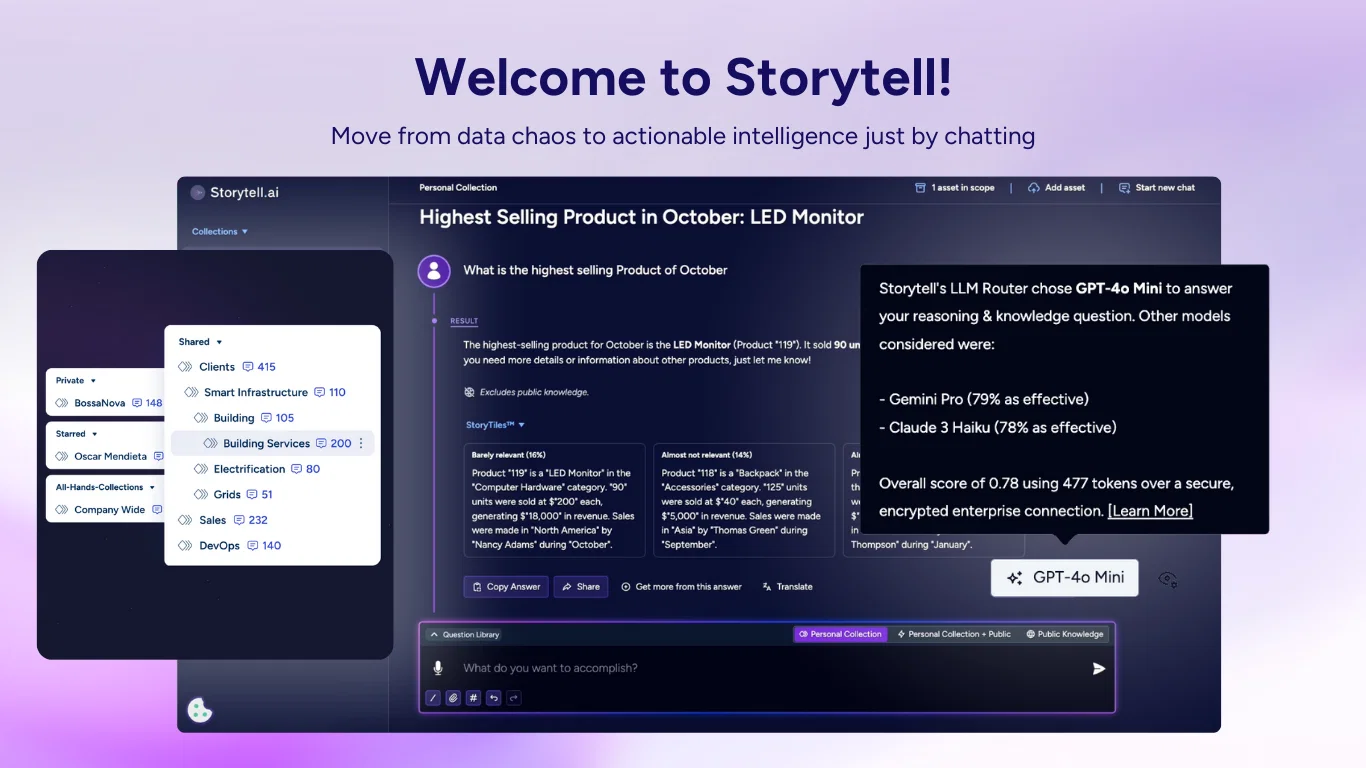
Storytell transforms AI tooling into better outcomes for enterprise knowledge workers.
With Storytell, data analysis becomes easier, more accurate, and seamlessly connects teams by breaking down organizational silos. Work effortlessly with data from multiple sources—all in one powerful platform.
Storytell helps teams resolve issues faster, improve response times, and scale support operations. Plus, with shared knowledge, Customer Success stays in sync with Sales and Product, ensuring everyone is aligned on customer needs and better equipped to deliver effective solutions.
- Data Analysis Without Sql
- Llm Router
- Verifiable Outputs You Can Trust
- Focused Queries
- Data Organization And Sharing
- Ai Prompt Assistancer/writer
Best for
Short scenarios where Storytell.ai tends to shine.
-
Automate market research and competitive landscape analysis
Best for Product Managers
-
Increase NPS and predict customer churn
Best for Technical Writers
-
Create AI-driven Product Requirement Docs (PRDs)
Best for Market Analysts
-
Position against competitors with intelligent battle cards
Best for Market Intelligence Professionals
-
Close more deals with deep prospect analysis
Best for Content Marketers
-
Plan smarter sprints with AI-powered insights
Best for Customer Success Managers
-
Generate compelling executive updates in minutes
Best for Sales Teams
-
Simplify revenue forecasting
Best for Finance Teams
Example outputs 1
Sample generations and before/after results for Storytell.ai.
Access & connections
Where you can use Storytell.ai.
Platforms
Capabilities
What this tool accepts, produces, and is strongest at.
Input
- Image
- Text
- Video
- Audio
Output
- Text
Pros & cons
Pros
- Streamlined content browsing
- Efficient summarization
- Chat-based interface
- Supports diverse file formats
- URL and file upload
- Chrome extension
- Assists in content navigation
- Time-saving content filtering
Show 2 more
- Variety of interaction options
- Optimal for various use cases
Cons
- Limited interaction methods
- Dependent on quality of upload
- Effectiveness not guaranteed
- Location-based support
- No mentioned support for images
- No mobile app mentioned
- No offline usage mentioned
Compare alternatives
Similar tools in the catalog — with a clear reason to open each one.

Grapha AI ✓
PaidUncover hidden trends and patterns in your data effortlessly.
from $150
Full comparison
DataSquirrel ✓
FreemiumData cleaning & visualization for insights gained.
Free + from $15/mo
Full comparison
Breadcrumb ✓
FreemiumAutomate data work and reporting with AI Agents. No data|coding skills required.
Why look Better fit for coding
Full comparison
Anomaly AI ✓
FreemiumAI data analysis workspace for business datasets and reports.
Free + from $25/mo
Full comparison
ChartPixel ✓
FreemiumAI-assisted graphs and insights in 30 seconds!
Free + from $5.39
Full comparison
Vizly ✓
Free TrialAnalyze your Excel spreadsheet or CSV in seconds!
Free + from $19.99/mo
Full comparisonPeople also view
Tools that often show up alongside Storytell.ai in collections and comparisons.
Grapha AI ✓
PaidUncover hidden trends and patterns in your data effortlessly.
Breadcrumb ✓
FreemiumAutomate data work and reporting with AI Agents. No data|coding skills required.

Sitenote ✓
UnknownLaunch website notification campaigns without code.

Plat.AI ✓
UnknownPredict with precision, deploy with ease.

Kick ✓
FreemiumAccounting software that does the work for you

Jupid ✓
FreemiumAI reads your bank. Categorizes expenses. Files your taxes.

Hana Newsletters ✓
FreemiumUse AI to build sector-specific newsletters in seconds with editing suite

Eternity AC ✓
FreemiumCreate and download your digital clone to live forever. Interact with others.
Releases 3
-
Collections - Organize and interact with specific sets of data. Collections allow you to group related content together and perform targeted analyses on that data. Collections work in a Parent > Child relationship, allowing you to nest child sub-Collections inside the parent Collections.
-
Shared Collections - Get a single space where you and your team can organize, collaborate, and access everything you need—without switching between tools.
-
'Improve It' Button - Craft better prompts with minimal effort. nstead of manually tweaking your wording, you can now let Storytell refine it for you. With a single click, your prompt improves for clarity, specificity, and effectiveness.
-
File mentioning - Select specific files in Storytell.ai to get more accurate answers, directly from your data. Just type "@" in your prompt to select Collections or Files from a structured dropdown menu.
-
Latest LLMs - Get access to the latest LLMs like OpenAI’s o3-Mini, Google’s Gemini 2.0
Advanced GPT-4o Integration: Experience superior conversational capabilities with the integration of GPT-4o into SmartChat™. Engage in more dynamic and fluid interactions.
One-Click Value Prompts Pages:
Role-specific, one-click value prompts pages are designed to guide users to completion of routine tasks with ease, offering predefined prompts tailored to various roles. Whether you're a marketer, creative professional, or in executive roles, you'll find targeted prompts that simplify and accelerate your workflow.
Effortless File Uploads: Easily upload files directly into Storytell for seamless content summarization and in-depth analysis, simplifying your workflow.
Centralized Knowledge Section: Introducing the all-new Knowledge tab – your go-to spot for all your knowledge assets linked to a thread. Effortlessly sort, filter, and search for specific files by name or summary. You can also upload new knowledge resources from this centralized hub.
Deep Linking for Enhanced Thread Navigation: Efficiently share and reference pivotal information with the new deep linking feature. Users can now create direct links to specific responses within a thread. Simply use the "Link to this response" option in the share menu to generate a URL that highlights the selected message.
Interactive Mad Libs-Style Prompt Bar: Unleash your creativity! Craft custom prompts by choosing from predefined values in an intuitive dropdown menu, allowing for personalized interactions.
Updated User Interface: A refreshed and intuitive user interface designed to enhance your storytelling experience.
Upcoming Collaboration Features: Soon, users will be able to invite team members to work together on projects, share insights, and co-create seamlessly within Storytell.
Imported reviews 5
Smooth experience overall. It handles complex data well and makes it easier to pull out the useful info. Really really solid
it can't visualize data. useless for me.
Hi TV Meley! We would love to know more about how Storytell can help and provide value for you!
As we’re working on shipping new features, you can sign up to get early access so you can try them out. Here’s where you can sign up: https://docs.storytell.ai/about/early-access
I'm really impressed! The GPT-4o integration makes conversations feel so much more natural. The one-click prompts are a lifesaver for getting tasks done quickly, and uploading files into Storytell is super easy now.
Immo currently best solution if you want to convert / enchant your how-to tutorials to more professional!
FAQ 12
What is Storytell.ai?
What can Storytell.ai do?
🛠️ 2
tools
🙏 19
karma
wrote:
Fosters a collaborative ambient knowledge environment where cross-functional teams gain and share collective intelligence through natural language conversations with their data, with the right information and insights always at their fingertips.
Instantly surfaces the expertise and information hidden within your organization, making every employee an expert.
Acts as an intelligent layer on top of an organization’s data, amplifying the collective brainpower of the workforce.
Makes an organization’s collective knowledge accessible to all employees, regardless of role or tenure.
Captures and preserves an organization’s institutional memory, ensuring that valuable knowledge and expertise are never lost — even after employees leave.
Can I upload different types of files to Storytell.ai?
How does Storytell.ai help me to navigate my content?
Can I use Storytell.ai to summarize online content?
What types of media does Storytell.ai support?
How do I start using Storytell.ai?
🛠️ 2
tools
🙏 19
karma
wrote:
To start using Storytell.ai, create an account using a magic link or create an account using an existing Google account.
Once logged in, you can use the intuitive chatbox to upload your files and input your prompt. Or you can navigate through our prompt library to instantly help you automate with your tasks.
Is there a Chrome extension for Storytell.ai?
Can Storytell.ai be used for filtering out unnecessary information?
Is Storytell.ai's chat-based interaction feature easy to use?
What kinds of options does Storytell.ai offer for uploading and interacting with content?
Can Storytell.ai work with web pages as well as files?
Related tools
Recommended

VenturusAI ✓
FreemiumBusiness idea analysis and reporting.

Mindsmith ✓
FreemiumPlatform for building and sharing eLearning content

Stunning ✓
PaidBuild AI-powered websites in seconds

IllumiChat ✓
FreemiumFrom Ticket Backlog to Instant Answers Powered by AI

TurboScribe ✓
Freemium🎯 3 free transcripts every day. 🔥 Unlimited transcription starting at $10/mo.

Scisummary ✓
Free TrialCutting-edge scientific articles summarization.