

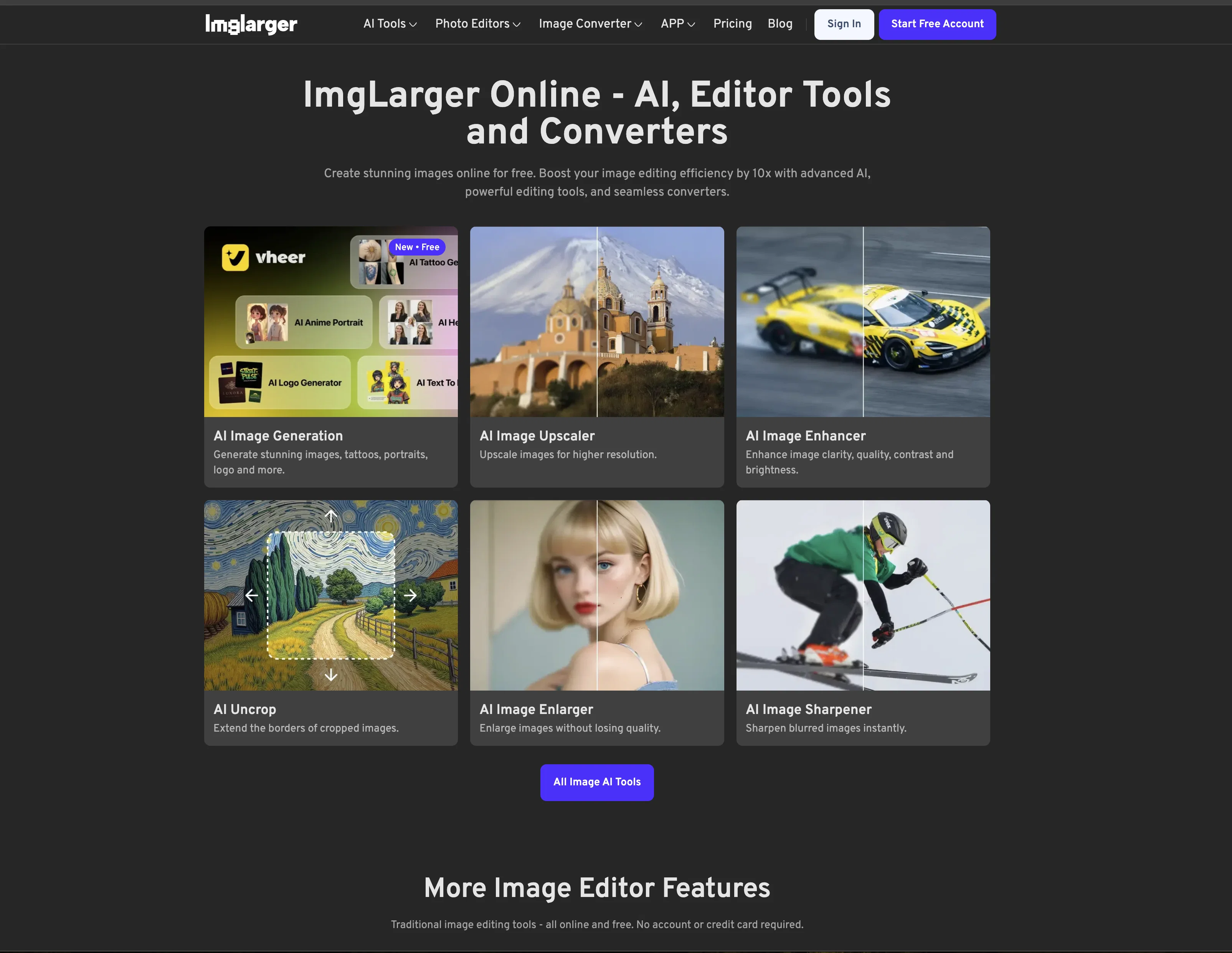
AI Image Enlarger ✓
Enlarge images without losing quality.
Free + from $4.9/mo
Verdict
A quick read before you dig into the full page.
- Best if
- You are photographers and need: Enhancing low-resolution images
- Skip if
- Limited to JPG, PNG
- Pick this when
- Free online image enlarger
Considering Viyou AI Image Generator instead? Compare side by side
Overview
AI Image Enlarger is a free online image enlarger that enables users to upscale and enhance small images automatically without losing quality. It works with JPG or PNG images and has a maximum size of 5MB or 1200x1200.
The AI Image Enlarger toolkit is powered by an advanced and fast AI technology that increases image resolution without any loss of quality. It uses a customized and optimized upscaling algorithm for upscaling images faster and in batch process.
It also provides a range of features that allow users to edit and enhance their images before upscaling them. Features include crop, fine-tune, filters, annotation, redaction, frames, and more.
The toolkit also includes AI Anime16K, AI Enhancer and AI Sharpener, which provide additional features to improve image quality. AI Image Enlarger is a great tool for both personal and business purposes, as it helps to quickly and efficiently produce high-quality images for web, print and social sharing.
Best for
Short scenarios where AI Image Enlarger tends to shine.
-
Enhancing low-resolution images
Best for Photographers
-
Restoring old photos
Best for Graphic designers
-
Removing backgrounds for product photos
Best for E-commerce businesses
-
Converting images to different formats
Best for Social media managers
-
Quickly editing images online
Best for Marketing professionals
Example outputs 1
Sample generations and before/after results for AI Image Enlarger.
Access & connections
Where you can use AI Image Enlarger.
Platforms
Capabilities
What this tool accepts, produces, and is strongest at.
Input
- Image
Output
- Image
Supported features
- Outpainting
Pros & cons
Pros
- Free online image enlarger
- Automatic upscaling
- Maintains image quality
- Supports JPG and PNG
- Max size 5MB or 1200x1200
- Customized upscaling algorithm
- Batch process capability
- Additional image editing features
Show 37 more
- Enlarging by 200%, 400%, 800%
- Adjust brightness, contrast, saturation
- Apply filter presets
- Add annotations to images
- Redact for privacy
- Add photo frames
- Cross-platform use
- Available on Android and iOS
- Enhance and adjust colors
- Adjust light balance
- Image noise reduction
- Convert to cartoon style
- Automatic color addition
- Removes unwanted objects and watermarks
- Enlarge and enhance photos
- Automatic image background remover
- Improves low-quality images
- Resize images for printing and other devices
- Edit before upscaling or enhancing
- Protect privacy with image redacting
- Optimized for speed and efficiency
- Multiple crop aspect ratios
- Offer a free account
- Ensures security, simplicity, easiness
- Used by multiple major brands
- Dedicated customer support
- Generates high-resolution wallpapers
- SRCNN neural network technology
- Removes digital camera noise
- Used by over 1 million users
- Available in multiple languages
- Image quality suitable for print production
- Maintains original image quality
- Optimized for e-commerce businesses
- Optimized for anime and cartoon images
- Supports image resizing for social sharing
- Offers trial with 8 free credits
Cons
- Max size 5MB or 1200x1200
- Limited to JPG, PNG
- Images cap on free account
- Requires Email Verification
- Subpar batch process handling
- Lacks offline functionality
- Feature-rich, could confuse users
- No integrated social sharing
Compare alternatives
Similar tools in the catalog — with a clear reason to open each one.

Viyou AI Image Generator ✓
FreemiumTransform text and images into stunning videos and visuals.
Free + from $39.99/yr
Full comparison
Img2Img AI ✓
FreemiumTransform any image with AI in seconds.
Why look Offers a public API
Full comparison
Photoeditor ✓
PaidEnhanced image editing with object and text removal.
from $9.99/mo
Full comparison
Cleanup pictures ✓
FreemiumRemove unwanted elements from photos instantly.
Why look Typically cheaper
Full comparisonPeople also view
Tools that often show up alongside AI Image Enlarger in collections and comparisons.
Viyou AI Image Generator ✓
FreemiumTransform text and images into stunning videos and visuals.
Photoeditor ✓
PaidEnhanced image editing with object and text removal.
Img2Img AI ✓
FreemiumTransform any image with AI in seconds.

Creen AI ✓
Paid40+ AI models for video, image and art. Free, no sign-up.
Cleanup pictures ✓
FreemiumRemove unwanted elements from photos instantly.

MF0.ai ✓
PaidEvery top AI in one chat. Real memory. No subscription.

LineArt ✓
Free TrialTurn one photo into a whole coloring book.

Kyukoma ✓
Free TrialTurn your stories into manga pages with AI.
Releases 1
FAQ 12
What is AI Image Enlarger?
What image formats does AI Image Enlarger support?
What is the maximum image size AI Image Enlarger can handle?
Does AI Image Enlarger really upscale images without loss of quality?
How does AI Image Enlarger work?
What other features does AI Image Enlarger provide apart from upscaling images?
How does the image editing and enhancing feature work?
What are AI Anime16K, AI Enhancer and AI Sharpener in AI Image Enlarger?
How can AI Image Enlarger be useful for personal and business purposes?
Does AI Image Enlarger have any limitations?
Is AI Image Enlarger free to use?
Is there a paid version of AI Image Enlarger?
Related tools
Recommended

ExtendImage ✓
Free TrialExtend images seamlessly with AI magic.

Deep Image ✓
Free TrialEnhance photos with advanced editing features.

AILab Tools ✓
PaidPowerful AI image editing tools at your fingertips
Magic Eraser ✓
FreemiumRemove unwanted things in seconds.
ImageEditor.AI ✓
FreemiumThe AI photo editor that does it all.

Cutout.Pro ✓
FreemiumAI-powered visual design platform for efficient creation
