
Project management 2026 Rank: #7
Team Pulse ✓
Project management with no PhD required.
Verdict
A quick read before you dig into the full page.
- Best if
- Project management with no PhD required
- Skip if
- Limited file format support
- Pick this when
- Simple AI project health score
Considering Allex instead? Compare side by side
Overview




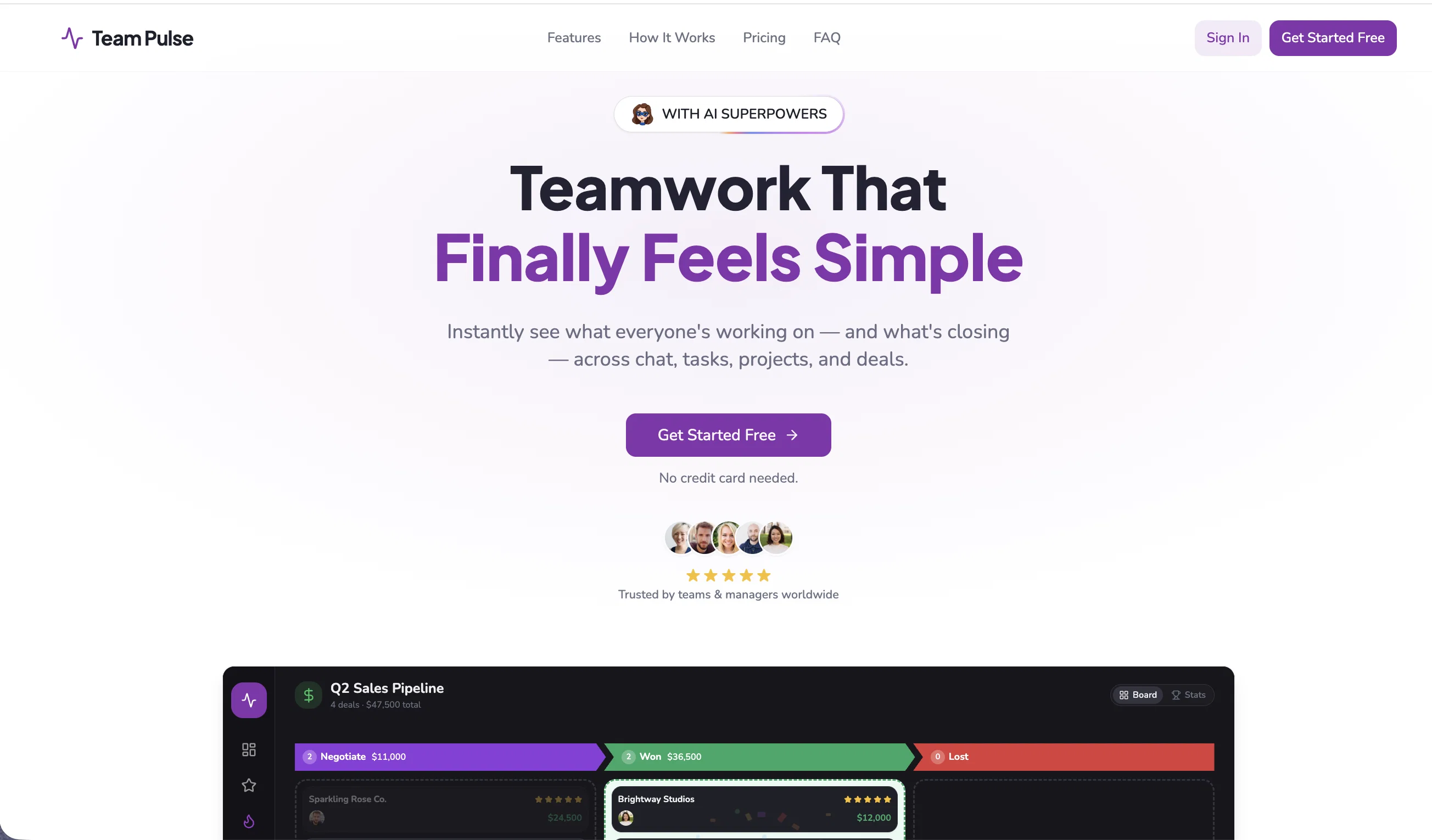
Team Pulse is a project management tool designed for team collaboration and task organization. Its primary functionality includes offering its users an immediate and comprehensive view of all ongoing work within a team, spanning multiple areas such as chat exchanges, task progression, project developments, and pipeline activities.
The tool emphasizes a user-friendly approach, requiring no advanced qualifications or extensive experience in project management to operate. Key features of Team Pulse include project division and work organization, which enables team members to follow given tasks through simple, focused views.
The progression of these tasks can be tracked using drag and drop functionalities, minimizing the need for complexity. Team activity is updated in real time, providing a clear view of all operations within the team.
The collaboration suite also allows chat, comments, and updates sharing, aiming to reduce the use of scattered tools. Files related to a project are consolidated within the platform, eliminating the need for exhaustive folder navigation.
In addition, the tool offers AI Insights, which swiftly deliver an understanding of completed tasks and the ones still requiring attention. Overall, Team Pulse is a comprehensive solution for those seeking to streamline teamwork, tasks, deals and project management.
- Ai-powered Workflows
- Crm Pipelines
- Built-in Team Chat
- Kanban Boards
- Unlimited Collaborators
- Guest Access
- Activity Tracking
- File Sharing
- Project Folders
- Real-time Collaboration
- Team Mentions & Comments
- Drag-and-drop Tasks
- Pipeline Analytics
- Workspace Organization
- Sales Pipeline Management
- Client Collaboration
Best for
Short scenarios where Team Pulse tends to shine.
-
Project management with no PhD required.
Example outputs 1
Sample generations and before/after results for Team Pulse.
Access & connections
Where you can use Team Pulse.
Platforms
Capabilities
What this tool accepts, produces, and is strongest at.
Input
- Tabular
- Text
Output
- Tabular
- Text
Highlights
- Use code TAAFT
- 40% OFF
Supported features
- Team Collaboration
- Instant file search
- Support
Pros & cons
Pros
- Simple AI project health score
- Project tracking
- Real-time team monitoring
- Work organization
- Centralized chat function
- Shared updates in one place
- Drag-and-drop task handling
- User-friendly interface
Show 10 more
- No need for advanced qualifications
- Inline comment feature
- Consolidated file management
- Task-focused views
- Individual task progression
- Cross-functional collaboration
- Business productivity enhancement
- Immediate view of activities
- Real-time updates
- Simple workflow visualization
Cons
- No offline usage
- Limited integration options
- No multi-language support
- Limited file format support
- No task automation
- No Gantt chart feature
- Lack of advanced task prioritization
Compare alternatives
Similar tools in the catalog — with a clear reason to open each one.

Allex ✓
Free TrialAI-supported project management for complex projects.
Why look Typically cheaper
Full comparison
Merlin Project ✓
Free TrialProfessional project management with a bit of magic.
Why look Typically cheaper
Full comparison
Dart ✓
FreemiumAutomated team productivity through project management.
Why look Typically cheaper
Full comparison
ProjectAssistant ✓
PaidAI-powered project management that supercharges your workflow.
Why look Typically cheaper
Full comparison
ProjectNext ✓
Free TrialAI-powered project management that simplifies and supercharges
Why look Typically cheaper
Full comparison
People also view
Tools that often show up alongside Team Pulse in collections and comparisons.

Claude ✓
FreemiumBuilding reliable, interpretable AI systems

Vtuber Assistant ✓
PaidYour AI VTuber co-host that actually pays attention.

cutedyno.com ✓
FreemiumGenerate websites from prompts, keep editing and shipping.

Scavio AI ✓
FreemiumOne API to search every platform.

RevLeak ✓
FreemiumFind the money your store is quietly losing.

MiniMax Agent ✓
Free TrialYour AI supercompanion for enhanced creativity and productivity.

Elvean ✓
FreemiumPrivate AI workspace for Mac

Audio Transcriber AI ✓
FreeTranscribe any audio to text in seconds.
Releases 1
Imported reviews 12
Team Pulse has become the central hub for our team's work. Everything from tasks and discussions to files and project updates is organized in one place, making collaboration much smoother. The interface is intuitive, the real-time updates keep everyone aligned, and the AI insights provide quick visibility into what’s done and what needs attention. It’s a powerful yet easy-to-use platform that helps teams stay productive without unnecessary complexity.
If you manage multiple teams or pipelines, you need Team Pulse. The Kanban boards are intuitive, and the drag-and-drop task progression is instant—no lag, no refreshes needed. Activity tracking shows me exactly who did what and when, which has improved accountability across 15+ team members. The built-in CRM pipelines surprised me; we retired a separate sales tool after two weeks. And unlike other platforms, unlimited collaborators didn’t come with a hidden price hike. Solid, fast, and refreshingly uncluttered.
Drag-and-drop Kanban plus client guest access made our team productive in one day.
Solid core features like drag-and-drop and real-time chat, but AI Insights feel basic and mobile app is noticeably laggy compared to desktop.
Finally, a single tool that combines chat, tasks, CRM, and AI insights seamlessly.
Finally, all our tools in one place. The AI Insights save me hours every week, and real-time chat keeps everyone aligned. No more app-hopping!
I know that sounds dramatic, but hear me out. Team Pulse gives us real-time collaboration without the sluggishness of enterprise bloat. The AI-powered workflows suggested task groupings that actually made sense for our sprint planning—it caught dependencies I missed. The Kanban boards with drag-and-drop are responsive, and team mentions & comments keep discussions attached to the right task instead of lost in a Slack thread. File sharing is centralized, so no more digging through Google Drive folders named "final_v3_REALLYfinal." Plus, unlimited collaborators means our QA contractors don't cost extra. Lightweight, smart, and refreshingly un-annoying.
My non-techy clients can actually use this. Guest access is seamless. Real-time updates = fewer "just checking in" emails.
Really solid tool. Missing one small thing but otherwise excellent.
Team Pulse does almost everything right—chat, Kanban, AI insights, file sharing. The only reason it's not 5 stars is I wish the mobile app (if there is one) had offline mode. Otherwise, highly recommend for teams who want simplicity without losing power features.
CRM + tasks + AI = finally. The AI Insights alone are worth it. Tracks deals and team progress without me begging for updates.
Finally, no more app juggling. Chat, tasks, and files all in one place. The drag-and-drop is buttery smooth. Love it.
Having CRM and task boards together finally connects sales and ops. Worth it.
FAQ 12
What is Team Pulse?
🛠️ 2
tools
wrote:
Team Pulse is an all-in-one workspace that combines project management, team chat, tasks, files, and CRM pipelines in a single platform. Teams can organize projects, collaborate in real time, track sales pipelines, manage workflows, and keep communication connected without bouncing between multiple apps.
How does Team Pulse help in project management?
🛠️ 2
tools
wrote:
Team Pulse helps teams manage projects by bringing chat, tasks, files, workflows, and CRM pipelines into one organized workspace. Teams can collaborate in real time, assign and track tasks with drag-and-drop boards, monitor activity across projects, share files, and use AI-powered insights to stay aligned and keep work moving forward.
What features does Team Pulse offer for teamwork?
🛠️ 2
tools
wrote:
Team Pulse includes built-in team chat, task management, file sharing, real-time collaboration, comments and mentions, activity tracking, Kanban workflows, and shared project spaces. Teams can communicate, manage work, organize files, and track progress together in one connected platform instead of juggling multiple apps.
What are the ways in which Team Pulse simplifies work organization?
🛠️ 2
tools
wrote:
Team Pulse simplifies work organization by combining projects, chat, tasks, files, and CRM pipelines into one streamlined workspace. Teams can organize work with drag-and-drop boards, shared folders, clear workflows, and real-time collaboration tools, helping reduce clutter, improve visibility, and keep everyone aligned.
What functionalities does the 'Task' feature in Team Pulse offer?
🛠️ 2
tools
wrote:
The 'Task' feature in Team Pulse offers a drag-and-drop function for easy task management and deal flow. It allows tracking of task progression without complicating the process. This makes it easy to see what's been completed and what requires further action.
How does the 'Team Activity' function work in Team Pulse?
How does Team Pulse facilitate real-time monitoring of team activities?
What are the collaboration features available in Team Pulse?
🛠️ 2
tools
wrote:
The collaboration features in Team Pulse include a centralized chat function, where teammates can comment, reply, mention, add reactions and share updates all in one place. It eliminates the need for scattered tools and keeps all communication within a single platform.
What is the 'Files' feature of Team Pulse and how does it work?
How does Team Pulse help in managing scattered tools?
🛠️ 2
tools
wrote:
Team Pulse manages scattered tools by providing a platform where all work-related elements like chat, comments, tasks, projects, and deal pipelines are centralized. This eliminates the need for different tools to manage these aspects separately and enhances productivity by reducing unnecessary complexity.
How does the AI Insights feature in Team Pulse assist users?
🛠️ 2
tools
wrote:
AI Insights helps users quickly understand project and workspace activity by highlighting progress, bottlenecks, overdue tasks, and areas that need attention. It gives teams a clear overview of what’s happening across projects so they can prioritize work, stay aligned, and make faster decisions without digging through endless updates.
How does Team Pulse aid in prioritizing tasks for project execution?
Related tools
Recommended

Page Pulse ✓
FreemiumSite analytics that finally feel simple.

ThumbnailCreator.com ✓
Free TrialCreate eye-catching YouTube thumbnails in seconds.

Thea ✓
FreemiumAI study tools to master material, not just memorize it.

remio: Your Personal ChatGPT ✓
FreemiumGet Tailored Answer with Your Personal ChatGPT

ZeroTwo ✓
FreemiumGo Beyond Answers

Base44 Superagents ✓
FreemiumBuild your own AI agent in minutes, not days.