
Calendar vv2.5 2026 Rank: #1211
Smart Calendars AI — Plan fast & easy ✓
Schedule without effort: speak, snap, paste — plan and adapt as you
Free + from $3.99/mo
Verdict
A quick read before you dig into the full page.
- Best if
- Schedule without effort: speak, snap, paste — plan and adapt as you
- Skip if
- Requires subscription after free trial
- Pick this when
- Free 7-day trial to explore all features
Considering Cal.AI instead? Compare side by side
Overview
SmartCalendars AI transforms your calendar from a passive planner into an active assistant. Speak, type, paste, or snap a photo — and it automatically creates clean, structured events and reminders with times, locations, alerts, and recurrence rules.
Built for busy professionals, students, and families, it brings together AI-driven scheduling, task management, smart summaries, and deep calendar integrations in one seamless experience.
Who It’s For
• Busy professionals managing meetings, deadlines, and travel
• Students tracking classes, exams, and projects
• Families coordinating school, sports, and social events
• Anyone trying to become more productive and better organized
• Apple ecosystem users (iPhone, iPad, macOS) and desktop browsers
Key Benefits
• Capture anything, anywhere – Voice, photos, text, and web content instantly become organized events
• Save valuable time – AI handles recurrences, reminders, and scheduling complexity for you
• Stay organized – Events, tasks, and reminders live on a unified, smart timeline
• Protect your privacy – Encrypted, temporary AI processing with zero data retention
Core Features
1. AI-Powered Creation of Events, Reminders & Contacts
• Natural language input: Simply say or type,
“Lunch with Alex next Thursday at 12:30 near the office, remind me 1 hour before”
“Summarize my next two weeks.”
“Reschedule my dentist appointment in November to Friday same week”
“Add the next soccer games of the FC Bayern München to my calendar”
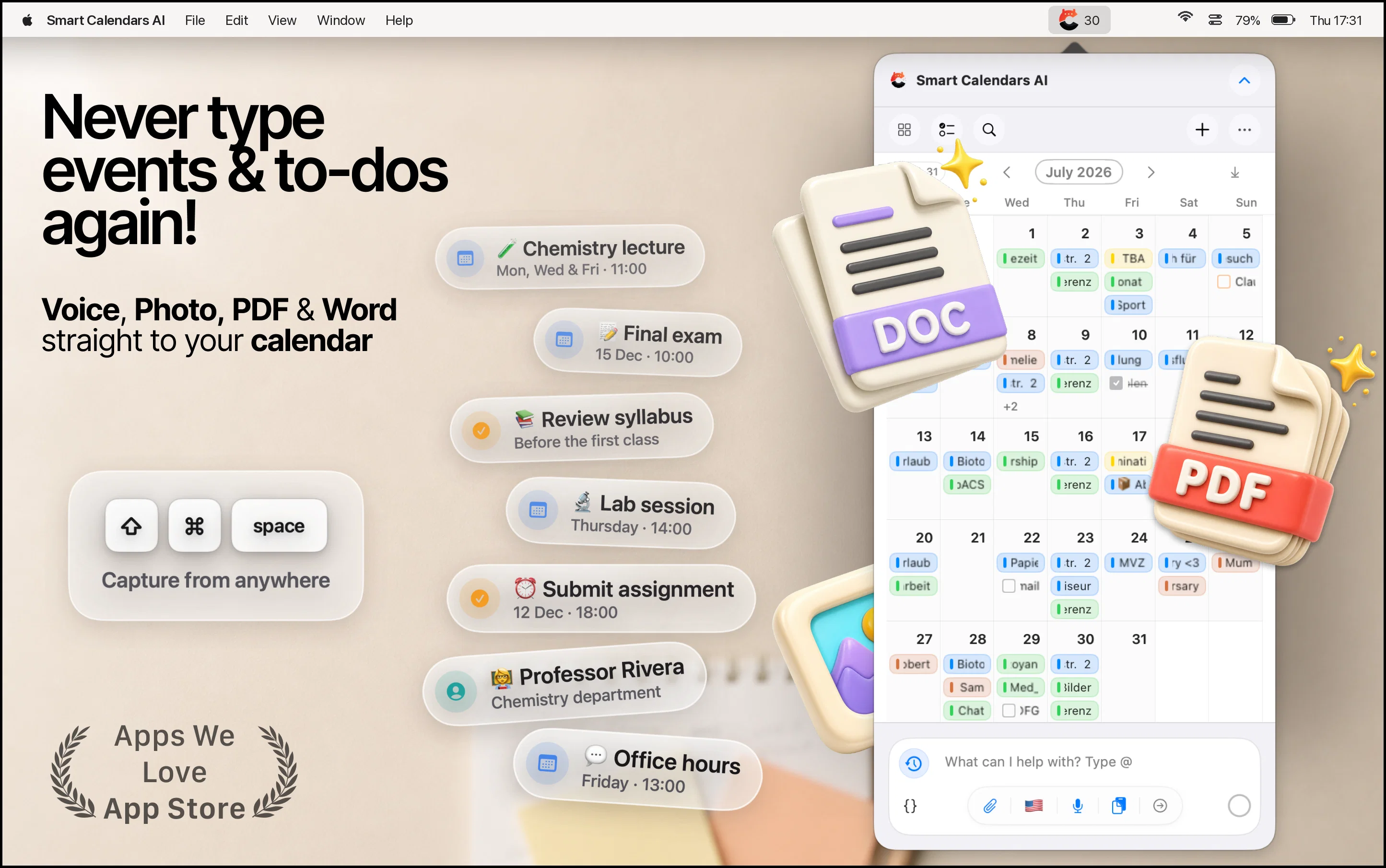
• Photo-to-calendar: Snap posters, tickets, or handwritten notes — AI extracts times, dates, and locations to create events.
• Smart text recognition: Paste details from emails, chats, or websites to instantly generate events and reminders.
2. Unified Calendar, Tasks & Reminders
• View events, reminders, and to-dos in a single, cohesive dashboard.
• Receive AI-based task suggestions and prioritization to focus on what matters most.
• Quickly rearrange your schedule with intuitive drag-and-drop actions.
3. Advanced Scheduling
• Supports complex recurrence patterns (e.g. “every first Friday”, “every other Tuesday”, or limited-time series).
• Create multiple or custom alerts (e.g. day-before plus 15-minute reminders).
• Timezone-aware scheduling ideal for travel or global collaboration.
4. Smart Summaries & Conflict Detection
• Daily and weekly summaries keep your schedule clear at a glance.
• Can detect scheduling conflicts and accounts for travel time or energy level buffers if you ask it to.
5. Sharing & Collaboration
• Share events instantly via URL, QR code, or .ics file.
• Send event invitations directly to your contacts for seamless coordination.
6. Browser Extensions & Multi-Source Capture
• Add events directly from emails, tickets, or websites using browser extensions for Chrome, Safari, Firefox, and Edge.
• Automatically extracts titles, dates, times, locations, and meeting links — no copy-paste of event details required.
7. Widgets, Watch Support & Ecosystem
• Beautiful home and lock-screen widgets for quick agenda access.
• Apple Watch support lets you add or check events by voice while on the go.
8. Multilingual AI Scheduling
• Works in 80+ languages, including English, German, French, Spanish, Chinese, and more — perfect for multilingual and international users.
9. Modern UI & Accessibility
• Minimal, distraction-free design in both light and dark modes.
• Color-coded calendars and integrated weather forecasts for visual clarity.
• Flexible day, list and grid views for your preferred planning style.
10. Privacy, Security & Compliance
• End-to-end encryption for all data in transit and at rest.
• Temporary, purpose-bound processing — data is used only to create your events and never for model training.
• Fully designed for GDPR compliance and user consent transparency.
Platform Compatibility
• iPhone: iOS 18+
• iPad: iPadOS 18+
• macOS: Optimized for Apple silicon (via iPad app design)
• Desktop Browsers: Chrome, Safari, Firefox, Edge (via SmartCalendars AI extensions)
- Agentic Ai
- Web Search
- Calendar
Best for
Short scenarios where Smart Calendars AI — Plan fast & easy tends to shine.
-
Schedule without effort: speak, snap, paste — plan and adapt as you
Example outputs 1
Sample generations and before/after results for Smart Calendars AI — Plan fast & easy.
Access & connections
Where you can use Smart Calendars AI — Plan fast & easy, and what it plugs into.
Integrations
Capabilities
What this tool accepts, produces, and is strongest at.
Input
- Image
- Text
- Audio
Output
- Tabular
- Text
- Image
Highlights
- Agents
Supported features
- Agents
- Assistant
- Automation
- Image Understanding
- STT
- Web browsing
- Integrations
- Meeting Intelligence
- Translation
- Mobile Companion
Pros & cons
Pros
- Free 7-day trial to explore all features
- Works across iPhone, iPad, macOS, and all major desktop browsers
- Color-coded calendars and integrated weather forecasts
- End-to-end encryption and zero data retention
- Multilingual support in 80+ languages
- Browser extensions extract event details in one click
- Integrates with Apple, Google, and Outlook calendars
- Easy sharing via URL, QR code, and .ics export
Show 12 more
- Apple Watch support for hands-free scheduling
- Home-screen and lock-screen widgets for quick access
- Clean, modern UI in light and dark modes
- AI-powered task prioritization to focus on what matters
- Automatic conflict detection and travel-time awareness
- Intelligent alert patterns with multiple customizable reminders
- Complex recurrence rules (“every first Friday”, “every other Tuesday”, etc.)
- Create events instantly from voice, photos, text, or webpages
- Powerful AI understands natural language instructions
- Smart extraction of dates, times, and locations from images
- Unified dashboard for events, reminders, and tasks
- Drag-and-drop scheduling for effortless reorganization
Cons
- Not available on Android devices
- No public API for developer integrations
- Handwritten Text recognition errors
- Advanced features may feel overwhelming to new users
- Requires subscription after free trial
Compare alternatives
Similar tools in the catalog.


Vimcal ✓
FreemiumThe world's fastest calendar for remote work
Free + from $12.50/mo
Full comparison

Toki AI ✓
FreemiumAI calendar assistant that manages your schedule.
Free + from $3.59/mo
Full comparison
People also view
Tools that often show up alongside Smart Calendars AI — Plan fast & easy in collections and comparisons.

Screenloop ✓
UnknownRevolutionize hiring with AI-powered talent operations.

Limitless - Personalized & Secure Memory AI ✓
FreemiumRecall anything you've said or heard in meetings or conversations

Jobed ✓
FreeAI-powered job descriptions to attract top talent

InterviewAI ✓
PaidAI-powered interviews for finding the best candidates.

HireVue ✓
UnknownUnlock human potential with AI-driven hiring.

Fellow ✓
FreemiumThe #1 AI Meeting Assistant
Vimcal ✓
FreemiumThe world's fastest calendar for remote work
Toki AI ✓
FreemiumAI calendar assistant that manages your schedule.
Releases 2
SmartCalendars AI now adds an email-based + web-based AI assistant you can reach from anywhere. It stands out with agentic AI that can web-search to find real-world info (events, places, schedules) and turn it into structured calendar items and smart reminder. Along the way we added invite/attendee management, contact extraction from text, and Apple Watch voice capture—all in a fast, modern UI.
Imported reviews 1
Good job dud good job , i wanna try sure
FAQ 12
What is Smart Calendars AI?
How does Smart Calendars AI use AI technology?
How does voice recognition work in Smart Calendars AI?
How can I create events or reminders using Smart Calendars AI?
How can I share events using Smart Calendars AI?
Does Smart Calendars AI have any integration with other calendars like Google Calendar or Microsoft Outlook?
What is smart task prioritization in Smart Calendars AI?
How do the drag and drop functionality for events and reminders work in Smart Calendars AI?
What features does the home- and lock-screen widgets of Smart Calendars AI provide?
Can I set up complex recurring events in Smart Calendars AI?
Does Smart Calendars AI provide alert patterns?
What are the customisation options available in Smart Calendars AI?
Related tools
Recommended

Notis ✓
Free TrialThe first WhatsApp assistant that runs on your ChatGPT and Claude subscriptions

TheLibrarian.io ✓
Free TrialYour WhatsApp AI assistant for instant productivity.

Recall ✓
FreemiumSummarize Anything, Forget Nothing!
Norton Neo Browser ✓
FreeThe first safe AI-native browser.

Resistant AI ✓
UnknownDetect document fraud in seconds with AI.

Automateed ✓
Free TrialCreate eBooks effortlessly with Automateed, the AI-powered writing tool.