Draw Things: AI-assisted Image Generation ✓
Create AI-generated images on your device in minutes
Verdict
A quick read before you dig into the full page.
- Best if
- Create AI-generated images on your device in minutes
- Skip if
- Limited model styles
- Pick this when
- Operates offline
Considering Photo AI instead? Compare side by side
Overview
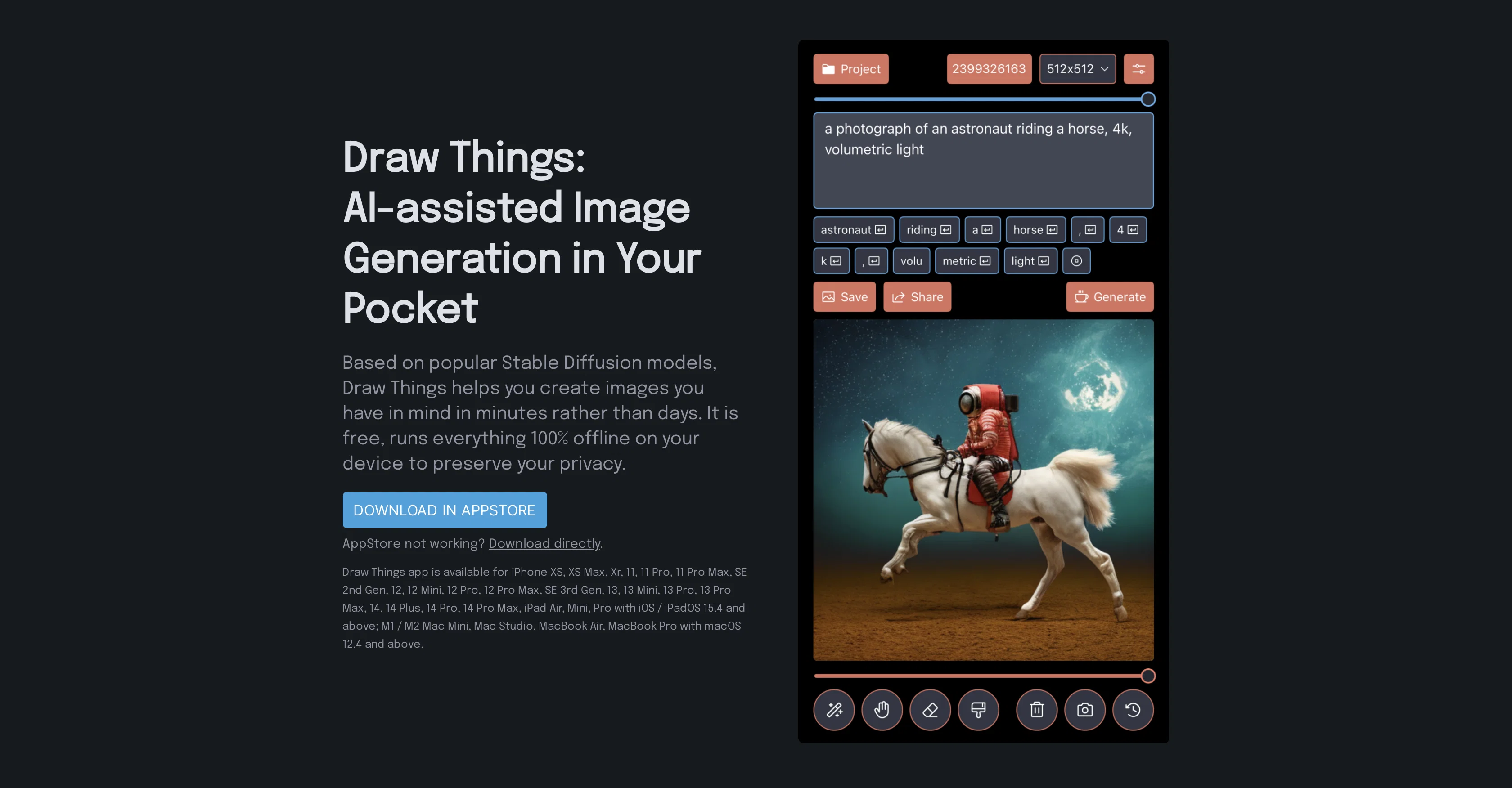
Draw Things is an AI-assisted image generation tool that utilizes Stable Diffusion models to create images. It is designed as a mobile application, allowing users to generate images directly from their device.
The application enables users to translate their ideas into images within a matter of minutes. In terms of functionality, Draw Things provides a complete emerging image generation editing workflow, featuring capabilities such as Inpainting Mask, Outpainting, Text to Image Generation, Text-Guided Image to Image Generation, and Image and Prompt Edit History.
Users can also select images from their camera roll for the application to work on. To cater to diverse user needs, Draw Things supports the use of different models and styles.
Users have the option to use the Generic Stable Diffusion v1.4 model or opt for other popular ones. Included among the options are models such as Waifu Diffusion v1.3, developed specifically for creating Anime images, and Stable Diffusion v1.5 for Inpainting tasks.
A notable attribute of Draw Things is its commitment to user privacy. The application functions entirely offline, ensuring user information is not shared online.
Draw Things is compatible with various iOS / iPadOS and macOS devices, including selected iPhones, iPads and Mac versions.
Best for
Short scenarios where Draw Things: AI-assisted Image Generation tends to shine.
-
Create AI-generated images on your device in minutes
Example outputs 1
Sample generations and before/after results for Draw Things: AI-assisted Image Generation.
Access & connections
Where you can use Draw Things: AI-assisted Image Generation.
Capabilities
What this tool accepts, produces, and is strongest at.
Input
- Image
- Text
Output
- Image
Supported features
- Inpainting
Pros & cons
Pros
- Free usage
- Operates offline
- Privacy protection
- Available for iOS
- Available for macOS
- Complete editing workflow
- Inpainting masks
- Outpainting feature
Show 21 more
- Text to image generation
- Text-guided image generation
- Image and prompt edit history
- Select from camera roll
- Multiple models and styles
- Generic Stable Diffusion v1.4
- Waifu Diffusion v1.3
- Stable Diffusion v1.5 Inpainting
- Quick image generation
- Supports latest iPhone models
- Supports latest iPad models
- Supports M1/M2 Mac Mini
- Supports MacBook Air/Pro
- Guidance Scale feature
- Steps control
- Strength control
- Image Sizes control
- Negative Prompt feature
- Manual Seed feature
- Prompt Tokenization Preview
- Direct download option
Cons
- iOS and macOS only
- May lack advanced editing
- Offline — no cloud storage
- No API access
- Limited to certain iPhone/iPad models
- May have compatibility issues
- Limited model styles
- No Android version
Show 1 more
- Privacy concerns with photo access
Compare alternatives
Similar tools in the catalog — with a clear reason to open each one.

Stockimg AI ✓
PaidGenerated images and text for design ease.
Why look Stronger for image work
Full comparisonPeople also view
Tools that often show up alongside Draw Things: AI-assisted Image Generation in collections and comparisons.
Stockimg AI ✓
PaidGenerated images and text for design ease.

Photo AI ✓
PaidCreate beautiful AI photos and videos of real people

Midjourney ✓
PaidExpand human imagination through AI-powered visuals.

CreativePixel ✓
FreemiumOut-create Your Competition in Minutes

BestPhotoAI ✓
FreemiumCreate amazing AI photos instantly

Nathan Tailors AI Suit Generator ✓
FreeDescribe your dream suit. We draw it, then build it.

LineArt ✓
Free TrialTurn one photo into a whole coloring book.

Line Drawing Converter ✓
Free TrialConvert photos into clean line drawings online.
Releases 1
Imported reviews 3
draw a thinker sitting on a log
its dont availabe in android, web and windows
Good and amazing
FAQ 12
What is Draw Things?
What are the key features of Draw Things?
Does Draw Things work offline?
Is Draw Things available for free?
What functions does Draw Things offer in its editing workflow?
Which devices are compatible with Draw Things?
Which models and styles does Draw Things provide?
How quickly can images be generated using Draw Things?
What privacy features does Draw Things offer?
What is negative prompt in Draw Things?
Can I save my image and prompt edit history on Draw Things?
How to select images from my camera roll using Draw Things?
Related tools
Recommended
AIimages ✓
FreeFree AI image generator: Write text, get images on your PC.
Artificial Art ✓
FreeCreate AI art with Stable Diffusion

Amazing AI ✓
FreeGenerate images from text using AI
Stable Diffusion ✓
FreemiumUnleash humanity's potential with generative AI

Diffusion Art ✓
FreemiumFree, web-based Midjourney alternative - no Discord, no signup.
Stable UI ✓
FreeCreate and modify images with AI, free and limitless.