
Artificial Art ✓
Create AI art with Stable Diffusion
Verdict
A quick read before you dig into the full page.
- Best if
- Create AI art with Stable Diffusion
- Skip if
- Complex for beginners
- Pick this when
- Free online tool
Considering Photo AI instead? Compare side by side
Overview
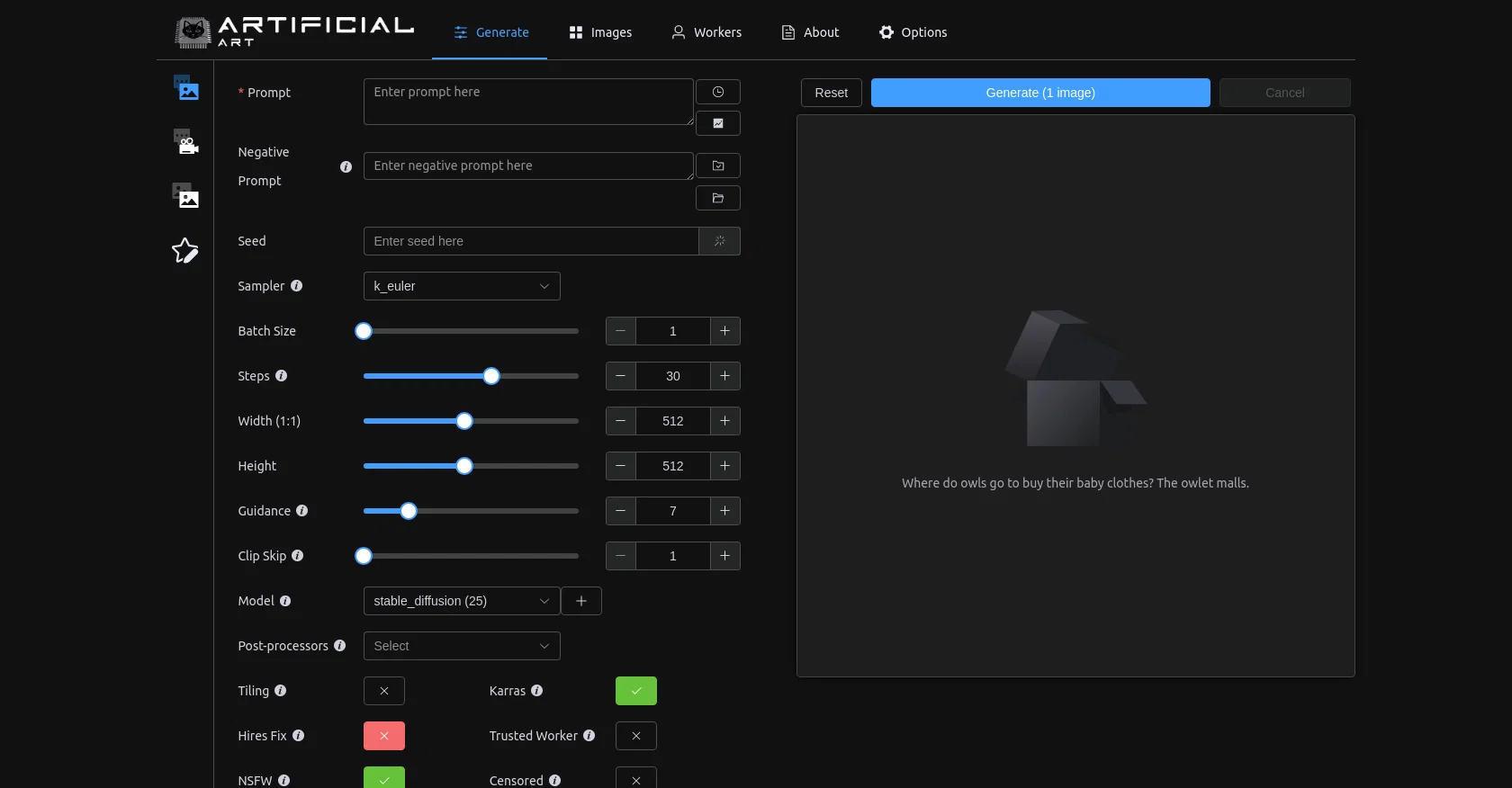
Artificial Art is a free online AI image generation tool that is based on Stable Diffusion, similar to DALL-E. The tool is user-friendly with a compact UI that is powered by Stable Horde.
It offers a range of options for generating images such as prompt, negative prompt, seed sampler, batch size, steps, width, height, guidance, clip skip, model selection, post-processors, tiling, Karras, hires fix, trusted worker, NSFW, and censored.
Artificial Art offers a wide variety of models to produce various types of images, including realistic, cartoon, comic/anime, pixel art, furry, artistic, and other types of images.
These models are designed to cater to different preferences of the user. The tool provides a list of models and the number of options available. Some models are NSFW, indicated by the tool, and care should be taken when selecting them.Overall, Artificial Art is a high-quality and versatile image generation tool that is easy to use with several options for producing different types of images according to user specifications.
Best for
Short scenarios where Artificial Art tends to shine.
-
Create AI art with Stable Diffusion
Example outputs 1
Sample generations and before/after results for Artificial Art.
Access & connections
Where you can use Artificial Art.
Platforms
Capabilities
What this tool accepts, produces, and is strongest at.
Input
- Tabular
- Text
Output
- Image
Pros & cons
Pros
- Free online tool
- Compact UI
- Based on Stable Diffusion
- UI powered by Stable Horde
- Wide range of image generating options
- Flexible image dimensions (width, height)
- Image guidance option
- Model selection availability
Show 26 more
- Post-processor optionality
- Karras available
- Hires fix functionality
- Trusted worker feature
- NSFW models
- Censoring option
- Image generation reset feature
- Realistic image generation
- Cartoon image generation
- Comic/Anime image generation
- Pixel art image generation
- Furry image generation
- Artistic image generation
- Diverse model selection
- Variety of image types
- Prompt feature for image generation
- Negative prompt feature
- Seed sampler for randomness
- Batch size functionality
- Steps for sequence generation
- Clip skip feature for speed
- Tiling for pattern generation
- Own various image models
- Variety of diffusion models
- Offers different style models
- NSFW model indication
Cons
- No offline functionality
- Image generation can be slow
- Complex for beginners
- Potentially NSFW models
- No multilingual support
- Doesn't support high resolution
- Validation needed for negative prompts
- No batch downloads
Show 2 more
- Does not save past works
- Narrow targeted art styles
Compare alternatives
Similar tools in the catalog — with a clear reason to open each one.

Stockimg AI ✓
PaidGenerated images and text for design ease.
Why look Stronger for image work
Full comparison


People also view
Tools that often show up alongside Artificial Art in collections and comparisons.
Stockimg AI ✓
PaidGenerated images and text for design ease.

Photo AI ✓
PaidCreate beautiful AI photos and videos of real people
Diffusion Art ✓
FreemiumFree, web-based Midjourney alternative - no Discord, no signup.

AIImageGenerator ✓
FreeCreate AI art from text and image prompts.
Roll ✓
FreeEnhanced mobile video editing with advanced technology.

Mindmap ✓
FreemiumVisualize ideas effortlessly with free mindmaps.

Infographic Ninja ✓
Free TrialGenerate infographics from keywords instantly.
ImgGen ✓
FreeGenerate stunning AI images from text, free and watermark-free.
Releases 1
Imported reviews 2
Bad experience
Litterally the worst AI art i've seen yet, takes forever and the quality is worse than ever
FAQ 12
What is Artificial Art?
How does Artificial Art work?
What types of images can Artificial Art create?
How do I adjust the settings on Artificial Art to produce different types of images?
What does 'prompt' mean in the context of Artificial Art?
What is the purpose of the 'trusted worker' option in Artificial Art?
What are the system requirements for using Artificial Art?
Does Artificial Art come with customer support or user guides?
What does the 'NSFW' label mean in some of the Artificial Art models?
How can I avoid the NSFW models on Artificial Art?
Could you elaborate on the 'Karras' feature in Artificial Art?
How do I interpret the numbers next to each option in Artificial Art?
Related tools
Recommended

Business Idea Generator AI ✓
FreeGenerate innovative business ideas with AI

Free Text-To-Speech ✓
FreeText transformed into customizable spoken output.
AIimages ✓
FreeFree AI image generator: Write text, get images on your PC.
AIImageGenerator ✓
FreeCreate AI art from text and image prompts.
AI Gallery ✓
FreeCreate mind-blowing art in seconds with AI.

LearningStudioAI ✓
Free TrialAI-powered authoring tool for effortless online course creation.