

Image to video 2026 Rank: #1559
Collart | AI Image to Video ✓
Animate any photo into a video instantly.
Free + from $5.83/mo
Verdict
A quick read before you dig into the full page.
- Best if
- Animate any photo into a video instantly
- Skip if
- Limited advanced features
- Pick this when
- Generates dynamic videos
Considering MojoMake - AI Image to Video Generator instead? Compare side by side
Overview
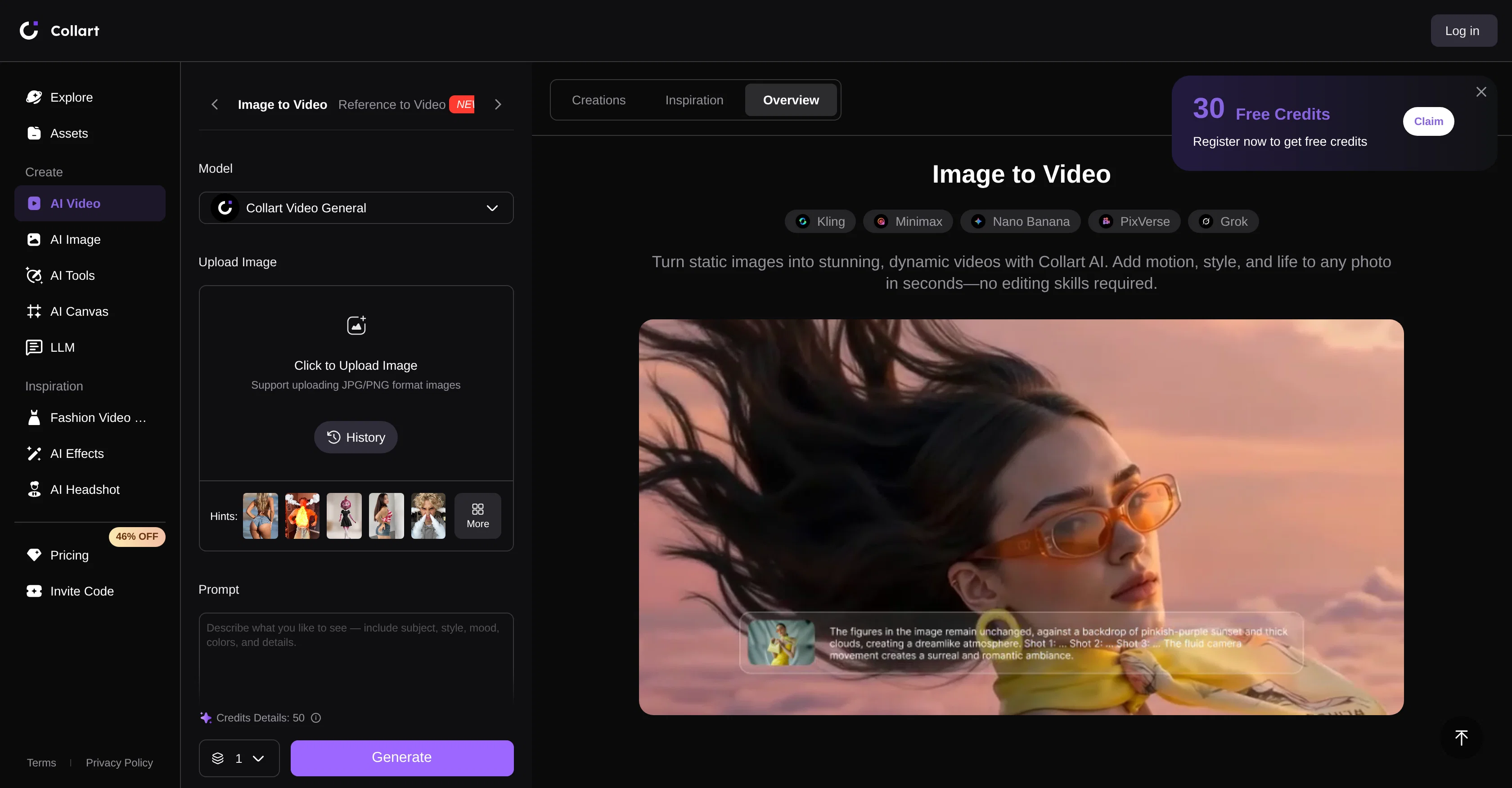
Collart AI Image to Video Generator is an AI-powered tool that allows users to transfigure static images into dynamic videos. The tool uses AI to integrate motion into the images, turning them into lifelike animations.
Users can also use text prompts to guide the motion and effects in the video, enabling customization. Furthermore, the tool ensures consistency throughout the video by allowing users to control the start and end frames.
This tool is not only limited to adding motion; it also allows the generation of videos purely from text prompts, adding a new level of accessibility for those who may not have source images but have concepts they'd like to visualize.
The tool is designed to be highly user-friendly, with a simple workflow of image upload, text prompt input, and finalized video creation. It supports popular image formats such as JPG and PNG, allowing a wide variety of pictures, designs, or artworks to be utilized.
Collart AI Image to Video Generator is apt for creating engaging social media content, ads, storytelling videos, or any other digital content where motion can improve engagement.
The priority on keeping the integrity of the source image intact and adding natural motion sets this tool apart. Moreover, users have the ability to add audio to their videos, making the content immersive.
This tool offers a free version with optional upgrades for more advanced features, providing flexibility based on the user's needs. After generating the content, users can further refine and enhance it with editing tools to ensure the video is ready for sharing.
Access & connections
Where you can use Collart | AI Image to Video.
Platforms
Capabilities
What this tool accepts, produces, and is strongest at.
Input
- Image
- Text
Output
- Video
Pros & cons
Pros
- Generates dynamic videos
- Integrates motion to images
- Text prompts for customization
- Start and end frames control
- Generates videos from text
- Supports JPG and PNG formats
- Ideal for social media content
- Ideal for digital advertisements
Show 38 more
- Preserves image integrity
- Adds natural motion
- Audio integration
- Optional advanced features upgrade
- Content refinement tools
- Ideal for storytelling videos
- Creates lifelike animations
- Free version available
- Easy content sharing
- Fluid motion synchronization
- Ready-to-share videos creation
- Cinematic effects rendering
- Seamless results
- Visual consistency throughout video
- Option for text to video
- Advanced post-generation editing options
- User-friendly interface design
- Ideal for any digital content
- Guarantees smooth animations
- Fast video generation
- Simple workflow of use
- High-quality results promise
- Allows motion prompts
- Enables different customization settings
- Option to add sound
- Supports wide range of images
- Ideal for products and portraits animations
- Helps create viral content
- Tool for creating engaging ads
- Allows for concept visualization without images
- Keeps source image visually consistent
- Turns artwork into videos
- Instant shares of videos
- Consistently improves technology for better results
- Assists in creating polished videos
- Helps in impact content creation
- Allows control over video story
- Keeps movements natural and fluid
Cons
- Limited image format support
- No API
- No collaborative features
- No offline version
- Limited advanced features
- No mobile app version
- No integration with other services
- Cannot reverse video frames
Show 2 more
- No multilingual support
- No batch image upload
Compare alternatives
Similar tools in the catalog — with a clear reason to open each one.

MojoMake - AI Image to Video Generator ✓
FreemiumUse every top AI model and 100+ effects in one account.
Why look Offers a public API
Full comparison
VidFlux - Photo to Video Generator ✓
PaidTransform photos into cinematic videos with AI.
from $6.75/mo
Full comparison
Grok Imagine ✓
FreemiumUnleash Your Creativity with Grok Imagine
Why look Offers a public API
Full comparison
VidFlux - Image to Video AI ✓
PaidTransform any image into stunning videos.
from $9/mo
Full comparison
MindVideo ✓
FreemiumCreate stunning videos from text or images.
Free + from $7.9/mo
Full comparison
Releases 1
FAQ 12
What can I do with the Collart AI Image to Video Generator?
Can you explain how the text prompt input in Collart AI Image to Video Generator works?
What image formats does the Collart AI Image to Video Generator support?
How does the Collart AI Image to Video Generator ensure consistency in videos?
Can I create a video purely from text prompts using Collart AI?
What makes Collart AI Image to Video Generator user friendly?
In which scenarios can the Collart AI Image to Video Generator be used?
How does Collart AI Image to Video Generator maintain the integrity of the source image?
How can I add audio to my videos in Collart AI Image to Video Generator?
What are the advanced features in Collart AI Image to Video Generator?
Are there optional upgrades in Collart AI Image to Video Generator's free version?
Canyou explain more about the editing tools provided by Collart AI?
Related tools
Recommended

Kinovi - AI Video Generator ✓
Free TrialAI video generator powered by Seedance 2.0

ChatGPT ✓
FreemiumAsk anything, create anything, and move from idea to action.

Pounce ✓
Free TrialGet real followers and engagement in minutes.

AdControlCenter ✓
Free TrialRun every ad network from one dashboard

Movie Maker Studio ✓
FreeTurn Ideas into finished Ad, TV show, or short movie in Minutes
Reelyze ✓
Free TrialKnow why your reels flop before you post.
