

Image editing 2026 Rank: #2523
Collart | AI Image to Image ✓
Transform any image with AI style transfer.
Verdict
A quick read before you dig into the full page.
- Best if
- Transform any image with AI style transfer
- Skip if
- Limited to JPG/PNG
- Pick this when
- Smart image generation
Considering Viyou AI Image Generator instead? Compare side by side
Overview
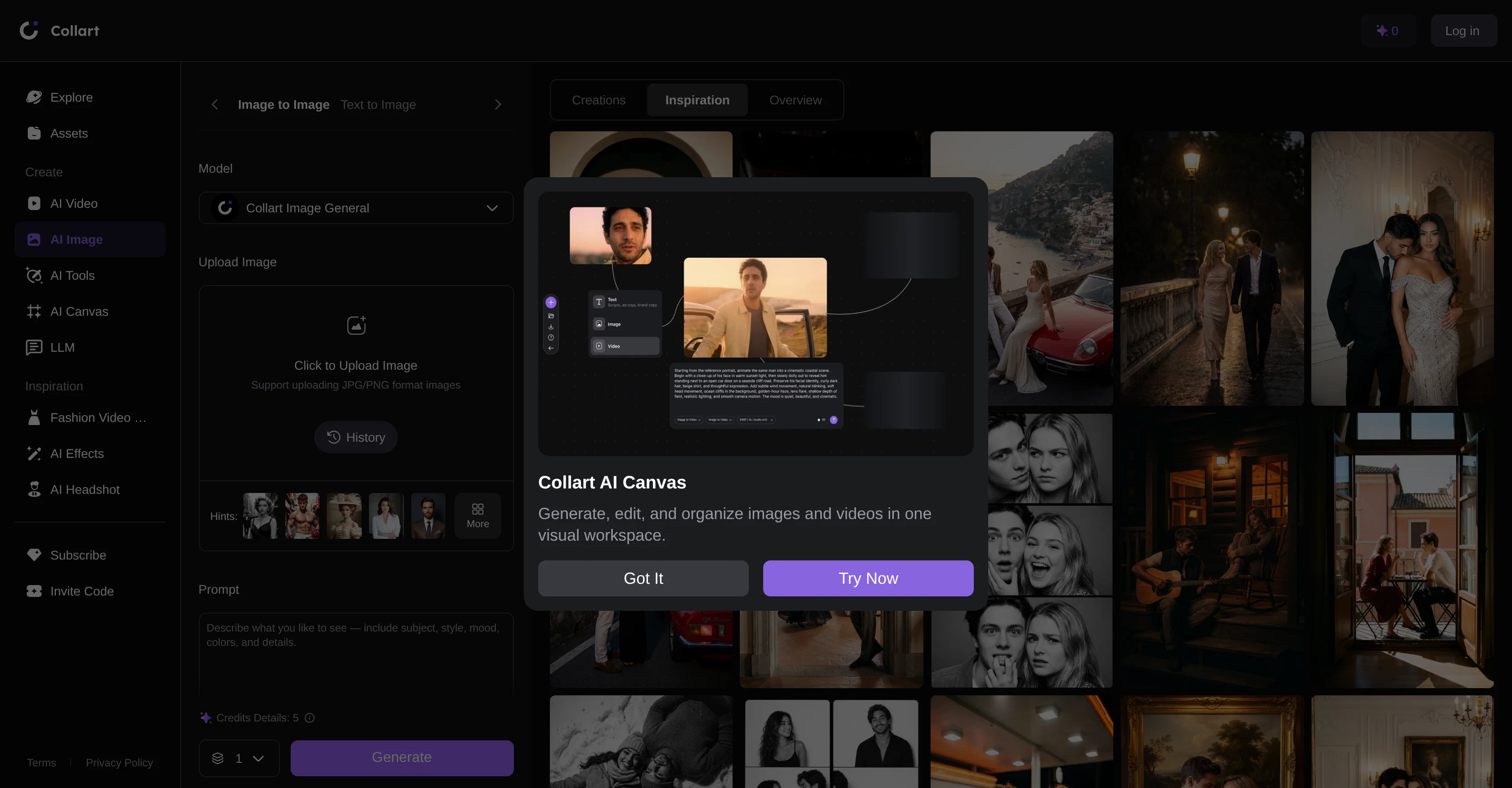
AI Image-to-Image provides a smart image generation solution that incorporates advanced artificial intelligence technology to modify or create new images.
Catered specifically for simplifying the creative design workflow, it brings forward diverse functionalities such as style transfer, image enhancement, and artistic recreation.
The tool is flexible with image inputs, supporting the upload of both JPG and PNG formats. AI Image-to-Image offers a unique way of transforming rough sketches into high-quality digital art, changing the background of photos seamlessly with AI-generated scenarios, and applying filters to convert real-life photos into anime-style illustrations.
There's provision for controlling how much the AI alters your original image, with lower values preserving the initial photo's likeness and higher values allowing substantial creative modifications.
The tool enables users to describe the kind of visualization they want to create, covering parameters such as subject, style, mood, colors, and specific details.
Access & connections
Where you can use Collart | AI Image to Image.
Platforms
Capabilities
What this tool accepts, produces, and is strongest at.
Input
- Image
- Text
Output
- Image
Pros & cons
Pros
- Smart image generation
- Simplifies creative design workflow
- Diverse functionality
- Style transfer capability
- Image enhancement
- Artistic recreation
- Supports JPG and PNG
- Transforms rough sketches
Show 10 more
- Changes photo backgrounds
- Converts images to anime
- Enables visualization descriptions
- Customizable parameters
- Swift conversion
- Generates digital art
- Seamless background alteration
- Anime-style conversion
- Controlled image modification
- Supports image upload
Cons
- Limited to JPG/PNG
- Sketch-to-art results variable
- Inconsistent anime-style conversion
- No batch processing
- No integration with design softwares
- No offline usage
- Lacks advanced customization
- No support for other formats
Show 1 more
- No collaborative feature
Compare alternatives
Similar tools in the catalog — with a clear reason to open each one.

Viyou AI Image Generator ✓
FreemiumTransform text and images into stunning videos and visuals.
Free + from $39.99/yr
Full comparison
Img2Img AI ✓
FreemiumTransform any image with AI in seconds.
Why look Offers a public API
Full comparison

Photoeditor ✓
PaidEnhanced image editing with object and text removal.
from $9.99/mo
Full comparison
Cleanup pictures ✓
FreemiumRemove unwanted elements from photos instantly.
Why look Typically cheaper
Full comparisonReleases 1
FAQ 12
What is the main function of AI Image-to-Image?
What kind of images can I upload to AI Image-to-Image?
What design features does AI Image-to-Image offer?
Can AI Image-to-Image be used to transform sketches into digital art?
How can I change the background of images using AI Image-to-Image?
Does AI Image-to-Image provide options to alter the likeness of my original image?
Can I customise the filter parameters in AI Image-to-Image?
Is there an option for anime-style conversion in AI Image-to-Image?
Can AI Image-to-Image create new images or just modify existing ones?
Can I contour the kind of visualization AI Image-to-Image creates?
What parameters can I control in AI Image-to-Image?
Are there options for denoising strength in AI Image-to-Image?
Related tools
Recommended
Convly AI Image-to-Prompt ✓
FreeTurn any image into an editable AI prompt — free, no signup.

EasyFaceSwap ✓
FreeFree online AI face swap: Create undetectable photos and videos in seconds.

Collart | AI Image to Video ✓
FreemiumAnimate any photo into a video instantly.

MagicSlides.app AI PPT Maker ✓
FreemiumCreate Stunning PPTs in Seconds with the AI PPT Maker

GetLogit ✓
FreemiumArtificial intelligence, available for everyone.

ChatGPT ✓
FreemiumAsk anything, create anything, and move from idea to action.