

Bing Create ✓
Create stunning images with AI-powered search.
Verdict
A quick read before you dig into the full page.
- Best if
- Create stunning images with AI-powered search
- Skip if
- Limited customizability and precision
- Pick this when
- Generates images from text
Considering Photo AI instead? Compare side by side
Overview
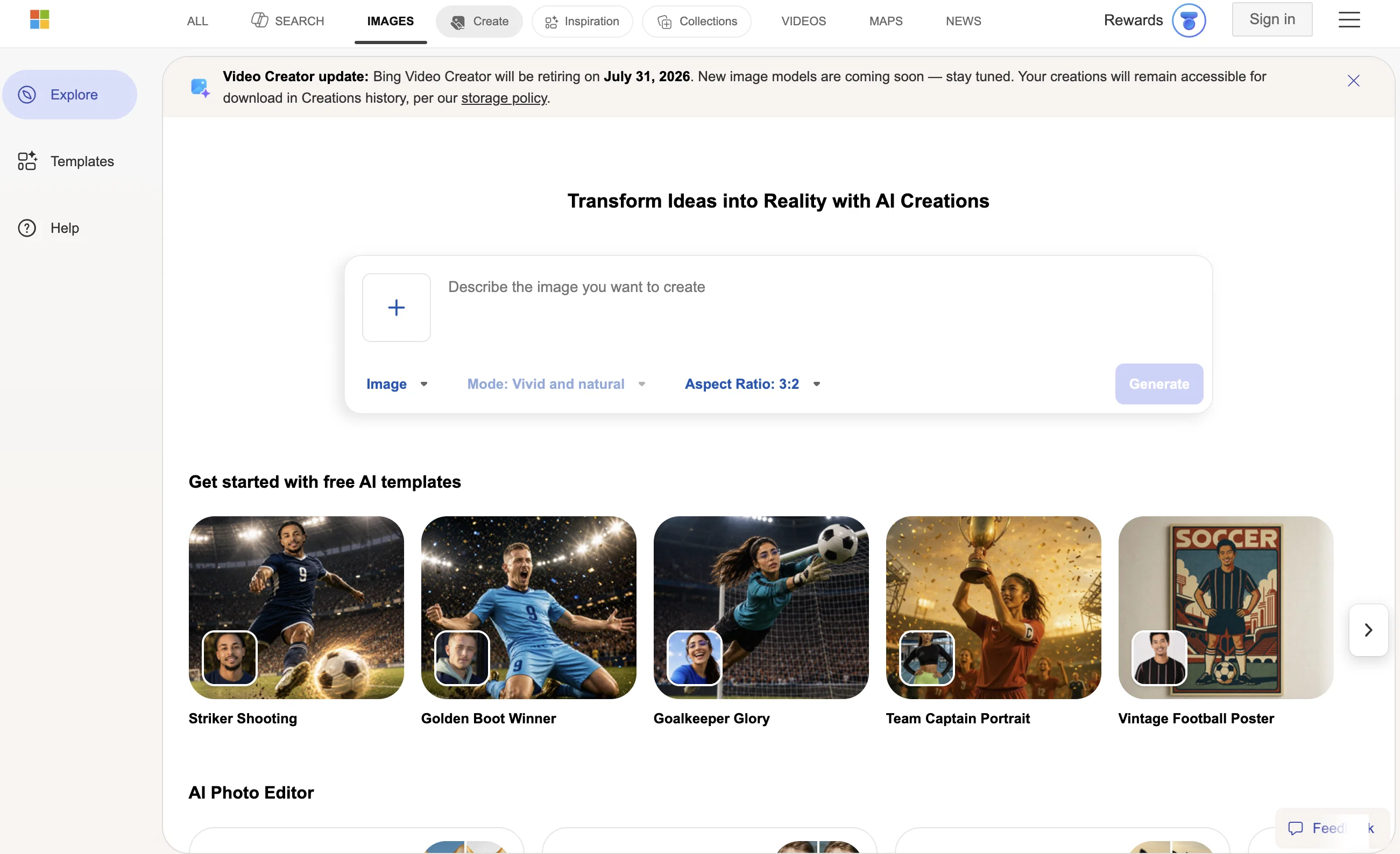
The Image Creator tool from Microsoft Bing is an Artificial Intelligence (AI) search feature that generates images based on user input text. The tool uses AI technology to analyze the text provided by the user and automatically creates an image that best matches the given description.
It is a free tool that can be accessed through Bing’s Image Search feature. However, to use the tool, users need to agree to Bing's privacy policy, which involves the use of cookies, personalization of ads, analytics, and social media.
The tool also allows users to earn rewards points that can be redeemed for boosts to generate images faster. On the other hand, it is worth noting that the tool may not be available in all regions yet, and there may be some technical issues or delays in image creation.
Overall, the Image Creator tool from Microsoft Bing is an innovative application of AI technology that provides users with a useful feature to create customized images based on their text input.
Best for
Short scenarios where Bing Create tends to shine.
-
Create stunning images with AI-powered search.
Example outputs 1
Sample generations and before/after results for Bing Create.
Access & connections
Where you can use Bing Create.
Platforms
Capabilities
What this tool accepts, produces, and is strongest at.
Input
- Text
Output
- Image
Pros & cons
Pros
- Generates images from text
- Accessible via Bing Image Search
- Free to use
- User agreement to privacy policy
- Earn rewards points
- Redeem points for image generation boosts
- Create customized images
- Intelligent search feature
Show 12 more
- Ad personalization
- Analytics usage
- Social media connectivity
- Possible regional expansion
- Working to resolve technical issues
- Join & create options
- Receive notifications about tool
- Examples of generated images
- Detailed privacy statement
- Detailed rewards terms
- Detailed image creator terms
- Feedback feature
Cons
- Requires agreeing to Bing's privacy policy
- Uses cookies
- May personalize ads
- Unavailable in some regions
- Potential technical issues
- Relies on rewards points system
- Possible delay in image creation
- May cause data privacy concern
Show 2 more
- Limited customizability and precision
- Image creation boosts not always redeemable
Compare alternatives
Similar tools in the catalog — with a clear reason to open each one.

Stockimg AI ✓
PaidGenerated images and text for design ease.
Why look Stronger for image work
Full comparisonPeople also view
Tools that often show up alongside Bing Create in collections and comparisons.
Stockimg AI ✓
PaidGenerated images and text for design ease.

Photo AI ✓
PaidCreate beautiful AI photos and videos of real people

Midjourney ✓
PaidExpand human imagination through AI-powered visuals.

CreativePixel ✓
FreemiumOut-create Your Competition in Minutes

BestPhotoAI ✓
FreemiumCreate amazing AI photos instantly

Nathan Tailors AI Suit Generator ✓
FreeDescribe your dream suit. We draw it, then build it.

LineArt ✓
Free TrialTurn one photo into a whole coloring book.

Line Drawing Converter ✓
Free TrialConvert photos into clean line drawings online.
Releases 1
Imported reviews 1
It's absolutely stunning how accurate it transforms your prompts into images, thanks to Dall-e 3. You have 15 boosts, after that image creation takes longer. You can create 30 images per day. You can organize your creations in gallery folders.
However, the restrictions are insane, they filter out too many words / combinations of words. If you use words that are filtered, it will block your prompt, but won't tell you which word of your prompt it was. After several tries that resulted in a blocked prompt, you will be banned. This can mean for an hour, a day,... or permanently.
If your prompt is OK, the AI will start to generate the images but if the created images are considered 'unsafe content', as the AI created something that could be considered offensive, it won't show you the resulting images. This is really annoying, you can't even create an image with several people in swimwear on a beach, it will generate only one person in swimwear, the other ones are wearing street wear for modesty or decency, I guess. But a single person in swimwear at a beach is ok. The logic behind that doesn't make sense.
This could be way better if it would at least tell you the blocked words or mark them. And if you could decide for yourself if you want to see the created 'unsafe' images anyway.
FAQ 12
How does Bing Create work?
What is the Image Creator tool from Microsoft Bing?
How does Bing Create generate images from text?
Is Bing Create free to use?
What are the usage conditions for Bing Create?
How can I access Bing Create?
Can I use Bing Create in any region?
What is Bing's privacy policy related to the use of Bing Create?
What are the technical issues I might encounter while using Bing Create?
How can I earn rewards with Bing Create?
What benefits do I get from rewards points in Bing Create?
How can I redeem my rewards points?
Related tools
Recommended

Playground AI ✓
FreemiumCreate art and visuals with AI, for free

Adobe Firefly ✓
FreemiumCreate stunning visuals with AI-powered text prompts

Lexica Aperture ✓
PaidGenerate stunning photorealistic images instantly.

LearningStudioAI ✓
Free TrialAI-powered authoring tool for effortless online course creation.

AI Gallery ✓
FreeCreate mind-blowing art in seconds with AI.
Stable UI ✓
FreeCreate and modify images with AI, free and limitless.
More from this creator

Speech Studio ✓
UnknownCreate stunning AI voices in minutes

Microsoft Designer ✓
FreemiumCreate stunning designs instantly with AI.

Jarvis/HuggingGPT ✓
FreeBridging LLMs with the ML community

Windows Copilot ✓
FreeUnleash AI-powered productivity on Windows 11

LIDA ✓
FreeGenerate visualizations from data using AI

Microsoft Security Copilot ✓
PaidBoost defense speed with AI-powered insights