

Lexica Aperture ✓
Generate stunning photorealistic images instantly.
from $8/mo
Verdict
A quick read before you dig into the full page.
- Best if
- You are artists and need: Generating images of specific subjects or styles based on text prompts (e.g., 'Redhead woman Hare in snow')
- Skip if
- Limited to photorealistic images
- Pick this when
- Generates photorealistic images
Considering Photo AI instead? Compare side by side
Overview
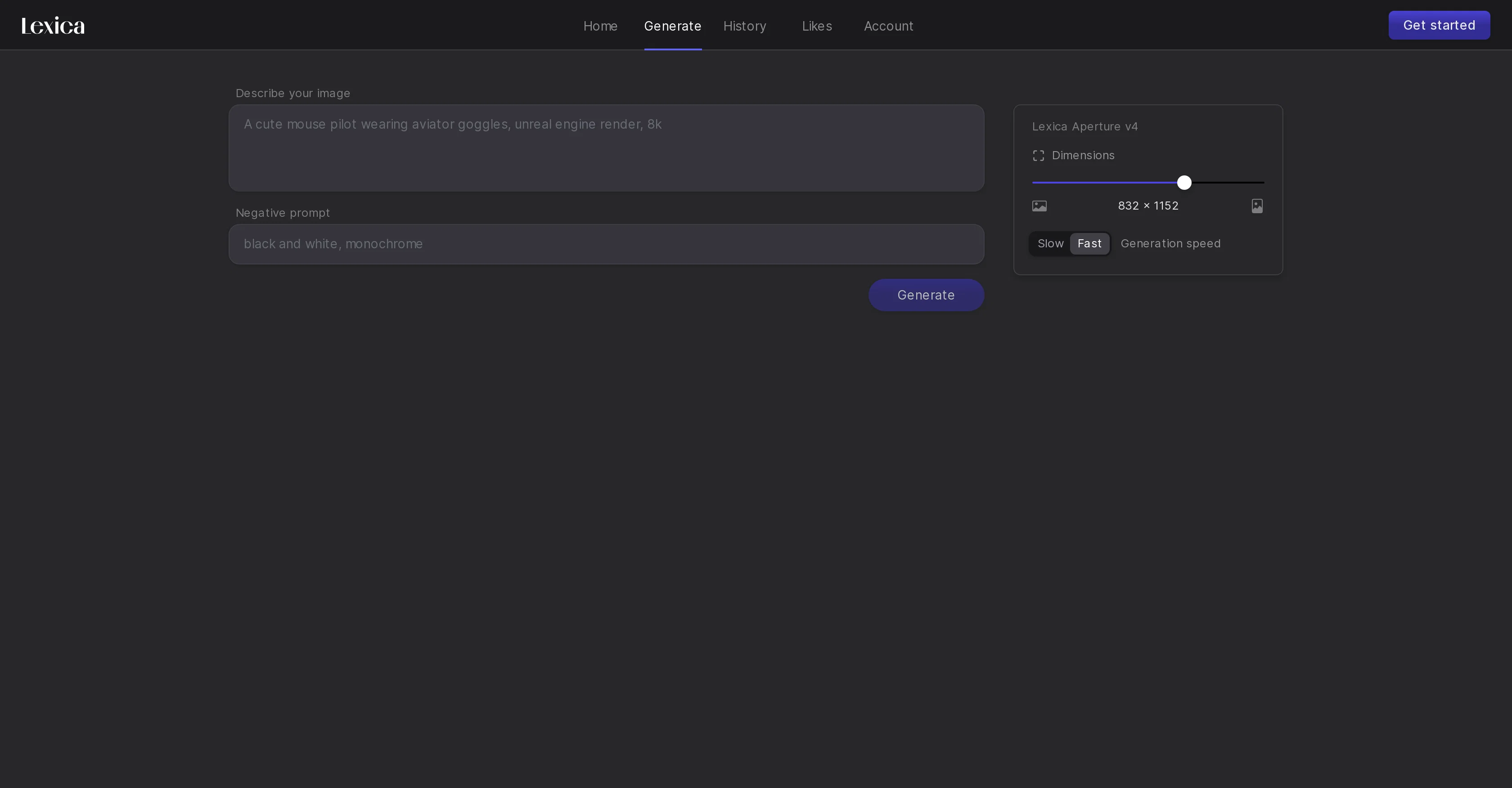
Lexica Aperture is an advanced AI tool that specializes in the creation of photorealistic images. It provides an intuitive interface that facilitates the easy generation, organization, and customization of high-quality digital images.
With Lexica Aperture, users can describe an image in natural language and the tool would respond by creating a picture that matches the description. This feature sets Lexica Aperture apart as it leverages AI's capacity for understanding language and delivering outputs in a completely different medium.
It also includes a 'Negative Prompt' functionality that aids users in refining image details by specifying aspects they want to avoid in the output. Lexica Aperture offers different generation speeds which allow the user to have control over the creation process.
The 'Home', 'Generate', 'History', 'Likes', and 'Account' functions avail a seamless user experience, enabling users to navigate through their image creation journey efficiently.
The 'History' and 'Likes' features enhance the usability by allowing users to revisit previously generated images and save their favourite outputs respectively.
Despite its advanced features, Lexica Aperture maintains an easy-to-use approach, accommodating both beginners and professional artists alike.
Best for
Short scenarios where Lexica Aperture tends to shine.
-
Generating images of specific subjects or styles based on text prompts (e.g., 'Redhead woman Hare in snow')
Best for Artists
-
Creating art in various styles (e.g., 'Anime art of Rei Ayanami')
Best for Designers
-
Designing visual content for various purposes (e.g., 'Create a simple trafficlight')
Best for Content creators
Example outputs 1
Sample generations and before/after results for Lexica Aperture.
Access & connections
Where you can use Lexica Aperture.
Platforms
Capabilities
What this tool accepts, produces, and is strongest at.
Input
- Text
Output
- Image
Pros & cons
Pros
- Generates photorealistic images
- Customizable image parameters
- Advanced settings feature
- Unique prompt capabilities
- High accuracy and precision
- Excellent for advertising/art
- Image generation through linguistics
- User-friendly interface design
Show 13 more
- Organizes images efficiently
- Natural language processing integration
- 'Negative Prompt' for detail refining
- Offers diverse generation speeds
- Easy navigation with functions
- 'History' feature for revisiting images
- 'Likes' feature for saving outputs
- Suitable for beginners and professionals
- Text addition to images
- Respective 'Home' and 'Account' functions
- Helps in digital visualization
- Generates visuals from words
- Allows image dimension choice
Cons
- Limited to photorealistic images
- No vector output options
- Lacks offline functionality
- Lack of detailed tutorials
- Can't input visual cues
- Unclear parameter definitions
- No multi-user functionality
- Doesn't support batch processing
Show 2 more
- No direct social media sharing
- Lacks seamless integration with design softwares
Compare alternatives
Similar tools in the catalog — with a clear reason to open each one.

Stockimg AI ✓
PaidGenerated images and text for design ease.
Why look Stronger for image work
Full comparison
BestPhotoAI ✓
FreemiumCreate amazing AI photos instantly
Why look Freemium alternative
Full comparison
CreativePixel ✓
FreemiumOut-create Your Competition in Minutes
Why look Freemium alternative
Full comparisonPeople also view
Tools that often show up alongside Lexica Aperture in collections and comparisons.
Stockimg AI ✓
PaidGenerated images and text for design ease.

Photo AI ✓
PaidCreate beautiful AI photos and videos of real people

Midjourney ✓
PaidExpand human imagination through AI-powered visuals.
CreativePixel ✓
FreemiumOut-create Your Competition in Minutes
BestPhotoAI ✓
FreemiumCreate amazing AI photos instantly

Nathan Tailors AI Suit Generator ✓
FreeDescribe your dream suit. We draw it, then build it.

LineArt ✓
Free TrialTurn one photo into a whole coloring book.

Line Drawing Converter ✓
Free TrialConvert photos into clean line drawings online.
Releases 1
FAQ 12
What is Lexica Aperture?
How does Lexica Aperture generate photorealistic images?
What kind of customizations can I make with Lexica Aperture?
What is the use of the advanced settings feature in Lexica Aperture?
How does the prompt input work in Lexica Aperture?
How quickly can Lexica Aperture produce images?
Can Lexica Aperture be used for commercial purposes?
What aspects of image creation can be controlled in Lexica Aperture?
How does the natural language processing feature work in Lexica Aperture?
What is the 'Negative Prompt' functionality in Lexica Aperture?
How can I refine image details using Lexica Aperture?
What are the different generation speeds offered by Lexica Aperture?
Related tools
Recommended

Playground AI ✓
FreemiumCreate art and visuals with AI, for free

Diffusion Art ✓
FreemiumFree, web-based Midjourney alternative - no Discord, no signup.

SD Telegram bot ✓
UnknownTransform text into art with 20 AI models.

Runway ✓
Free TrialAI-powered creative tools for content generation and editing

Bing Create ✓
FreeCreate stunning images with AI-powered search.

Stable Diffusion XL ✓
UnknownCreate stunning visuals with AI-powered image generation.