

Vivu.ai ✓
AI video co-director for effortless production
Free + from $37/mo
Verdict
A quick read before you dig into the full page.
- Best if
- AI video co-director for effortless production
- Skip if
- Storage limit on plans
- Pick this when
- Automatic rough cut compositions
Considering CapCut Online Creative Suite instead? Compare side by side
Overview
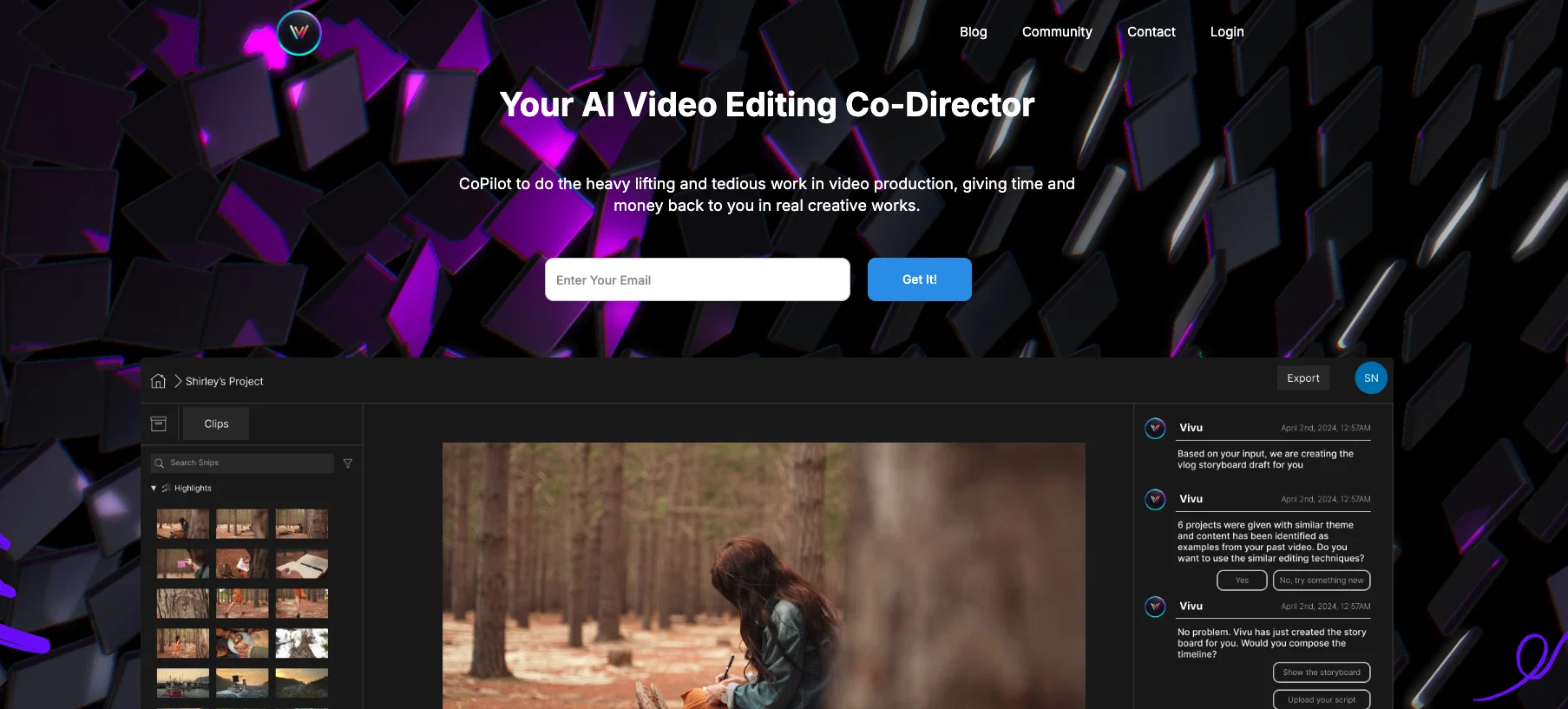
Vivu.ai is an AI-powered video editing application that aims to simplify the video production process. It serves as a co-director, handling the heavy lifting of tedious tasks in video creation, allowing users to focus on creative works.
Vivu.ai features a Rough Cuts Assistant that automatically develops rough cut compositions based on user needs. This AI-powered assistant can be customized to align with individual editing styles and also provides advice and stylistic suggestions.
Vivu.ai also offers effective video asset management through AI-powered search functionality that aids in the easy organization and retrieval of video assets.
Based on the user's project description, the tool's 'AI Cutter' selects relevant clips and assembles draft rough cuts for preview. Users can choose from three different rough cut variations and directly download them.
Vivu.ai's 'Production Assistant' offers useful tips on different editing styles and production advice, and suggests suitable audio tracks and post-production tools.
Additionally, all footage can be uploaded and managed in Vivu.ai's media library, with AI-driven segmentation into smaller clips, detailed metadata, object detection, and transcription capabilities.
Access & connections
Where you can use Vivu.ai.
Platforms
Capabilities
What this tool accepts, produces, and is strongest at.
Input
- Video
Output
- Video
Pros & cons
Pros
- Automatic rough cut compositions
- Offers stylistic suggestions
- Effective asset management
- Direct download of rough cuts
- Editing styles suggestions
- Audio tracks suggestions
- Managed media library
- Detailed metadata
Show 22 more
- Object detection
- Transcription capabilities
- One-click Import/Export to/from video tools
- Compatible with Adobe Premier Pro and CapCut
- Transforms user instructions into actions
- Provides production advice
- Trained on vast array of videos
- Personalizes learning from user actions
- Unlocks creative potentials
- Adaptable to changing market trends
- Streamlined video asset indexing
- Suggestions always hit right notes
- Saves time in video editing process
- Provides professional touches to videos
- Advanced text, video and audio analysis
- Desirable for all creators and editors
- Offers team collaboration on projects
- On Prem deployment
- Workflow integration
- Dedicated customer success team
- 80% time saved
- 60% Money saved
Cons
- Limited rough cut variations
- Doesn't mention 4k support
- Storage limit on plans
- Only three editing styles
- Possible watermark on videos
- Charges for additional time
- No specific plugin support
Compare alternatives
Similar tools in the catalog — with a clear reason to open each one.

CapCut Online Creative Suite ✓
FreemiumUnleash creativity with CapCut's all-in-one online suite
Why look Typically cheaper
Full comparison
ClipFinder ✓
FreemiumTurn hours of streams and VODs into viral clips automatically.
Why look Typically cheaper
Full comparison
Gling - AI Video Editing Software for YouTube ✓
FreemiumAI-powered video editing for YouTube creators.
Why look Typically cheaper
Full comparison
Captions ✓
PaidAI-powered creative studio for studio-grade videos.
Why look Typically cheaper
Full comparison
Video to Video AI ✓
PaidTransform videos using simple text commands.
Why look Typically cheaper
Full comparison
Releases 1
FAQ 12
How does Vivu.ai simplify the video production process?
How does the Rough Cuts Assistant feature of Vivu.ai work?
Is it possible to customize the Rough Cuts Assistant to align with my editing style?
What advice and stylistic suggestions does the AI-powered assistant offer?
How does the AI-powered search functionality aid with video asset management?
Could you explain the functionality of Vivu.ai's 'AI Cutter' tool?
Can I download rough cut variations directly from Vivu.ai?
Does Vivu.ai offer audio track suggestions?
Does Vivu.ai provide post-production tool recommendations?
How is the footage managed in Vivu.ai's media library?
Does Vivu.ai offer object detection and transcription capabilities in its videos?
Can Vivu.ai's Production Assistant offer production advice?
Related tools
Recommended

AutoClipper ✓
FreemiumWith AutoClipper you can produce clips at scale every day.

SuperCraft ✓
FreemiumDesign Physical Products with AI

Freepik Background Remover ✓
FreemiumErase the background from your images effortlessly.

PDFgen ✓
FreemiumGenerate PDFs from a prompt, template, HTML, or Markdown via API

LearningStudioAI ✓
Free TrialAI-powered authoring tool for effortless online course creation.

VenturusAI ✓
FreemiumBusiness idea analysis and reporting.