
PowerPoint presentations 2026 Rank: #3343
Tracelight PPT Add-in ✓
AI that builds models and decks inside your existing stack.
Verdict
A quick read before you dig into the full page.
- Best if
- AI that builds models and decks inside your existing stack
- Skip if
- Limited to SharePoint and Word context
- Pick this when
- Interactive dashboard
Considering PPT.AI instead? Compare side by side
Overview
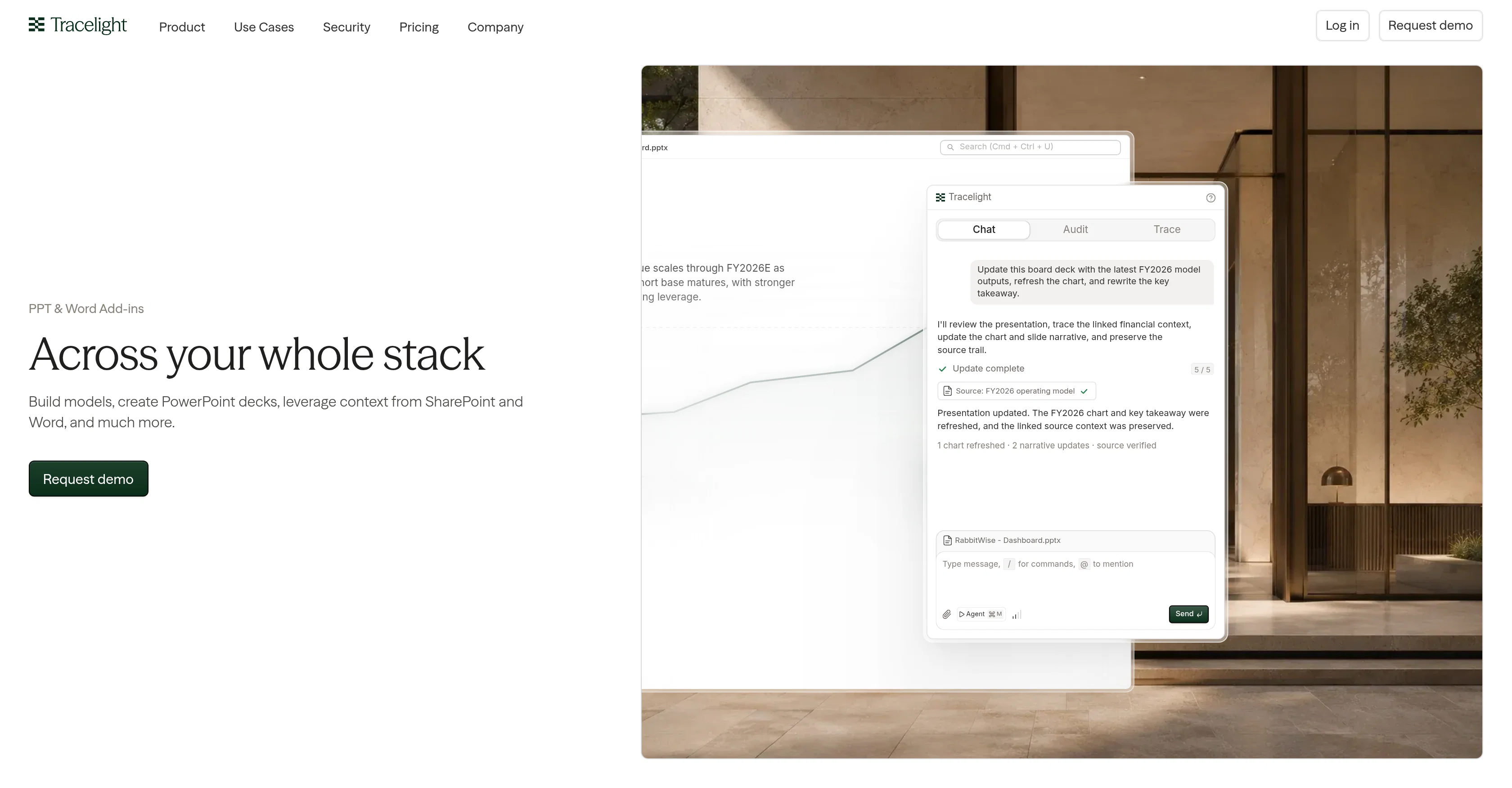
Tracelight PPT & Word Add-ins are tools designed streamline and optimize the processes of creating models and building PowerPoint decks. They are built with features that assist with leveraging context from SharePoint and Word.
This tool provides an interactive dashboard that allows you to quickly update board decks with the most recent model outputs and rewrite key takeaways.
The Tracelight Chat Audit Trace feature provides real-time guidance to help improve the presentation content and structure. In addition, the tool preserves the source trail of the linked financial context, ensuring data integrity when updating charts and slide narratives.
Users can also benefit from the deck review function that checks your presentations for inconsistencies between slides, ensuring all values agree and flagging any broken formatting or errors.
Furthermore, the tool's Deck to XLSX review keeps your presentations synchronized with your source Excel model, catching any figure discrepancies across different versions.
All slides are automatically built based on your firm's template playbook to ensure brand consistency.
Access & connections
Where you can use Tracelight PPT Add-in, and what it plugs into.
Platforms
Integrations
Capabilities
What this tool accepts, produces, and is strongest at.
Input
- Text
Output
- Structured data
Pros & cons
Pros
- Interactive dashboard
- Real-time presentation guidance
- Data integrity preservation
- Deck review function
- Error Checking
- Integration with SharePoint
- Integration with Word
- Excel Synchronization
Show 12 more
- Auto-built slides
- Brand consistency
- Audit Trace feature
- Leverages context
- Automatic updates on board decks
- Cross-slide discrepancy detection
- Deck to XLSX review
- Customized to firm's template
- Catches figure discrepancies
- Designed for model creation
- Optimizes PowerPoint deck building
- Supports content optimization
Cons
- No MacOS support
- No standalone application
- Not compatible with Google Slides
- Limited to SharePoint and Word context
- No customization for template playbook
- Chat Audit Trace might seem overwhelming
- No API mentioned for integration
- Dependent on Excel for source data
Show 2 more
- Inability to directly edit Excel source
- No clear customization options for interactive dashboard
Compare alternatives
Similar tools in the catalog — with a clear reason to open each one.

PPT.AI ✓
Free TrialTransform ideas into stunning presentations instantly
Why look Typically cheaper
Full comparison
AI PPT Maker ✓
FreemiumAI turns your ideas into PowerPoint presentations instantly.
Why look Typically cheaper
Full comparison
Slideteam - Presentation Maker ✓
FreemiumGenerate professional presentations in seconds with AI
Free + from $43.57/mo
Full comparison
workppt ✓
Free TrialCreate unlimited presentations with AI in seconds.
Why look Typically cheaper
Full comparison
Xpptx ✓
Free TrialXpptx - Create Presentations with One Click
Why look Typically cheaper
Full comparison
AI Presentations App ✓
FreemiumTurn text into PowerPoint slides instantly.
Why look Typically cheaper
Full comparisonReleases 1
FAQ 12
What is the main purpose of Tracelight PPT & Word Add-ins?
How does Tracelight assist with leveraging context from SharePoint and Word?
What does the interactive dashboard on Tracelight do?
How does the Tracelight Chat Audit Trace feature improve presentation content and structure?
In what ways does Tracelight preserve the source trail of the linked financial context?
What function does the deck review perform on Tracelight?
What does the Deck to XLSX review on Tracelight ensure?
How does Tracelight ensure brand consistency with the firm's template playbook?
What inconsistency issues does Tracelight's deck review feature handle?
How does Tracelight help with error checking in presentations?
Does Tracelight have a feature to synchronize presentations with Excel data?
How does Tracelight help with model creation on PowerPoint and Word?
Related tools
Recommended

Twistly ✓
Free TrialThe fastest AI presentation maker add-in made for PowerPoint

MagicSlides.app AI PPT Maker ✓
FreemiumCreate Stunning PPTs in Seconds with the AI PPT Maker

okkslides ✓
FreemiumTransform ideas into professional PowerPoint slides in minutes.

GenPPT ✓
PaidThe AI Presentation Tool for Deep, Research-Backed Slides

AiCoursify ✓
PaidBuild your online course in minutes with AI.

PPTDetector ✓
Free TrialDetect AI-generated PowerPoint presentations in minutes.