
Excel 2026 Rank: #3228
Tracelight Excel Add-in ✓
AI-powered financial modelling, inside Excel.
Verdict
A quick read before you dig into the full page.
- Best if
- AI-powered financial modelling, inside Excel
- Skip if
- Possibly complex for non-accountants
- Pick this when
- Efficient financial modelling workflow
Considering Excel Master instead? Compare side by side
Overview
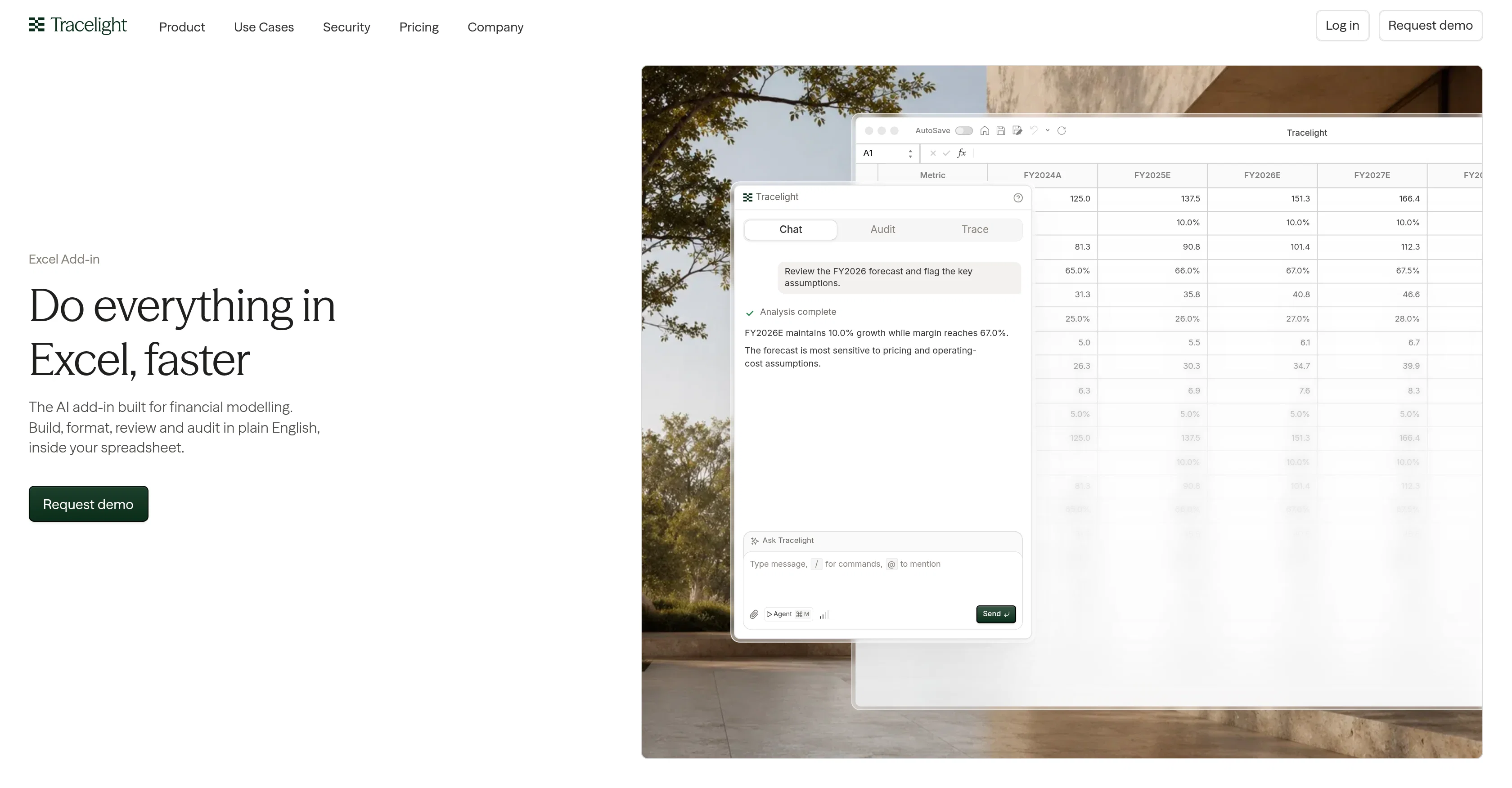
Tracelight is an AI-enhanced Excel add-in that is designed for a more efficient and intelligent financial modelling workflow. The tool enables users to build, format, review, and audit financial models within their spreadsheets, primarily catering to financial analysts and accountants.
Tracelight streamlines processes like reviewing forecasts, flagging key assumptions, and providing visual overviews of complete workbooks, no matter their complexity or size.
It includes functional features such as interpreting any formula in plain language, describing its elements by label rather than cell address, and mapping its logic via a flowchart.
The tool also aligns with users' defined formatting styles across models, ensuring consistency and predictability in financial document outputs, including colors, fonts, number formats, and conventions.
Furthermore, Tracelight offers provision for users to embed their team's methodology into the tool, which it then applies to all tasks. This feature facilitates the scalability of repeated work and the uniformity of approach when building financial models using distinct templates.
Apart from these, Tracelight possesses its own spreadsheet engine that performs background checks and verifies edits before changes reach the user's workbook.
Access & connections
Where you can use Tracelight Excel Add-in, and what it plugs into.
Platforms
Integrations
Capabilities
What this tool accepts, produces, and is strongest at.
Input
- Structured data
Output
- Structured data
Pros & cons
Pros
- Efficient financial modelling workflow
- Streamlines forecast reviews
- Flags key assumptions
- Provides visual overviews
- Interprets formulas in plain language
- Describes elements by label
- Maps formula logic via flowchart
- Aligns with user's formatting styles
Show 44 more
- Embeds team's methodology
- Scalability of repeated work
- Uniformity of approach with templates
- Own spreadsheet engine
- Verifies edits in background
- Handles workbooks of any size
- Supports excel add-in
- Ensures consistency in financial documents
- Effective for financial analysts and accountants
- Convenient for auditing financial models
- Offers mass formatting
- Facilitates business modelling
- Functional features for data mapping
- Checkbox for forecast review
- Produces predictable financial document outputs
- Supports team collaboration in financial modelling
- Excel spreadsheet management
- Workflow management
- Improves trade finance processes
- Supports accounting automation
- Excel Add-in efficiency
- Assures data audit
- PDF citations for document data
- Uploads a PDF
- Extracts figures into structured tables
- Offers workspace for complex models
- Holds compressed picture of whole workbook
- Tracks every edit made
- Allows review, approval or undo actions
- Reviews changelog
- Processes financial document formatting
- Handles financial data processing
- Allows data review
- Ensures verified edits
- Matches with firm's formatting style
- Explains formulas in plain language
- Follows methodology for all tasks
- Allows spreadsheet comparison
- Performs background checks before changes
- Ability to build COA mapping table
- Complete three-statement model
- Features company valuation
- Dealt schedule model
- Handles bottom-up model review
Cons
- Excel dependency
- Limited to financial models
- Requires specific formatting styles
- Not designed for real-time collaboration
- Lacks multi-language support
- No mobile functionality
- Possibly complex for non-accountants
- Non-transferable skillset to other software
Show 2 more
- Dependent on user's methodology definition
- Time-consuming initial setup
Compare alternatives
Similar tools in the catalog — with a clear reason to open each one.

Excel Master ✓
Free TrialExcel's AI assistant for expert formulas and VBA.
Why look Typically cheaper
Full comparison
Macabacus ✓
Free TrialAI-Powered Workflows for Faster Financial Modeling and Deck Creation
Free + from $200/yr
Full comparison
RowSpeak ✓
FreemiumAI data analysis for messy spreadsheets and business files
Why look Typically cheaper
Full comparison
FreeOCR.AI ✓
FreemiumConvert document images into editable Word, Excel, and structured data.
Why look Typically cheaper
Full comparison
UAE SmartTaxReceipt ✓
Free TrialTurn scanned or normal PDF invoices into UAE FTA-ready Excel in minutes.
Why look Typically cheaper
Full comparison
2markdown ✓
FreemiumConvert anything to Markdown, instantly.
Why look Typically cheaper
Full comparisonReleases 1
FAQ 12
How does Tracelight improve financial modelling workflow in Excel?
Can Tracelight handle complex and large workbooks?
How does Tracelight interpret formula in plain language?
Can Tracelight maintain consistency in financial document formatting?
Can Tracelight embed team's methodology for scalability and uniformity?
What primary features does Tracelight offer for financial analysts?
How does the Spreadsheet Engine in Tracelight improve data integrity?
Can Tracelight identify and flag key assumptions in financial models?
Can Tracelight provide a detailed visual overview of my financial models?
What types of financial documents can Tracelight handle?
How does Tracelight ensure predictability in document outputs?
Does Tracelight include any features for team collaboration?
Related tools
Recommended

AI Excel Translator ✓
FreemiumTranslate Excel and CSV Files Instantly with AI

MagicSlides.app AI PPT Maker ✓
FreemiumCreate Stunning PPTs in Seconds with the AI PPT Maker

Anathema AI ✓
FreemiumConviction-driven intelligence

Anomaly AI ✓
FreemiumAI data analysis workspace for business datasets and reports.

Affint ✓
Free TrialThe First AI-Native Workspace

GenPPT ✓
PaidThe AI Presentation Tool for Deep, Research-Backed Slides