

Accounting vv1.0
Kick ✓
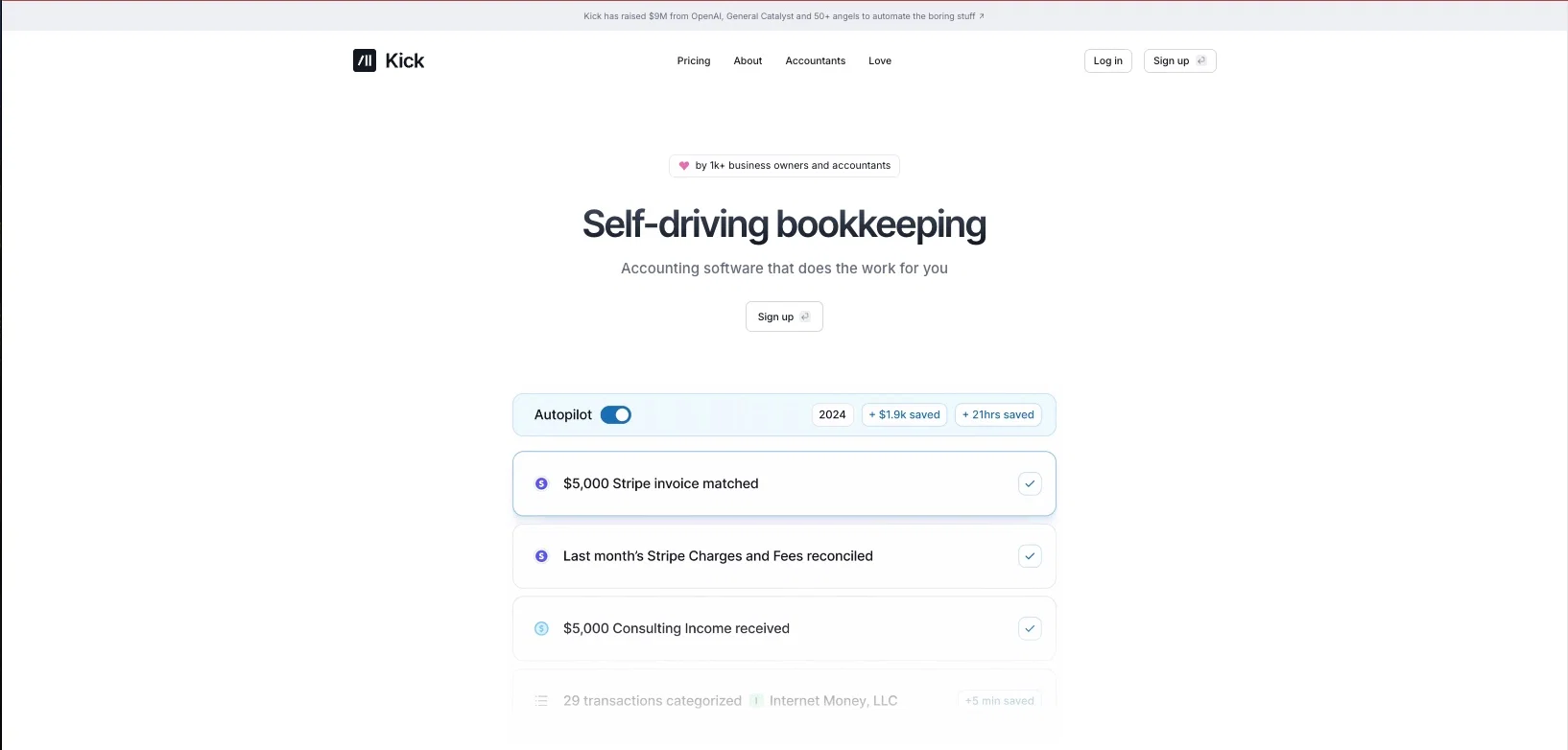
Accounting software that does the work for you
Free + from $35/mo
Verdict
A quick read before you dig into the full page.
- Best if
- Accounting software that does the work for you
- Skip if
- You need enterprise SLAs or a fully managed team plan right away
- Pick this when
- Freemium · Free + from $35/mo
Considering Jupid instead? Compare side by side
Overview



Backed by OpenAI, Kick is the tool of choice for the modern Entrepreneur or Accountant who wants to automate their business life.
Kick is free to use and pays for itself.
1. Actions
Ever wish you had an assistant who was available 24/7 to handle your accounting for you, while still staying in full control? Introducing actions.
Here's how Actions work:
Personalization: Kick learns about your business by categorizing transactions and creating account-specific rules.
Savings Actions: Kick finds write-offs from your personal accounts such as Travel, Meals, Cell Phone and Home Office leading to $4k in average annual savings.
Tax Actions: Kick proactively stays on top of making sure your financials are ready for your Accountant
2.Cash Flow
Creating a Profit & Loss statement can be a hassle, whether you’re using QuickBooks, Excel, or Bench. Enter Cash Flow drill-downs. Because Kick categorizes you transactions in real-time and a human review, you’ll finally get an accurate view of revenue and expenses.
3. Auto-match receipts
More often than not, managing your receipts is a losing battle. They either end up stuffed in a shoebox or you have to meticulously log them into something like Expensify. Worst case, you’re not tracking receipts at all which is risky. Because Kick auto-matches receipts, all you have to do is text, email or upload your receipts and Kick will automatically match them to the correct transactions.
4. CSV importer
Uploading CSVs into accounting software has always been tedious. Columns, dates, and amounts all have to to be perfectly formatted, aggregated and then uploaded. With Kick, you can now simply drop in a CSV in any format and have it effortlessly transformed into financial statements. PDFs, JPGs and more formats coming soon.
Best for
Short scenarios where Kick tends to shine.
-
Accounting software that does the work for you
Example outputs 1
Sample generations and before/after results for Kick.
Access & connections
Where you can use Kick, and what it plugs into.
Platforms
Integrations
Capabilities
What this tool accepts, produces, and is strongest at.
Highlights
- Agents
- Use code TAAFT
- 20% OFF
Supported features
- Agents
- Finance & Accounting
Compare alternatives
Similar tools in the catalog — with a clear reason to open each one.

Jupid ✓
FreemiumAI reads your bank. Categorizes expenses. Files your taxes.
Why look Higher community rating
Full comparison
Smart Clerk ✓
FreemiumAI-powered bookkeeping from bank statements and online banking
Why look Typically cheaper
Full comparison
Truewind ✓
UnknownAI-powered bookkeeping for startup peace of mind
Why look Higher community rating
Full comparison
Ledger IQ ✓
FreemiumAI-Powered Bookkeeping for the Modern Business.
Why look Typically cheaper
Full comparison
Beancount.io ✓
FreemiumWrite your finances like code with AI insights.
Why look Typically cheaper
Full comparison
Booke AI ✓
PaidAI-powered bookkeeping automation in one app
Why look Typically cheaper
Full comparisonPeople also view
Tools that often show up alongside Kick in collections and comparisons.
Smart Clerk ✓
FreemiumAI-powered bookkeeping from bank statements and online banking

VenturusAI ✓
FreemiumBusiness idea analysis and reporting.
ReceiptiX ✓
FreemiumExpense tracking made simple
Truewind ✓
UnknownAI-powered bookkeeping for startup peace of mind
Jupid ✓
FreemiumAI reads your bank. Categorizes expenses. Files your taxes.
Booke AI ✓
PaidAI-powered bookkeeping automation in one app

Marketing Assistant (Elsa AI) ✓
FreemiumDefine your ideal customers and craft a winning marketing strategy with Elsa.
Beancount.io ✓
FreemiumWrite your finances like code with AI insights.
Releases 2
Kick back, your books are handled! - Official Launch of Kick
Beta - Kick Accountant Program
Beta - Kick Bookkeeper Program
Imported reviews 12
it works okay, but I don't think it saves as much time as the reviews suggest. I still spent quite a while checking everything. I end up reviewing almost everything myself, it's definitely not a 'set it and forget it' solution. You still need to know what you're doing.
tried kick for tax season and it actually automated most of the tedious stuff. categorizes expenses pretty well. still doublecheck everything before filing but it saves me hours.
When it will be available in Brazil?
Good and best to use....
it is great app, and very useful.
Is this tool available for Indian accounting system and if yes, how much it cost to us in INR currency
good and best to use
only $25k in expenses? So our business has to be leass than $200k in revenues? Is this for gig workers and hobbyists or actual businesses?
I like it a lot
It is a hard work
The real-time analysis is a game-changer.
This team took the time to understand the industry, problem and its users and designed a perfectly engineered solution. Kudos.
FAQ 11
What exactly is Kick?
What does Kick cost?
Kick is priced competitively and as you scale, your cost per categorization decreases for every new dollar we save you. This means you can you connect all your accounts and businesses, without having to worry.
How does Kick work?
We categorize transactions - Get your books handled for less audit risk, more savings and CPA-approved accuracy
Get a real-time P&L - Get confident about what's driving your profitability, and eliminate unnecessary expenses
Only pay when you save - Get your first $5k in savings credits free or upgrade to handle your last years books
Do I need an LLC in order to sign up?
[email protected]
and we'll refer you to the right place.
Can I open an account if I'm not located in the U.S.?
Can I trust my data with Kick?
[email protected]
for any questions.
How do I close my Kick account?
[email protected]
.
What’s included in my 30-day free trial?
How does Kick’s pricing work?
$0 - $25k annual business expenses: Kick is completely free
$25k - $250k annual business expenses: Enjoy a 30-day trial of our Basic or Plus plan. Cancel anytime during your trial. After your trial ends, you’ll be charged for full-year bookkeeping.
$250k+ annual business expenses: Book a call with our team to get a discount tailored to your industry
Does Kick offer tax services?
[email protected]
for a list of recommended tax professionals.
Can I delete my Kick account?
[email protected]
.
Related tools
Recommended

Marblism ✓
FreemiumAI Employees who Work for Your Business

Mindsmith ✓
FreemiumPlatform for building and sharing eLearning content

PrometAI ✓
FreemiumTurn ideas into viable reality with AI business plan generator.
VenturusAI ✓
FreemiumBusiness idea analysis and reporting.

Automateed ✓
Free TrialCreate eBooks effortlessly with Automateed, the AI-powered writing tool.

TurboScribe ✓
Freemium🎯 3 free transcripts every day. 🔥 Unlimited transcription starting at $10/mo.