

Slidely AI (backed by YC) ✓
Build professional, on-brand decks — 10x faster. Inside PowerPoint or online.
Trial; then from $16/mo
Verdict
A quick read before you dig into the full page.
- Best if
- Build professional, on-brand decks — 10x faster. Inside PowerPoint or online
- Skip if
- Integrates only with PowerPoint
- Pick this when
- Available as a PowerPoint add-in
Considering PPT.AI instead? Compare side by side
Overview


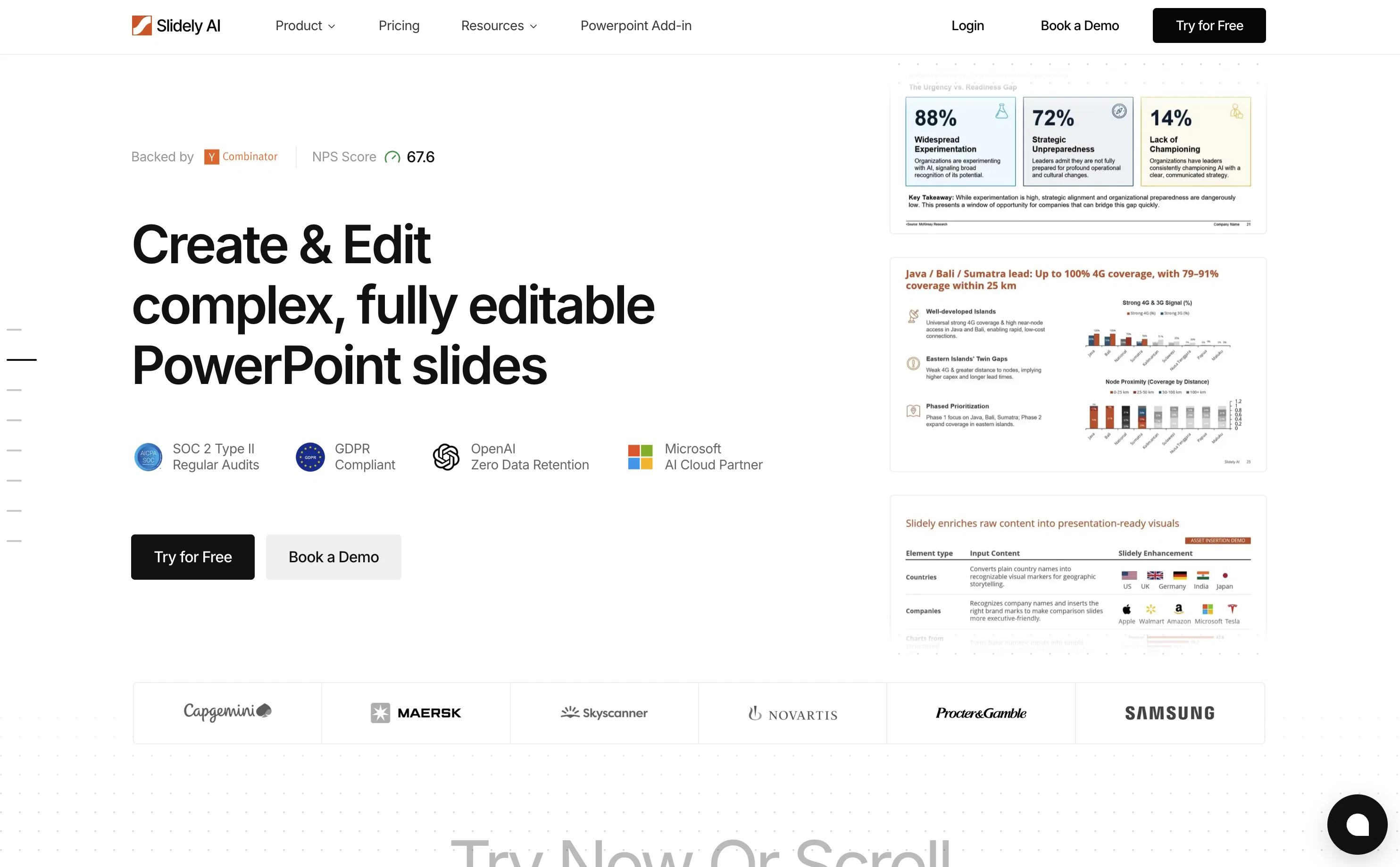
Slidely is designed to significantly accelerate the process of creating business decks. Tailored to fit your company's specific template, this tool allows you to generate and edit engaging slides (also directly within PowerPoint), optimizing speed and efficiency substantially.
Slidely AI facilitates the creation of new presentations with a simple idea description and selection of context, such as Retail Turnaround, Logistics Plan, FinTech Analysis, or AI Initiative. Additionally, it provides the functionality of importing your existing PowerPoint files for working on revisions.
Accompanied by a suite of templates, it supports various industries and specialties like consulting, finance, and investment, making it a versatile tool for professional presentations.
It yields high-quality business slides, financial reports & analysis, and pitch decks & investor slides in a straightforward and user-friendly manner.
Being a product of Tersho, Inc., and backed by Y Combinator, Slidely AI also ensures a high level of security and robust support system.
Best for
Short scenarios where Slidely AI (backed by YC) tends to shine.
-
Build professional, on-brand decks — 10x faster. Inside PowerPoint or online.
Example outputs 1
Sample generations and before/after results for Slidely AI (backed by YC).
Access & connections
Where you can use Slidely AI (backed by YC).
Platforms
Capabilities
What this tool accepts, produces, and is strongest at.
Input
- API
- Tabular
- Image
- Text
Output
- Tabular
- API
- Text
- Image
Highlights
- Local
Supported features
- Runs Locally
- Slides
Pros & cons
Pros
- Available as a PowerPoint add-in
- Option to upgrade existing PowerPoints
- Ability to upload custom templates
- Holistic - helps with storyline, data, design and formatting
- Company-specific branding alignment
- Generates high-quality slides
- User-friendly interface
- Secure data handling - SOC 2 Type II, Microsoft and OpenAI Partner
Show 4 more
- Suitable for consulting, finance, investment
- Backed by Y Combinator
- Robust support - dedicated channels, live chat, support center
- Allows slide editing within PowerPoint
Cons
- Integrates only with PowerPoint
- Restricted offline functionality for PowerPoint add-in
- PowerPoint add-in not available for Mac
- Cannot directly present presentation from Slidely
- AI-generated content might be inaccurate
Compare alternatives
Similar tools in the catalog — with a clear reason to open each one.

PPT.AI ✓
Free TrialTransform ideas into stunning presentations instantly
Why look Typically cheaper
Full comparison
AI PPT Maker ✓
FreemiumAI turns your ideas into PowerPoint presentations instantly.
Why look Typically cheaper
Full comparison
Slideteam - Presentation Maker ✓
FreemiumGenerate professional presentations in seconds with AI
Free + from $43.57/mo
Full comparison
workppt ✓
Free TrialCreate unlimited presentations with AI in seconds.
Why look Typically cheaper
Full comparison
Xpptx ✓
Free TrialXpptx - Create Presentations with One Click
Why look Typically cheaper
Full comparison
AI Presentations App ✓
FreemiumTurn text into PowerPoint slides instantly.
Why look Typically cheaper
Full comparisonPeople also view
Tools that often show up alongside Slidely AI (backed by YC) in collections and comparisons.
Xpptx ✓
Free TrialXpptx - Create Presentations with One Click
workppt ✓
Free TrialCreate unlimited presentations with AI in seconds.
Slideteam - Presentation Maker ✓
FreemiumGenerate professional presentations in seconds with AI
PPT.AI ✓
Free TrialTransform ideas into stunning presentations instantly
AI Presentations App ✓
FreemiumTurn text into PowerPoint slides instantly.
AI PPT Maker ✓
FreemiumAI turns your ideas into PowerPoint presentations instantly.

Zetane ✓
Free TrialCompress document work from days to minutes

Tome App AI ✓
FreemiumCreate professional presentations in minutes with AI.
Releases 1
Imported reviews 1
I think Slidely is the only tool that has worked for me when creating my client presentations. The presentations aren't web pages or images like the other tools but actual PowerPoint slides which I really like.
FAQ 12
What is Slidely AI?
🛠️ 1
tool
wrote:
Slidely AI is an AI-assisted presentation assistant, available as a PowerPoint add-in and a web-app. It is designed to facilitate the creation and modification of business-oriented presentation slides. The tool enables users to generate brand-consistent presentations with ease and efficiency.
How does Slidely AI assist with PowerPoint presentations?
🛠️ 1
tool
wrote:
Slidely AI assists with PowerPoint presentations by providing AI assistance. Users can generate presentations from scratch by simply describing their presentation idea to the tool. Slidely AI then helps them brainstorm the storyline, create the data from any uploaded documents (or search online), and then create slides in the users' uploaded theme. Alternatively, they have the option to improve existing PowerPoint presentations using Slidely AI's text to edit feature called ChatPPT.
Who backs Slidely AI?
How does Slidely AI integrate into PowerPoint?
🛠️ 1
tool
wrote:
Slidely AI integrates directly into PowerPoint as an add-in, providing AI-powered tools within the PowerPoint interface itself.
With features like Excel Linking, 1-click table styling, alignment module, and slide library, the add-in streamlines business presentations by allowing users to create or modify slides without leaving PowerPoint.
Can I create a presentation from scratch with Slidely AI? If so, how?
🛠️ 1
tool
wrote:
Yes, you can create a presentation from scratch with Slidely AI.
Slidely AI offers a professional workflow to create presentations:
1. Storyline: you enter 2-3 sentences about what you want to create, with the option to upload supporting documents (pdf, pptx, docx, xlsx). Then, Slidely AI brainstorms the narrative and storyline of the presentation.
2. Data: Once you are satisfied, Slidely uses your uploaded documents and searches the internet for finding the best data for each slide, citing its sources.
3. Design: Once you are satisfied with the data, you can upload or choose your template, and Slidely will generate your slides in the chosen template.
What themes does Slidely AI offer for presentation creation?
🛠️ 1
tool
wrote:
Slidely AI offers a few preset themes for convenience, but the real power of Slidely AI comes out with custom themes. Slidely can use any of your past presentations as a theme, using colors, fonts and layouts from it. Moreover, the AI even learns how you use those layouts.
Can I upgrade existing PowerPoint presentations with Slidely AI?
🛠️ 1
tool
wrote:
Yes, you can upgrade your existing PowerPoints with Slidely AI. The tool allows you to upload your existing PowerPoint file and use features like talk-to-edit, inbuilt templates, visual revamp and alignment features to improve your presentations.
Does Slidely AI align with company's branding template?
🛠️ 1
tool
wrote:
Yes, Slidely AI ensures alignment with a company's branding template, thus providing consistency across all your presentations. You can upload even a single presentation, and Slidely will adhere to your layouts, fonts, colors and even your way of making slides.
What type of AI algorithms does Slidely AI use?
🛠️ 1
tool
wrote:
Slidely AI uses an advanced agentic AI architecture which allows it to create new slides, edit existing slides, or even review and answer questions about your slides — all while keeping your slides on-brand.
A unique aspect of Slidely is that it creates PowerPoints like humans, placing each shape at a time instead of using templated slides.
Can I generate presentations from scratch with Slidely AI?
What type of templates does Slidely AI provide for specific professional fields?
🛠️ 1
tool
wrote:
Slidely AI provides thousands of templates that are tailor-made for specific professional fields such as Consulting, Finance, and Investment.
Each template has unique focus areas such as professional consulting slides, financial reports and analysis, and pitch decks or investor slides.
How does Slidely AI ensure alignment with a company's branding template?
Related tools
Recommended

Thea ✓
FreemiumAI study tools to master material, not just memorize it.

Notis ✓
Free TrialThe first WhatsApp assistant that runs on your ChatGPT and Claude subscriptions

Tendem ✓
PaidAI + Human Agent to get tasks done

ChatGPT ✓
FreemiumAsk anything, create anything, and move from idea to action.

TheLibrarian.io ✓
Free TrialYour WhatsApp AI assistant for instant productivity.

Automateed ✓
Free TrialCreate eBooks effortlessly with Automateed, the AI-powered writing tool.