

Otio ✓
Fastest Way To Read & Write - Your Research Focused AI Workspace
Free + from $10/mo
Verdict
A quick read before you dig into the full page.
- Best if
- You are researchers and need: Researching a topic by collecting relevant articles and videos, then using Otio to summarize and extract key ideas for writing a…
- Skip if
- No offline access
- Pick this when
- Free tier option
Considering Vicena instead? Compare side by side
Overview
How it works?
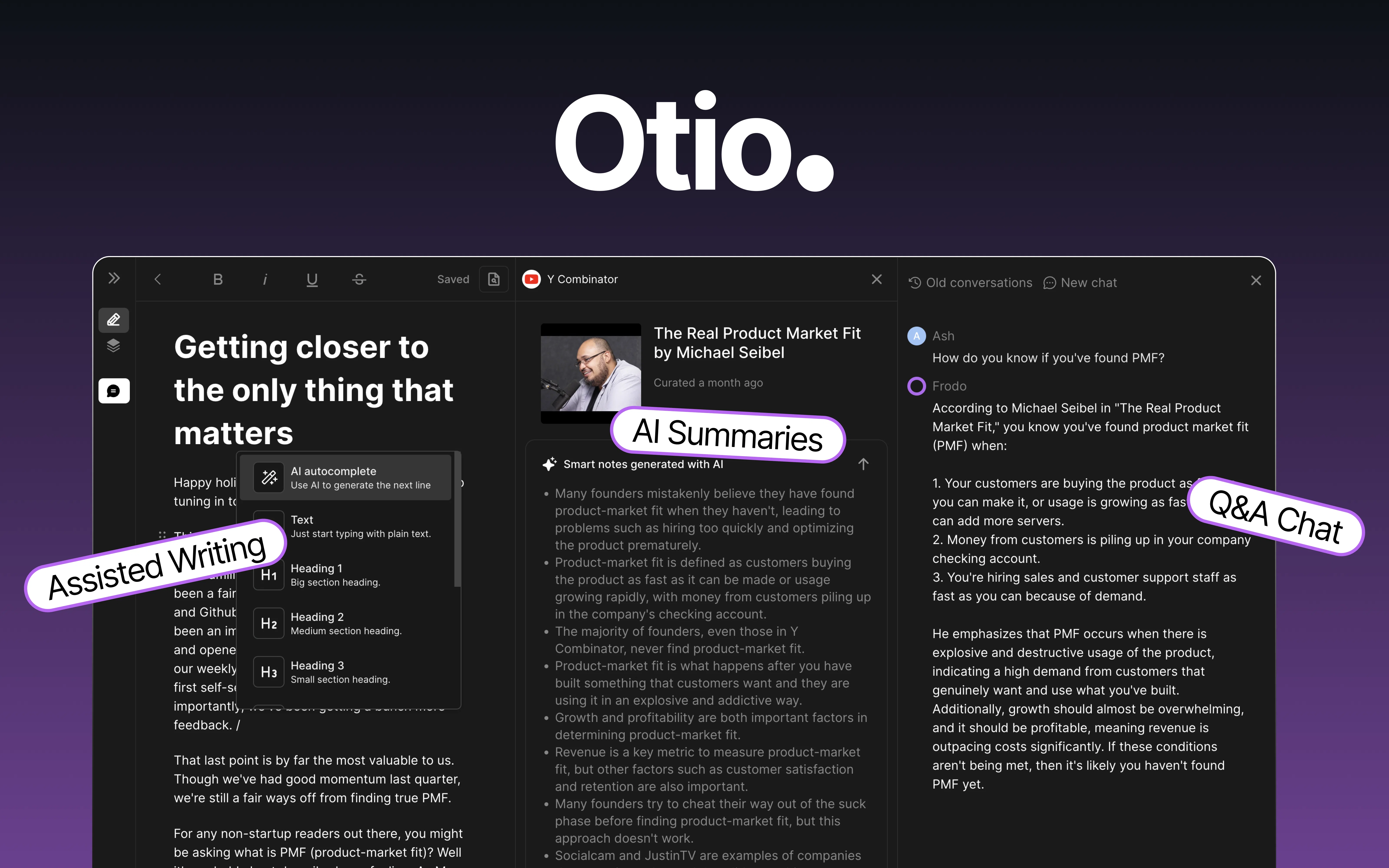
Collect anything: Collect anything from PDFs, to web pages, to Youtube videos.
Extract Insights: Otio reads your stuff, takes notes for you, and lets you ask follow up questions to get to the key ideas - fast. Whether its simple summaries or details comparisons - Otio was custom built for research.
AI-Editing & Writing: Need to write something? Otio helps you outline, draft & edit your work in an AI powered editor that is grounded in your knowledge. Don’t settle for generic ChatGPT generated text.
Otio also gives you direct, unlimited access to GPT-4, Llama 3, Claude Opus, Mistral, Perplexity models & more so you can customize your experience and benefit from bleeding-edge AI.
Who uses Otio?
Researchers at tier one companies like Deepmind, Google & JP Morgan.
Students and academics making sense of big articles or planning essays/theses.
Anyone who wants to remember key points from videos or podcasts
Try Otio Now!
Ready to boost you work and study? Click below
Best for
Short scenarios where Otio tends to shine.
-
Researching a topic by collecting relevant articles and videos, then using Otio to summarize and extract key ideas for writing a report.
Best for Researchers
-
Drafting a blog post by gathering source material and using Otio's AI to create an outline and initial draft.
Best for Students
Example outputs 1
Sample generations and before/after results for Otio.
Access & connections
Where you can use Otio, and what it plugs into.
Platforms
Integrations
Pros & cons
Pros
- Free tier option
- Multilingual compatibility
- Effortless content organization
- Imports Twitter, Pocket bookmarks
- Content resurfacing
- Full text search
- Upload PDFs as big as 10M
- Supports various content types
Show 8 more
- Feedback and feature request option
- Automatic tagging of content
- Option to edit, remove or add tag manually
- Organise content in Folders
- Available on multiple browsers
- Use AI with the internet
- Multiple AI models to choose from
- 50% discount for academics and students (join community for more info)
Cons
- No offline access
- No mobile app version
- No safari or Firefox extensions
- No integration with Readwise
- Not accessible via API
Compare alternatives
Similar tools in the catalog — with a clear reason to open each one.

Vicena ✓
FreemiumAI for real scientific research (Vibe Research)
Why look Typically cheaper
Full comparison
Paperguide ✓
FreemiumAI Research Platform for scientific research workflows
Free + from $12/mo
Full comparison
Biolysis ✓
UnknownAI-powered lab assistant for chemists and microbiologists.
No pricing
Full comparisonPeople also view
Tools that often show up alongside Otio in collections and comparisons.
Vicena ✓
FreemiumAI for real scientific research (Vibe Research)
Paperguide ✓
FreemiumAI Research Platform for scientific research workflows

BioSkepsis ✓
FreemiumAI research assistant with cited answers from 40M+ papers
Biolysis ✓
UnknownAI-powered lab assistant for chemists and microbiologists.

Benchling AI ✓
UnknownAI for every scientist. Breakthroughs for all.

SciFig ✓
FreemiumTurn text into publication-ready scientific figures.

PaperFig ✓
FreemiumAI scientific figures with editable labels, built-in OCR, and 4K

PaperClaw ✓
Free TrialMake publication-ready scientific figures with AI.
Releases 1
Imported reviews 4
This is great :)
Otio.ai was a lifesaver! I had an exam with only one day to study the entire book. I asked Otio to summarize each section for me, and thanks to her, I passed the exam! Otio, you saved me :))
I would highly recommend for researches and students. useful to manage your articles and use AI to get the key points.
I am an ai researcher. I used Frontdoor to generate summaries and ask follow-up questions to prepare for a meeting and it absolutely delivered 🔥🔥🔥
The workflow was so much more user-friendly than trying to accomplish the same thing with ChatGPT/Bard.
FAQ 12
What is Otio?
What types of content can I save with Otio?
How does Otio handle Twitter and Pocket bookmarks?
What is the advantage of AI-generated summaries and notes in Otio?
Is Otio available for all browsers?
Do I have to pay to use Otio?
How can I provide feedback or request a feature from Otio?
How does Otio enhance my internet browsing experience?
How does the automatic tagging feature in Otio work?
Can I import my existing bookmarks to Otio?
Why is Otio referred to as an AI knowledge assistant?
Who are the early supporters of Otio?
Related tools
Recommended

VenturusAI ✓
FreemiumBusiness idea analysis and reporting.

IllumiChat ✓
FreemiumFrom Ticket Backlog to Instant Answers Powered by AI

Stratup.ai ✓
FreemiumInnovative idea generation for businesses.

LearningStudioAI ✓
Free TrialAI-powered authoring tool for effortless online course creation.

Stunning ✓
PaidBuild AI-powered websites in seconds

Flowpoint ✓
FreemiumWebsite Analytics Reports with AI Agents