

Notta Note Taker ✓
AI note taker that transcribes and summarizes meetings.
Free + from $13.49/mo
Verdict
A quick read before you dig into the full page.
- Best if
- AI note taker that transcribes and summarizes meetings
- Skip if
- Learning curve for non-tech users
- Pick this when
- Transcribes in 58 languages
Considering Interpret AI instead? Compare side by side
Overview
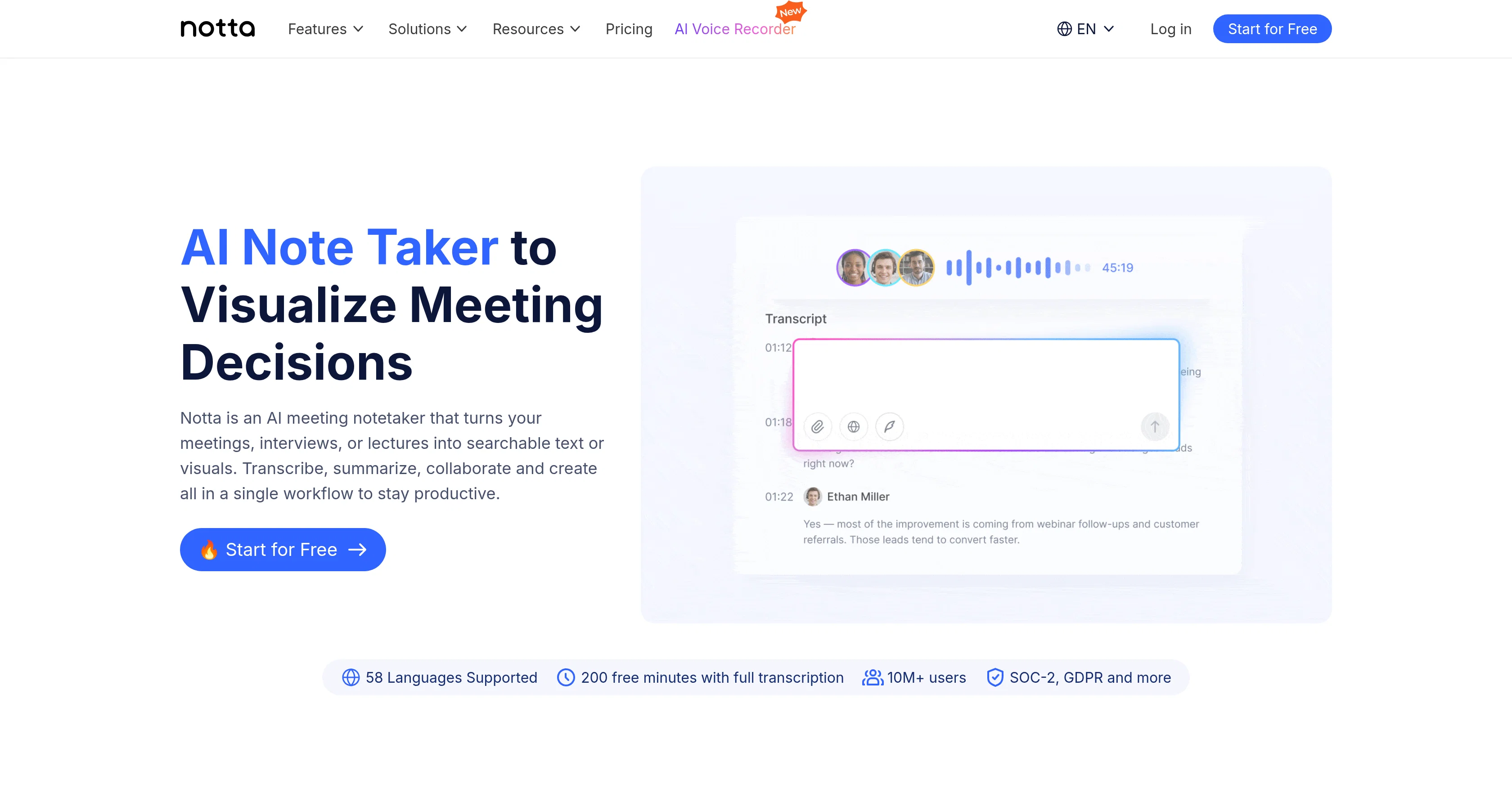
Notta is an AI-based platform designed to assist in capturing, transcribing, and summarizing the content of meetings, interviews, or lectures. It provides a variety of features including AI transcription that captures audio and video and transcribes them into text in 58 languages, automatic translation to empower conversations, and bilingual transcription for smoother communication in bilingual meetings.
Furthermore, Notta provides a feature to extract key insights and possible follow-up actions from your meetings a beneficial tool for corporate strategizing.
Notta also offers a meeting recording feature that enables high-quality audio and video capturing of online meetings, as well as a meeting scheduler to simplify meeting scheduling and sync events to your calendar for better organization.
Impressively, Notta can turn your content into infographics or slides with AI, fostering better understanding and simplified representation of information.
This platform integrates seamlessly with many popular professional tools, streamlining your workflow and enhancing productivity. Notta's AI-driven platform is compatible with virtual or offline meetings and supports transcriptions and translations in 58 different languages, making it a versatile tool for global interactions.
It is built to support various professional roles including executives, sales and customer success teams, consultants, and educators, providing tailored value to each.
Access & connections
Where you can use Notta Note Taker.
Platforms
Capabilities
What this tool accepts, produces, and is strongest at.
Input
- Text
- Video
- Audio
Output
- Text
- Image
Supported features
- Meeting Intelligence
- Transcription
Pros & cons
Pros
- Transcribes in 58 languages
- Automatic translation feature
- Bilingual transcription
- Extracts key insights
- Identifies follow-up actions
- Meeting recording feature
- Calendar syncing for scheduling
- Turns content into infographics
Show 34 more
- Turns content into slides
- Seamlessly integrates with professional tools
- Supports virtual and offline meetings
- Tailored solutions for different roles
- Supports executives, sales and customer success teams
- Supports consultants and educators
- Transcribes and summarizes meetings
- Automated note taking
- Enhances productivity
- Visualizes meeting decisions
- Turns meetings into searchable text
- Generates ready-to-be-shared PPT files
- Creates structured visuals quickly
- Searchable across meetings for insights
- Review board meetings visually
- Summarizes calls into buying criteria
- Transforms interviews into PowerPoint and Infographics
- Analyzes conversations at scale
- Supports in-person and online meeting
- Supports uploaded file transcriptions
- Generates visual framework for lectures
- Integrated with Google Calendar, Zoom, Slack and more
- Generates instant deliverables
- Enterprise-grade security
- No setup required
- Exports to Google Drive, Notion, Salesforce
- Generates content in English, Japanese, Chinese, Spanish, German
- Offers free Plan
- High transcription accuracy
- Instant insightful infographics generation
- No credit card for free trial
- Supports transcription in 58 languages
- 98%+ transcription accuracy
- Mobile app and Chrome extension available
Cons
- Limited languages for content generation
- Requires internet for virtual meetings
- Transcription errors possible
- No offline mode mentioned
- Possible integration compatibility issues
- May not suit individual users
- Learning curve for non-tech users
- Dependence on meeting recording quality
Show 2 more
- Limited transcription minutes on free plan
- Monthly or annual payments required
Compare alternatives
Similar tools in the catalog — with a clear reason to open each one.

Interpret AI ✓
Free TrialAll-in-one AI notetaker and translator
Why look Typically cheaper
Full comparison
talat ✓
Free TrialThe private meeting notes app with on-device AI.
Why look More privacy-focused
Full comparison
Recal ✓
FreemiumYour AI-powered second brain that captures everything important.
Free + from $14/mo
Full comparison
Dicte.ai ✓
FreemiumAI-powered meeting transcription and report generation
Why look Typically cheaper
Full comparison
Hyprcore ✓
FreemiumAI wiki, meetings and dictation in one workspace.
Free + from $19.99/mo
Full comparison
Releases 1
FAQ 12
What is Notta?
How does Notta transcribe audio and video into text?
In how many languages can Notta transcribe and translate?
What does Notta mean by automatic translation?
How does Notta help with bilingual meetings?
How does Notta extract key insights from meetings?
Can Notta record my meetings?
How does scheduling meetings with Notta work?
Does Notta integrate with my work calendar?
How can Notta turn my content into infographics or slides?
What professional tools does Notta integrate with?
Is Notta only for virtual meetings?
Related tools
Recommended
Discord DiscMeet ✓
FreemiumDiscord voice transcription and note taking app for teams and DnD sessions

RambleFix ✓
Paid⚡ Write by thinking aloud - emails, notes, articles, in your style.
Clipto ✓
Free TrialAI transcription, summaries and video search across all your media

Paraspeech ✓
Free TrialPrivate dictation, cloud optional

Limitless - Personalized & Secure Memory AI ✓
FreemiumRecall anything you've said or heard in meetings or conversations

SparkVox ✓
PaidThe LinkedIn AI that learns your voice and your strategy.