

Meeting transcription 2026 Rank: #1840
talat ✓
The private meeting notes app with on-device AI.
Verdict
A quick read before you dig into the full page.
- Best if
- The private meeting notes app with on-device AI
- Skip if
- Poor transcription of complex discussions
- Pick this when
- On-device audio recording
Considering Interpret AI instead? Compare side by side
Overview


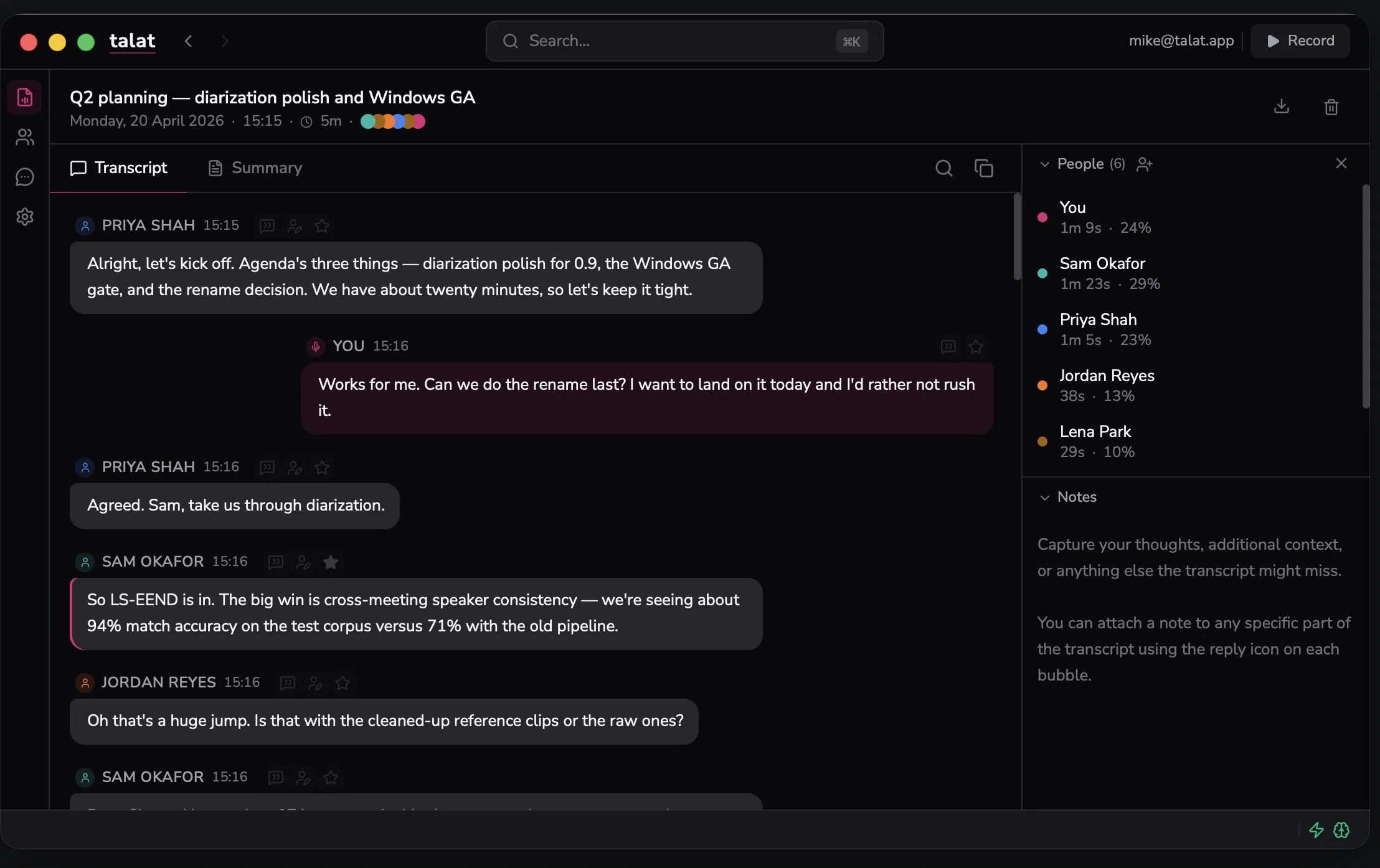
It records your microphone and whatever audio is playing on your machine (Zoom, Teams, Google Meet, anything else), transcribes both sides in real time, and writes you a summary at the end. There's no meeting bot to invite to calls, no account to create, and no subscription.
You can use the built-in local summariser, or plug in your own (local or cloud). Transcripts auto-export to Markdown (Obsidian, iCloud, a git repo, wherever you keep notes), and there's full local search across every meeting you've ever recorded.
You pay once and own the app - no subscription, no account.
- User Privacy Prioritized
- On-device Ai Transcription
Best for
Short scenarios where talat tends to shine.
-
The private meeting notes app with on-device AI.
Example outputs 1
Sample generations and before/after results for talat.
Access & connections
Where you can use talat, and what it plugs into.
Platforms
Capabilities
What this tool accepts, produces, and is strongest at.
Input
- Tabular
- Audio
Output
- Audio
- Text
Highlights
- MCP
- Local
- No Signup
- Use code TAAFT
- 10% OFF
Supported features
- MCP
- Runs Locally
- No Signup
Pros & cons
Pros
- On-device audio recording
- Real-time transcription
- Integral note editing
- Automatic software-integration recording
- Intelligent speaker identification
- Local model summaries
- User-controlled cloud model summaries
- Designed data privacy
Show 23 more
- Local data storage
- Supports various cloud storages
- Local and cloud learning models
- No recurrent subscriptions
- Automated data export
- HTTP endpoint data pushing
- One-time payment option
- Cross-platform compatibility (macOS, Windows)
- Inbuilt meeting tool integration
- Text-to-voice capability
- User-configurable prompt adjustments
- Facilitates webhook export
- Optional audio playback
- Online account not required
- Data not used for training
- MCP server support
- User controlled data trust
- Custom system prompts
- Automated folder note export
- Microsoft Teams, Zoom, Google Meet compatibility
- Segment reassignment options
- Auth headers, Markdown, JSON format features
- Meeting specific key-points summary
Cons
- Requires device storage
- Limited controlled language model
- Compatibility only with MacOS, Windows
- Poor transcription of complex discussions
- Difficulties commercial licensing
- No account, difficult customer tracking
Compare alternatives
Similar tools in the catalog — with a clear reason to open each one.

Interpret AI ✓
Free TrialAll-in-one AI notetaker and translator
Why look Typically cheaper
Full comparison
Recal ✓
FreemiumYour AI-powered second brain that captures everything important.
Why look Typically cheaper
Full comparison
Dicte.ai ✓
FreemiumAI-powered meeting transcription and report generation
Why look Typically cheaper
Full comparison
Hyprcore ✓
FreemiumAI wiki, meetings and dictation in one workspace.
Why look Typically cheaper
Full comparison
Sigmise ✓
FreemiumTranscribe, translate, and summarise any meeting in real-time.
Why look Typically cheaper
Full comparison
Notta Note Taker ✓
FreemiumAI note taker that transcribes and summarizes meetings.
Why look Typically cheaper
Full comparisonPeople also view
Tools that often show up alongside talat in collections and comparisons.
Sigmise ✓
FreemiumTranscribe, translate, and summarise any meeting in real-time.
Interpret AI ✓
Free TrialAll-in-one AI notetaker and translator
Hyprcore ✓
FreemiumAI wiki, meetings and dictation in one workspace.
Recal ✓
FreemiumYour AI-powered second brain that captures everything important.
Notta Note Taker ✓
FreemiumAI note taker that transcribes and summarizes meetings.
Dicte.ai ✓
FreemiumAI-powered meeting transcription and report generation

Vocova ✓
Free TrialTranscribe audio, video, or links into text. 1,000+ platforms, 100+ languages.

SuperIntern ✓
FreemiumYour always-on AI assistant that runs your admin so you can focus.
Releases 1
Related tools
Recommended

Denovo ✓
FreemiumTurn your idea into a real business in minutes.

GetLogit ✓
FreemiumArtificial intelligence, available for everyone.

ChatGPT ✓
FreemiumAsk anything, create anything, and move from idea to action.

Automateed ✓
Free TrialCreate eBooks effortlessly with Automateed, the AI-powered writing tool.

Recall ✓
FreemiumSummarize Anything, Forget Nothing!

Suno ✓
FreemiumMake music at the speed of your ideas.