

Diffusion Bee ✓
Generate AI art on your computer for free.
Verdict
A quick read before you dig into the full page.
- Best if
- You are digital artists and need: Creating stunning images from text prompts
- Skip if
- Only for Mac
- Pick this when
- Free of charge
Considering Photo AI instead? Compare side by side
Overview
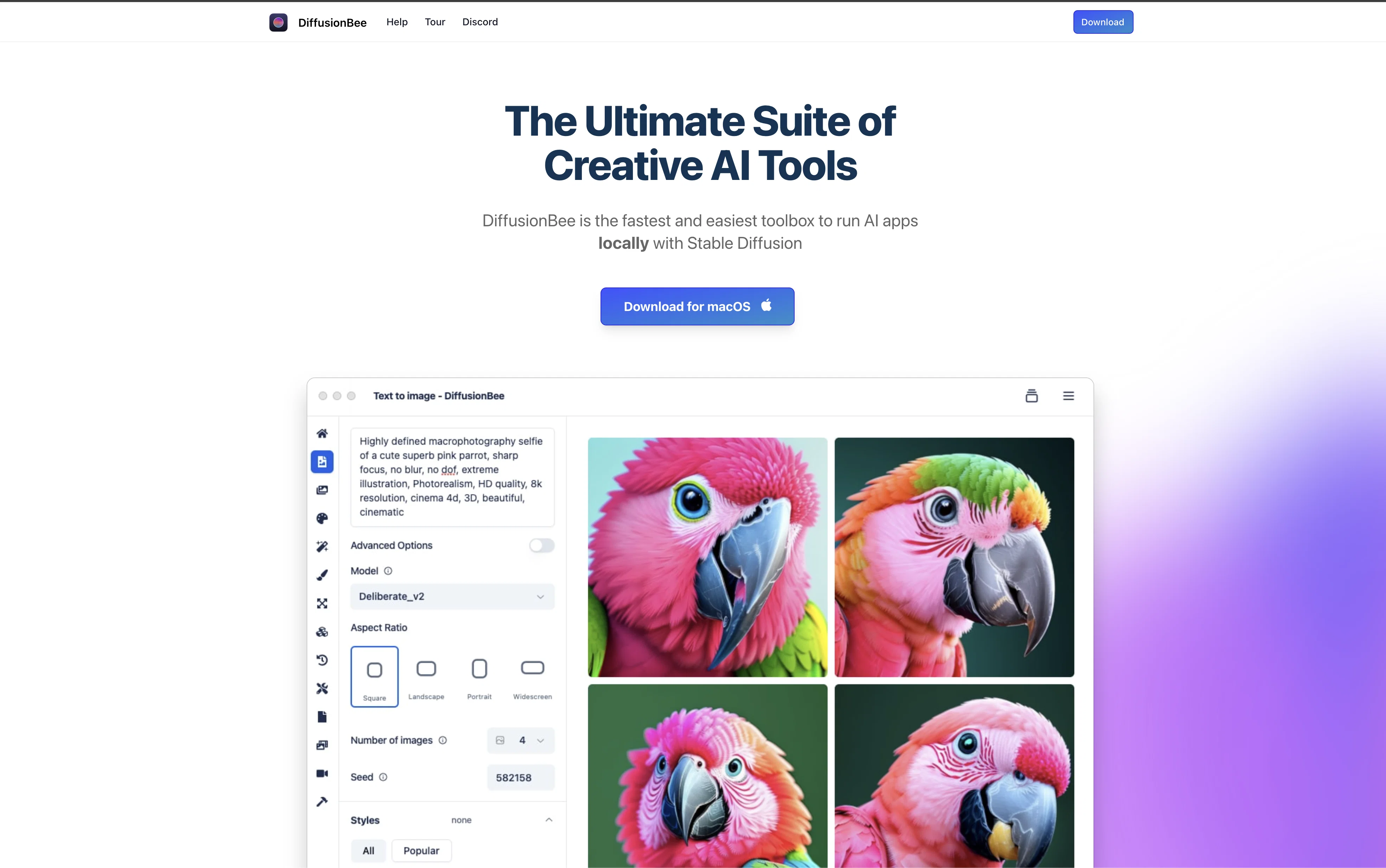
DiffusionBee is a free, easy-to-use AI art generation tool for Mac computers. Powered by Stable Diffusion, a cutting-edge AI technology, DiffusionBee allows users to generate AI art with just a text prompt.
DiffusionBee comes with all the features of Stable Diffusion, including Text to Image, Image to Image, In-painting, Out-painting, Upscaling, and Custom Models.
All the generation takes place locally, so there are no limits or cloud-based communication. Additionally, an active community on Discord is available to help with any questions.
DiffusionBee is compliant with the CreativeML Open RAIL-M license, so users are free to use generated images as they wish. DiffusionBee works with macOS 12.5.1 or higher, but machines with Apple silicon are recommended for optimal performance.
DiffusionBee is a great tool for anyone who wants to quickly generate stunning AI art.
Best for
Short scenarios where Diffusion Bee tends to shine.
-
Creating stunning images from text prompts.
Best for Digital artists
-
Adding or removing objects in images.
Best for Graphic designers
-
Generating animations and videos using AI.
Best for Hobbyists
-
Transforming existing images using text prompts.
Best for Content creators
-
Enhancing image quality and resolution.
Best for AI enthusiasts
-
Generating variations of existing images.
Best for Digital artists
-
Training custom models on user-provided datasets.
Best for Digital artists
-
Creating images with specific structures using control images.
Best for Digital artists
Example outputs 1
Sample generations and before/after results for Diffusion Bee.
Access & connections
Where you can use Diffusion Bee, and what it plugs into.
Platforms
Integrations
Capabilities
What this tool accepts, produces, and is strongest at.
Input
- Image
- Text
Output
- Image
Pros & cons
Pros
- Free of charge
- Runs on macOS
- Local image generation
- Multiple image generation features
- Comes with Stable Diffusion
- Active community on Discord
- Optimized for Apple silicon
- Works with Intel machines
Show 28 more
- Text to Image feature
- Image to Image feature
- In-painting feature
- Out-painting feature
- Upscaling feature
- Supports Custom Models
- Advanced options available
- Private and secure
- Uses text prompts
- Easy to use
- Quick results
- Transforms existing images
- User-friendly interface
- Runs offline
- No cloud communication
- Model Licence provided
- Open-source Licenses provided
- Responsive development team
- High quality outputs
- Can modify images
- Can add/remove objects
- Can change style of images
- Can transform scenes
- Thorough documentation
- Interactive video tour
- GitHub support
- Twitter support
- Allows creative expression
Cons
- Only for Mac
- Slower on Intel machines
- Requires macOS 12.5.1 or higher
- Optimized for Apple silicon
- No cloud based communication
- No API mentioned
Compare alternatives
Similar tools in the catalog — with a clear reason to open each one.

Stockimg AI ✓
PaidGenerated images and text for design ease.
Why look Stronger for image work
Full comparison
People also view
Tools that often show up alongside Diffusion Bee in collections and comparisons.

Superhuman ✓
PaidAI-powered email for blazing speed and productivity
Raycast AI ✓
FreemiumUnlock AI power on your Mac for smarter productivity.

Github Copilot ✓
FreemiumAI-powered coding assistant for faster development

Cursor ✓
FreemiumAI-powered IDE for faster coding
Stockimg AI ✓
PaidGenerated images and text for design ease.

Photo AI ✓
PaidCreate beautiful AI photos and videos of real people

Midjourney ✓
PaidExpand human imagination through AI-powered visuals.

CreativePixel ✓
FreemiumOut-create Your Competition in Minutes
Releases 1
FAQ 12
What is DiffusionBee?
How does DiffusionBee generate images from text prompts?
What are the key features of DiffusionBee?
Can I edit existing images using DiffusionBee?
What do the In-painting and Out-painting features in DiffusionBee do?
How can I upscale image resolution using DiffusionBee?
Can I use custom models with DiffusionBee?
What are the advanced options available in DiffusionBee?
Is my data privacy guaranteed with DiffusionBee?
Where can I get help if I have questions about using DiffusionBee?
Can I freely use the images generated by DiffusionBee?
Which macOS versions are compatible with DiffusionBee?
Related tools
Recommended
AIimages ✓
FreeFree AI image generator: Write text, get images on your PC.
Stable UI ✓
FreeCreate and modify images with AI, free and limitless.
Dezgo ✓
FreemiumGenerate AI images from text prompts

Coloromo AI Art Generator ✓
FreeTurn photos into stunning AI-generated artwork

Dream by WOMBO ✓
FreemiumAI turns words into stunning art in seconds.
ArtBot.ai ✓
FreeAI-powered Halloween art generator