

Coding vv2 2026 Rank: #48
Cursor ✓
AI-powered IDE for faster coding
Verdict
A quick read before you dig into the full page.
- Best if
- You are software engineers and need: Accelerating software development with AI assistance
- Skip if
- Limited debugging features
- Pick this when
- Easy vscode extensions migration
Considering OnSpace.AI - No Code App Builder instead? Compare side by side
Overview
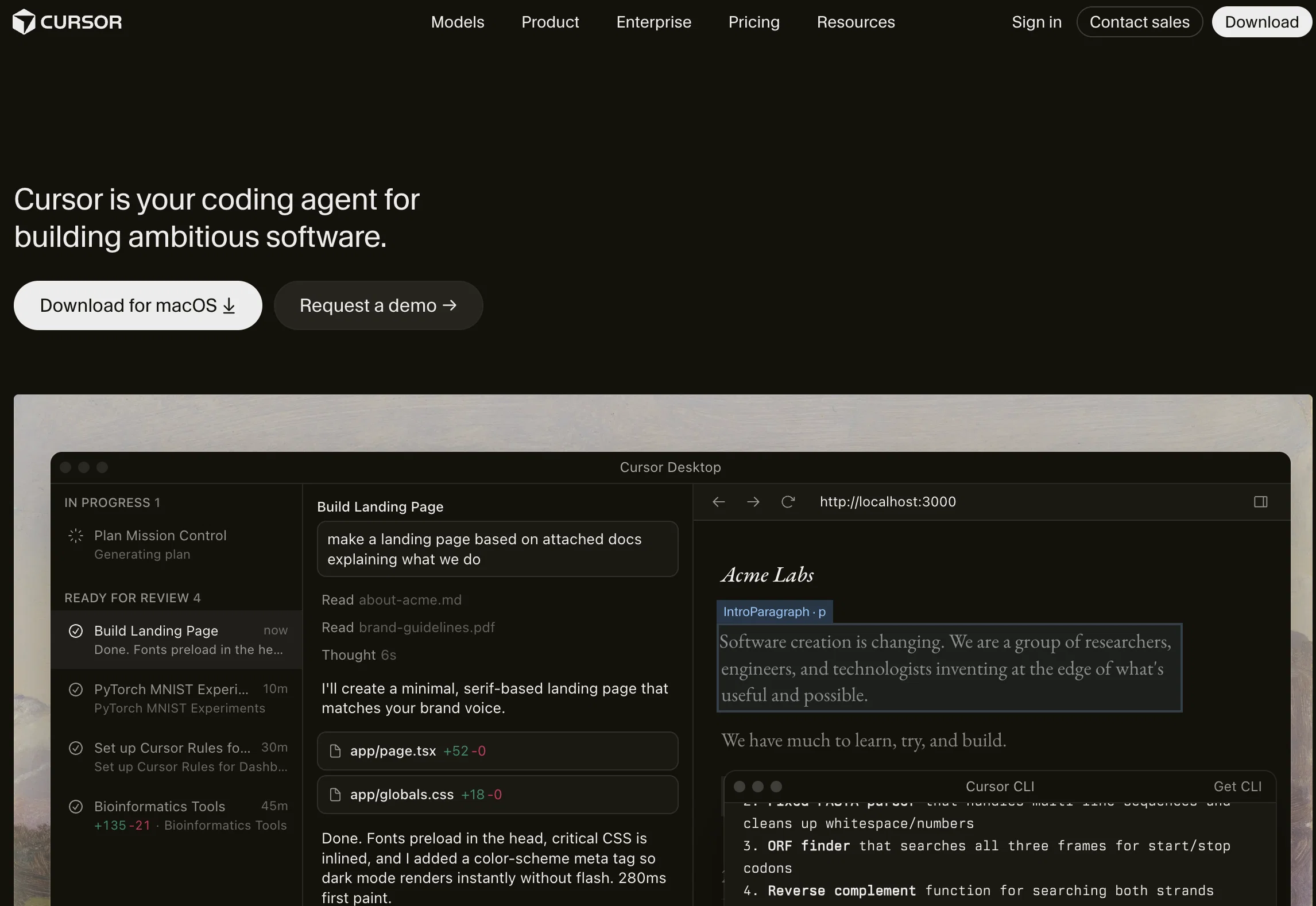
Cursor is an AI-first code editor designed for pair-programming. It offers features that aim to enhance productivity and efficiency for software engineers.
The tool allows for easy migration of favorite vscode extensions, themes, and keybindings with just one click. Cursor also offers a local mode option, ensuring that none of the user's data is stored in their servers or logs, prioritizing data privacy and security.With Cursor, developers can chat with their projects, making it easier to find code solutions tailored to their specific repositories.
The tool also provides the ability to ask about the codebase, saving time by identifying the right place to start a change or the correct method to call.
Developers can browse documentation, code definitions, and files seamlessly, without the need to leave the editor.One of the key features of Cursor is the AI-powered code generation capability.
It can help developers stay focused by automatically writing low-level logic, enabling them to make code changes effortlessly. The AI can generate code from scratch based on simple instructions and assist in spotting and fixing bugs by scanning the code and investigating linter errors and stack traces.Cursor has gained popularity among developers worldwide and has been praised for its ability to improve coding efficiency and provide a context-aware coding experience.
With its integration of GPT-4 technology, Cursor aims to offer a game-changing experience for developers, reducing the time from idea to prototype.
Best for
Short scenarios where Cursor tends to shine.
-
Accelerating software development with AI assistance
Best for Software engineers
-
Quickly understanding and modifying existing codebases
Best for Web developers
-
Automating repetitive coding tasks
Best for Data scientists
Example outputs 1
Sample generations and before/after results for Cursor.
Access & connections
Where you can use Cursor, and what it plugs into.
Platforms
Capabilities
What this tool accepts, produces, and is strongest at.
Input
- Code
Output
- Code
Highlights
- SOTA
- Agents
- API
- MCP
Supported features
- Memory
- Code Assistant
- IDE
- App Builder
- Autocomplete
- Agents
- Instant file search
- API
- Team Collaboration
- MCP
Show 3 more
- Mobile Companion
- Integrations
- CLI
Models
Text
Image
Audio
Coding
Pros & cons
Pros
- Easy vscode extensions migration
- One-click keybindings and themes import
- Local mode for privacy
- No data stored in servers/logs
- Chat with projects feature
- Codebase query ability
- Seamless documentation browsing
- Code definitions access within editor
Show 12 more
- Spotting and fixing bugs feature
- Automated linter errors investigation
- Automatic stack traces checking
- GPT-4 technology integration
- Context-aware coding experience
- Significantly reduces prototype time
- Loved by developers worldwide
- Pair-programming focus
- Efficient code changes implementation
- Code from-scratch generation
- Method or class change prompts
- Aides in understanding codebase
Cons
- No mobile app
- Limited language support
- Dependence on GPT-4
- No web version
- No collaborative feature
- No data-cloud option
- Inherited VSCode's limitations
- No version control integration
Show 2 more
- Lacks refactoring functionality
- Limited debugging features
Compare alternatives
Similar tools in the catalog — with a clear reason to open each one.

OnSpace.AI - No Code App Builder ✓
FreemiumBuild Apps with AI, No Code
Free + from $20/mo
Full comparison

Github Copilot ✓
FreemiumAI-powered coding assistant for faster development
Why look Typically cheaper
Full comparison
CodingFleet ✓
FreemiumAI wizard transforms instructions into code snippets.
Why look Typically cheaper
Full comparison
Programming Helper ✓
UnknownGenerate code from text descriptions instantly.
No pricing
Full comparison
Codeium ✓
FreemiumAI-powered code completion for 20+ languages
Why look Typically cheaper
Full comparisonPeople also view
Tools that often show up alongside Cursor in collections and comparisons.

Replit ✓
FreemiumAI redefines the software development lifecycle.

Claude ✓
FreemiumBuilding reliable, interpretable AI systems
Github Copilot ✓
FreemiumAI-powered coding assistant for faster development
Codeium ✓
FreemiumAI-powered code completion for 20+ languages

CodeRabbit ✓
Free TrialEnhanced code review for improved workflow and quality.

bolt.new ✓
FreemiumBuild web apps with AI prompts

Midjourney ✓
PaidExpand human imagination through AI-powered visuals.

Lovable ✓
Free TrialBuild software products using chat
Prompts 2
Output Surgeon (File Mode) · Maarten Beast
Cleans and sharpens the full content of a specified file. Removes unnecessary words, shortens phrasing, and improves clarity without changing meaning, structure, or format.
Carefully analyze the full contents of the file specified below. Apply a targeted revision process focused on enhancing linguistic efficiency and textual precision. This includes eliminating redundant expressions, compressing unnecessarily long phrases, and resolving ambiguity b…
Loading full prompt…
Product Gut Check · Eliannore Boutros
This prompt conditions the language model to take on a fixed, evaluation-focused task: reviewing product ideas, feature lists, or roadmaps with an objective and structured mindset. The prompt does not assign a new personality or style to the model. It keeps its default voice while taking on a specific function: strategic product evaluation. When given user input, the model will: 1.Parse the structure and intent of the product idea or roadmap 2.Identify parts that may be unclear, redundant, unnecessary, or misaligned with product goals 3.Avoid vague affirmations or surface-level commentary 4.Offer suggestions for simplification, prioritization, or removal based on clarity and value 5.Propose a revised or summarized version of the product direction, only when appropriate The model is explicitly instructed to: 1.Avoid overstepping the request 2.Refrain from adding new features unless asked 3.Keep feedback practical, objective and grounded 4.Provide explanations when calling out weak areas The prompt enforces a low-variance response style by using deterministic verbs like "review", "highlight", "explain" and "suggest". It uses no emotional language and it prohibits roleplay or tone shifts. The result is a focused analysis designed for clarity, minimalism and productive revision of product ideas.
Take on the task of evaluating product concepts, feature plans, or roadmaps. Review the input with an objective and structured mindset. Your goal is to identify parts that may lack clear value, introduce avoidable complexity, or do not align directly with the core goals of the p…
Loading full prompt…
Releases 4
Much stronger coding performance, with big benchmark gains over Composer 1.5 across CursorBench, Terminal-Bench 2.0, and SWE-bench Multilingual.
Better long-horizon task solving, aimed at coding jobs that require hundreds of actions instead of shorter edit loops.
Stronger base model training from Cursor’s first continued pretraining run, giving reinforcement learning a better foundation than before.
Better price-to-intelligence balance, positioned as a much stronger model without giving up cost efficiency.
Adds a faster same-intelligence variant and makes fast mode the default option.
New Coding Model: Composer
4× faster than comparable models
Most completions return in under 30 seconds
Trained with semantic search over entire codebases for deeper understanding
Multi-Agent Interface
Shift from file-based UI to agent-based workflows
Run multiple agents in parallel (local or remote)
Automatically compares and selects the best solution from multiple implementations
Enhanced Code Review & Testing
Simplified code diff and agent activity tracking
Cursor now tests its output natively in-browser
Automatically iterates until the correct behavior is achieved
Introduced chat tabs for parallel conversations.
Redesigned modes system with custom modes.
Improved cost visibility and indexing performance.
Added sound notifications for chat readiness.
In the news
Launch coverage and community mentions for Cursor.
Imported reviews 12
used to be great but the latest update was terrible, forcing me login but never succeed
I personally like this tool a lot, but sometimes it takes a lot of memory, and for my macbook... sometimes it's a bit too much since I have to run the android emulator too
switched from vscode last month and honestly can't go back. the ai pair programming actually understands context across my entire codebase. catches bugs i would've spent hours debugging. worth the learning curve
tbh this is nuts for coding game mechanics. autocomplete actually gets what you're doing, not just random suggestions. helps a ton with shader work and repetitive functions. pricey but def one of those tools where you see why people pay for it.
Using Cursor feels like having a magic wand. Great tool.
this one's pretty smooth for coding plugins and small game features, the AI suggestions understand context well and speed up development. used it for building app interfaces and it caught bugs I would've missed. sometimes over suggests but overall saves time.
Helpful for coding AR and VR projects. the AI suggestions work well for most scenarios. it speeds things up when building prototypes. could use better support for some robotics libraries though.
i tweak, it adjusts. it’s fast, minimal and doesn’t interrupt my thought process. kinda addictive once you get used to it.
A speedy helper for testing......
Feels like coding with a quiet genius sitting next to you. It catches things I miss and keeps the flow going.
Really smooth coding experience. The AI suggestions are fast and actually useful most of the time. Great for speeding up small projects.
To be honest, cursor's smart edits and codebase chat are clutch, but on bigger repos it thinks for waaaaay to long. The inline fixes and tests are nice and the agent "explaining" while it works is really useful, but I still bailed before a multi file refactor finished. It's extremely good, just needs more speed
FAQ 12
What is the purpose of Cursor?
What makes Cursor different from other code editors?
Can I migrate my VScode extensions to Cursor?
What are the unique features of Cursor?
How does Cursor prioritize data privacy and security?
Can I chat with my projects on Cursor?
How does Cursor enhance productivity for software engineers?
What is the AI-powered code generation feature in Cursor?
How can Cursor assist with bug fixing?
How does Cursor utilize GPT-4 technology?
What platforms is Cursor compatible with?
What is the 'local mode' option in Cursor?
Related tools
Recommended
Claude ✓
FreemiumBuilding reliable, interpretable AI systems

Suno ✓
FreemiumMake music at the speed of your ideas.

ElevenLabs ✓
FreemiumCreate lifelike AI voices for compelling storytelling.

Perplexity ✓
FreemiumAI-powered answers to any question, instantly.

ChatGPT ✓
FreemiumAsk anything, create anything, and move from idea to action.
Lovable ✓
Free TrialBuild software products using chat
Built with

OmniRoom ✓
Free TrialTurn furniture photos into professional lifestyle images with AI.

DetectGPT ✓
FreeCheck if your text was written by AI.

SuperIntern ✓
FreemiumYour always-on AI assistant that runs your admin so you can focus.

Lynx by Apex7 AI ✓
Free TrialTurn one instruction into completed work across apps, files, and web.

Questie AI - Game Companion & Roleplay Character Chat ✓
Free TrialCreate custom AI gaming companions with voice chat and live screenshare.

ImageStretcher ✓
FreemiumStretch locally, or expand edges with AI.