
3D objects 2026 Rank: #1248
Create3D.io ✓
Create 3D Models Online
Verdict
A quick read before you dig into the full page.
- Best if
- Create 3D Models Online
- Skip if
- Limited format conversion options
- Pick this when
- Streamlines 3D model generation
Considering 3D AI Studio instead? Compare side by side
Overview
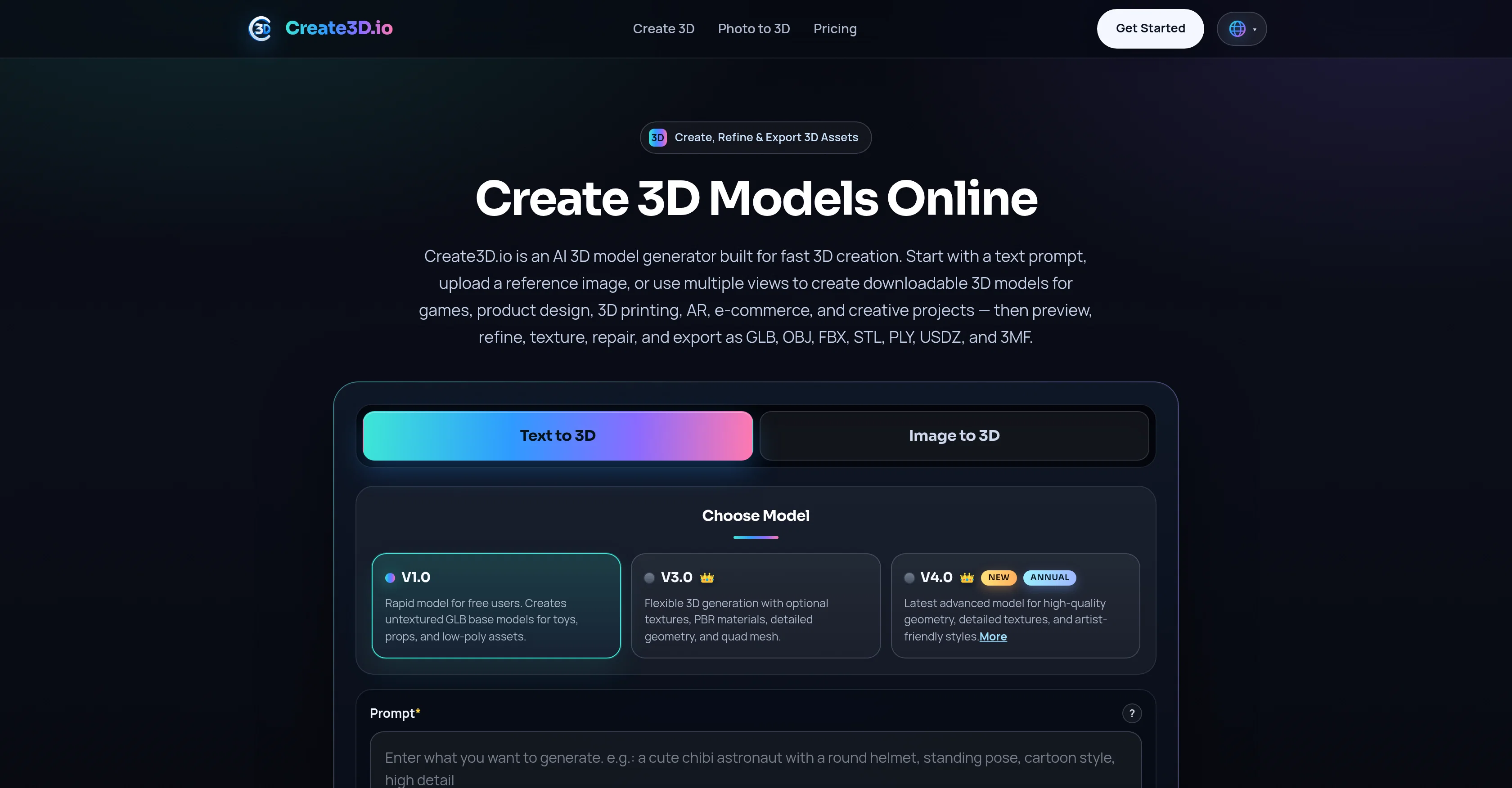
Create3D.io is an AI-powered tool designed to streamline 3D model generation. Aimed at both professionals and hobbyists in various fields such as gaming, product design, 3D printing, AR, e-commerce, and creative projects, the tool offers feasibility to create downloadable 3D models using text prompts, images, or multiview references.
Additionally, users can export their creations in various widely-used file formats such as GLB, OBJ, FBX, STL, PLY, USDZ, and 3MF. With online access, operators can create an account and manage their own uniquely crafted 3D models.
It also offers flexibility and customization with multiple generation modes including 'Text to 3D', 'Image to 3D', and 'Multiview to 3D'. They also provide convenient features such as a 3D model viewer, an online converter, and around-the-clock customer support.
Designed for simplicity, the 3D creation process is expedited, allowing users to create a model, refine it, and subsequently export the appropriate file for their needs.
- Text To 3d
- Image To 3d
- Ai 3d Model
- 3d Ai
- Photo To 3d
- 3d Material Textures
Access & connections
Where you can use Create3D.io.
Platforms
Capabilities
What this tool accepts, produces, and is strongest at.
Input
- 3D
- Image
- Text
Output
- Video
- 3D
- Image
Supported features
- 3D Generation
- Image Understanding
- Visual Creation
- Styling
Pros & cons
Pros
- Streamlines 3D model generation
- Creates downloadable 3D models
- Models from text prompts
- Models from images
- Models from multiview references
- Exports in GLB format
- Exports in OBJ format
- Exports in FBX format
Show 31 more
- Exports in STL format
- Exports in PLY format
- Exports in USDZ format
- Exports in 3MF format
- Online access
- User account management
- Customizable generation modes
- Text to 3D mode
- Image to 3D mode
- Multiview to 3D mode
- 3D model viewer
- Online format converter
- 24/7 customer support
- Targets professionals and hobbyists
- Suitable for gaming industry
- Suitable for product design
- Suitable for 3D printing
- Suitable for AR
- Suitable for e-commerce
- Suitable for creative projects
- User interface simplicity
- Quick 3D creation process
- Refine models after creation
- Offers texture options
- Offers geometry repair
- Permits render previews
- Supports remeshing
- Model inspection online
- Maintenance of reusable 3D assets
- Supports commercial use
- Supports multiple concurrent tasks
Cons
- Requires online access
- Non-intuitive text prompts
- No offline version
- Potentially longer processing times
- No mobile app
- Limited preview capabilities
- Limited refinement options
- Limited texture support
Show 2 more
- Limited geometric repair options
- Limited format conversion options
Compare alternatives
Similar tools in the catalog — with a clear reason to open each one.

3D AI Studio ✓
PaidEasily generate free 3D models with our AI-powered 3D AI Studio.
Why look Offers a public API
Full comparison
Mimetic Labs ✓
Free TrialTransform ideas into printable 3D models with AI.
Free + from $9.99
Full comparison
Image3D.io ✓
FreemiumImage to STL and 3D models from any image
Why look Typically cheaper
Full comparison
Hi3D ✓
Free TrialAI-powered 3D model generator with unprecedented precision.
Free + from $17.91/mo
Full comparison
TRELLIS 2 ✓
UnknownGenerate high-fidelity 3D assets from images instantly.
No pricing
Full comparison
Neural4D | Image to 3D ✓
Free TrialTurn photos or prompts into 3D models instantly.
Why look Typically cheaper
Full comparisonReleases 1
FAQ 12
What is Create3D.io?
Who can benefit from using Create3D.io?
What kind of 3D models can Create3D.io generate?
How does Create3D.io use AI to generate 3D models?
Which file formats does Create3D.io support for export?
How can I create a 3D model using text prompts on Create3D.io?
What are the generation modes available on Create3D.io?
Does Create3D.io have a model viewer and an online converter?
How does the 'Text to 3D' feature work on Create3D.io?
How does the 'Image to 3D' feature work on Create3D.io?
How does the 'Multiview to 3D' feature work on Create3D.io?
Does Create3D.io offer around-the-clock customer support?
Related tools
Recommended

remio: Your Personal ChatGPT ✓
FreemiumGet Tailored Answer with Your Personal ChatGPT

VideoInPrompt ✓
PaidExtract prompts. Generate AI images and videos.

3DGenerator.io ✓
Freemium3D Generator

ChatGPT ✓
FreemiumAsk anything, create anything, and move from idea to action.

Notis ✓
Free TrialThe first WhatsApp assistant that runs on your ChatGPT and Claude subscriptions

CodeRabbit ✓
Free TrialEnhanced code review for improved workflow and quality.
More from this creator

TrySpeak ✓
FreemiumLearn any language through AI conversation practice.

Csong AI ✓
Free TrialCreate original songs from text and lyrics with AI.

Text3D.ai ✓
Free TrialText to 3D AI Generator
3DGenerator.io ✓
Freemium3D Generator

AIto3D.ai ✓
FreemiumTurn text or images into downloadable 3D models.

SpeakCoach ✓
Free TrialYour AI speaking coach, available 24/7.