

Adobe Audio Enhancer ✓
Clean up spoken audio with AI studio-quality filters.
Trial; then from $12.95/mo
Verdict
A quick read before you dig into the full page.
- Best if
- You are podcasters and need: Improving audio quality for podcasts
- Skip if
- Effects limited to reverb, echo
- Pick this when
- Reduces background noise
Considering Free AI Audio Cleaner Online instead? Compare side by side
Overview
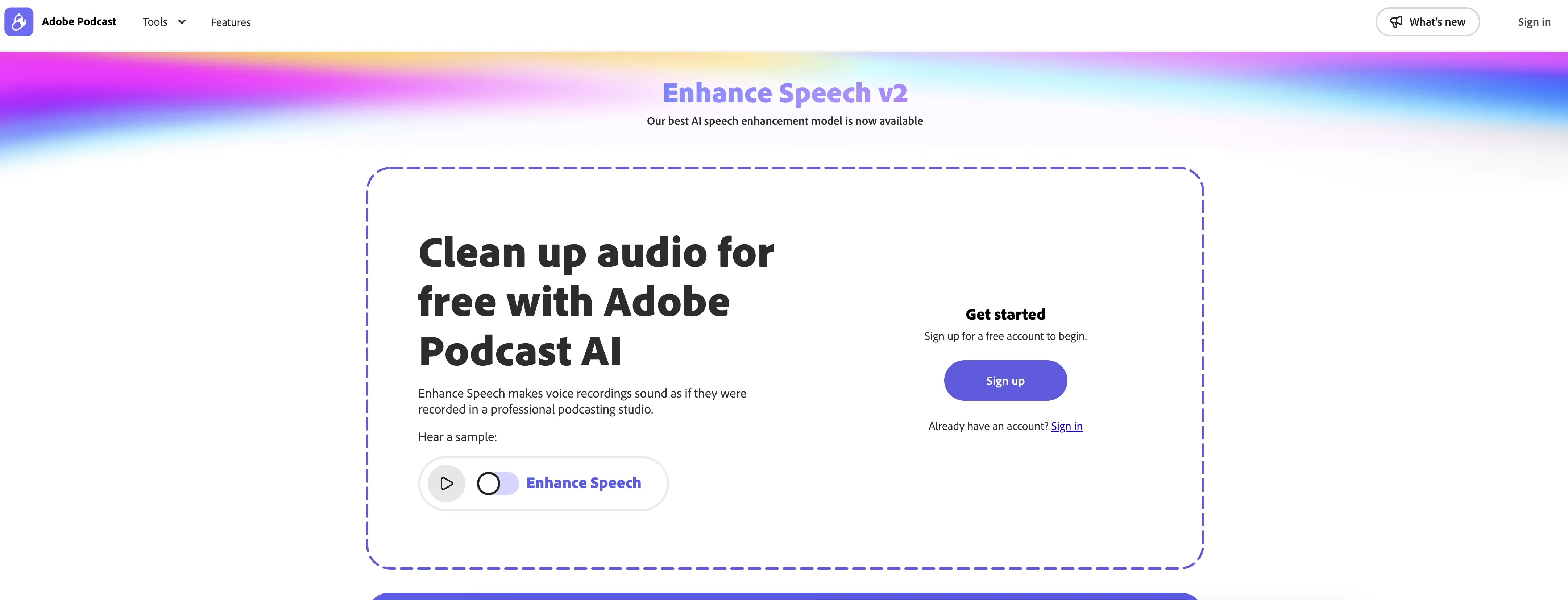
Enhance Speech from Adobe is an AI-powered audio filter designed to enhance the quality of spoken audio. Its primary function is to process raw audio and refine it in such a manner that it appears to have been recorded in a professional, soundproofed studio.
By integrating advanced artificial intelligence algorithms, this tool expertly fine-tunes noise and dissonance in spoken audio, resulting in clear and high-quality sound output.
The application is user-friendly, allowing users to easily navigate its features and reap maximum benefits from its capabilities. Ideal for podcasters, broadcasters, and any individual or business with audio refining requirements, Enhance Speech can deliver studio-grade audio quality virtually, regardless of the initial recording conditions.
It's a free tool, making it accessible to large and small scale users. However, it's noteworthy this tool doesn't substitute professional audio editing software but enhances the audio quality based on the AI's interpretation of a soundproofed studio recording.
In terms of usability, the tools efficiency may vary based on the quality of the raw audio input.
Best for
Short scenarios where Adobe Audio Enhancer tends to shine.
-
Improving audio quality for podcasts
Best for Podcasters
-
Cleaning up audio recordings for interviews
Best for Content creators
-
Enhancing audio for voiceovers
Best for Voiceover artists
-
Creating clear audio for online courses
Best for Interviewers
-
Optimizing microphone settings for better sound
Best for Online educators
Example outputs 1
Sample generations and before/after results for Adobe Audio Enhancer.
Access & connections
Where you can use Adobe Audio Enhancer.
Platforms
Capabilities
What this tool accepts, produces, and is strongest at.
Input
- Audio
Output
- Audio
Supported features
- Denoise
Pros & cons
Pros
- Reduces background noise
- Minimizes reverberations
- Removes undesired distortions
- Detects and removes unwanted noise
- Automatically adjusts audio elements
- Volume adjustment
- Pitch adjustment
- Frequency adjustment
Show 12 more
- Can add audio effects
- Removes audio errors
- Detects inconsistencies in speech
- Ideal for podcasters
- Useful for broadcasters
- Can handle any audio refining
- User-friendly interface
- Delivers studio-grade audio quality
- Free tool
- Can be used regardless of initial recording conditions
- Doesn't replace professional audio editing software
- Efficiency varies based on raw audio quality
Cons
- Doesn't substitute professional editing
- Efficiency varies with raw audio
- May misinterpret some noises
- Only enhances spoken audio
- Effects limited to reverb, echo
- User reviews not visible
- Can't handle severe distortions
- May incorrectly process mispronunciations
Show 1 more
- Lacks advanced editing options
Compare alternatives
Similar tools in the catalog — with a clear reason to open each one.

Free AI Audio Cleaner Online ✓
UnknownRemove background noise from audio with AI.
No pricing
Full comparison
Xound ✓
FreemiumAI sound enhancement for content creators
Why look Typically cheaper
Full comparison
Voice Cleaner AI ✓
FreemiumRemove background noise from audio instantly with AI.
Why look Typically cheaper
Full comparison
AI Voice Cleaner ✓
Free TrialRemove background noise from audio instantly with AI.
Why look Typically cheaper
Full comparison
Noiseremoval.net ✓
FreemiumAI-powered background noise removal for crystal-clear audio.
Why look Typically cheaper
Full comparison
AI Voice Enhancer Online ✓
FreeInstantly improve speech clarity in any audio or video.
Why look Fully free option
Full comparisonPeople also view
Tools that often show up alongside Adobe Audio Enhancer in collections and comparisons.
Xound ✓
FreemiumAI sound enhancement for content creators
AI Voice Enhancer Online ✓
FreeInstantly improve speech clarity in any audio or video.
Voice Cleaner AI ✓
FreemiumRemove background noise from audio instantly with AI.
Noiseremoval.net ✓
FreemiumAI-powered background noise removal for crystal-clear audio.
Free AI Audio Cleaner Online ✓
UnknownRemove background noise from audio with AI.
AI Voice Cleaner ✓
Free TrialRemove background noise from audio instantly with AI.

SubcueAI ✓
FreemiumReal-time AI help for every interview.

StudioEditor.io ✓
FreemiumRecord, edit, and export audio free in your browser.
Releases 1
Imported reviews 4
The result is more than disappointing; in some cases, it is even significantly worse than the original condition. I cannot understand why ADOBE would put its name on such an inferior product. Especially as it is relatively easy to achieve much better results with AUDITION.
My tip for the best voice enhancement: IZotope.
Can't recommend - Robotic voice
I've noticed its output can sometimes feel a bit too robotic and synthetic for my taste.
Privacy Nightmare. Your content will belong to Adobe.
FAQ 12
What is Adobe Enhance Speech?
How does Adobe Enhance Speech work?
What technologies does Adobe Enhance Speech use to improve audio quality?
Can Adobe Enhance Speech remove background noise from my recordings?
Can I adjust the volume and pitch of my recordings using Adobe Enhance Speech?
Does Adobe Enhance Speech include effects like reverb and echo?
Is Adobe Enhance Speech able to detect and correct mispronounced words and stutters?
Is Adobe Enhance Speech suitable for podcasters and broadcasters?
Is Adobe Enhance Speech free to use?
Does Adobe Enhance Speech replace professional audio editing software?
Does the quality of my raw audio impact the effectiveness of Adobe Enhance Speech?
How accessible is Adobe Enhance Speech for new users with no audio editing experience?
Related tools
Recommended

LearningStudioAI ✓
Free TrialAI-powered authoring tool for effortless online course creation.

VenturusAI ✓
FreemiumBusiness idea analysis and reporting.

Scisummary ✓
Free TrialCutting-edge scientific articles summarization.
ai|coustics ✓
FreemiumHigh Quality Audio From Any Device, Anywhere

Free Text-To-Speech ✓
FreeText transformed into customizable spoken output.

Stratup.ai ✓
FreemiumInnovative idea generation for businesses.
More from this creator

Adobe Firefly ✓
FreemiumCreate stunning visuals with AI-powered text prompts

Adobe Express ✓
FreemiumCreate stunning content easily with AI-powered design tools.

Adobe AI Assistant ✓
PaidUnleash PDF intelligence with AI-powered assistance

Adobe Customer Journey Analytics ✓
UnknownUnified customer insights across every channel, every moment.

Adobe Brand Concierge ✓
UnknownAI-powered conversations that turn intent into action.

Adobe Journey Optimizer ✓
UnknownEngage every customer, in every moment that matters.