

WritePanda - Studio ✓
AI-powered copywriting for professionals and businesses
Free + from $19/mo
Verdict
A quick read before you dig into the full page.
- Best if
- You are audio Podcasters and need: Audio podcasters can generate shownotes and speaker-labeled transcripts
- Skip if
- Desktop only (macOS and Windows), no web or mobile app
- Pick this when
- One-time purchase, no subscription
Considering 2short instead? Compare side by side
Overview
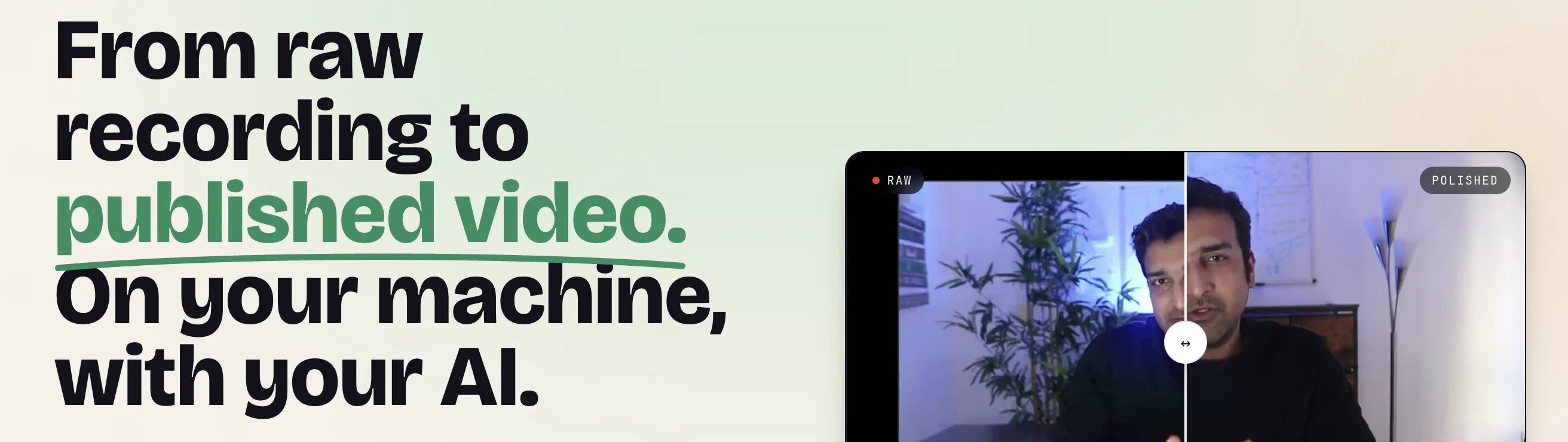
Everything sensitive stays on your machine: transcription and the built-in language model run locally, so your footage never has to leave your computer. You can edit by hand, or hand the whole thing to an AI. WritePanda ships with a skill file and an MCP server plus CLI, so Claude, ChatGPT, Cursor, and other agents can record, edit, caption, and publish for you. Bring your own Replicate key for cloud generation features like voiceovers, images, and music when you want them.
It is a one time purchase with no subscription and no servers to depend on. You own the license and keep using it forever.
Best for
Short scenarios where WritePanda - Studio tends to shine.
-
Audio podcasters can generate shownotes and speaker-labeled transcripts.
Best for Audio Podcasters
-
Youtubers/Video podcasters can repurpose videos into short AI clips for various platforms.
Best for Youtubers/Video Podcasters
-
Coaches can generate action items and session worksheets from coaching sessions.
Best for Coaches
-
Sales teams can generate pain points and customer insights from sales calls.
Best for Sales Teams
-
Customer discovery teams can identify customer pain points and needs from customer discovery calls.
Best for Customer Discovery Teams
-
Meeting attendees can generate meeting summaries and action items from meeting recordings.
Best for Audio Podcasters
Example outputs 1
Sample generations and before/after results for WritePanda - Studio.
Access & connections
Where you can use WritePanda - Studio, and what it plugs into.
Platforms
Capabilities
What this tool accepts, produces, and is strongest at.
Input
- Text
Output
- Text
Pros & cons
Pros
- One-time purchase, no subscription
- Runs locally, your footage never leaves your machine
- Edit video by editing the transcript
- Drive the entire editor with your own AI via MCP and CLI
- Built-in local transcription and AI, no API key required
- Publish straight to YouTube and Instagram Reels
Cons
- Desktop only (macOS and Windows), no web or mobile app
- Cloud extras like voiceovers, images, and music need your own Replicate API key
- Newer product, so the template and asset library is still growing
- Local AI and transcription want a reasonably capable machine
Compare alternatives
Similar tools in the catalog — with a clear reason to open each one.

Eklipse ✓
FreemiumA video editing suite for gaming streamers.
Why look Higher community rating
Full comparisonPeople also view
Tools that often show up alongside WritePanda - Studio in collections and comparisons.

Shorts Generator ✓
PaidTurn popular videos into viral YouTube Shorts.
Eklipse ✓
FreemiumA video editing suite for gaming streamers.

ClipGOAT ✓
PaidConvert YouTube videos into viral Shorts with AI.

Chopcast ✓
PaidTurn webinars into viral social media clips.

2short ✓
FreemiumAI-powered YouTube Shorts generator for 10X faster growth.

MojoMake - AI Image to Video Generator ✓
FreemiumUse every top AI model and 100+ effects in one account.

HiTranscript ✓
Free TrialCreate searchable transcripts and timed subtitles from Instagram, TikTok and YouTube videos

GoFaceless ✓
Free TrialTurn any idea into a finished faceless video.
Releases 1
Imported reviews 1
For professional copy the constraint is usually voice consistency across a team rather than raw output. Is there a way to hold a house style - words the brand avoids, claims it is not allowed to make, the reading level it writes to - and enforce it across everyone using the account? That is the part manual editing never manages to keep up with.
FAQ 7
How is PandaStudio different from other screen recorders?
🛠️ 1
tool
wrote:
It is a full studio, not just a recorder. Record your screen, camera, or a podcast, then edit by transcript, add captions, zooms, and motion graphics, and publish, all in one app. You can even drive the whole editor with your own AI agent (Claude, ChatGPT, and more). And it runs on both Mac and Windows, not Mac only.
Does my footage leave my machine?
🛠️ 1
tool
wrote:
No. PandaStudio is local-first — recording, transcription, and editing all run on your computer. Even remote-podcast guest tracks transfer peer-to-peer, not through a cloud.
Can I record my screen, camera, and audio together?
🛠️ 1
tool
wrote:
Yes. Capture your screen, camera, microphone, and system audio at the same time, and reposition or resize the camera while you edit. You can also record multi-person podcasts with each guest captured locally in full quality.
Can I export in 4K?
🛠️ 1
tool
wrote:
Yes. Export local MP4 files up to 4K, plus vertical cuts for Shorts, Reels, and TikTok. You can also publish straight to YouTube and Instagram from inside the app.
Which AI do I need?
🛠️ 1
tool
wrote:
Your own. Connect your ChatGPT, Claude, Gemini, or Kimi account for titles, thumbnails, and edit-by-asking. You pay your provider directly — no AI markup from us.
Mac and Windows?
🛠️ 1
tool
wrote:
Both. Native builds for macOS (Apple Silicon and Intel) and Windows.
What are the system requirements?
🛠️ 1
tool
wrote:
macOS 12 (Monterey) or newer, or Windows 10/11 (64-bit). Both Apple Silicon and Intel Macs work. Because the AI models run on your machine, we recommend Apple Silicon or 16GB+ RAM for smooth performance, and around 10GB of free disk while exporting longer videos.
Related tools
Recommended

Eightify
UnknownAI-powered YouTube video summarizer extracting key ideas for quick content assessment.
WriteHuman ✓
Free TrialUndetectable and private content generation.

KeywordSearch ✓
FreemiumDiscover and target YouTube audiences.

IllumiChat ✓
FreemiumFrom Ticket Backlog to Instant Answers Powered by AI

Stratup.ai ✓
FreemiumInnovative idea generation for businesses.

Otio ✓
FreemiumFastest Way To Read & Write - Your Research Focused AI Workspace