

from $30
Verdict
A quick read before you dig into the full page.
- Best if
- Create apps at the speed of thought
- Skip if
- Limited customization options
- Pick this when
- Accelerates prototyping process
Considering Magic Patterns instead? Compare side by side
Overview
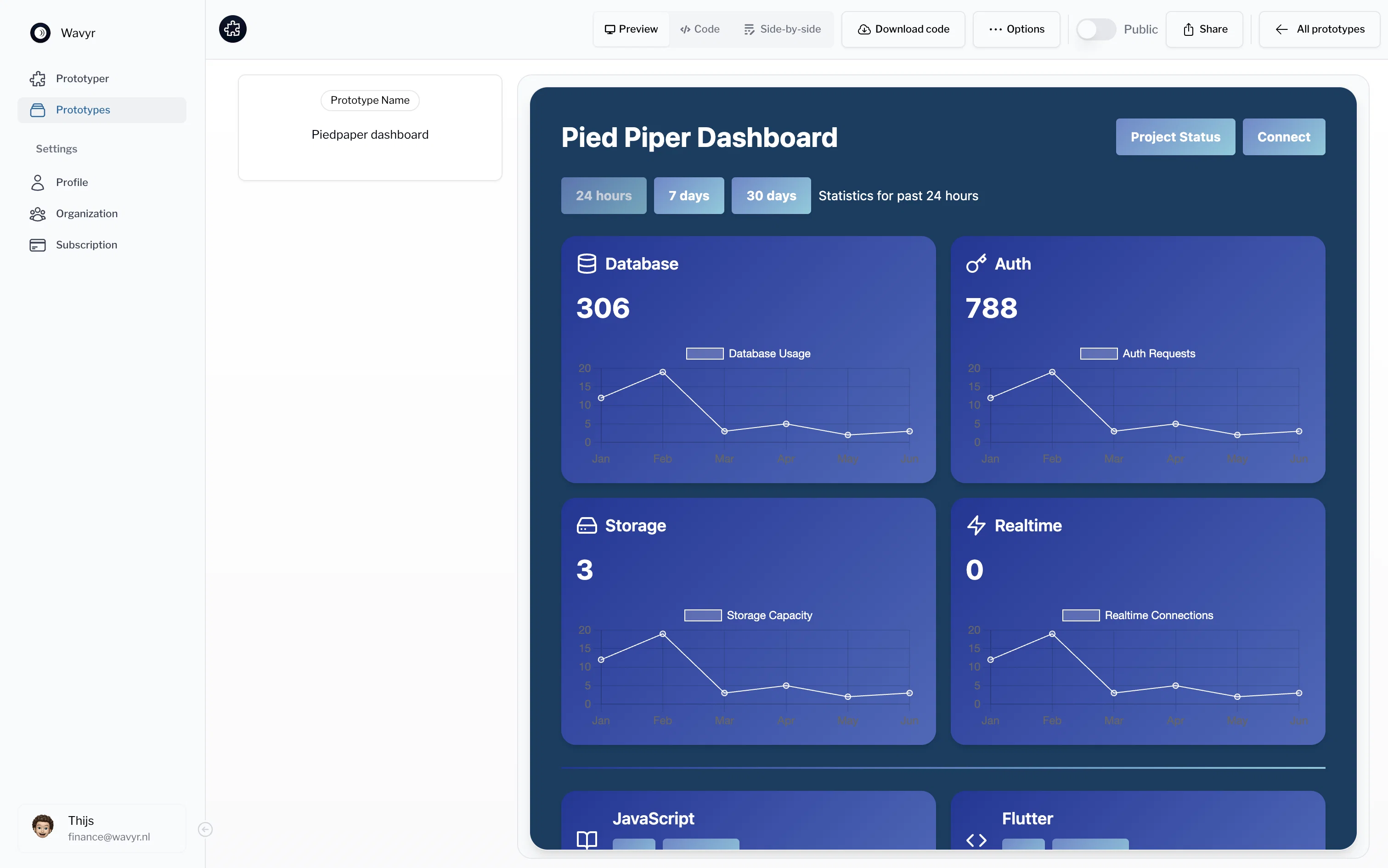
Whether you’re working on a dashboard, issue tracker, or calendar application, Prototyper provides the tools you need. Getaprototype.com is used by 1000+ customers worldwide, with 98% positive reviews. Free 7 days trail.
Features:
1. From prompt to design: Prototyper let's you design UI using natural language.
2. From screenshot to design: Paste in a screenshot or image of a design that you want to replicate and create it within 5 min.
3. React and Tailwind: Prototyper designs user interfaces using React and Tailwind so that you can directly incorporate it into your product environment.
4. Publish to the Web: Prototyper allows you to publish your prototypes directly to the web.
5. Public Workspaces: Manage different organizations, teams, and projects in one place.
6. Collaboration Built-In: Invite team members to your workspace and work on prototypes together.
7. Integrations: Integrate with your own design systems and React components.
8: Interactive Editing: Make real-time changes to the code and see the results instantly.
9. Preview Code Side-by-Side: Seamlessly adjust code while previewing the outcome.
10. Export Code: Import the code into production or publish directly to the web.
Best for
Short scenarios where Prototyper tends to shine.
-
Create apps at the speed of thought.
Example outputs 1
Sample generations and before/after results for Prototyper.
Access & connections
Where you can use Prototyper, and what it plugs into.
Platforms
Integrations
Capabilities
What this tool accepts, produces, and is strongest at.
Input
- Text
Output
- Code
- Text
Pros & cons
Pros
- Accelerates prototyping process
- Transformation of idea to interface
- Generates code from text prompts
- Generates code from screenshots
- UI iteration feature
- Supports multiple coding frameworks
- Real-time view of changes
- Collaboration features
Show 22 more
- Interactivity for seamless updates
- Easy-to-use for various technical levels
- Automatic code generation from design
- Natural language comprehension
- Infinite iterations feature
- Real-time results visualization
- Framework-specific code generation
- Upload screenshots to generate code
- Built-in collaboration system
- Supports Tailwind, HTML, React
- Side-by-side editor
- Real-time code adjustments
- Generative UI design
- Workspace management
- Multiple frameworks support
- Streamlines workflow
- 7B+ and 30B+ Parameter models
- Custom branding for Enterprise
- High Quality renders
- Independent workspaces
- Platform APIs
- Dedicated support
Cons
- Sub-optimal collaboration features
- Possibly over-simplified for professionals
- Lack known integration capabilities
- Limited framework flexibility
- Lacks in-depth documentation
- Specific language comprehension
- No custom branding on basic plans
- Credit-based usage can be limiting
Show 2 more
- Limited customization options
- Lack of robust API
Compare alternatives
Similar tools in the catalog — with a clear reason to open each one.
Magic Patterns ✓
Free TrialGenerate perfect components for your design system.
Why look Stronger for image work
Full comparison
DOMSY.IO ✓
FreeEmpower your creativity with the ultimate prototyping tool.
Why look Fully free option
Full comparison
Alloy ✓
FreemiumPrototype AI features inside your real product.
Why look Freemium alternative
Full comparison
Dessn ✓
FreemiumBuild custom sales demos without derailing your day.
Why look Freemium alternative
Full comparison
AI Builder | Hostinger Horizons ✓
Free TrialBuild web apps and websites without writing any code.
Why look Typically cheaper
Full comparison
Fleck AI ✓
FreemiumTurn ideas into validated, build-ready products, from research to portfolio.
Why look Freemium alternative
Full comparisonPeople also view
Tools that often show up alongside Prototyper in collections and comparisons.
Magic Patterns ✓
Free TrialGenerate perfect components for your design system.
DOMSY.IO ✓
FreeEmpower your creativity with the ultimate prototyping tool.
Alloy ✓
FreemiumPrototype AI features inside your real product.

SpriteCook ✓
FreemiumAI pixel art generator for game developers.

Shyne ✓
FreemiumDesign anything, with your team and AI.

Nathan Tailors AI Suit Generator ✓
FreeDescribe your dream suit. We draw it, then build it.

Modeinspect ✓
FreemiumDesign production UI directly in your codebase.
AI Builder | Hostinger Horizons ✓
Free TrialBuild web apps and websites without writing any code.
Releases 2
What’s New
→ World-class design generation – create polished, studio-level interfaces from a single idea.
→ Instant updates – no compile or refresh lag; changes appear immediately.
→ Simplified UI – months spent removing steps, making common actions one-click.
→ Full design control – choose components, colors, and layouts without tool-imposed limits.
→ Responsive by default – designs adapt seamlessly to phones, tablets, and desktops with instant previews.
→ Customizable workflow – defaults that work out-of-the-box, but everything can be tuned to your style.
FAQ 12
What is Prototyper?
🛠️ 1
tool
wrote:
Prototyper is an AI-powered tool dedicated to expediting the prototyping process for organizations. It allows users to rapidly transform an idea into an interface by describing their ideas through plain text prompts or by uploading screenshots. The AI component of the tool then generates the corresponding code, which users can refine and iterate for prototype fine-tuning. Prototyper supports various frameworks, enhancing its versatility. It also offers real-time tracking of changes, collaboration features, and the ability to comprehend natural language, making it highly accessible and user-friendly.
How does Wavyr Prototyper generate code from text prompts?
🛠️ 1
tool
wrote:
Prototyper uses a built-in AI model to interpret the text prompts provided by the user. Upon comprehension of the idea outlined in the text, the model generates the corresponding code that best fits the idea description. This way, users won't have to manually code every element of their prototype, speeding up and simplifying the prototyping process.
What's the process for refining a prototype in Prototyper?
🛠️ 1
tool
wrote:
Users start by providing their ideas either through simple text prompts or by uploading screenshots. Once the AI generates the initial code, users can directly interact and iterate on the generated UI to fine-tune their creation. Changes done are tracked and reflected in real-time, giving users instantaneous feedback as they refine the prototype to their preference.
What frameworks does Prototyper support?
🛠️ 1
tool
wrote:
Wavyr Prototyper supports multiple frameworks to widen its application range. These include HTML for structure, Tailwind for styling, and React for interactivity, among others. This multi-framework support increases its versatility, allowing users to work in the environment they are most comfortable or familiar with.
Can I view changes to my prototype in real time using Prototyper?
🛠️ 1
tool
wrote:
Yes, Prototyper has a real-time interaction feature that allows users to view changes to their prototypes instantly. This feature enables seamless integration of updates, helping users maintain flow and observe the impact of their modifications directly and immediately.
Does Prototyper allow collaboration among team members?
🛠️ 1
tool
wrote:
Absolutely. Prototyper has a built-in collaboration feature which allows team members to work together on a prototype. Users can invite their team members to their workspace, allowing collaborative development, which is particularly useful for larger organizations and projects.
Is it possible to upload screenshots to Prototyper?
🛠️ 1
tool
wrote:
Yes, it is. One of Prototyper's core features is the ability to upload screenshots. Users can upload a screenshot of a design or interface, and the AI will interpret this visual input and generate the corresponding code, eliminating manual coding and subsequently speeding up the prototype development process.
How does Prototyper handle natural language comprehension?
🛠️ 1
tool
wrote:
Prototyper's approach to natural language comprehension is to apply its AI to understand user instructions given in plain text. This means users can describe their ideas in everyday language, and the AI will accurately interpret the idea and translate it into the corresponding code. This promotes ease of use and accessibility, even for users with limited technical backgrounds.
How user-friendly is Prototyper for people new to prototyping?
🛠️ 1
tool
wrote:
Prototyper is designed to be user-friendly for individuals new to the prototyping process. Its key feature is utilizing natural language for instructions, so users can simply explain their idea in everyday language. Combined with the feature for uploading screenshots as a means of instruction and its real-time interaction feature for immediate feedback, Prototyper creates a comfortable environment for beginners to learn and develop prototypes.
How does Prototyper accelerate the prototyping process?
🛠️ 1
tool
wrote:
Prototyper accelerates the prototyping process by leveraging AI technology. Users need to describe their idea through simple text prompts or upload a screenshot, and the AI will generate the corresponding code. This reduces the time-consuming part of manual coding and allows rapid transformation of an idea into a UI prototype. Furthermore, users can see changes to their prototype in real-time, which speeds up the iterative process of refining the UI.
What does the interactivity feature in Prototyper entail?
🛠️ 1
tool
wrote:
The interactivity feature in Prototyper involves real-time interaction and iteration on generated prototypes. Users have the ability to change the code and see the results in real time, which enables immediate feedback and a dynamic development environment. This results in a more efficient process, where users can tweak their prototype till it matches their desired outcome perfectly.
Can I use Prototyper on multiple frameworks?
🛠️ 1
tool
wrote:
Certainly. Prototyper supports multiple frameworks, increasing its versatility and making it adaptable to the user's specific needs. It supports frameworks including Tailwind, HTML, and React, making it a tool capable of fitting into different development environments without compromising capability.
Related tools
Recommended

PrometAI ✓
FreemiumTurn ideas into viable reality with AI business plan generator.

B12 AI Website Builder ✓
FreemiumAI-powered website builder

AI Product Design by Pietra ✓
PaidDream, design, and manufacture products for your e-commerce brand

IllumiChat ✓
FreemiumFrom Ticket Backlog to Instant Answers Powered by AI

Mindsmith ✓
FreemiumPlatform for building and sharing eLearning content

Automateed ✓
Free TrialCreate eBooks effortlessly with Automateed, the AI-powered writing tool.