

TurboDoc ✓
Transform invoices into easy-to-read data
Trial; then from $6/mo
Verdict
A quick read before you dig into the full page.
- Best if
- Transform invoices into easy-to-read data
- Skip if
- Limited language support
- Pick this when
- Intelligent document processing
Considering Lienhound — Turn mechanics liens into money instead? Compare side by side
Overview
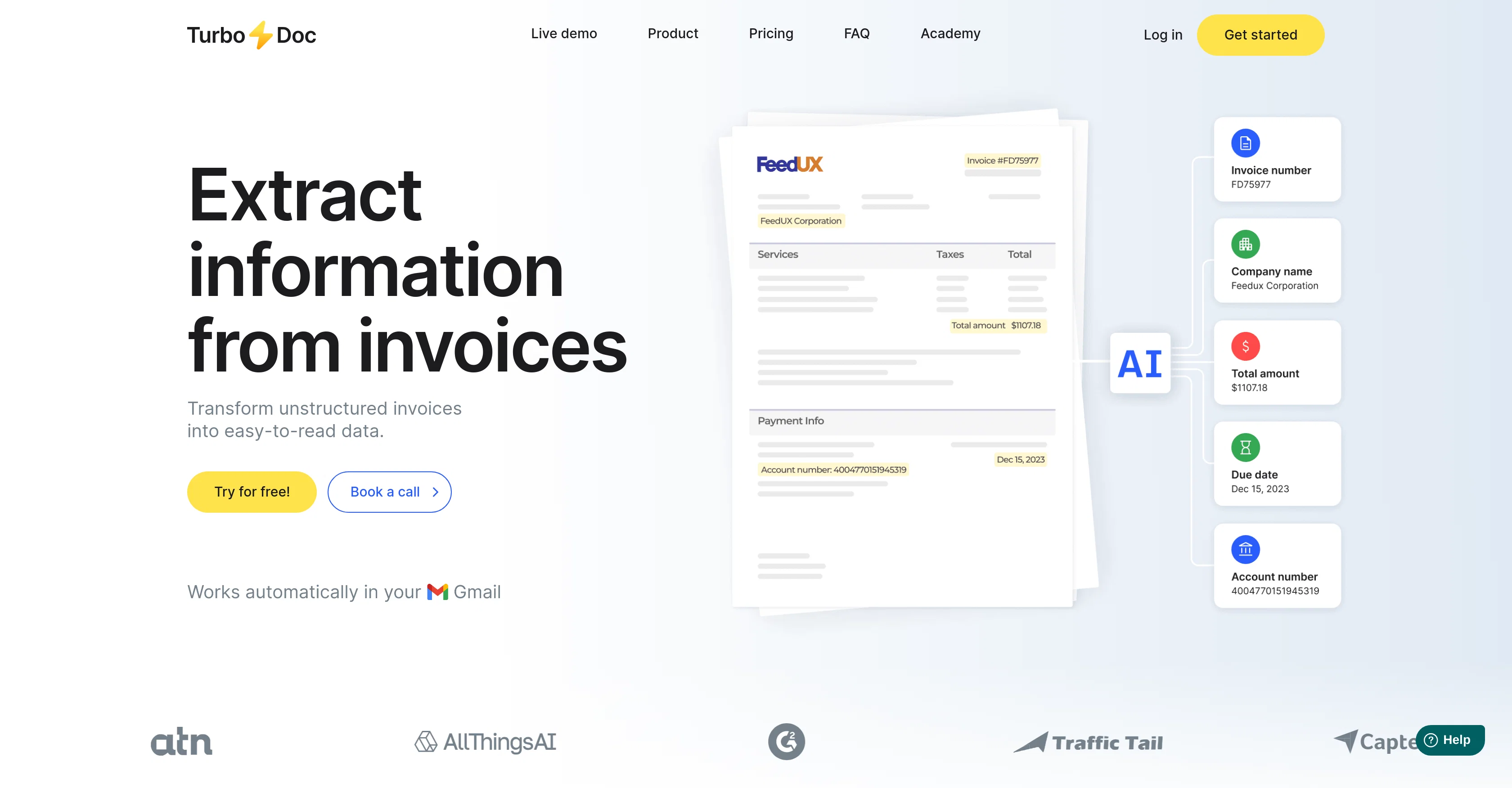
TurboDoc eases the burden of paperwork through intelligent document processing. The tool is designed to transform unstructured data from invoices and receipts into structured, easily digifiable data.
TurboDoc is powered by an advanced AI model extensively trained on a broad scope of documents, which enhances the tool's precision and accuracy. It has a user-friendly interface that allows users to work effectively with invoices.
In addition to its basic functions, TurboDoc also lets users upload data in various formats (xls, csv, pdf, word) for subsequent accounting purposes. With TurboDoc, all recognized data extracted from invoices are systematically arranged in one place.
The AES256 enterprise-level encryption used by the tool ensures optimum security for your data. TurboDoc can automate invoice processing as it can connect with Gmail, capture invoices from your mailbox, extract all unstructured information, and send the extracted data as a structured table in an email.
Notably, TurboDoc can process invoices of varied image quality thanks to its advanced image processing algorithms. Technical support is available for users with priority given to premium subscribers.
While it primarily caters to invoice processing, plans for seamless integration into other accounting software are underway. The tool aims to streamline the accounts payable workflow, thus reducing costs and saving time.
Access & connections
Where you can use TurboDoc, and what it plugs into.
Platforms
Integrations
Capabilities
What this tool accepts, produces, and is strongest at.
Input
- Image
Output
- Tabular
Supported features
- Finance & Accounting
Pros & cons
Pros
- Intelligent document processing
- Transforms unstructured data
- User-friendly interface
- Supports various data formats
- Data systematically arranged
- Uses AES256 encryption
- Automated invoice processing
- Connects with Gmail
Show 40 more
- Advanced image processing
- Technical support available
- Priority to premium subscribers
- Integration with accounting software planned
- Streamlines accounts payable workflow
- Cost reduction feature
- Time-saving capability
- Processes invoices of varied image quality
- Can handle poor image quality
- Supports multiple languages
- Enterprise-level security
- Automated email extraction
- Transparency in data for accounting
- Invoices are saved on dashboard
- Promises seamless integrations
- Automatically captures invoices from mailbox
- Safe data storage on USA servers
- Invoices processed on user's servers in advanced plan
- Affordable plans available
- Free trial offered
- Personalised plans available
- Efficient data organization
- Automatic Gmail invoice processing
- Split-second processing
- Premium technical support for Pro users
- High accuracy data extraction on OCR
- Trained on large corpus of documents
- Data extraction in table format
- Invoices processing limit choice in self-hosting plan
- Multi-format document support
- Processes data in few seconds
- Caters to invoice processing
- Can extract data from receipts
- Offers invoice number, date, total amount extraction
- Flexible plans suiting various user demands
- Transparent invoice processing system
- Can work with varied invoice formats
- Personalized account for organizing data
- Can handle invoices in different languages
- Embedded data analysis feature
Cons
- Limited to invoice processing
- Limited format support
- No integration with other email services
- Tech support prioritization
- Limited language support
- High quality images needed for optimal operation
- Integration with accounting software still in progress
- No receipt processing function
Show 2 more
- Data only stored on US servers
- Unclear whether mobile compatible
Compare alternatives
Similar tools in the catalog — with a clear reason to open each one.

Lienhound — Turn mechanics liens into money ✓
UnknownFile and enforce mechanics liens. AI does the paperwork, licensed lawyers file.
No pricing
Full comparison
InvoiceClip ✓
Free TrialStop manual invoice typing with AI scanning.
Free + from $5.99/mo
Full comparison
Taxing ✓
FreemiumAutomate 30+ hours of tax prep in 10 minutes.
Why look Higher community rating
Full comparison
Tailride ✓
FreemiumAI inbox scanner for invoices, receipts, and expense reconciliation
Why look Higher community rating
Full comparison

Releases 1
FAQ 12
What is TurboDoc?
How can TurboDoc help with the processing of paperwork?
What types of documents does TurboDoc support for data extraction?
What formats can be uploaded to TurboDoc?
How does TurboDoc help in maintaining data security?
How does TurboDoc connect and interact with Gmail?
Can TurboDoc process invoices of varying image quality?
What kind of technical support does TurboDoc offer?
Does TurboDoc have plans to integrate with other accounting software?
How does TurboDoc streamline the accounts payable workflow?
What are the main benefits of using TurboDoc?
How is the data extracted from invoices arranged in TurboDoc?
Related tools
Recommended

Scisummary ✓
Free TrialCutting-edge scientific articles summarization.

Free Text-To-Speech ✓
FreeText transformed into customizable spoken output.

Midjourney ✓
PaidExpand human imagination through AI-powered visuals.

Recall ✓
FreemiumSummarize Anything, Forget Nothing!

Sensay ✓
Free TrialAI Offboarding that keeps knowledge inside your company.

Marketing Assistant (Elsa AI) ✓
FreemiumDefine your ideal customers and craft a winning marketing strategy with Elsa.