
Thinktask ✓
Boost productivity with AI-powered project management
Verdict
A quick read before you dig into the full page.
- Best if
- You are project Managers and need: Automate performance reporting and gain insights from historical data using ChatGPT
- Skip if
- Limited customization capabilities
- Pick this when
- Advanced task management
Considering SureThing.io - "OpenClaw" for Beginners instead? Compare side by side
Overview
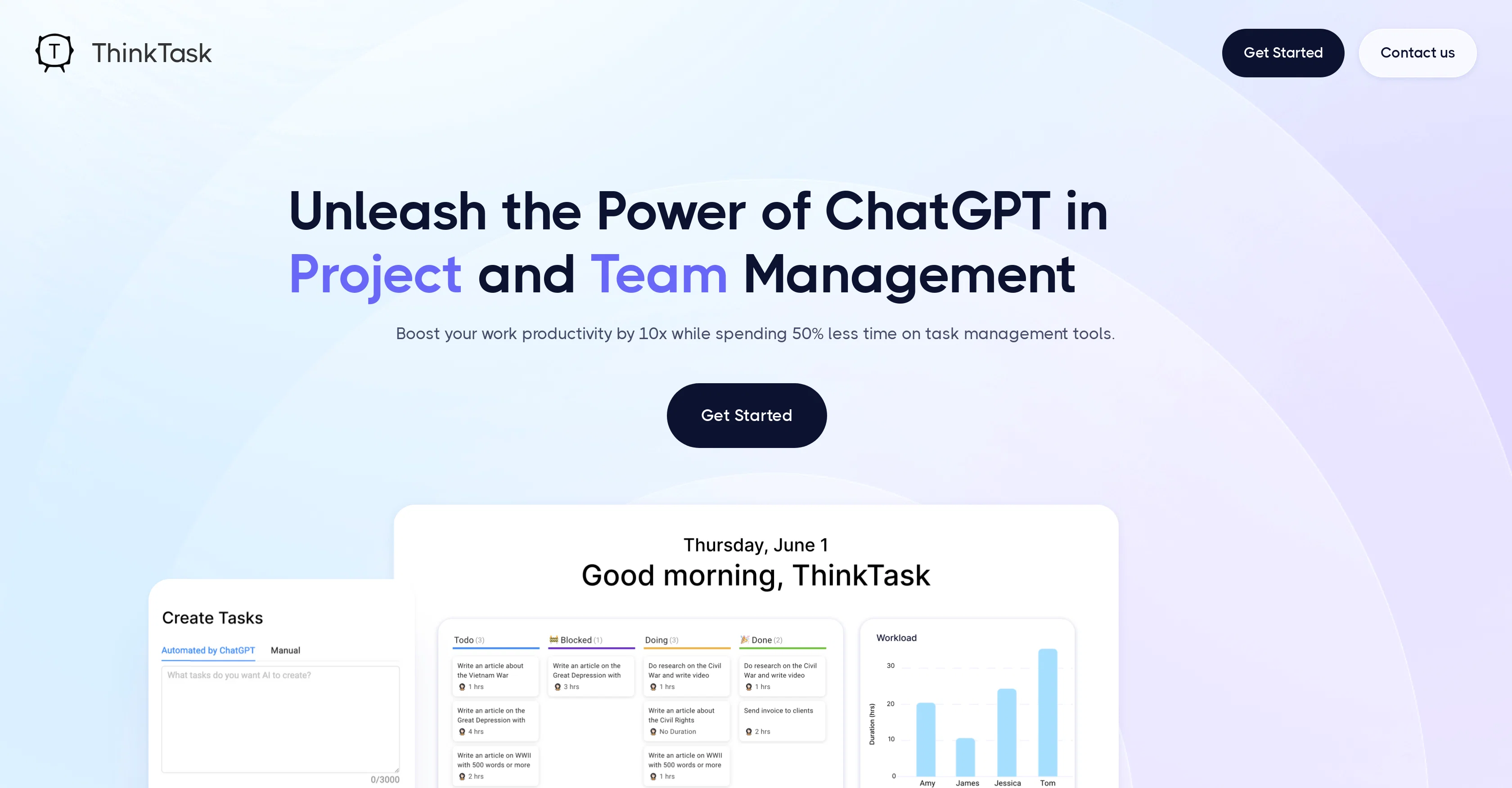
ThinkTask is a tool that leverages the power of OpenAI's ChatGPT for task and project management. It is designed to boost work productivity by automating routine tasks and providing insights based on historical data.
One of its key features is the automation of performance reporting which delivers insights through ChatGPT's historical data analysis, as well as tracking AI usage to evaluate its impact on workflows.
The platform offers visual representations of the utilization of AI by team members and an overview of project progress, task status, and estimated costs for effective project monitoring.
The Team Pulse feature provides visualizations of different task types and their status within a selected time period. Task Insights entails a tree diagram illustrating interdependencies among project tasks, thus, fostering effective planning and sequencing.
Additionally, ThinkTask can auto-create tasks from notes or context, using ChatGPT's capabilities. These tasks can come pre-filled with details like title, time, and assignee.
It also features AI-generated tags and assignments based on past experience and skills. The broad objective is to unlock productivity potential by providing a single workspace that accommodates notes, tasks, databases, collaboration, and customization.
Best for
Short scenarios where Thinktask tends to shine.
-
Automate performance reporting and gain insights from historical data using ChatGPT.
Best for Project Managers
-
Auto-create tasks with title, time, assignee, and other details filled from notes.
Best for Team Leaders
-
Visualize team dynamics and project progress for better management.
Best for Business Analysts
Example outputs 1
Sample generations and before/after results for Thinktask.
Access & connections
Where you can use Thinktask.
Platforms
Capabilities
What this tool accepts, produces, and is strongest at.
Input
- Tabular
Output
- Tabular
- Text
Pros & cons
Pros
- Advanced task management
- Boosts productivity by 10x
- Reduces task management time by 50%
- One-click task creation automation
- Detailed notes in task creation
- Context in task creation
- Individual user analytics
- Data-driven task assignments
Show 29 more
- Automated reports and insights
- Project progress tracking
- Task dependency visualization
- Best candidate identification
- Project insights integrations
- Bar charts of project progress
- Treediagrams for task dependencies
- WorkPage as content hub
- Combines notes, tasks, databases
- Offers collaboration and customization
- Optimizes task management process
- Automates repetitive workflows
- Insights into project performance
- Automates performance reporting
- Historical data analysis
- Project progress overview
- Estimate cost tracking
- Effective project monitoring
- Team Pulse visualization
- Visual task status representation
- Auto-create tasks from notes
- Auto-filled task details
- Single workspace for all tasks
- Ready-to-use content hub
- Detailed task insights
- Combines notes, tasks, databases
- Team productivity potential unlocking
- Boosts work productivity by 10x
- Reduces task management time by 50%
Cons
- Over-reliance on historical data
- No manual tagging option
- No in-built chat feature
- No multi-language support
- Limited customization capabilities
- Possibly excessive data tracking
- No offline mode
- No standalone mobile application
Compare alternatives
Similar tools in the catalog — with a clear reason to open each one.

SureThing.io - "OpenClaw" for Beginners ✓
FreemiumFirst General AI Agency. Designed for long-horizon tasks.
Why look Offers a public API
Full comparison
Raccoon AI ✓
FreemiumThe AI Coworker for Apps, Research, Docs & Everything Else
Why look Offers a public API
Full comparison

People also view
Tools that often show up alongside Thinktask in collections and comparisons.

Supernormal App ✓
FreemiumThe AI assistant app that turns meetings into completed work

Cron AI ✓
FreeAutomation of cron jobs using natural language.

Caret ✓
FreeAI that completes you everywhere.

AppDeploy ✓
FreeDeploy real apps directly from ChatGPT or Claude

Tendem ✓
PaidAI + Human Agent to get tasks done
SureThing.io - "OpenClaw" for Beginners ✓
FreemiumFirst General AI Agency. Designed for long-horizon tasks.
Raccoon AI ✓
FreemiumThe AI Coworker for Apps, Research, Docs & Everything Else

Manus ✓
FreemiumTurn your thoughts into actions with AI
Releases 1
Imported reviews 1
We are live now!
FAQ 12
What is ThinkTask - ChatGPT with Task Management?
How does ThinkTask boost productivity?
What is the one-click automation feature in ThinkTask?
How does ThinkTask use AI-generated tags and data-driven assignments?
Can you elaborate on the 'Ask AI' feature of ThinkTask?
What type of automated reports and insights does ThinkTask provide?
How does WorkPage in ThinkTask enhance workflow?
What are the integrations offered for project insights in ThinkTask?
How does ThinkTask utilize ChatGPT within task and project management?
Can ThinkTask automate performance reporting?
What is the 'Team Pulse' feature in ThinkTask?
What visual representations does ThinkTask provide for project monitoring?
Related tools
Recommended

Hints ✓
Free TrialEfficient and automated business task assistant.

Hyperis ✓
FreemiumOrganized task prioritization.

VenturusAI ✓
FreemiumBusiness idea analysis and reporting.

Agentgpt ✓
FreemiumDeploy autonomous AI Agents effortlessly in your browser.

LearningStudioAI ✓
Free TrialAI-powered authoring tool for effortless online course creation.

Taskade ✓
FreemiumAutomated productivity and collaboration platform.